Примечание.
Для доступа к этой странице требуется авторизация. Вы можете попробовать войти или изменить каталоги.
Для доступа к этой странице требуется авторизация. Вы можете попробовать изменить каталоги.
In this article, you do the following steps.
Run a custom script to install Microsoft Cognitive Toolkit on an Azure HDInsight Spark cluster.
Upload a Jupyter Notebook to the Apache Spark cluster to see how to apply a trained Microsoft Cognitive Toolkit deep learning model to files in an Azure Blob Storage Account using the Spark Python API (PySpark)
Предпосылки
Кластер Apache Spark в HDInsight. См. Создание кластера Apache Spark.
Опыт работы с записными книжками Jupyter и Spark в HDInsight. Дополнительные сведения см. в разделе Загрузка данных и выполнение запросов с помощью Apache Spark в Azure HDInsight.
How does this solution flow?
This solution is divided between this article and a Jupyter Notebook that you upload as part of this article. In this article, you complete the following steps:
- Run a script action on an HDInsight Spark cluster to install Microsoft Cognitive Toolkit and Python packages.
- Upload the Jupyter Notebook that runs the solution to the HDInsight Spark cluster.
The following remaining steps are covered in the Jupyter Notebook.
- Load sample images into a Spark Resilient Distributed Dataset or RDD.
- Load modules and define presets.
- Download the dataset locally on the Spark cluster.
- Convert the dataset into an RDD.
- Score the images using a trained Cognitive Toolkit model.
- Download the trained Cognitive Toolkit model to the Spark cluster.
- Define functions to be used by worker nodes.
- Score the images on worker nodes.
- Evaluate model accuracy.
Install Microsoft Cognitive Toolkit
You can install Microsoft Cognitive Toolkit on a Spark cluster using script action. Script action uses custom scripts to install components on the cluster that aren't available by default. You can use the custom script from the Azure portal, by using HDInsight .NET SDK, or by using Azure PowerShell. You can also use the script to install the toolkit either as part of cluster creation, or after the cluster is up and running.
In this article, we use the portal to install the toolkit, after the cluster has been created. For other ways to run the custom script, see Customize HDInsight clusters using Script Action.
Использование портала Azure
For instructions on how to use the Azure portal to run script action, see Customize HDInsight clusters using Script Action. Make sure you provide the following inputs to install Microsoft Cognitive Toolkit. Use the following values for your script action:
| Недвижимость | Ценность |
|---|---|
| Тип скрипта | - Custom |
| Имя | Install MCT |
| URI bash-скрипта | https://raw.githubusercontent.com/Azure-Samples/hdinsight-pyspark-cntk-integration/master/cntk-install.sh |
| Node type(s): | Head, Worker |
| Параметры | Отсутствует |
Upload the Jupyter Notebook to Azure HDInsight Spark cluster
To use the Microsoft Cognitive Toolkit with the Azure HDInsight Spark cluster, you must load the Jupyter Notebook CNTK_model_scoring_on_Spark_walkthrough.ipynb to the Azure HDInsight Spark cluster. This notebook is available on GitHub at https://github.com/Azure-Samples/hdinsight-pyspark-cntk-integration.
Download and unzip https://github.com/Azure-Samples/hdinsight-pyspark-cntk-integration.
В веб-браузере перейдите на страницу
https://CLUSTERNAME.azurehdinsight.net/jupyter, гдеCLUSTERNAME— это имя вашего кластера.From the Jupyter Notebook, select Upload in the top-right corner and then navigate to the download and select file
CNTK_model_scoring_on_Spark_walkthrough.ipynb.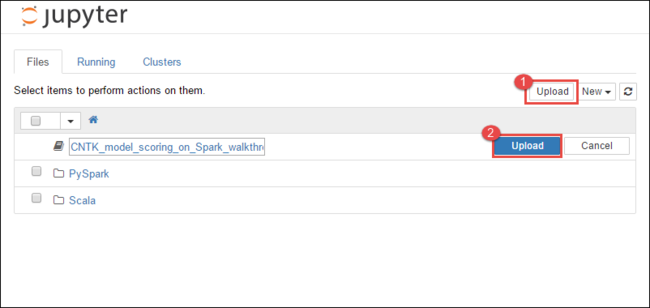
Select Upload again.
After the notebook is uploaded, click the name of the notebook and then follow the instructions in the notebook itself on how to load the data set and perform the article.
См. также
Сценарии
- Использование Apache Spark со средствами бизнес-аналитики. Выполнение интерактивного анализа данных с использованием Spark в HDInsight с помощью средств бизнес-аналитики
- Apache Spark и машинное обучение: Используйте Spark в HDInsight для анализа температуры в здании, используя данные HVAC
- Apache Spark и машинное обучение: использование Spark в HDInsight для прогнозирования результатов проверок пищевых продуктов
- Анализ журналов веб-сайтов с помощью Apache Spark в HDInsight
- Application Insight telemetry data analysis using Apache Spark in HDInsight
Создание и запуск приложений
- Создание автономного приложения с использованием Scala
- Удаленный запуск заданий с помощью Apache Livy в кластере Apache Spark
Инструменты и расширения
- Используйте плагин HDInsight Tools для IntelliJ IDEA, чтобы создавать и отправлять Spark Scala приложения
- Используйте подключаемый модуль HDInsight Tools для IntelliJ IDEA для удаленной отладки приложений Apache Spark
- Используйте ноутбуки Apache Zeppelin с кластером Apache Spark в HDInsight
- Ядра, доступные для работы с Jupyter Notebook в кластере Apache Spark для HDInsight
- Использование внешних пакетов с Jupyter Notebook
- Установите Jupyter на свой компьютер и подключитесь к кластеру HDInsight Spark