Note
Access to this page requires authorization. You can try signing in or changing directories.
Access to this page requires authorization. You can try changing directories.
The May 2025 release of Microsoft Sustainability Manager includes these updates. Check back throughout the month for new updates and links to documentation as they become available.
To see what's new in previous months, go to What's new in Microsoft Sustainability Manager overview.
Release information
These dates indicate when you can manually update an environment for testing and when sandbox and production environments update automatically. To update an environment manually, see Manage Dynamics 365 apps in the Power Platform documentation.
| Region | Availability planned | Automatic sandbox environment updates planned | Automatic production environment updates planned |
|---|---|---|---|
| Asia Pacific (APAC) | May 13 | May 21 | June 04 |
| Australia (OCE) | May 13 | May 21 | June 04 |
| Germany (GER) | May 13 | May 21 | June 04 |
| India (IND) | May 13 | May 21 | June 04 |
| United Arab Emirates (UAE) | May 13 | May 21 | June 04 |
| United Kingdom (UK) | May 13 | May 21 | June 04 |
| Europe (EU) | May 20 | May 28 | June 11 |
| United States (NAM) | May 20 | May 28 | June 11 |
Note
This release supports Sustainability Manager version 2.27 or later. The May 2025 release is version 2.30. For more information, including what to do if your environment isn't running a supported version, see Supported versions.
For more information about release cadences, see Release schedule.
Updates
Important notice regarding Dataverse capacity entitlement
Microsoft Sustainability Manager provides preset storage capacity across Database, Log, and File storage. It uses Elastic Tables for most high-volume transactional entities, like all activity and emissions entities.
We changed the entitlement to modify the capacity allocation between Database and Log storage for Elastic Tables. Because of this change, customers can exceed their Log storage limits.
Elastic tables now count as Log storage instead of Database storage. File storage doesn't change. The following tables show the previous and updated entitlements, with less Database capacity and more Log capacity. For more information, see Capacity page details.
Previous Capacity Entitlement
| SKU | Database | Log | File |
|---|---|---|---|
| Essentials | 10 GB | 2 GB | 20 GB |
| Premium | 50 GB | 2 GB | 20 GB |
Updated Capacity Entitlement
| SKU | Database* | Log | File |
|---|---|---|---|
| Essentials | 3 GB | 12 GB | 20 GB |
| Premium | 3 GB | 52 GB | 20 GB |
Note
*We still provide 3 GB for Database for the nonelastic tables in Microsoft Sustainability Manager.
If you exceeded the Database capacity before, you might have purchased extra Database capacity. Your Log storage can still show as over capacity. Contact your licensing partner or account representative to adjust your storage capacity licensing.
Learn more about Dataverse storage capacity in Dataverse capacity-based storage details - Power Platform | Microsoft Learn.
Microsoft for Sustainability deployments is now managed through the Power Platform Admin Center
Because Microsoft Solution Center is being deprecated, manage all Microsoft for Sustainability solution deployments through the Power Platform Admin Center.
The documentation is updated to show how to access and manage Microsoft for Sustainability solutions using the Power Platform Admin Center. For more information, see Set up Microsoft for Sustainability.
2025 version of EPA emission factors available
The 2025 version of EPA emission factors is now in the Emission Factor Libraries. This update gives you the most current and accurate data for calculating emissions with the latest regulatory standards. To see the available factor sets, including the new EPA 2025 version, and learn how to use them in your calculations, see Emission factor libraries.
Previews of new Allocations capabilities and Product carbon footprint calculations
We're still improving these preview releases. To join the preview program, fill out the sign-up form for Product carbon footprint calculation or the sign-up form for Allocations.
Accessibility improvements
Accessibility is improved throughout Microsoft Sustainability Manager to provide a more inclusive and user-friendly experience for a broader range of user needs.
Fixes
Fixed error creating records when audit is enabled
Users were unable to create records in certain tables when audit was enabled. They faced a Plugin error while creating item sustainable content when audit is enabled. The validation issue preventing the record creation is resolved.
Heterogeneous imports for same underlying table don't interfere with each other
Before, in a heterogeneous import, if the underlying tables for the selected activities or data are the same, running 'delete previously imported data' would delete data from the same run of a different activity.
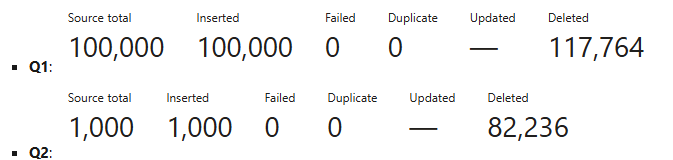
This issue is fixed. Import runs now operate independently and don't interfere with each other, even when 'delete previously imported data' is enabled for heterogeneous imports targeting the same table.
Performance updates on profile page
Running too many profiles disrupted the user experience. The Refresh button wasn't pulling new data and sticky headers sometimes appeared on the profile wizard.
The issue is now fixed by refreshing only the latest data. Sticky headers issue in the profile wizard is resolved. New calculation profiles now appear immediately. The refresh button uses custom logic to update the list with the latest job. We added validation on the profile filter step to prevent accidental empty values in the filter.
Data imports do not detect Origin Correlation ID duplicates in reference data
Previously, we detected duplicates in the OCID column for a reference data import in each query, assuming that it's a user error if there are same OCID values in data source.
We changed this behavior to maintain consistency with other data model entities in Sustainability Manager. So, the last record to process is the last record updating the existing records with same OCID values.
Automatic scheduling now selects chosen days
When users select an import and make a schedule, they may find that selecting one day of the week will automatically select all days.
This issue is fixed where only the day(s) that you click is selected. The UI was updated so that those selections are saved correctly.
Calculation error grid expansion
Previously, calculation jobs with over 5,000 errors didn't all show up in the grid on the calculation job page.
In this release, we fixed this issue so all errors from a calculation job are visible on the page, regardless of how many there are.
Updated partner data forms
Partner activity and partner emissions were missing references to one another on their respective forms.
These forms are updated with the appropriate references.
Underlying Dataflow failures are now shown on Data imports UI
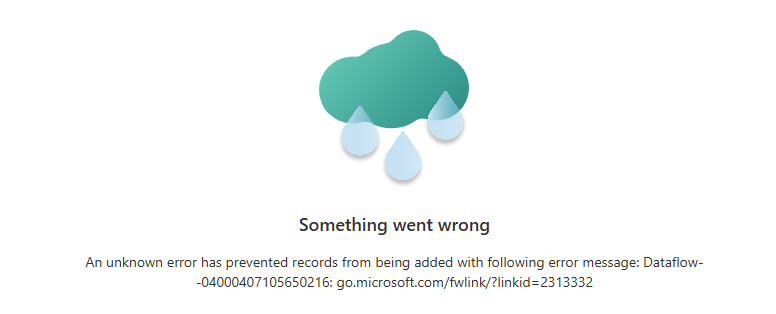
Earlier, all underlying dataflow refresh failures for PQ-related imports failed silently. The import status updated to "Error" without any error messages or indication of why it failed. The data import detail view showed the previous run's details, with the latest run's failure status.
Now, the details page shows the latest run, with a generic error message indicating that the underlying dataflow failed, the dataflow name, and a link to find the error.
Fixed issues with updating GWP factor for custom AR versions
Incorrect validation logic prevented the update of GWP factors for custom AR versions.
This issue is resolved, and users can now update the GWP factors for custom AR versions.
Support for SharePoint connector to import data from multiple files in SharePoint.
The SharePoint connector can now show all available files, and multiple files can be used for data imports. A data import can now be set up to bring data from multiple files within a sharepoint folder using the sharepoint connector in PQ connectors.
The SharePoint connector now fully supports importing data from multiple source files in Microsoft Sustainability Manager.
Data Import runs after completing an edit.
Customers faced an issue where, after completing an import using a Power Query Connector and editing it, the import will remain stuck in the scheduled state.
We applied a fix that resolves this issue, ensuring the import process works as expected. We originally saved the information of the existing import after it was first completed, causing us to obtain dataflow information that is no longer used after we edit the import (a new dataflow is created after saving the edit). We now always get the dataflow information from Dataverse for each import run.
External emission calculation reliability display
Previously, the external emissions calculation profiles didn't display any filters and showed a spinner.
This fix ensures that the profile filters are always displayed and the correct source is displayed.
Updated Excel templates for ingestion
Excel templates were missing certain tables and columns.
We added the missing tables and columns in the Excel templates.
IEA 2022 emission factors show correct AR version used
Previously, the IEA 2022 emission factor library's description mentioned that the CH4 and N2O values in CO2e provided by IEA were derived using AR4 GWP factors. This issue is corrected to AR6 in the library description.
Also, we made IEA 2022 emission factor value precision improvements.
Origin Correlation Id added to Energy related tables
Previously, it wasn't possible to update existing records from the energy data model through the data import process.
OCID is added to all the relevant activity and reference data tables to enable the ability to update existing records.
Fixed product footprint form
The form for product footprint table wasn't editable in some cases. This error was due to validation logic that was incorrectly triggered.
We updated the validation logic to ensure the form is editable.
Transient: Error message when transferring connector ownership on imports created before February release
Customers found a pop-up error suggesting that an owner transfer failed for an import. This error is false and only happens on existing imports after an upgrade occurred. For example, if you create an import using version 2.26 and upgrade to version 2.29, you may see the error message come up yet the transfer was successful.
If you see this error after upgrading Sustainability Manager from a version before 2.28, verify that the transfer was successful. You shouldn't see the error from version 2.28 onwards on an upgrade.
Fix to address report customization issues
This bug fix addresses the issues around copy and save functionality for customized dashboard in the insights section (Overview, Emissions, Water, Waste, Social, and governance).
Fix Scope 1 insights breakdown by data definition
This bug fix corrects the incorrect results shown on the visuals related to emissions break down by sdds for Scope 1, that is, stationary combustions, mobile combustion, industrial process and fugitive emissions on the Scope 1 page of the insights section.
Water quantity connect-to-data goal checkins fixed
Previously, any connect-to-data goals measuring water quantities would return 0 even if data was in the system.
We fixed this behavior so goal check-ins measuring water quantities display accurate aggregations.
Fixed the issue of Calculation jobs running too many times
Previously, some calculations jobs executed more than once when not intended by the user. This error created duplicate work in the system.
We made updates to ensure each calculation job gets executed exactly one time and not more.