ОБЛАСТЬ ПРИМЕНЕНИЯ: ML-расширение Azure CLI версии 2 (текущая версия)Python SDK azure-ai-ml версии 2 (текущая версия)
Из этой статьи вы узнаете, как подключиться к службам хранилища данных Azure с помощью хранилищ данных Машинного обучения Azure.
Предварительные требования
Подсказка
Примеры кода SDK для Python в этой статье используют MLClient.from_config(), для которого необходим файл config.json в вашем текущем каталоге или родительском каталоге. Скачайте этот файл на портале Azure: зайдите в рабочую область, а затем выберите Обзор>Загрузить config.json. Кроме того, можно создать MLClient вручную:
ml_client = MLClient(
    credential=DefaultAzureCredential(),
    subscription_id="<your-subscription-id>",
    resource_group_name="<your-resource-group>",
    workspace_name="<your-workspace-name>",
)
Примечание.
Хранилища данных машинного обучения не создают базовые ресурсы учетной записи хранения. Вместо этого они связывают существующую учетную запись хранения для использования машинного обучения.
Каждый тип хранилища данных (BLOB-объект Azure, ADLS 2-го поколения, Файлы Azure, OneLake) создается независимо. Порядок разделов в этой статье не представляет собой необходимую последовательность шагов.
Создайте хранилище Blob Azure
from azure.ai.ml.entities import AzureBlobDatastore
from azure.ai.ml import MLClient
from azure.identity import DefaultAzureCredential

ml_client = MLClient.from_config(credential=DefaultAzureCredential())

store = AzureBlobDatastore(
    name="",
    description="",
    account_name="",
    container_name=""
)

ml_client.create_or_update(store)
from azure.ai.ml.entities import AzureBlobDatastore
from azure.ai.ml.entities import AccountKeyConfiguration
from azure.ai.ml import MLClient
from azure.identity import DefaultAzureCredential

ml_client = MLClient.from_config(credential=DefaultAzureCredential())

store = AzureBlobDatastore(
    name="blob_protocol_example",
    description="Datastore pointing to a blob container using https protocol.",
    account_name="mytestblobstore",
    container_name="data-container",
    protocol="https",
    credentials=AccountKeyConfiguration(
        account_key="aaaaaaaa-0b0b-1c1c-2d2d-333333333333"
    ),
)

ml_client.create_or_update(store)
from azure.ai.ml.entities import AzureBlobDatastore
from azure.ai.ml.entities import SasTokenConfiguration
from azure.ai.ml import MLClient
from azure.identity import DefaultAzureCredential

ml_client = MLClient.from_config(credential=DefaultAzureCredential())

store = AzureBlobDatastore(
    name="blob_sas_example",
    description="Datastore pointing to a blob container using SAS token.",
    account_name="mytestblobstore",
    container_name="data-container",
    credentials=SasTokenConfiguration(
        sas_token= "?xx=A1bC2dE3fH4iJ5kL6mN7oP8qR9sT0u&xx=C2dE3fH4iJ5kL6mN7oP8qR9sT0uV1wx&xx=Ff6Gg~7Hh8.-Ii9Jj0Kk1Ll2Mm3Nn4_Oo5Pp6Qq7&xx=N7oP8qR9sT0uV1wX2yZ3aB4cD5eF6g&xxx=Ee5Ff~6Gg7.-Hh8Ii9Jj0Kk1Ll2Mm3_Nn4Oo5Pp6&xxx=C2dE3fH4iJ5kL6mN7oP8qR9sT0uV1w"
    ),
)

ml_client.create_or_update(store)
Создайте следующий ФАЙЛ YAML (обновите соответствующие значения):
# my_blob_datastore.yml
$schema: https://azuremlschemas.azureedge.net/latest/azureBlob.schema.json
name: my_blob_ds # add your datastore name here
type: azure_blob
description: here is a description # add a datastore description here
account_name: my_account_name # add the storage account name here
container_name: my_container_name # add the storage container name here
Создайте хранилище данных для машинного обучения в Azure CLI.
az ml datastore create --file my_blob_datastore.yml
Создайте этот ФАЙЛ YAML (обновите соответствующие значения):
# my_blob_datastore.yml
$schema: https://azuremlschemas.azureedge.net/latest/azureBlob.schema.json
name: blob_example
type: azure_blob
description: Datastore pointing to a blob container.
account_name: mytestblobstore
container_name: data-container
credentials:
  account_key: aaaaaaaa-0b0b-1c1c-2d2d-333333333333
Создайте хранилище данных для Машинное обучение в интерфейсе командной строки (CLI).
az ml datastore create --file my_blob_datastore.yml
Создайте этот ФАЙЛ YAML (обновите соответствующие значения):
# my_blob_datastore.yml
$schema: https://azuremlschemas.azureedge.net/latest/azureBlob.schema.json
name: blob_sas_example
type: azure_blob
description: Datastore pointing to a blob container using SAS token.
account_name: mytestblobstore
container_name: data-container
credentials:
  sas_token: "?xx=A1bC2dE3fH4iJ5kL6mN7oP8qR9sT0u&xx=C2dE3fH4iJ5kL6mN7oP8qR9sT0uV1wx&xx=Ff6Gg~7Hh8.-Ii9Jj0Kk1Ll2Mm3Nn4_Oo5Pp6Qq7&xx=N7oP8qR9sT0uV1wX2yZ3aB4cD5eF6g&xxx=Ee5Ff~6Gg7.-Hh8Ii9Jj0Kk1Ll2Mm3_Nn4Oo5Pp6&xxx=C2dE3fH4iJ5kL6mN7oP8qR9sT0uV1w"
Создайте хранилище данных для Машинное обучение в интерфейсе командной строки (CLI).
az ml datastore create --file my_blob_datastore.yml
Создание хранилища данных Azure Data Lake Storage 2-го поколения
from azure.ai.ml.entities import AzureDataLakeGen2Datastore
from azure.ai.ml import MLClient
from azure.identity import DefaultAzureCredential

ml_client = MLClient.from_config(credential=DefaultAzureCredential())

store = AzureDataLakeGen2Datastore(
    name="",
    description="",
    account_name="",
    filesystem=""
)

ml_client.create_or_update(store)
from azure.ai.ml.entities import AzureDataLakeGen2Datastore
from azure.ai.ml.entities._datastore.credentials import ServicePrincipalCredentials

from azure.ai.ml import MLClient
from azure.identity import DefaultAzureCredential

ml_client = MLClient.from_config(credential=DefaultAzureCredential())

store = AzureDataLakeGen2Datastore(
    name="adls_gen2_example",
    description="Datastore pointing to an Azure Data Lake Storage Gen2.",
    account_name="mytestdatalakegen2",
    filesystem="my-gen2-container",
     credentials=ServicePrincipalCredentials(
        tenant_id= "bbbbcccc-1111-dddd-2222-eeee3333ffff",
        client_id= "44445555-eeee-6666-ffff-7777aaaa8888",
        client_secret= "Cc3Dd~4Ee5.-Ff6Gg7Hh8Ii9Jj0Kk1_Ll2Mm3Nn4",
    ),
)

ml_client.create_or_update(store)
Создайте этот ФАЙЛ YAML (обновите значения):
# my_adls_datastore.yml
$schema: https://azuremlschemas.azureedge.net/latest/azureDataLakeGen2.schema.json
name: adls_gen2_credless_example
type: azure_data_lake_gen2
description: Credential-less datastore pointing to an Azure Data Lake Storage Gen2 instance.
account_name: mytestdatalakegen2
filesystem: my-gen2-container
Создайте хранилище данных для Машинное обучение в интерфейсе командной строки (CLI).
az ml datastore create --file my_adls_datastore.yml
Создайте этот ФАЙЛ YAML (обновите значения):
# my_adls_datastore.yml
$schema: https://azuremlschemas.azureedge.net/latest/azureDataLakeGen2.schema.json
name: adls_gen2_example
type: azure_data_lake_gen2
description: Datastore pointing to an Azure Data Lake Storage Gen2 instance.
account_name: mytestdatalakegen2
filesystem: my-gen2-container
credentials:
  tenant_id: bbbbcccc-1111-dddd-2222-eeee3333ffff
  client_id: 44445555-eeee-6666-ffff-7777aaaa8888
  client_secret: Cc3Dd~4Ee5.-Ff6Gg7Hh8Ii9Jj0Kk1_Ll2Mm3Nn4
Создайте хранилище данных для Машинное обучение в интерфейсе командной строки (CLI).
az ml datastore create --file my_adls_datastore.yml
Создание хранилища данных Файлов Azure
from azure.ai.ml.entities import AzureFileDatastore
from azure.ai.ml.entities import AccountKeyConfiguration
from azure.ai.ml import MLClient
from azure.identity import DefaultAzureCredential

ml_client = MLClient.from_config(credential=DefaultAzureCredential())

store = AzureFileDatastore(
    name="file_example",
    description="Datastore pointing to an Azure File Share.",
    account_name="mytestfilestore",
    file_share_name="my-share",
    credentials=AccountKeyConfiguration(
        account_key= "aaaaaaaa-0b0b-1c1c-2d2d-333333333333"
    ),
)

ml_client.create_or_update(store)
from azure.ai.ml.entities import AzureFileDatastore
from azure.ai.ml.entities import SasTokenConfiguration
from azure.ai.ml import MLClient
from azure.identity import DefaultAzureCredential

ml_client = MLClient.from_config(credential=DefaultAzureCredential())

store = AzureFileDatastore(
    name="file_sas_example",
    description="Datastore pointing to an Azure File Share using SAS token.",
    account_name="mytestfilestore",
    file_share_name="my-share",
    credentials=SasTokenConfiguration(
        sas_token="?xx=A1bC2dE3fH4iJ5kL6mN7oP8qR9sT0u&xx=C2dE3fH4iJ5kL6mN7oP8qR9sT0uV1wx&xx=Ff6Gg~7Hh8.-Ii9Jj0Kk1Ll2Mm3Nn4_Oo5Pp6Qq7&xx=N7oP8qR9sT0uV1wX2yZ3aB4cD5eF6g&xxx=Ee5Ff~6Gg7.-Hh8Ii9Jj0Kk1Ll2Mm3_Nn4Oo5Pp6&xxx=C2dE3fH4iJ5kL6mN7oP8qR9sT0uV1w"
    ),
)

ml_client.create_or_update(store)
Создайте этот ФАЙЛ YAML (обновите значения):
# my_files_datastore.yml
$schema: https://azuremlschemas.azureedge.net/latest/azureFile.schema.json
name: file_example
type: azure_file
description: Datastore pointing to an Azure File Share.
account_name: mytestfilestore
file_share_name: my-share
credentials:
  account_key: aaaaaaaa-0b0b-1c1c-2d2d-333333333333
Создайте хранилище данных для Машинное обучение в интерфейсе командной строки (CLI).
az ml datastore create --file my_files_datastore.yml
Создайте этот ФАЙЛ YAML (обновите значения):
# my_files_datastore.yml
$schema: https://azuremlschemas.azureedge.net/latest/azureFile.schema.json
name: file_sas_example
type: azure_file
description: Datastore pointing to an Azure File Share using a SAS token.
account_name: mytestfilestore
file_share_name: my-share
credentials:
  sas_token: "?xx=A1bC2dE3fH4iJ5kL6mN7oP8qR9sT0u&xx=C2dE3fH4iJ5kL6mN7oP8qR9sT0uV1wx&xx=Ff6Gg~7Hh8.-Ii9Jj0Kk1Ll2Mm3Nn4_Oo5Pp6Qq7&xx=N7oP8qR9sT0uV1wX2yZ3aB4cD5eF6g&xxx=Ee5Ff~6Gg7.-Hh8Ii9Jj0Kk1Ll2Mm3_Nn4Oo5Pp6&xxx=C2dE3fH4iJ5kL6mN7oP8qR9sT0uV1w"
Создайте хранилище данных для Машинное обучение в интерфейсе командной строки (CLI).
az ml datastore create --file my_files_datastore.yml
Создание хранилища данных azure Data Lake Storage 1-го поколения
from azure.ai.ml.entities import AzureDataLakeGen1Datastore
from azure.ai.ml import MLClient
from azure.identity import DefaultAzureCredential

ml_client = MLClient.from_config(credential=DefaultAzureCredential())

store = AzureDataLakeGen1Datastore(
    name="",
    store_name="",
    description="",
)

ml_client.create_or_update(store)
from azure.ai.ml.entities import AzureDataLakeGen1Datastore
from azure.ai.ml.entities._datastore.credentials import ServicePrincipalCredentials
from azure.ai.ml import MLClient
from azure.identity import DefaultAzureCredential

ml_client = MLClient.from_config(credential=DefaultAzureCredential())

store = AzureDataLakeGen1Datastore(
    name="adls_gen1_example",
    description="Datastore pointing to an Azure Data Lake Storage Gen1.",
    store_name="mytestdatalakegen1",
    credentials=ServicePrincipalCredentials(
        tenant_id= "bbbbcccc-1111-dddd-2222-eeee3333ffff",
        client_id= "44445555-eeee-6666-ffff-7777aaaa8888",
        client_secret= "Cc3Dd~4Ee5.-Ff6Gg7Hh8Ii9Jj0Kk1_Ll2Mm3Nn4",
    ),
)

ml_client.create_or_update(store)
Создайте этот ФАЙЛ YAML (обновите значения):
# my_adls_datastore.yml
$schema: https://azuremlschemas.azureedge.net/latest/azureDataLakeGen1.schema.json
name: alds_gen1_credless_example
type: azure_data_lake_gen1
description: Credential-less datastore pointing to an Azure Data Lake Storage Gen1 instance.
store_name: mytestdatalakegen1
Создайте хранилище данных для Машинное обучение в интерфейсе командной строки (CLI).
az ml datastore create --file my_adls_datastore.yml
Создайте этот ФАЙЛ YAML (обновите значения):
# my_adls_datastore.yml
$schema: https://azuremlschemas.azureedge.net/latest/azureDataLakeGen1.schema.json
name: adls_gen1_example
type: azure_data_lake_gen1
description: Datastore pointing to an Azure Data Lake Storage Gen1 instance.
store_name: mytestdatalakegen1
credentials:
  tenant_id: bbbbcccc-1111-dddd-2222-eeee3333ffff
  client_id: 44445555-eeee-6666-ffff-7777aaaa8888
  client_secret: Cc3Dd~4Ee5.-Ff6Gg7Hh8Ii9Jj0Kk1_Ll2Mm3Nn4
Создайте хранилище данных для Машинное обучение в интерфейсе командной строки (CLI).
az ml datastore create --file my_adls_datastore.yml
Создание хранилища данных OneLake (Microsoft Fabric) (предварительная версия)
В этом разделе описаны различные параметры создания хранилища данных OneLake. Хранилище данных OneLake является частью Microsoft Fabric. В настоящее время Машинное обучение поддерживает подключение к артефактам Microsoft Fabric lakehouse в папке "Файлы", которая включает папки или файлы и сочетания клавиш Amazon S3. Дополнительные сведения о озерах см. в статье "Что такое озеро в Microsoft Fabric?".
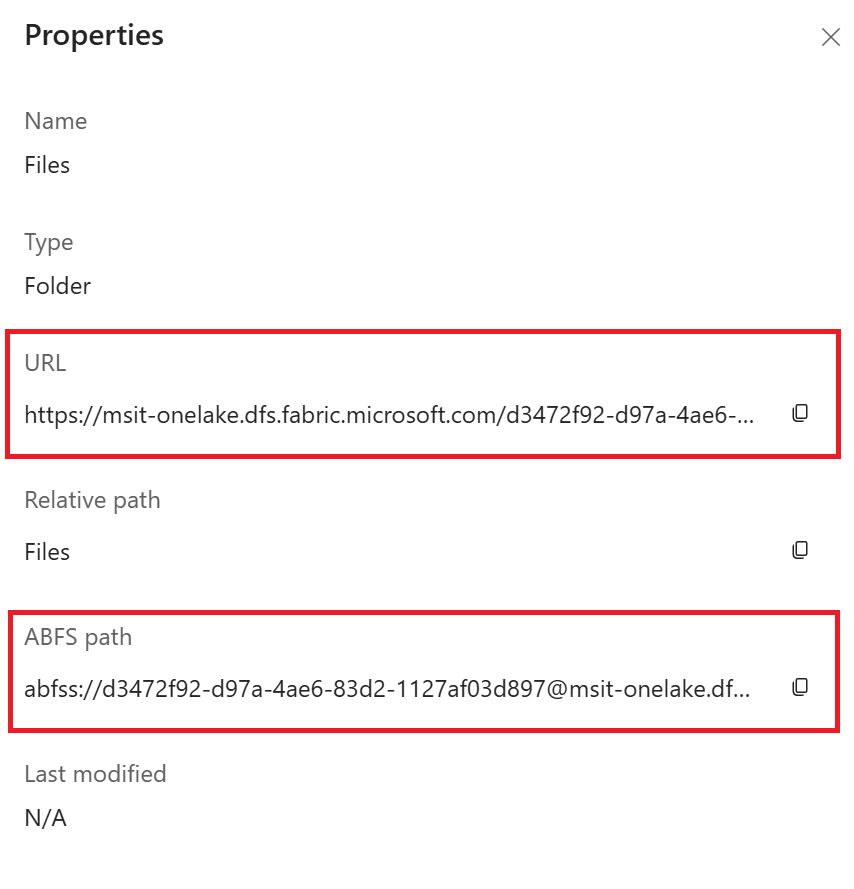
Для создания хранилища данных OneLake требуются следующие сведения из экземпляра Microsoft Fabric:
- Конечная точка
- GUID рабочей области
- GUID артефакта
На следующих снимках экрана описано, как получить эти необходимые информационные ресурсы из экземпляра Microsoft Fabric.
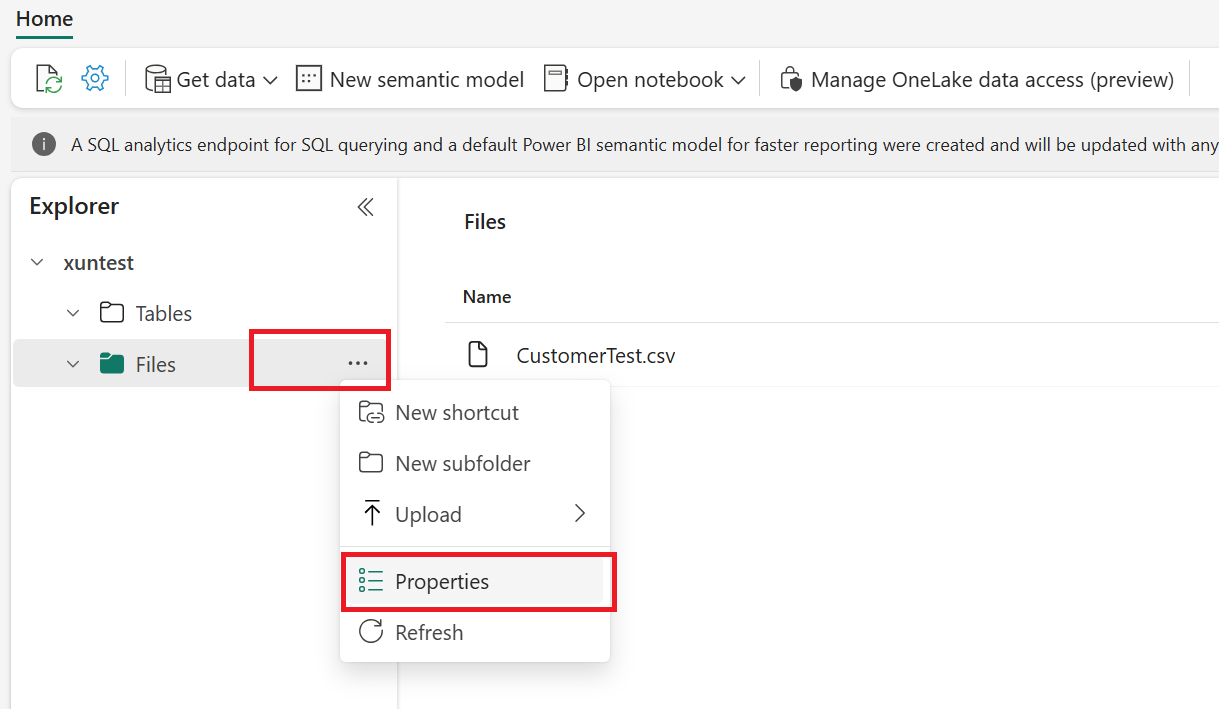
На странице "Свойства" можно найти "Endpoint", "Workspace GUID" и "Artifact GUID" в "URL" и "ABFS path".
- Формат URL-адреса: https://{your_one_lake_endpoint}///Files
- Формат пути ABFS: abfss://{your_one_lake_workspace_guid}@//Files
Создание хранилища данных OneLake
from azure.ai.ml.entities import OneLakeDatastore, OneLakeArtifact
from azure.ai.ml import MLClient
from azure.identity import DefaultAzureCredential

ml_client = MLClient.from_config(credential=DefaultAzureCredential())

store = OneLakeDatastore(
    name="onelake_example_id",
    description="Datastore pointing to a Microsoft fabric artifact.",
    one_lake_workspace_name="bbbbbbbb-7777-8888-9999-cccccccccccc", #{your_one_lake_workspace_guid}
    endpoint="msit-onelake.dfs.fabric.microsoft.com", #{your_one_lake_endpoint}
    artifact=OneLakeArtifact(
        name="cccccccc-8888-9999-0000-dddddddddddd/Files", #{your_one_lake_artifact_guid}/Files
        type="lake_house"
    )
)

ml_client.create_or_update(store)
from azure.ai.ml.entities import OneLakeDatastore, OneLakeArtifact
from azure.ai.ml.entities._datastore.credentials import ServicePrincipalCredentials
from azure.ai.ml import MLClient
from azure.identity import DefaultAzureCredential

ml_client = MLClient.from_config(credential=DefaultAzureCredential())

store = OneLakeDatastore(
    name="onelake_example_sp",
    description="Datastore pointing to a Microsoft fabric artifact.",
    one_lake_workspace_name="bbbbbbbb-7777-8888-9999-cccccccccccc", #{your_one_lake_workspace_guid}
    endpoint="msit-onelake.dfs.fabric.microsoft.com", #{your_one_lake_endpoint}
    artifact=OneLakeArtifact(
        name="cccccccc-8888-9999-0000-dddddddddddd/Files", #{your_one_lake_artifact_guid}/Files
        type="lake_house"
    ),
    credentials=ServicePrincipalCredentials(
        tenant_id= "bbbbcccc-1111-dddd-2222-eeee3333ffff",
        client_id= "44445555-eeee-6666-ffff-7777aaaa8888",
        client_secret= "Cc3Dd~4Ee5.-Ff6Gg7Hh8Ii9Jj0Kk1_Ll2Mm3Nn4",
    ),
)

ml_client.create_or_update(store)
Создайте следующий ФАЙЛ YAML. Обновите значения:
# my_onelake_datastore.yml
$schema: http://azureml/sdk-2-0/OneLakeDatastore.json
name: onelake_example_id
type: one_lake
description: Credential-less datastore pointing to a OneLake lakehouse.
one_lake_workspace_name: "eeeeffff-4444-aaaa-5555-bbbb6666cccc"
endpoint: "msit-onelake.dfs.fabric.microsoft.com"
artifact:
  type: lake_house
  name: "1111bbbb-22cc-dddd-ee33-ffffff444444/Files"
Создайте хранилище данных для Машинное обучение в интерфейсе командной строки (CLI).
az ml datastore create --file my_onelake_datastore.yml
Создайте следующий ФАЙЛ YAML. Обновите значения:
# my_onelakesp_datastore.yml
$schema: http://azureml/sdk-2-0/OneLakeDatastore.json
name: onelake_example_id
type: one_lake
description: Credential-less datastore pointing to a OneLake lakehouse.
one_lake_workspace_name: "eeeeffff-4444-aaaa-5555-bbbb6666cccc"
endpoint: "msit-onelake.dfs.fabric.microsoft.com"
artifact:
  type: lake_house
  name: "1111bbbb-22cc-dddd-ee33-ffffff444444/Files"
credentials:
  tenant_id: bbbbcccc-1111-dddd-2222-eeee3333ffff
  client_id: 44445555-eeee-6666-ffff-7777aaaa8888
  client_secret: Cc3Dd~4Ee5.-Ff6Gg7Hh8Ii9Jj0Kk1_Ll2Mm3Nn4
Создайте хранилище данных для Машинное обучение в интерфейсе командной строки (CLI).
az ml datastore create --file my_onelakesp_datastore.yml
Следующие шаги
