Note
Access to this page requires authorization. You can try signing in or changing directories.
Access to this page requires authorization. You can try changing directories.
Azure Application Gateway
Azure Container Registry
Azure Firewall
Azure Kubernetes Service (AKS)
Azure Role-based access control
This article provides a recommended baseline infrastructure architecture to deploy an Azure Kubernetes Service (AKS) cluster. It follows our design principles and aligns with AKS architectural best practices from the Azure Well-Architected Framework. The article guides multiple distinct interdisciplinary groups, like networking, security, and identity teams, when they deploy this general-purpose infrastructure.
This architecture doesn't focus on a workload. It concentrates on the AKS cluster itself. This information is the minimum recommended baseline for most AKS clusters. It integrates with Azure services that deliver observability, provide a network topology that supports multi-regional growth, and secure in-cluster traffic.
Your business requirements influence the target architecture and can vary between application contexts. Consider the architecture as your starting point for preproduction and production stages.
Tip
This article covers extensive design considerations for AKS clusters. AKS Automatic implements many design decisions to reduce the number of considerations you need to evaluate and to optimize for common use cases. For example, AKS Automatic provisions and operates a managed system node pool, so the system node pool sizing, isolation, and upgrade decisions in this article don't apply to that platform.
Even if your workload is going to be hosted in an AKS Automatic environment, knowing the foundations for a self-managed AKS cluster can help you make the right choices as your workload changes.
Kubernetes is a broad ecosystem that extends beyond Azure and Microsoft technologies. When you deploy an AKS cluster, you're responsible for many decisions about how to design and operate the cluster. Running an AKS cluster involves closed-source components from various vendors, including Microsoft, along with open-source components from the Kubernetes ecosystem. The landscape changes frequently, so revisit decisions regularly. When you adopt Kubernetes, you acknowledge that your workload needs its capabilities and that your workload team is prepared to invest on an ongoing basis.
You can use an implementation of this architecture on GitHub: AKS baseline reference implementation as an alternative starting point and configure it to meet your needs.
Note
The reference architecture requires knowledge of Kubernetes and its concepts. If you need a refresher, see the Intro to Kubernetes and Develop and deploy applications on Kubernetes training paths.
Networking configuration
Cluster compute
Compute for the base cluster
Container image reference
Policy management
Secure data flow
Business continuity
Node and pod scalability
Business continuity decisions
Availability zones
Multiple regions
Architecture

Download a Visio file of this architecture.
For more information, see Hub-spoke network topology in Azure.
Network topology
This architecture uses a hub-and-spoke network topology. Deploy the hub and spokes in separate virtual networks that are connected through virtual network peering. This topology has several advantages:
Enable segregated management. You can apply governance and adhere to the principle of least privilege (PoLP). It also supports the concept of an Azure landing zone with a separation of duties.
Minimize direct exposure of Azure resources to the public internet.
Provide regional hub-and-spoke topologies. You can expand hub-and-spoke network topologies in the future and provide workload isolation.
Employ a web application firewall service to help inspect HTTP traffic flow for all web applications.
Provide support for workloads that span multiple subscriptions.
Make the architecture extensible. To accommodate new features or workloads, you can add new spokes instead of redesigning the network topology.
Support sharing resources, like a firewall and Domain Name System (DNS) zones, across networks.
Align with the Azure enterprise-scale landing zone.
Hub virtual network
The hub virtual network is the central point of connectivity and observability. In this architecture, the hub contains the following components:
Azure Firewall with global firewall policies that your central IT teams define to enforce organization-wide rules
Azure Bastion, which establishes a secure tunnel into the private network perimeter so that you can perform cluster management operations
A gateway subnet for VPN connectivity
Azure Monitor for network observability
Within the network, the architecture has three subnets.
Subnet to host Azure Firewall
Azure Firewall is a managed firewall service. The Azure Firewall instance secures outbound network traffic. Without this layer of security, the traffic might communicate with a malicious, non-Microsoft service that could exfiltrate sensitive workload data. Use Azure Firewall Manager to centrally deploy and configure multiple Azure Firewall instances and manage Azure Firewall policies for this hub virtual network architecture type.
Subnet to host a gateway
This subnet is a placeholder for a VPN gateway or an Azure ExpressRoute gateway. The gateway provides connectivity between the routers in your on-premises network and the virtual network.
Subnet to host Azure Bastion
This subnet is used for Azure Bastion. You can use Azure Bastion to securely access Azure resources without exposing the resources to the internet. This architecture uses Azure Bastion to securely connect to the AKS cluster's API server for management operations. The subnet is for management operations only.
Spoke virtual network
The spoke virtual network contains the AKS cluster and other related resources. The spoke has the following subnets.
Subnet to host Azure Application Gateway
Azure Application Gateway is a web traffic load balancer that operates at Layer 7. The reference implementation uses the Application Gateway v2 SKU that enables Azure Web Application Firewall. Web Application Firewall secures incoming traffic from common web traffic attacks, including bots. The instance has a public front-end IP configuration that receives user requests. By design, Application Gateway requires a dedicated subnet.
Subnet for internal load balancer IPs
This subnet provides the address space for the internal load balancer front-end IPs. Application Gateway sends traffic to the assigned private internal load balancer IP, and the load balancer distributes traffic to any node in the cluster.
The kube-proxy agent on the receiving node forwards the packet to the gateway proxy pod in the system node pool, potentially adding an extra network hop. The proxy terminates Transport Layer Security (TLS) and forwards requests to workload pods over HTTP.
By using a dedicated subnet for the front-end load balancer IPs, you can apply network security group (NSG) rules that scope inbound traffic to the load balancer without affecting the node subnet. For more information, see Use an internal load balancer with AKS.
Subnet to host the cluster nodes
This architecture uses two node pools, which are separate groups of nodes. The system node pool hosts pods that run core cluster services, including the gateway proxy that routes traffic to the workload. The user node pool runs the workload.
Subnet to host Azure Private Link endpoints
Create Azure Private Link connections for Azure Container Registry and Azure Key Vault so that users can access these services via a private endpoint within the spoke virtual network. Private endpoints don't require a dedicated subnet. You can also place private endpoints in the hub virtual network. In the baseline implementation, the endpoints are deployed to a dedicated subnet within the spoke virtual network. This approach reduces traffic that passes through the peered network connection, and keeps the resources that belong to the cluster in the same virtual network. You can also apply granular security rules at the subnet level by using NSGs.
For more information, see Private Link deployment options.
Subnet for the AKS API server
You can configure an AKS cluster to use API server virtual network integration, which projects the cluster's API server endpoint into a delegated subnet in your virtual network. This configuration is called a private cluster because it ensures that all traffic between the API server, node pools, and connected clients remain entirely within your private network.
All communication between the AKS-managed Kubernetes API server and both cluster-internal and external clients is restricted to a trusted network.
With a private cluster, you can use NSGs and other built-in network controls to secure your environment. This configuration prohibits any unauthorized public access between the internet and the environment. For more information, see Create a private AKS cluster.
Plan the IP addresses
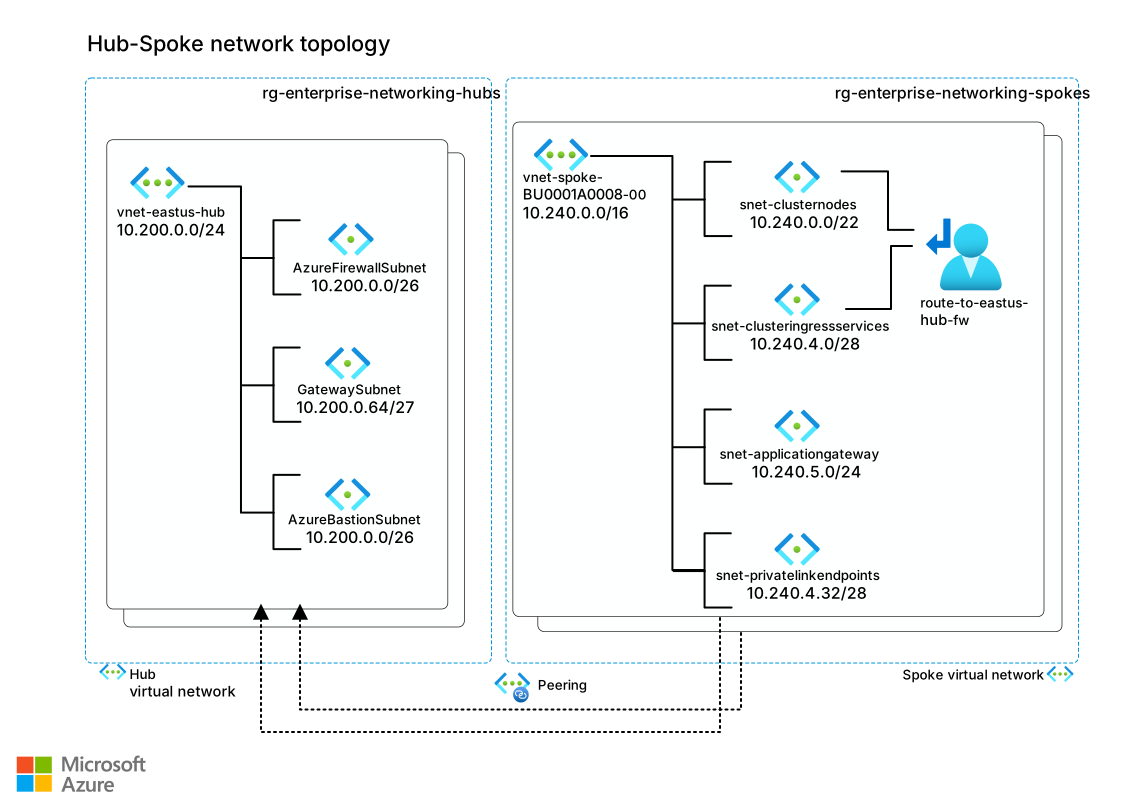
Download a Visio file of this architecture.
This reference architecture uses the following networking approaches, which each require a separate IP address space.
Your Azure virtual network that you use for resources like cluster nodes, the cluster API server, private endpoints for Azure services, and Application Gateway.
The Azure Container Networking Interface (CNI) Overlay, which the cluster uses to allocate IP addresses to pods from an address space that's separate from your Azure virtual network.
Virtual network IP address space
The address space of your Azure virtual network should be large enough to hold all of your subnets. Account for all entities that receive traffic. Kubernetes allocates IP addresses for the entities from the subnet address space. Consider the following points when you plan your Azure virtual network's IP addresses:
Upgrades: AKS updates nodes regularly to make sure that the underlying VMs are up-to-date on security features and other system patches. During an upgrade process, AKS creates a node that temporarily hosts the pods, while the upgrade node is cordoned and drained. That temporary node receives an IP address from the cluster subnet. Ensure that you have sufficient address space for the temporary node IP addresses.
In this architecture, pods are allocated IP addresses from within the Azure CNI Overlay pod address space, including during rolling updates. This approach reduces the overall number of IP addresses used from your Azure virtual network compared to other Kubernetes networking approaches.
Scalability: Consider the total number of system and user nodes and their maximum scalability limits. For example, if you want to scale out by 400%, you need four times the number of addresses for all the scaled-out nodes.
Because this architecture uses Azure CNI Overlay, the scalability of your pods doesn't affect your virtual network's address space.
Private Link addresses: Factor in the addresses that are required for communication with other Azure services over Private Link. This architecture has two addresses assigned for the links to Container Registry and Key Vault.
Private cluster API server addresses: API server virtual network integration helps you to project the AKS API server as an endpoint inside your virtual network. This feature requires a minimum subnet size, so ensure that you meet these prerequisites during your network planning.
Reserved IP addresses: Azure reserves specific addresses for its uses. They can't be assigned.
The preceding list isn't exhaustive. If your design has other resources that affect the number of available IP addresses, accommodate those addresses.
This architecture is designed for a single workload. In a production AKS cluster, always separate the system node pool from the user node pool. When you run multiple workloads on the cluster, you might also want to isolate the user node pools from each other. This isolation results in more, smaller subnets. The gateway topology might also expand because each Gateway resource produces its own gateway proxy deployment and load balancer front-end IP. Plan subnet address space accordingly.
Pod IP address space
Azure CNI Overlay assigns IP addresses to pods by using a dedicated address space, which is separate from the address space that you use in your virtual network. Use an IP address space that doesn't overlap with your virtual network or any peered virtual networks. But if you create multiple AKS clusters, you can safely use the same pod address space on each cluster.
Azure CNI Overlay assigns each node a /24 address space for its pods. It's important to ensure that the pod address space is sufficiently large. Allow for as many /24 blocks as you need for the number of nodes in your cluster. Remember to include any temporary nodes created during upgrades or scale-out operations. For example, if you use a /16 address space for your Classless Inter-Domain Routing (CIDR) range, your cluster can grow to a maximum of about 250 nodes.
Each node supports up to 250 pods, and this limit includes any pods that are temporarily created during upgrades.
For more information, see the guidance about IP address planning for Azure CNI Overlay.
Other IP address space considerations
For the complete set of networking considerations for this architecture, see AKS baseline network topology. For more information about how to plan IP addressing for an AKS cluster, see Configure Azure CNI networking in AKS.
Add-ons and preview features
Kubernetes and AKS continuously evolve, with faster release cycles than software for on‑premises environments. This baseline architecture depends on specific AKS preview features and AKS add-ons. Consider the following differences between preview features and add-ons:
The AKS team describes preview features as shipped and improving because many of the preview features stay in that state for only a few months before they move to the general availability (GA) phase.
AKS add-ons and extensions provide extra, supported functionality. AKS manages their installation, configuration, and lifecycle.
The baseline architecture doesn't include every preview feature or add-on, but only the ones that add significant value to a general-purpose cluster. As these features come out of preview, this baseline architecture is revised accordingly.
You might want to evaluate some other preview features or AKS add-ons in preproduction clusters. These features can improve your security, manageability, or other requirements. You must install and maintain any non-Microsoft add-ons, which includes tracking available versions and installing updates after you upgrade a cluster's Kubernetes version.
Container image reference
The cluster might contain the workload and several other images, like self-managed gateway infrastructure or a utility container that syncs TLS certificates from Key Vault. Some of those images might reside in public registries, but it's a good practice to keep them scanned, audited, and stored in a dedicated private registry like Azure Container Registry. Consider the following points when you pull the images into your cluster:
Authenticate the cluster to pull the image.
If you use a public image, import the image into a container registry that aligns with your service-level objective (SLO). Otherwise, the image might be subject to unexpected availability problems. If the image is unavailable when you need it, operational problems can occur. Consider the following benefits of using a private container registry, like Azure Container Registry, instead of a public registry:
- You can block unauthorized access to your images.
- You don't have public-facing dependencies.
- You can access image pull logs to monitor activities and triage connectivity problems.
- You can take advantage of integrated container scanning and image compliance.
Pull images from authorized registries. You can enforce this restriction through Azure Policy. In the reference implementation, the cluster pulls images only from the dedicated Azure Container Registry instance that deploys with the cluster.
Configure compute for the base cluster
In AKS, each node pool usually maps to a virtual machine scale set. Nodes are virtual machines (VMs) in each node pool.
Consider using a smaller VM size for the system node pool to minimize costs. The reference implementation deploys the system node pool with three D2dv5 nodes. That size is sufficient to meet the expected load of the system pods. The operating system ephemeral disk is 64 GB.
When you plan capacity for a user node pool, consider the following recommendations:
Choose larger node sizes to pack the maximum number of pods set on a node. Large nodes minimize the footprint of services that run on all nodes, like monitoring and logging.
Select the appropriate VM type if you have specific workload requirements. For example, you might need a memory-optimized product for some workloads, or a GPU-accelerated product for others. For more information, see Sizes for VMs in Azure.
Deploy at least two nodes so that the workload can follow a high availability pattern with two replicas. With AKS, you can change the node count without recreating the cluster.
Plan the actual node sizes for your workload based on the requirements that your design team determines. Based on the business requirements, this architecture uses the D4dv5 SKU for the production workload.
When you plan capacity for your cluster, assume that your workload consumes up to 80% of each node. The remaining 20% is reserved for AKS services.
Set the maximum pods for each node based on your capacity planning. If you try to establish a capacity baseline, start with a value of 30. Adjust that value based on the requirements of the workload, the node size, and your IP address constraints.
Select an operating system
Most AKS clusters use Linux as the operating system for their node pools. The reference implementation uses Azure Linux, which is a lightweight, hardened Linux distribution that's tuned for Azure. You can choose another Linux distribution like Ubuntu if you prefer or if Azure Linux doesn't meet your requirements. If you choose a different operating system, ensure that the OS disk is sized appropriately for that image. Some distributions require more space than Azure Linux, so you might need to increase the disk size to avoid problems with deployment or runtime.
If your workload is composed of mixed technologies, you can use different operating systems in different node pools. If you don't need different operating systems, we recommend that you use a single operating system for all workload node pools to reduce operational complexity.
Integrate Microsoft Entra ID for the cluster
Securing access to and from the cluster is critical. Use the cluster's perspective to understand the difference between inside-out and outside-in traffic.
Inside-out access: Consider AKS access to Azure components like networking infrastructure, Container Registry, and Key Vault. Authorize only the resources that the cluster should be allowed to access.
Outside-in access: Provide identities with access to the Kubernetes cluster. Authorize only those external entities that are allowed access to the Kubernetes API server and Azure Resource Manager.
AKS access to Azure components
There are two ways to manage AKS to Azure access through Microsoft Entra ID: service principals or managed identities for Azure resources.
Of the two methods to manage AKS access to Azure, we recommend managed identities. For service principals, you must manage and rotate secrets, either manually or programmatically. For managed identities, Microsoft Entra ID manages and performs the authentication and timely rotation of secrets.
We recommend that you enable and use managed identities in AKS so that the cluster can interact with external Azure resources through Microsoft Entra ID. If you don't use Microsoft Entra ID integration immediately, you can add it later.
By default, the cluster uses two primary identities: the cluster identity and the kubelet identity. The AKS control plane components use the cluster identity to manage cluster resources, including ingress load balancers, and AKS managed public IP addresses. The kubelet identity authenticates with Container Registry. Some add-ons also support authentication by using a managed identity.
You should use a managed identity when the cluster needs to pull images from a container registry. This action requires the cluster to get the registry credentials, which you allow by granting the cluster's kubelet managed identity AcrPull access to your registry. If you don't use a managed identity, you can store that information in a Kubernetes secret and use imagePullSecrets to retrieve it. We don't recommend this approach because it introduces security complexities, such as needing to know the secret in advance and store it in the DevOps pipeline. It also adds operational overhead because you must rotate the secret.
In this architecture, the cluster accesses Azure resources that Microsoft Entra ID secures, and the cluster performs operations that support managed identities. Assign Azure role-based access control (Azure RBAC) roles and permissions to the cluster's managed identities, depending on the operations that the cluster does. The cluster authenticates itself to Microsoft Entra ID and is allowed or denied access based on the roles assigned to it. The following examples from the reference implementation show Azure built-in roles that are assigned to the cluster:
The Network Contributor role manages the cluster's ability to control the spoke virtual network. With this role assignment, the AKS cluster system-assigned identity can interact with the dedicated subnet for the internal load balancer that fronts the gateway proxy and the AKS private API server.
The Private DNS Zone Contributor role manages the cluster's ability to link the zone directly to the spoke virtual network that hosts the cluster. A private cluster keeps DNS records off the public internet by using a private DNS zone, but it's still possible to create a private AKS cluster with a public DNS address. We recommend that you explicitly prohibit this feature by setting
enablePrivateClusterPublicFQDNtofalseto prevent disclosure of your control plane's private IP address. Consider using Azure Policy to enforce the use of private clusters without public DNS records.The Monitoring Metrics Publisher role manages the cluster's ability to send metrics to Azure Monitor.
The AcrPull role manages the cluster's ability to pull images from the specified Container Registry instances.
Two AKS add-ons provision additional managed identities that require role assignments. The Secrets Store CSI Driver add-on identity retrieves TLS certificates from Key Vault. The application routing add-on identity manages DNS records and Gateway reconciliation.
Grant these two identities the following access to the resources they interact with:
The Secrets Store CSI Driver add-on managed identity needs the Key Vault Certificate User role on your key vault so the driver can retrieve TLS certificates.
Note
As an alternative, you can replace the CSI Driver add-on managed identity with Microsoft Entra Workload Identity for Key Vault access. When you use Workload Identity, you bind a user-assigned managed identity to a Kubernetes ServiceAccount by using federated credentials, and reference the ServiceAccount in the gateway listener's TLS options. The application routing add-on then creates the SecretProviderClass automatically.
You typically choose either the add-on's managed identity or Workload Identity for Key Vault access through the CSI driver. Workload Identity provides namespace-scoped identity isolation and reduces manual resource management at the cost of added identity hardening through federated credentials.
The application routing add-on managed identity needs the Key Vault Secrets User and Key Vault Reader roles on your key vault. For the built-in DNS component to reconcile gateway resources, this identity also needs the Private DNS Zone Contributor role on the ingress private DNS zone.
Note
The built-in DNS component deployed with the add-on doesn't automatically reconcile DNS records. For Gateway API records, use the Workload Identity approach.
For more information, see Configure Azure DNS and TLS with the application routing Gateway API implementation.
Cluster access
Microsoft Entra integration also simplifies security for outside-in access. For example, you might want to use kubectl. As an initial step, you can run the az aks get-credentials command to get the credentials of the cluster. Microsoft Entra ID authenticates your identity against the Azure roles that are allowed to get cluster credentials. For more information, see Available cluster roles permissions.
AKS supports Kubernetes access through Microsoft Entra ID by using Microsoft Entra ID as an identity provider integrated with native Kubernetes RBAC or by using native Azure RBAC to control cluster access. The following sections detail both approaches.
Associate Kubernetes RBAC with Microsoft Entra ID
Kubernetes supports RBAC through the following API objects:
A set of permissions that you define by using a
RoleorClusterRoleobject for cluster-wide permissions.Bindings that assign users and groups who have permission to do the actions. Define bindings by using a
RoleBindingorClusterRoleBindingobject.
Kubernetes has some built-in roles like cluster-admin, edit, and view. Bind those roles to Microsoft Entra users and groups to use the enterprise directory to manage access. For more information, see Use Kubernetes RBAC with Microsoft Entra integration.
Be sure that you include the Microsoft Entra groups for cluster and namespace access in your Microsoft Entra access reviews.
Use Azure RBAC for Kubernetes authorization
We recommend that you use Azure RBAC and Azure role assignments to enforce authorization checks on the cluster. This authorization approach integrates with Microsoft Entra authentication. You can assign roles at various scopes, like the management group, subscription, or resource group. All clusters under the scope then inherit a consistent set of role assignments with respect to who has permissions to access the objects on the Kubernetes cluster.
We don't recommend using Kubernetes-native RBAC with ClusterRoleBindings and RoleBindings.
For more information, see Azure RBAC for Kubernetes authorization.
Local accounts
AKS supports native Kubernetes user authentication. We don't recommend that you use this method to provide user access to clusters. This method is certificate-based and performed externally to your primary identity provider, which makes your centralized user access control and governance difficult. Always manage access to your cluster by using Microsoft Entra ID, and configure your cluster to explicitly prohibit local account access.
In the reference implementation, local cluster accounts access is explicitly prohibited when the system deploys the cluster.
Integrate Microsoft Entra ID for the workload
Similar to having an Azure system-assigned managed identity for the entire cluster, you can assign managed identities at the pod level. A workload identity enables the hosted workload to access resources through Microsoft Entra ID. For example, the workload can store files in Azure Storage. When the pod needs to access those files, it authenticates itself against the resource as an Azure managed identity.
In the reference implementation, Microsoft Entra Workload ID on AKS provides the managed identities for pods. This approach integrates with the Kubernetes-native capabilities to federate with external identity providers. For more information, see Workload identity federation.
Select a networking model
AKS provides CNI plugins in two networking models: overlay and flat. Both models support network policies for in-cluster traffic control.
With a flat networking plugin, such as Azure CNI Pod Subnet, every pod gets an IP address from the virtual network subnet. Resources in the same network or peered networks can access pods directly by their IP addresses without network address translation (NAT). Use a flat networking model when your workload requires pods to be directly routable from the virtual network.
This implementation uses Azure CNI Overlay, an overlay networking plugin that allocates virtual network IP addresses only to nodes and assigns pod IPs from a separate CIDR range. Because Azure CNI Overlay consumes far fewer virtual network IP addresses than flat models, we recommend it for most deployments.
For more information about the models, see AKS CNI networking overview and Best practices for network connectivity and security in AKS.
Application routing
This architecture uses the application routing add-on with the Kubernetes Gateway API. The application routing add-on is an AKS cluster configuration that declares the cluster should include managed gateway infrastructure. The Gateway API is a set of Kubernetes custom resource definitions (CRDs), including GatewayClass, Gateway, HTTPRoute, and others. The Kubernetes community designated the Gateway API as the successor to the previous Ingress API. The Gateway API provides a standardized, role-oriented, and extensible framework for traffic management.
The Gateway API components deploy at the following lifecycle stages:
Cluster design. The application team decides which gateway controller should manage ingress traffic and how to manage that controller's lifecycle. Gateway controllers typically bundle together their data-plane proxies, so this decision also determines which proxy handles the traffic path. This architecture enables managed Gateway API CRDs. It configures the add-on to use managed Istio as the gateway controller, which pairs with Envoy as the gateway proxy. Although you can also use Istio as a service mesh, this architecture uses Istio only as the gateway controller and doesn't enable its service mesh capabilities.
If the team requires a different implementation, they can use other Gateway API controllers, such as NGINX Gateway Fabric, Envoy Gateway, and Traefik. Self-managing these controllers requires owning manifests, anti-affinity, node placement, probes, RBAC scoping, scaling policies, source IP restrictions, and version lifecycle. In return, teams gain full governance over proxy behavior, version pinning independent of cluster upgrades, and unconstrained configuration.
Cluster provisioning. No design decisions occur at this stage. AKS installs the Gateway API CRDs, Istio gateway controller pods in the
aks-istio-systemnamespace, and theapprouting-istioGatewayClass. At this stage, no data-plane pods for the gateway proxy exist.Cluster bootstrapping. The workload team defines whether the gateway proxy is exposed via internal or external load balancer, which subnet hosts the load balancer front-end IP, and in which namespace the gateway proxy runs. In this architecture, the gateway proxy is exposed on an internal load balancer. There's a dedicated subnet for load balancer IPs, and the gateway proxy is deployed in the
a0008workload namespace.A Gateway resource referencing the
approuting-istioGatewayClass expresses these decisions. The gateway controller reconciles the resource into Envoy gateway proxy deployments, a LoadBalancer service, a HorizontalPodAutoscaler, and a PodDisruptionBudget in the same namespace as the Gateway resource.When a private DNS zone is attached to the add-on, the add-on's DNS component can manage DNS A records so you don't have to maintain static records in your infrastructure as code (IaC) templates. Bootstrapping also deploys the TLS certificate sync resources described in Access cluster secrets.
Note
The built-in DNS component deployed with the add-on doesn't automatically reconcile DNS records when you use Gateway API resources. To enable automatic private DNS record reconciliation, deploy a ClusterExternalDNS or ExternalDNS custom resource. The application routing operator component then deploys a managed
external-dnsinstance that watches Gateway and HTTPRoute resources and publishes A records to the attached DNS zone.Because writing to the DNS zone requires RBAC permissions, this integration requires Microsoft Entra Workload Identity, including a user-assigned managed identity with DNS Zone Contributor on the target zone, federated identity credentials that trust the cluster's OpenID Connect (OIDC) issuer, and a dedicated Kubernetes ServiceAccount. Evaluate the additional identity infrastructure requirements against your security and operational needs.
Workload deployment. The application team defines which hostnames, paths, and back ends should receive traffic. HTTPRoute resources, which bind to the gateway, express these routing decisions. The gateway controller pushes the declared routing behavior to the Envoy pods.
Ongoing maintenance: The add-on ties the Istio gateway controller version to the AKS cluster version, so upgrades happen alongside cluster upgrades rather than requiring independent lifecycle management. This add-on uses Istio solely for gateway proxy management. It doesn't enable sidecar injection or the full Istio service mesh, which is a separate add-on.
Note
Choose self-management when your workload requires capabilities that the add-on doesn't yet support, such as TLSRoute for Server Name Indication (SNI) passthrough, advanced traffic transformations through custom Lua or Wasm plugins, or when compliance mandates a specific proxy product. Also choose self-management if you need to version the proxy independent from cluster upgrades, or if your cluster already uses the Istio service mesh add-on, because the two add-ons can't coexist.
Apply Gateway and HTTPRoute resources
This architecture uses the application routing add-on with the Kubernetes Gateway API for ingress traffic management. This section covers the cluster bootstrapping and workload deployment stages described in the preceding section. At this point, the gateway controller is running and waiting for Gateway API resources to reconcile.
The Gateway API is a vendor-neutral standard that expresses TLS policy, header-based routing, and traffic splitting as native API fields rather than implementation-specific annotations. Because your routing configuration doesn't depend on any particular proxy technology, you can change the underlying implementation later without rewriting it. The application routing add-on dictates the gateway controller and proxy lifecycle, which removes the need to manage upgrades, security patches, scaling configuration, and RBAC scoping.
The Gateway API separates ingress into two resources that change independently:
The Gateway resource declares the network surface, including which ports and protocols to expose, TLS certificates, and the subnet for the internal load balancer. This resource changes infrequently and affects all routes attached to it.
The HTTPRoute resource declares routing logic, or which hosts, paths, and headers map to which back-end services. This resource changes with each deployment and is scoped to individual services.
This architecture reduces the risk of a routing change disrupting network configuration or vice versa, because each resource has a different change cadence and blast radius. It also removes several dependencies.
- Your routing configuration isn't tied to a specific proxy technology.
- The proxy version moves with your AKS cluster version rather than requiring independent tracking.
- Each Gateway resource gets its own proxy deployment rather than sharing a single controller across all routes.
As described in the lifecycle stages section, when you apply a Gateway resource that references the configured GatewayClass, the gateway controller reconciles it into gateway proxy deployment resources and supporting resources. You control subnet placement through infrastructure annotations on the Gateway resource.
This declarative model removes the need to manage Helm charts, container images, or deployment manifests for the proxy. You express intent through Gateway API resource configuration, and the gateway controller converges the proxy towards your desired state.
Typically, a managed gateway controller provisions the gateway proxy with production-oriented defaults, including readiness and liveness probes, RBAC permissions, replica scaling with CPU-based autoscaling, and a PodDisruptionBudget that maintains at least one available pod during voluntary disruptions.
Add-on scheduling topology
AKS add-ons place managed components on node pools based on scheduling decisions that the application team doesn't control. Before sizing system and user node pools, determine where each enabled add-on schedules its pods. Some add-ons tolerate system node pool taints and therefore run only on the system pool. Other add-ons target user pools. This topology directly affects the capacity required in each pool.
The managed Envoy gateway proxy runs on the system node pool by design, not the user node pool. Size the system pool to account for the proxy's additional resource footprint. If this default topology doesn't meet your organization's requirements, for example if you need the proxy on user pools for cost isolation, network segmentation, or compliance reasons, switch to a self-managed gateway controller where you can make node placement decisions.
Even with a managed gateway controller, the application team can configure pod anti-affinity to spread proxy replicas across nodes. You configure these settings through allowlisted gateway customization settings. For more information, see Gateway resource customization.
Because the gateway proxy runs on the system node pool and the workload runs on the user node pool, the scheduler treats them as independent scheduling domains. The gateway proxy and workload services communicate frequently, because every inbound request flows through the proxy before reaching the workload. No built-in mechanism correlates zone placement between pods on different node pools. Without explicit guidance, the scheduler might place workload pods in zones where no proxy replica exists, forcing traffic to cross an availability zone boundary and adding latency and cross-zone data transfer costs.
To reduce this cross-zone traffic, configure preferred pod affinity on your workload to co-locate with the proxy replicas at the zone level. This co-location is the closest you can achieve when the proxy and workload run on separate node pools, because node-level affinity has no effect across pools. Be aware that interpod affinity adds processing overhead to the scheduler and might slow scheduling in large clusters.
Add-on resource requirements in governance policies
AKS add-ons deploy managed components whose resource requirements are defined and controlled by AKS, not by the application team. When the cluster enforces container resource limit policies in Deny mode through Azure Policy and Open Policy Agent (OPA) Gatekeeper, the policies must accommodate every enabled add-on. Otherwise, Gatekeeper silently blocks managed pod creation, which disables platform capabilities such as ingress, secrets synchronization, and observability without showing any obvious deployment error.
Treat add-on resource profiling as a prerequisite to policy authoring. Before you define container CPU, memory, volume type, or security context constraints, inventory every enabled add-on and determine its runtime resource requirements. Use load testing or controlled deployments in a preproduction environment to capture actual resource consumption under realistic traffic conditions. Then set your policy limits to accommodate both the add-on components and your workload containers. This approach ensures that your governance guardrails protect the cluster without interfering with platform-managed infrastructure.
For example, the managed Envoy gateway proxy requires up to 2 CPU cores and 1 GiB of memory per replica. These values probably exceed the needs of a small or low-resource workload. Set your policy limits to accommodate the gateway proxy along with your application containers. Without this adjustment, Gatekeeper denies the gateway proxy pods and the entire ingress pipeline fails to materialize.
In-cluster gateway TLS termination and HTTPS enforcement
This architecture configures the gateway with HTTPS on port 443 using a TLS certificate synced from Key Vault, and an HTTP listener on port 80 for redirect. Infrastructure annotations on the gateway place the load balancer in the ingress subnet and make it internal. A redirect HTTPRoute bound to the HTTP listener returns 301 Moved Permanently to upgrade all HTTP requests to HTTPS. The application HTTPRoute binds to the HTTPS listener and routes traffic to the workload service over HTTP. Because the gateway proxy performs TLS termination, communication with the back-end services is unencrypted.
Secure the network flow
In this architecture, the network flow includes the following types of traffic:
Ingress traffic from the client to the workload that runs in the cluster.
Egress traffic from a pod or node in the cluster to an external service.
Pod-to-pod traffic between pods, which includes communication between the gateway proxy and the workload. If your workload is composed of multiple applications deployed to the cluster, communication between those applications also falls into this category.
Management traffic between the client and the Kubernetes API server.

Download a Visio file of this architecture.
This architecture has several layers of security to secure all types of traffic.
Ingress traffic flow
The architecture accepts only TLS-encrypted requests from the client. TLS v1.2 is the minimum allowed version, and allows a restricted set of ciphers. SNI strict matching is enabled. End-to-end TLS is set up through Application Gateway by using two different TLS certificates, as shown in the following diagram.

Download a Visio file of this architecture.
The client sends an HTTPS request to the domain name:
bicycle.contoso.com, a name associated with a DNS A record to the public IP address of Application Gateway. This traffic is encrypted to help ensure that the traffic between the client browser and gateway can't be inspected or changed. Application Gateway has an integrated web application firewall and negotiates the TLS handshake forbicycle.contoso.com, allowing only secure ciphers.Application Gateway is a TLS termination point, which is important because Application Gateway's web application firewall needs to inspect the plaintext request and response.
Application Gateway processes web application firewall inspection rules and runs routing rules that forward the traffic to the configured back end.
As traffic moves from Application Gateway to the back end, it's encrypted again with another TLS certificate, which is a wildcard for
*.aks-ingress.contoso.com, because it forwards to the internal load balancer. This re-encryption helps ensure that unsecured traffic doesn't flow into the cluster subnet.The gateway proxy receives the encrypted traffic through the load balancer. The proxy is another TLS termination point for
*.aks-ingress.contoso.comand forwards the traffic to the workload pods over HTTP.Both TLS certificates are stored in Key Vault.
The cluster accesses the
bicycle.contoso.comcertificate with a user-assigned managed identity that integrates with Application Gateway. For more information, see TLS termination with Key Vault certificates. The TLS certificate for*.aks-ingress.contoso.comis synced into the cluster as a Kubernetes Secret that the Gateway resource references. For more information, see Add secret management.
You can implement end-to-end TLS traffic at every hop. Be sure to consider the performance, latency, and operational effects of any decisions to secure pod-to-pod traffic. For most single-tenant clusters that have proper control plane RBAC and mature software development lifecycle practices, it's sufficient to TLS encrypt up to the gateway proxy and protect with Web Application Firewall. This approach minimizes overhead from workload management and poor network performance. Your workload and compliance requirements dictate where you perform TLS termination.
Egress traffic flow
In this architecture, we recommend that all egress traffic from the cluster go through Azure Firewall. You can also use your own similar network virtual appliance. We don't recommend other egress options, like Azure NAT Gateway or an HTTP proxy because they don't provide network traffic inspection. For Zero Trust control and the ability to inspect traffic, send all egress traffic through Azure Firewall. Implement this configuration with user-defined routes (UDRs). The next hop of the route is the private IP address of Azure Firewall. Azure Firewall decides whether to block or allow the egress traffic based on the rules that you define or the built-in threat intelligence rules.
An alternative to Azure Firewall is to use the AKS HTTP proxy feature. All traffic that leaves the cluster goes to the IP address of the HTTP proxy, which forwards the traffic or drops it.
For either method, review the required egress network traffic rules for AKS.
Note
If you use a public load balancer as your public point for ingress traffic and egress traffic through Azure Firewall using UDRs, you might see an asymmetric routing scenario. This architecture uses internal load balancers in a dedicated ingress subnet behind Application Gateway. This design choice enhances security and also eliminates asymmetric routing concerns. Or you can route ingress traffic through Firewall before or after Application Gateway, but this approach isn't necessary for most situations, and we don't recommend it. For more information about asymmetric routing, see Integrate Firewall with an Azure standard load balancer.
An exception to the Zero Trust control is when the cluster needs to communicate with other Azure resources. For example, the cluster might need to pull an updated image from the container registry or secrets from Key Vault. In these scenarios, we recommend that you use Private Link.
The advantage of using Private Link is that specific subnets reach the service directly, and the traffic between the cluster and the services doesn't go over the internet. A downside is that Private Link needs extra configuration instead of using the target service over its public endpoint. Also, not all Azure services or products support Private Link. For those cases, consider enabling a virtual network service endpoint on the subnet to access the service.
For Container Registry specifically, use dedicated data endpoints. Without them, image-layer downloads redirect to a *.blob.core.windows.net endpoint rather than the registry's private endpoint and your egress firewall rules would need to allow a dangerous Blob storage wildcard. This rule would permit node egress to any Azure Storage account. Dedicated data endpoints replace the wildcard with registry-specific FQDNs (<registry>.<region>.data.azurecr.io) that resolve through Private Link to your private endpoint, keeping image-layer traffic on the private path and letting you scope egress rules to your cluster's registry.
If Private Link or service endpoints aren't an option, you can reach other services through their public endpoints and control access through Azure Firewall rules and the firewall built into the target service. The firewall applies source network address translation (SNAT) to egress flows, replacing the pod IP with one of its attached public IP addresses per flow, and the selection isn't deterministic. Add the entire set of attached public IPs to the target service's IP allowlist, or use a public IP address prefix to express that set as a contiguous range.
One downside of connecting to Azure services through public endpoints is that Azure Firewall then needs more rules to make sure it allows only traffic from a specific subnet. The number of attached public IPs also caps the SNAT port pool and therefore the cluster's concurrent outbound connection ceiling. Plan for multiple IP addresses on Azure Firewall before you reach port exhaustion. For clusters that open large numbers of concurrent outbound connections, attach an Azure NAT Gateway to the AzureFirewallSubnet to significantly expand the SNAT port pool while keeping all egress traffic under firewall inspection.
Pod-to-pod traffic
By default, a pod can accept traffic from any other pod in the cluster. Use Kubernetes NetworkPolicy to restrict network traffic between pods. Apply policies carefully to prevent blocking critical network flows. Allow only specific communication paths, like traffic between the gateway proxy and workload, as needed. Because the gateway proxy runs in the same namespace as the workload, target it by pod label rather than by namespace selector. For more information, see Network policies.
Enable network policy when you set up the cluster, because you can't add it later. You have a few choices for technologies that implement NetworkPolicy. Azure network policy requires Azure CNI. Other options include Calico network policy, a well-known open-source option. Consider Calico if you need to manage cluster-wide network policies. Calico isn't covered under standard Azure support.
For more information, see Differences between Azure network policy engines.
Management traffic
As part of running the cluster, the Kubernetes API server receives traffic from resources that want to do management operations on the cluster, like requests to create resources to scale the cluster. Examples of those resources include the build agent pool in a DevOps pipeline, an Azure Bastion instance within the Azure Bastion subnet, and the node pools themselves. Instead of accepting this management traffic from all IP addresses, we recommend that you set up a private AKS cluster.
For more information, see Define API server-authorized IP ranges.
We recommend that you deploy your AKS cluster as a private cluster. All control plane and node pool traffic remains on your private network and isn't exposed to the public internet. The reference implementation sets up a private cluster by using API server virtual network integration. Lower environments might consider relaxing this private cluster recommendation for convenience, but production AKS clusters should always be deployed as private clusters for a secure deployment baseline.
Private traffic to a private AKS cluster might originate from the spoke virtual network, from peered networks, or from private endpoints in remote networks. Although the AKS nodes naturally live in the spoke, operators doing administrative tasks require a dedicated network path to reach the AKS API server privately. You can establish this connectivity in the following ways:
- Tunneling: Use Azure Bastion to open a tunnel directly to the cluster's API server.
- Jump box: Provision a jump-box VM, and use Azure Bastion to connect to it through SSH or RDP. From there, the operator makes requests against the cluster's API server through its private IP address.
This architecture uses Azure Bastion native client tunneling to connect an operator's local machine to the private AKS API server through Azure CLI commands. The tunnel supports direct kubectl and Helm workflows without a jump box. This approach is recommended because it keeps the AKS API endpoint private while remaining simpler and less costly to operate than a jump box. It's also less complex to coordinate among multiple operators.
However, you might choose to use a jump box if you have any of these requirements:
Operators use insecure devices. A jump box can provide stronger security hardening if your client devices aren't trusted.
Operators connect through unstable networks. A jump box can provide a more stable connection to the cluster, especially for long-running or batch management operations.
Operators use advanced diagnostic tooling. Some types of diagnostic tooling, like packet capture, might not work well with tunneling approaches.
Add secret management
Store secrets in a managed key store like Key Vault. Advantages are that a managed key store handles secret rotation, provides strong encryption and an access audit log, and keeps core secrets out of the deployment pipeline. In this architecture, a Key Vault firewall is enabled and configured, and Private Link is used to connect to Azure resources, such as accessing secrets and certificates.
Key Vault is well integrated with other Azure services. Use the built-in feature of those services to access secrets. For more information about how Application Gateway accesses TLS certificates for the ingress flow, see the Ingress traffic flow section.
The Azure RBAC permission model for Key Vault enables you to assign the workload identities either the Key Vault Secrets User or Key Vault Reader role assignment to access the secrets. For more information, see Access Key Vault by using Azure RBAC.
Access cluster secrets
You must use workload identities to allow a pod to access secrets from a specific store. To facilitate the retrieval process, use a secrets store CSI driver. When the pod needs a secret, the driver connects with the specified store, retrieves a secret on a volume, and mounts that volume in the cluster. The pod can then get the secret from the volume file system.
The CSI driver has many providers to support various managed stores. This implementation uses the Key Vault with Secrets Store CSI driver with the manual TLS configuration approach. A SecretProviderClass resource defines which Key Vault certificates to sync into the cluster as Kubernetes Secrets. The CSI driver requires at least one pod to mount the corresponding CSI volume to create and maintain the synced Secret. If you delete all mounted pods, the driver garbage-collects the Secret, which means that the gateway loses its TLS certificate. To prevent this, deploy a dedicated, always-running pod that keeps the CSI volume mounted independently of your workload pods' lifecycles.
This architecture uses the busybox container image, which runs a lightweight container with a dummy task. Import the container image into Azure Container Registry before cluster creation, because Flux deploys it during bootstrapping. Enable secret rotation and set a rotation poll interval like two minutes on the CSI add-on, so that Key Vault certificate renewals propagate automatically. The Gateway resource references the synced TLS Secret for HTTPS termination. For more information, see Secure ingress traffic with the application routing Gateway API implementation.
As noted in AKS access to Azure components, you can replace this manual configuration with the operator-managed TLS approach. With that approach, you declare the Key Vault certificate URI and a Workload Identity ServiceAccount directly on the gateway listener. The application routing operator then creates the SecretProviderClass and patches the Gateway certificate reference automatically, which eliminates the need to author those resources during cluster bootstrapping or create a dedicated TLS sync pod. Both approaches rely on the CSI driver's rotation mechanism to pick up certificate renewals from Key Vault.
Workload storage
The workload in this architecture is stateless. If you must store state, we recommend that you persist it outside the cluster. Guidance for workload state is outside the scope of this article.
For more information, see Storage options for applications in AKS.
Policy management
An effective way to manage an AKS cluster is to enforce governance through policies. Kubernetes implements policies through OPA Gatekeeper. For AKS, deliver policies through Azure Policy. Each policy applies to all clusters in its scope. OPA Gatekeeper handles policy enforcement in the cluster and logs all policy checks. The policy changes aren't immediately reflected in your cluster, so expect some delays.
To manage your AKS clusters, you can use Azure Policy in several ways:
Prevent or restrict the deployment of AKS clusters in a resource group or subscription. Apply standards for your organization. For example, you can follow a naming convention or specify a tag.
Secure your AKS cluster through Azure Policy for Kubernetes.
A common example of where a policy can be useful is around governance and validation of container images. Container images can be a source of vulnerabilities, and some organizations require that untrusted container images are validated by using a container image scanning tool, and then approved, before they can be used in a production cluster. You can enforce this process by using Azure Policy, and block untrusted container images from being deployed to the cluster. For more information, see the Quarantine pattern.
When you set policies, apply them based on the requirements of the workload. Consider these factors:
Decide whether to set a collection of policies, known as initiatives, or to choose individual policies. Azure Policy provides two built-in initiatives: basic and restricted. Each initiative is a collection of built-in policies applicable to an AKS cluster. We recommend that you select an initiative and choose other policies for the cluster and the resources, like Container Registry, Application Gateway, or Key Vault, which interact with the cluster. Choose policies based on the requirements of your organization.
Decide if you want to Audit or Deny the action. In Audit mode, the action is allowed but flagged as Non-Compliant. Have processes to check noncompliant states at a regular cadence and take necessary action. In Deny mode, the action is blocked because it violates the policy. Be careful when you choose Deny mode, because it can be too restrictive for the workload to function.
Decide if you have areas in your workload that shouldn't be compliant by design. Azure Policy can specify Kubernetes namespaces that are exempt from policy enforcement. We recommend that you still apply policies in Audit mode so that you're aware of those instances.
Decide if you have requirements that aren't covered by the built-in policies. You can create a custom Azure Policy definition that applies your custom OPA Gatekeeper policies. Don't apply custom policies directly to the cluster. For more information, see Create and assign custom policy definitions.
Decide if you have organization-wide requirements. If so, add those policies at the management group level. Your cluster should also assign its own workload-specific policies, even if your organization has generic policies.
Decide if you must assign Azure policies to specific scopes. Ensure that the production policies are also validated against your preproduction environment. Otherwise, when you deploy to your production environment, you might run into unexpected extra restrictions that you didn't account for in preproduction.
The reference implementation enables Azure Policy when the AKS cluster is created. The restrictive initiative is assigned in Audit mode to gain visibility into noncompliance.
The implementation also sets extra policies that aren't part of any built-in initiatives. Those policies are set in Deny mode. For example, there's a policy in place to make sure images are only pulled from the deployed Container Registry instance.
Consider creating your own custom initiatives. Combine the policies that are applicable for your workload into a single assignment.
To observe how Azure Policy functions from within your cluster, you can access the pod logs for all pods in the gatekeeper-system namespace and the logs for the azure-policy and azure-policy-webhook pods in the kube-system namespace.
Node and pod scalability
With increasing demand, Kubernetes can scale out by adding more pods to existing nodes, through horizontal pod autoscaling. When Kubernetes can no longer schedule more pods, the number of nodes must be increased through AKS cluster autoscaling. A complete scaling solution must have ways to scale both pod replicas and the node count in the cluster.
There are two approaches: autoscaling or manual scaling.
Both the autoscaling and manual approach require you to monitor and set alerts on CPU usage or custom metrics. For pod scaling, your application operator can increase or decrease the number of pod replicas by adjusting the ReplicaSet through Kubernetes APIs. For cluster scaling, one method is to be notified when the Kubernetes scheduler fails. Another way is to watch for pending pods over time. You can adjust the node count through the Azure CLI or the Azure portal.
We recommend that you use the autoscaling approach because some of the manual mechanisms are built into the autoscaler.
As a general method, start by performance testing with a minimum number of pods and nodes. Use those values to establish the baseline expectation. Then, use a combination of performance metrics and manual scaling to locate bottlenecks and understand the application's response to scaling. Finally, use this data to set the parameters for autoscaling.
Horizontal Pod Autoscaler
The Horizontal Pod Autoscaler (HPA) is a Kubernetes resource that scales the number of pods.
In the HPA resource, we recommend that you set the minimum and maximum replica count. The values constrain the autoscaling bounds.
The HPA can scale based on CPU usage, memory usage, and custom metrics. Only CPU usage is provided natively. The HorizontalPodAutoscaler definition specifies target values for the metrics. For instance, the spec sets the target CPU usage. While pods are running, the HPA controller uses the Kubernetes Metrics API to check each pod's CPU usage. It compares that value against the target usage and calculates a ratio. It then uses the ratio to determine whether pods are overallocated or underallocated. It relies on the Kubernetes scheduler to assign new pods to nodes or remove pods from nodes.
A race condition might occur, like when the HPA checks before a scaling operation finishes. So, the outcome could be an incorrect ratio calculation. For more information, see Cooldown of scaling events.
If your workload is event-driven, a popular open-source option is Kubernetes event-driven autoscaling (KEDA). Consider KEDA if an event source, like message queue, drives your workload, rather than your workload being CPU-bound or memory-bound. KEDA supports many event sources or scalers. Use the list of event sources that KEDA can scale at KEDA scalers. The list includes the Azure Monitor scaler, which is a convenient way to scale KEDA workloads based on Azure Monitor metrics.
Cluster autoscaler
The cluster autoscaler is an AKS add-on component that scales the number of nodes in a node pool. Add it during cluster provisioning. You need a separate cluster autoscaler for each user node pool.
The Kubernetes scheduler triggers the cluster autoscaler. When the Kubernetes scheduler fails to schedule a pod because of resource constraints, the autoscaler automatically sets up a new node in the node pool. Conversely, the cluster autoscaler checks the unused capacity of the nodes. If the node doesn't run at an expected capacity, the pods are moved to another node, and the unused node is removed.
When you enable the autoscaler, set the maximum and minimum node count. The recommended values depend on the performance expectation of the workload, how much you want the cluster to grow, and cost implications. The minimum number is the reserved capacity for that node pool. In the reference implementation, the minimum value is set to two because of the simplicity of the workload.
For the system node pool, the recommended minimum value is three.
Business continuity decisions
To maintain business continuity, define the SLO for the infrastructure and your application. For more information, see Recommendations for defining reliability targets. Review the service-level agreement (SLA) conditions for AKS in the latest SLA for online services article.
Cluster nodes
To meet the minimum level of availability for workloads, you need multiple nodes in a node pool. If a node fails, another node in the same node pool and cluster can continue running the application. For reliability, we recommend three nodes for the system node pool. For the user node pool, start with no fewer than two nodes. If you need higher availability or capacity, scale out to add more nodes.
Isolate your application from the system services by placing it in a separate node pool, referred to as a user node pool. This way, Kubernetes services run on dedicated nodes and don't compete with your workload. We recommend that you use tags, labels, and taints to identify the node pool and schedule your workload. Ensure that your system node pool is tainted with the CriticalAddonsOnly taint to prevent application pods from being scheduled on system node pools.
Regular upkeep tasks on your cluster, like timely updates, are crucial for reliability. Also, we recommend that you monitor the health of the pods through probes.
Pod availability
Specify pod resource requirements: We recommended that you specify pod resource requirements in your deployments. The scheduler can then appropriately schedule the pod. Reliability is greatly reduced if your pods can't be scheduled.
Set pod disruption budgets: This setting determines how many replicas in a deployment can come down during an update or upgrade event. For more information, see Pod disruption budgets.
Configure multiple replicas in the deployment to handle disruptions like hardware failures. For planned events like updates and upgrades, a disruption budget can help ensure the required number of pod replicas exist to handle expected application load.
Set resource quotas on the workload namespaces: The resource quota on a namespace helps ensure that pod requests and limits are properly set on a deployment. For more information, see Enforce resource quotas.
Note
If you set resources quotas at the cluster level, problems can occur if you deploy external workloads that don't have proper requests and limits. When you set quotas at the namespace level, it ensures that they only apply to your workload components.
Set pod requests and limits: Set requests and limits to enable Kubernetes to efficiently allocate CPU and memory resources to the pods. It gives you higher container density on a node. Requests and limits can also increase your reliability while reducing your costs because of better hardware usage.
To estimate the limits for a workload, test and establish a baseline. Start with equal values for requests and limits. Then gradually tune those values until you establish the threshold that causes instability in the cluster.
You can specify requests and limits in your deployment manifests. For more information, see Set pod requests and limits.
Availability zones
To protect against some types of outages, use availability zones if the region supports them. Both the control plane components and the nodes in the node pools are then zone-redundant, which means they're spread across multiple zones. If an entire zone is unavailable, a node in another zone within the region is still available. Each node pool maps to a separate virtual machine scale set, which manages node instances and scalability. The AKS service manages scale set operations and configuration. Here are some considerations when you enable multiple zones:
Entire infrastructure: Choose a region that supports availability zones. For more information, see Limitations. To have an uptime SLA, you need to choose the Standard or Premium tier. The uptime SLA is greater when you use availability zones.
Cluster: You can set availability zones only when you create the node pool. They can't be changed later. The node sizes should be supported in all zones so that the expected distribution is possible. The underlying virtual machine scale set provides the same hardware configuration across zones.
Zone redundancy not only applies to node pools, but also to the control plane. The AKS control plane spans the zones requested, like the node pools. If you don't use zone support in your cluster, the control plane components aren't guaranteed to spread across availability zones.
Dependent resources: To achieve the resiliency benefit of using availability zones, all service dependencies must also support zones. If a dependent service doesn't support zones, it's possible that a zone failure can cause that service to fail.
For example, suppose your workload uses a database that isn't zone-resilient. If a failure occurs, the AKS node might move to another zone, but the database doesn't move with the node to that zone, so your workload is disrupted.
For simplicity in this architecture, AKS is deployed to a single region with node pools that span three availability zones. Other resources of the infrastructure, like Azure Firewall and Application Gateway, are also deployed to the same region with multiple zone support. Geo-replication is enabled for Container Registry.
Multiple regions
When you enable availability zones, it isn't enough coverage in the unlikely event that an entire region fails. To gain higher availability, run multiple AKS clusters in different regions.
Prefer paired regions when they're available. A benefit of using paired regions is reliability during platform updates. Azure makes sure that only one region in the pair is updated at a time. Some regions don't have pairs. If your region isn't paired, you can still deploy a multi-region solution by selecting other regions to use. Consider using a continuous integration and continuous delivery (CI/CD) pipeline, which you configure to orchestrate recovery from a region failure. Specific DevOps tools like Flux can make the multi-region deployments easier.
Provide the location where the redundant service has its secondary instance if an Azure resource supports geo-redundancy. For example, by enabling geo-replication for Container Registry, it automatically replicates images to the selected Azure regions. It also provides continued access to images even if the primary region experiences an outage.
Choose a traffic router that can distribute traffic across zones or regions, depending on your requirement. This architecture deploys Load Balancer because it can distribute nonweb traffic across zones. If you need to distribute traffic across regions, consider Azure Front Door. For other options, see Choose a load balancer.
Note
The AKS baseline for multiregion clusters example scenario extends the architecture in this article to include multiple regions in an active-active and highly available configuration.
Disaster recovery
Ideally, if a failure occurs in the primary region, you can quickly switch to an instance in another region. You might pre-create a cluster or wait to create it until it's required. Consider the following recommendations:
Use multiple regions. If your primary region has a paired region, use that pair. If not, select regions based on your data residency and latency requirements.
Use a nonstateful workload that you can replicate efficiently. If you must store state in the cluster, which we don't recommend, be sure you back up the data frequently in another region.
Integrate the recovery strategy, like replicating to another region, as part of the DevOps pipeline to meet your SLO.
Set up each Azure service by using features that support disaster recovery. For example, in this architecture, Container Registry is enabled for geo-replication. If a region fails, ACR's health-aware failover automatically reroutes pulls to a healthy replica through the global endpoint without requiring a change to your cluster's configuration.
Deploy your infrastructure as code, including your AKS cluster and any other components you need. If you need to deploy into another region, you can reuse the scripts or templates to create an identical instance.
Cluster backup
For many architectures, you can set up a new cluster and return it to operating state through GitOps-based cluster bootstrapping, followed by application deployment. But if there's critical resource state, like config maps, jobs, and secrets that can't be captured within your bootstrapping process, consider your recovery strategy. We recommend that you run stateless workloads in Kubernetes. If your architecture involves disk-based state, you must also consider your recovery strategy for that content.
When cluster backup must be a part of your recovery strategy, you must install a solution that matches your business requirements within the cluster. This agent is responsible for pushing cluster resource state out to a destination of your choosing and coordinating Azure disk-based, persistent volume snapshots.
VMware Velero is an example of a common Kubernetes backup solution that you can install and manage directly. Or you can use the AKS backup extension to provide a managed Velero implementation. The AKS backup extension supports backing up both Kubernetes resources and persistent volumes, with schedules and backup scope externalized as vault configuration in Azure Backup.
The reference implementation doesn't implement backup, which involves extra Azure resources to manage, monitor, purchase, and secure. These resources might include an Azure Storage account, an Azure Backup vault and configuration, and the trusted access feature. Instead, GitOps combined with the intent to run stateless workload is the recovery solution.
Choose and validate a backup solution that meets your business objective, which includes your defined recovery-point objective and recovery-time objective. Define your recovery process in a team runbook and practice it for all business-critical workloads.
If you must support stateful workloads and adopt AKS Backup, use Azure Policy to enforce that backup is configured on your cluster. Azure Monitor surfaces backup job health through the same observability stack already established in this architecture. Beyond that governance, account for the following architectural considerations in your design:
- Backup scope. Decide whether you back up the entire cluster or specific namespaces. AKS Backup stores data in a blob container and as disk or file snapshots. Define this scope early because it determines your storage account sizing, retention policies, and recovery granularity for scenarios such as operational recovery, environment cloning, and cluster upgrades.
- Trusted access. AKS Backup requires trusted access between the Backup vault and the AKS cluster, regardless of whether the cluster is public, private, or IP-restricted.
- RBAC permissions. The Backup vault's managed identity requires a set of permissions on the AKS cluster to configure and execute backups. The backup extension also creates a user identity with permissions on the storage account where backups are stored.
- Network egress. The backup extension communicates with Azure Backup services from within the cluster. Account for the required outbound endpoints in your Azure Firewall and NSG rules.
- In-cluster footprint. The extension deploys pods onto your nodes. Plan for the additional compute and memory consumption in your node resource budgets, and include the extension namespace in your network policy governance.
Kubernetes API server SLA
You can use AKS as a free service, but that tier doesn't provide a financially backed SLA. To obtain an SLA, you must choose the Standard tier. We recommend that all production clusters use the Standard tier. Reserve the Free tier for preproduction clusters, and the Premium tier for mission-critical workloads only. When you use Azure availability zones, the Kubernetes API server SLA is higher. Your node pools and other resources are covered under their own SLAs.
For more information about specific SLAs for each service, see SLA for online services.
Trade-off
There's a cost-to-availability trade-off for deploying the architecture across zones and especially regions. Some replication features, like geo-replication in Container Registry, are available in premium SKUs, which is more expensive. For multi-region deployments, the cost also increases because bandwidth charges apply when traffic moves across regions.
Also, expect a small amount of extra network latency in node communication between zones, and more significant latency in communication between regions. Measure the effect of this architectural decision on your workload.
Test with simulations and forced failovers
Test your solution's reliability through forced failover testing with simulated outages. Simulations can include stopping a node, bringing down all AKS resources in a particular zone to simulate a zone failure, or invoking an external dependency failure. You can also use Azure Chaos Studio to simulate various types of outages in Azure and on the cluster.
For more information, see Chaos Studio.
Monitor and collect logs and metrics
We recommend the Azure Monitor Kubernetes monitoring services to monitor the performance of container workloads because you can view events in real time. Azure Monitor captures container logs from the running pods and aggregates them for viewing. It also collects information from the metrics API about memory and CPU usage to monitor the health of running resources and workloads. You can also use Azure Monitor to monitor performance as the pods scale. It includes telemetry that's critical for monitoring, analysis, and visualization of the collected data.
Enable log collection from pods
The ContainerLogV2 log schema is designed to capture container logs from Kubernetes pods in a streamlined approach. Log entries are consolidated into the ContainerLogV2 table in an Azure Log Analytics workspace.
In an AKS cluster, there are two primary methods for configuring pod log collection. Both approaches let you customize settings. You can filter namespaces, adjust collection intervals, enable or prohibit specific features (like ContainerLogV2 or ContainerLogV2-HighScale), and specify which data streams to collect.
If you require centralized, reusable monitoring configurations across multiple clusters or prefer cluster configuration to be externalized in Azure-native resources, use data collection rules (DCRs). DCRs are Azure resources that the Azure Resource Manager control plane manages natively, and you can include them in Bicep files. The reference implementation uses DCRs.
Alternatively, you can define monitoring by using ConfigMaps, which are nonconfidential Kubernetes YAML objects configured through the Kubernetes API control plane. The Azure Monitor Agent that runs on the cluster monitors for ConfigMap objects. It uses predefined settings to determine which data to collect.
When both methods are enabled, ConfigMap settings take precedence over DCRs. Avoid mixing ConfigMap and DCR configuration for container log collection, because it can result in hard-to-troubleshoot logging problems.
Alerts and Prometheus metrics
Outages and malfunctions pose significant risks to workload applications, which makes it essential to proactively identify problems related to your infrastructure's health and performance. When you monitor your environment and act on what you learn, you reduce disruptions and improve the reliability of your solution. To anticipate potential failure conditions in your cluster, enable the recommended Prometheus alert rules for Kubernetes.
Most workloads hosted in pods emit Prometheus metrics. Azure Monitor can integrate with Prometheus. You can view the application and workload metrics collected from containers, pods, nodes, and the cluster.
Some non-Microsoft solutions integrate with Kubernetes, like Datadog, Grafana, or New Relic. So if your organization already uses these solutions, you can take advantage of them.
Azure infrastructure and Kubernetes control plane logs
With AKS, Azure manages some of the core Kubernetes services. Azure implements the logs for the AKS control plane components as resource logs. These options can help you troubleshoot cluster problems, and they have a relatively low log density. We recommend that you enable the following options on most clusters:
ClusterAutoscaler: Gain observability into the scaling operations through logging. For more information, see Retrieve cluster autoscaler logs and status.KubeControllerManager: Gain observability into the interaction between Kubernetes and the Azure control plane.kube-audit-admin: Gain observability into activities that modify your cluster. There's no need to enable bothkube-auditandkube-audit-adminbecausekube-auditis a superset that also includes nonmodify (read) operations.guard: Capture Microsoft Entra ID and Azure RBAC audits.
It might be helpful for you to enable other log categories, like KubeScheduler or kube-audit, during early cluster or workload life cycle development. The added cluster autoscaling, pod placement and scheduling, and similar data can help you troubleshoot cluster or workload operations concerns. But if you keep the extended troubleshooting logs on full time after your troubleshooting needs end, you might be incurring unnecessary costs to ingest and store the data in Azure Monitor.
Azure Monitor includes a set of existing log queries to start with, but you can also use them as a foundation to help build your own queries. As your library grows, you can save and reuse log queries by using one or more query packs. Your custom library of queries provides greater observability into the health and performance of your AKS clusters. It supports achieving your SLOs.
For more information about monitoring best practices for AKS, see Monitor AKS with Azure Monitor.
Network metrics
Basic, cluster-level networking metrics are available through native platform and Prometheus metrics. You can further use AKS node network metrics to expose network metrics at the node level by using Prometheus metrics. Most clusters should include network observability to provide extra network troubleshooting capabilities and to detect unexpected network usage or problems at the node level.
The reference implementation uses Azure Monitor, which also collects some network-related metrics. The reference implementation prohibits directly collecting some network metrics from Azure Monitor, and instead collects the network observability metrics by using an Azure Monitor workspace with managed Prometheus.
For workloads that are highly sensitive to Transmission Control Protocol (TCP) or User Datagram Protocol (UDP) packet loss, latency, or DNS pressure, the pod-level network metrics are important. In AKS, you can access these detailed metrics by using the Advanced Container Networking Services feature. Most workloads don't require this depth of network observability. You shouldn't enable advanced network observability unless your pods demand a highly optimized network, with sensitivity down to the packet level.
Cost optimization for logging
The reference implementation configures the ContainerLogV2 table to use the Basic plan as a starting point. Microsoft Defender for Containers and the alerts created for the reference implementation don't query this table, so the Basic plan is likely to be cost effective because it reduces ingestion costs.
As your log volume and query requirements evolve, select the most cost-effective table plan for your needs. If the solution becomes read-intensive, where queries frequently scan table data, the default Analytics plan might be more suitable. The Analytics plan eliminates query charges, which optimizes for scenarios where query activity outweighs ingestion costs. When you monitor usage patterns and adjust table plans as needed, you can achieve a balance between cost and functionality for your monitoring solution.
For more information, see Select a table plan based on data usage in a Log Analytics workspace.
Enable self-healing
Monitor the health of pods by setting liveness and readiness probes. If Kubernetes detects an unresponsive pod, it restarts the pod. A liveness probe determines if the pod is healthy. If Kubernetes detects an unresponsive pod, it restarts the pod. A readiness probe determines if the pod is ready to receive requests and traffic.
Note
AKS has an automatic node repair feature that provides built-in self-healing for infrastructure nodes.
Routine updates for AKS clusters
Part of day-2 operations for Kubernetes clusters is to perform routine platform and operating system updates. There are three layers of updates to address on every AKS cluster:
The Kubernetes version (like Kubernetes 1.32.3 to 1.32.7 or Kubernetes 1.32.7 to 1.33.1), which might come with Kubernetes API changes and deprecations. Version changes at this layer affect the whole cluster.
The virtual hard disk (VHD) image on each node, which combines operating system updates and AKS component updates. These updates are tested against the cluster's Kubernetes version. Version changes at this layer are applied at the node pool level and don't affect the Kubernetes version.
The operating system's own native update process, like Windows Update or
apt. The operating system vendor supplies these updates directly and they aren't tested against the cluster's Kubernetes version. Version changes at this layer affect a single node and don't affect the Kubernetes version.
Each of these layers is independently controlled. You decide how each layer is handled for your workload's clusters. Choose how often each AKS cluster, its node pools, or its nodes are updated (the cadence). Also, pick what days or times to apply the updates (your maintenance window). Choose whether updates install manually or automatically or not at all. Just like the workload that runs on your cluster needs a safe deployment practice, so do the updates to your clusters.
For a comprehensive perspective about patching and upgrading, see AKS patch and upgrade guidance in the AKS day-2 operations guide. Use the following information for baseline recommendations as it relates to this architecture.
Immutable infrastructure
Workloads that operate AKS clusters as immutable infrastructure don't automatically or manually update their clusters. Set the node image upgrade to none and the cluster automatic upgrade to none. In this configuration, you're solely responsible for all upgrades at all layers.
When an update that you want becomes available, you must do the following steps:
Test the update in a preproduction environment and evaluate its compatibility on a new cluster.
Deploy a production replica stamp that includes the updated AKS version and node pool VHDs.
When the new production cluster is ready, drain the old cluster and eventually decommission it.
Immutable infrastructure with regular deployments of new infrastructure is the only situation in which a production cluster shouldn't have an in-place upgrade strategy applied to it. All other clusters should have an in-place upgrade strategy.
In-place upgrades
Workloads that don't operate AKS clusters as immutable infrastructure should regularly update their running clusters to address all three layers. Align your update process to your workload's requirements. Use the following recommendations as a starting point for designing your routine update process.
Schedule the planned maintenance feature of AKS so that you can control upgrades on your cluster. This feature enables you to perform the updates, an inherently risky operation, at a controlled time to reduce the effect of an unexpected failure.
Configure pod disruption budgets such that your application remains stable during rolling upgrades. But don't configure the budgets to be so aggressive that they block node upgrades from happening, because most upgrades require a cordon and drain process on each node.
Confirm Azure resource quota and resource availability. In-place upgrades deploy new instances of nodes, known as surge nodes, before old nodes are removed. This means Azure quota and IP address space must be available for the new nodes. A surge value of 33% is a good starting point for most workloads.
Test compatibility with tooling, like service meshes or security agents that you added to your cluster. Also, test your workload components, like ingress controllers, service meshes, and your workload pods. Run tests in a preproduction environment.
In-place upgrades for nodes
Use the NodeImage automatic upgrade channel for node OS image upgrades. This channel configures your cluster to update the VHD on each node with node-level updates. Microsoft tests the updates against your AKS version. For Windows nodes, the updates happen about once per month. For Linux nodes, the updates happen about once per week.
The upgrades never change your AKS or Kubernetes version, so Kubernetes API compatibility isn't a concern.
When you use
NodeImageas the upgrade channel, it respects your planned maintenance window, which you should set for at least once per week. Set it no matter what node image operating system you use to help ensure timely application of updates.These updates include operating system-level security, compatibility, and functional updates, operating system configuration settings, and AKS component updates.
Image releases and their included component version numbers are tracked by using the AKS release tracker.
If the security requirements for your cluster demand a more aggressive patching cadence and your cluster can tolerate the potential interruptions, use the SecurityPatch upgrade channel instead. Microsoft also tests these updates. The updates are only published if there are security upgrades that Microsoft considers important enough to release before the next scheduled node image upgrade. When you use the SecurityPatch channel, you also get the updates that the NodeImage channel received. The SecurityPatch channel option still honors your maintenance windows, so be sure your maintenance window has more frequent gaps (like daily or every other day) to support these unexpected security updates.
Most clusters that do in-place upgrades should avoid the None and Unmanaged node image upgrade channel options.
In-place updates to the cluster
Kubernetes is a rapidly evolving platform, and regular updates bring important security fixes and new capabilities. It's important that you remain current with Kubernetes updates. You should stay within the two most recent versions (N-2). It's critical to upgrade to the latest version of Kubernetes because new versions are released frequently.
Most clusters should be able to perform in-place AKS version updates with enough caution and rigor. The risk of performing an in-place AKS version upgrade can mostly be mitigated through sufficient preproduction testing, quota validation, and pod disruption budget configuration. But any in-place upgrade can result in unexpected behavior. If in-place upgrades are deemed too risky for your workload, we recommended you use a blue-green deployment of AKS clusters approach instead of following the remaining recommendations.
We recommend that you avoid the cluster automatic upgrade feature when you first deploy a Kubernetes cluster. Use a manual approach, which provides you with the time to test a new AKS cluster version in your preproduction environments before the updates hit your production environment. This approach also achieves the greatest level of predictability and control. But you must be diligent about monitoring for new updates to the Kubernetes platform, and quickly adopting new versions as they release. It's better to adopt a 'stay current' mindset over a long-term support approach.
Warning
We don't recommend automatically patching or updating a production AKS cluster, even with minor version updates, unless you test those updates in your lower environments first. For more information, see Regularly update to the latest version of Kubernetes and Upgrade an AKS cluster.
You can receive notifications when a new AKS version is available for your cluster by using the AKS system for Azure Event Grid. The reference implementation deploys this Event Grid system so that you can subscribe to the Microsoft.ContainerService.NewKubernetesVersionAvailable event from your eventstream notification solution. Review the AKS release notes for specific compatibility concerns, behavior changes, or feature deprecations.
You might eventually reach the point of confidence with Kubernetes releases, AKS releases, your cluster, its cluster-level components, and the workload, to explore the automatic upgrade feature. For production systems, it's rare to move beyond patch. Also, when you automatically upgrade your AKS version, check the AKS version setting in your infrastructure as code (IaC) so that the two don't get out of sync. Configure your planned maintenance window to support the automatic upgrade operation.
Security monitoring
Monitor your container infrastructure for both active threats and potential security risks. For more information, see the following resources:
- Microsoft Defender for Containers identifies and remediates Defender for Cloud recommendations for your container images.
- Defender for Containers regularly scans your container images for vulnerabilities.
- Defender for Containers also generates real-time security alerts for suspicious activities.
- Security concepts for applications and clusters in AKS details information about how container security protects the entire end-to-end pipeline from build to the application workloads running in AKS.
Cluster and workload operations
For cluster and workload operations (DevOps) considerations, see the Operational Excellence design principles pillar.
Cluster bootstrapping
After you set up your cluster, it's a working cluster, but you might have more steps to do before you can deploy workloads. The process of preparing your cluster is called bootstrapping. Bootstrapping often consists of deploying prerequisite images onto cluster nodes, creating namespaces, and doing other tasks that fulfill the requirements of your organization's use case.
To speed up the transition from a newly set up cluster to a properly configured one, you must define your unique bootstrapping process and prepare relevant assets in advance. For example, if you use a service mesh like Linkerd or Consul Connect, you typically deploy the mesh before application workloads can be scheduled. Before you set up the cluster, you must validate that the service mesh's images exist in a previously created container registry. This validation helps prevent deployment delays or failures.
You can configure the bootstrapping process by using one of the following methods:
- GitOps Flux v2 cluster extension
- Pipelines
- Self-configuration with Flux or Argo CD, for example
Note
Any of these methods work with any cluster topology, but we recommend the GitOps Flux v2 cluster extension for fleets because of uniformity and easier governance at scale. When you run only a few clusters, GitOps might be overly complex. You might instead opt to integrate the process into one or more deployment pipelines to ensure that bootstrapping takes place. Use the method that best aligns with your organization and team objectives.
One of the main advantages of using the GitOps Flux v2 cluster extension for AKS is that there's effectively no gap between a provisioned cluster and a bootstrapped cluster. It sets up the environment with a solid management foundation going forward, and it also supports including the bootstrapping as resource templates to align with your IaC strategy.
When bootstrapped manifests require values that are known only at deployment time, such as a container registry URL, a Key Vault name, or an identity client ID, use Flux variable substitution in the kustomization configuration. A kustomization defines which path in the Git repository to reconcile and which post-build variable substitutions to apply. You configure kustomizations as part of the Flux extension deployment in your IaC template, where you define the substitution variables so that values are resolved from the deployed resources at cluster creation time. This approach eliminates timing issues that arise when a ConfigMap must exist before the first reconciliation, and it avoids requiring users to fork the repository solely to customize environment-specific values. The Flux extension agent translates this IaC configuration into Kubernetes custom resources that the Flux Kustomize controller reconciles, applying the variable replacements when it processes each path.
Finally, when you use the GitOps Flux v2 cluster extension, kubectl isn't required for any part of the bootstrapping process. You can reserve kubectl-based access for emergency break-fix situations. Between templates for Azure resource definitions and the bootstrapping of manifests via the GitOps extension, you can perform all normal configuration activities without the need to use kubectl.
Isolate workload responsibilities
Divide the workload by teams and types of resources to individually manage each portion.
Start with a basic workload that contains the fundamental components and build on it. An initial task is to configure networking. Set up virtual networks for the hub and spokes and also subnets within those networks. For example, a spoke has separate subnets for system and user node pools, ingress resources, and the private AKS API server. Deploy a subnet for Azure Firewall in the hub.
Another task is to integrate the basic workload with Microsoft Entra ID.
Use IaC
Choose an idempotent declarative method over an imperative approach, where possible. Instead of writing a sequence of commands that specify configuration options, use declarative syntax that describes the resources and their properties. The reference implementation uses Bicep, but you can choose to use Terraform or Azure Resource Manager templates (ARM templates) instead.
Be sure to set up resources per the governing policies. For example, when you select VM sizes, stay within the cost constraints and availability zone options to match the requirements of your application. You can also use Azure Policy to enforce your organization's policies for these decisions.
If you need to write a sequence of commands, use the Azure CLI. These commands cover a range of Azure services and you can automate them through scripting. Windows and Linux support the Azure CLI. Another cross-platform option is Azure PowerShell. Your choice depends on your preferred skill set.
Store and version your scripts and template files in your source control system.
Workload CI/CD
Pipelines for workflow and deployment must be able to build and deploy applications continuously. Updates must deploy safely and quickly and roll back in case there are problems.
Your deployment strategy needs to include a reliable and an automated continuous delivery pipeline. Deploy changes in your workload container images to the cluster automatically.
In this architecture, GitHub Actions manages the workflow and deployment. Other popular options include Azure DevOps Services and Jenkins.
Cluster CI/CD
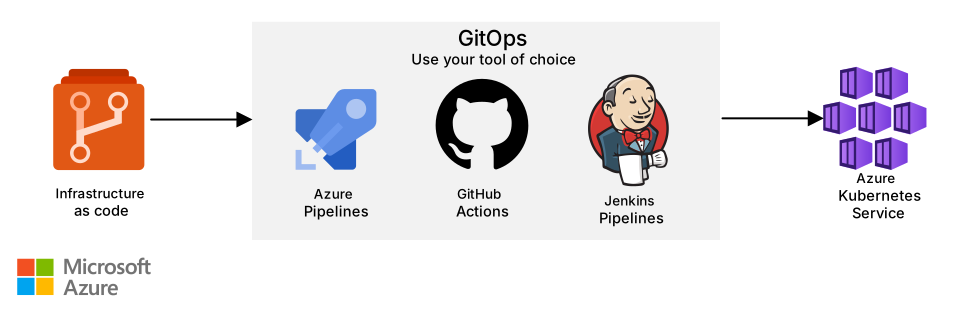
Download a Visio file of this architecture.
Instead of using an imperative approach like kubectl, use tools that automatically sync cluster and repository changes. To manage the workflow, like the release of a new version and validation on that version before deploying to production, consider a GitOps flow.
An essential part of the CI/CD flow is bootstrapping a newly provisioned cluster. A GitOps approach is useful because it lets operators declaratively define the bootstrapping process as part of the IaC strategy and see the configuration reflected in the cluster automatically.
When you use GitOps, an agent is deployed in the cluster to make sure that the state of the cluster is coordinated with configuration stored in your private Git repo. One such agent is Flux, which uses one or more operators in the cluster to trigger deployments inside Kubernetes. Flux does the following tasks:
- Monitors all configured repositories
- Detects new configuration changes
- Triggers deployments
- Updates the desired running configuration based on those changes
You can also set policies that govern how the changes are deployed.
The following example diagram shows how to automate cluster configuration with GitOps and Flux.

Download a Visio file of this architecture.
A developer commits changes to source code, like configuration YAML files, which are stored in a Git repository. The changes are then pushed to a Git server.
Flux runs in a pod alongside the workload. Flux has read-only access to the Git repository to make sure that Flux is only applying changes as requested by developers.
Flux recognizes changes in configuration and applies those changes by using kubectl commands.
Developers don't have direct access to the Kubernetes API through kubectl.
You can have branch policies on your Git server so that multiple developers can then approve changes through a pull request before the change is applied to production.
While you can configure GitOps and Flux manually, we recommend the GitOps with Flux v2 cluster extension for AKS.
Workload and cluster deployment strategies
Deploy any change, like architecture components, workload, and cluster configuration, to at least one preproduction AKS cluster. This process simulates the change and might identify problems before they're deployed to production.
Run tests and validations at each stage before you continue to the next stage. It helps ensure that you can push updates to the production environment in a highly controlled way and minimize disruption from unanticipated deployment problems. The deployment should follow a similar pattern as production, by using the same GitHub Actions pipeline or Flux operators.
Advanced deployment techniques, like blue-green deployment, A/B testing, and canary releases, require extra processes and potentially extra tooling. Flagger is a popular open-source solution to help solve for advanced deployment scenarios.
Cost management
Start by reviewing the cost optimization design checklist and list of recommendations outlined in Well-Architected Framework for AKS. For general workload recommendations, see the Design review checklist for Cost Optimization.
You can find a cost estimate for the components used in this baseline architecture in the Azure pricing calculator. Modify your estimate to include the components required for your use case. This estimate covers spoke-level resources that are directly associated with the cluster. Shared hub infrastructure, such as Azure Firewall, hub virtual networks, and Azure Private DNS zones, isn't included because those resources are typically owned and managed by a central platform team.
Consider using AKS cost analysis for granular cluster infrastructure cost allocation by Kubernetes-specific constructs.
Provision
Understand where your costs come from. There are minimal costs associated with AKS in deployment, management, and operations of the Kubernetes cluster itself. What affects the cost are the VM instances, storage, log data, and networking resources consumed by the cluster. Consider choosing cheaper VMs for system node pools. The Ddv5 series is a typical VM type for the system node pool, and the reference implementation uses the Standard_D2d_v5 SKU.
Don't use the same configuration for dev/test and production environments. Production workloads have extra requirements for high availability and are typically more expensive. This configuration isn't necessary in the dev/test environment.
Add an uptime SLA for production workloads. But there are savings for clusters designed for dev/test or experimental workloads where availability isn't required to be guaranteed. For example, your SLO might be sufficient. Also, if your workload supports it, consider using dedicated spot node pools that run spot VMs.
For nonproduction workloads that include Azure SQL Database or Azure App Service as part of the AKS workload architecture, evaluate if you're eligible to use Azure Dev/Test subscriptions and receive service discounts.
Provision a cluster with the minimum number of nodes, and enable the cluster autoscaler to monitor and make sizing decisions instead of starting with an oversized cluster to meet scaling needs.
Set pod requests and limits to let Kubernetes allocate node resources with higher density so that you use the full capacity of the nodes.
Consider that when you enable diagnostics on the cluster, it can increase the cost.
Commit to one-year or three-year Azure Reserved Virtual Machine Instances to reduce the node costs if your workload must exist for a long period of time. For more information, see Save costs with Azure Reserved Virtual Machine Instances.
Use tags when you create node pools. Tags help when you create custom reports to track incurred costs. You can use tags to track the total expenses and map any cost to a specific resource or team. If the cluster is shared between teams, build chargeback reports for each consumer to identify metered costs for shared cloud services. For more information, see Specify a taint, label, or tag for a node pool.
Expect extra bandwidth costs if your workload is multi-region and you replicate data between regions. For more information, see Bandwidth pricing.
Create budgets to stay within the cost constraints that your organization identifies. You can create budgets through Microsoft Cost Management. You can also create alerts to get notifications when specific thresholds are exceeded. For more information, see Create a budget by using a template.
Monitor
You can monitor the entire cluster and the cost of compute, storage, bandwidth, logs, and the firewall. Azure provides the following options to monitor and analyze costs:
Monitor your costs in real time or on a regular schedule so that you can take action before the end of the month, when costs are already calculated. Monitor the monthly trends over time to stay within budget.
To make data-driven decisions, pinpoint which resource, at a granular level incurs the most cost. Also, have a good understanding of the meters that calculate resource usage. For example, by analyzing metrics, you can determine whether the platform is oversized. You can see the usage meters in Azure Monitor metrics.
Optimize
Follow the recommendations from Azure Advisor. Explore other ways to optimize:
Enable the cluster autoscaler to detect and remove underused nodes in the node pool.
Important
Making rapid or frequent changes to cluster autoscaler settings, like the minimum and maximum node counts for a node pool, to control costs might lead to unintended or counterproductive outcomes. For example, if
scale-down-unneeded-timeis set to 10 minutes, and the minimum and maximum node settings are modified every 5 minutes based on workload characteristics, the number of nodes never reduces. It's because the calculation of the unneeded time for each node resets when the cluster autoscaler settings are refreshed.Choose a lower SKU for the node pools, if your workload supports it.
If the application doesn't require burst scaling, consider rightsizing the cluster by analyzing performance metrics over time.
If your workload supports it, scale your user node pools to zero nodes when there's no expectation for them to run. If there are no workloads left scheduled to run in your cluster, consider using the AKS start/stop feature to shut down all compute, which includes your system node pool and the AKS control plane.
For more information, see AKS pricing.