Note
Access to this page requires authorization. You can try signing in or changing directories.
Access to this page requires authorization. You can try changing directories.
Azure Bastion is a fully managed PaaS service that provides secure and seamless RDP/SSH connectivity to your virtual machines directly over TLS from the Azure portal, or via the native SSH or RDP client already installed on your local computer. Azure Bastion is deployed directly in your virtual network and supports all VMs in the virtual network using private IP addresses. When you connect via Azure Bastion, your virtual machines don't need a public IP address, agent, or special client software.
Azure Bastion is available in four SKUs: Developer, Basic, Standard, and Premium.
Note
Azure Bastion is one of the services that make up the Network Security category in Azure. Other services in this category include Azure DDoS Protection, Azure Firewall, and Azure Web Application Firewall. Each service has its own unique features and use cases. For more information on this service category, see Network Security.
Key benefits
Azure Bastion provides the following benefits:
- Secure connectivity over TLS: Connect to VMs using RDP/SSH over TLS on port 443. Learn more about connection methods and Kerberos authentication.
- Protection from external threats: Your VMs are protected from port scanning. Deploy with availability zones for additional resilience.
- Scalability and flexibility: Configure host scaling, use shareable links, and connect via IP address.
- Reduced management overhead: Deploy once and use virtual network peering to serve multiple networks.
- Compliance and audit: Use session recording for compliance requirements (Premium SKU).
SKUs
Azure Bastion offers four SKU tiers:
- Premium: Includes all Standard features plus session recording for compliance and private-only deployment.
- Standard: Includes all Basic features plus scalability and advanced features (native client, shareable links, IP-based connections, custom ports, file transfer).
- Basic: Dedicated deployment with fixed capacity for production environments with moderate connection requirements.
- Developer: Free SKU using shared infrastructure recommended for development and testing. Supports one VM at a time. Available in select regions.
For a complete feature comparison and capacity details, see Choose the right Azure Bastion SKU.
Architecture
Azure Bastion offers three deployment architectures:
Private-only deployment: Premium SKU without public IP address for enhanced security.
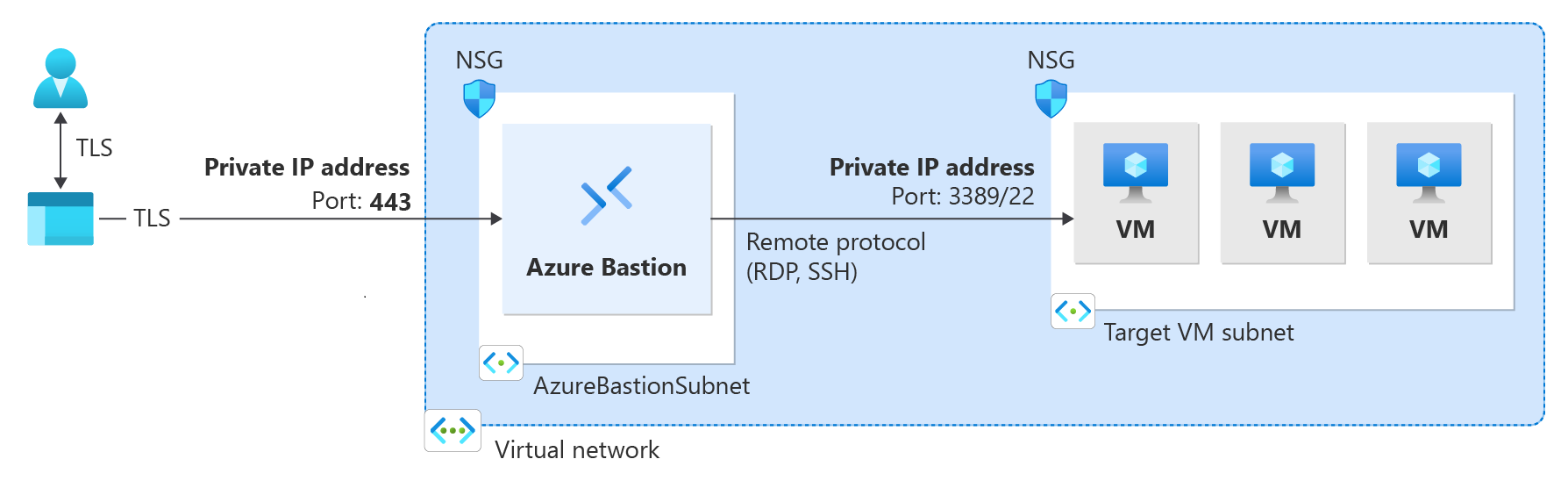
For detailed information about each architecture, deployment requirements, and network topology options, see Bastion design and architecture.
Dedicated deployment: Basic, Standard, and Premium SKUs deployed to your virtual network.
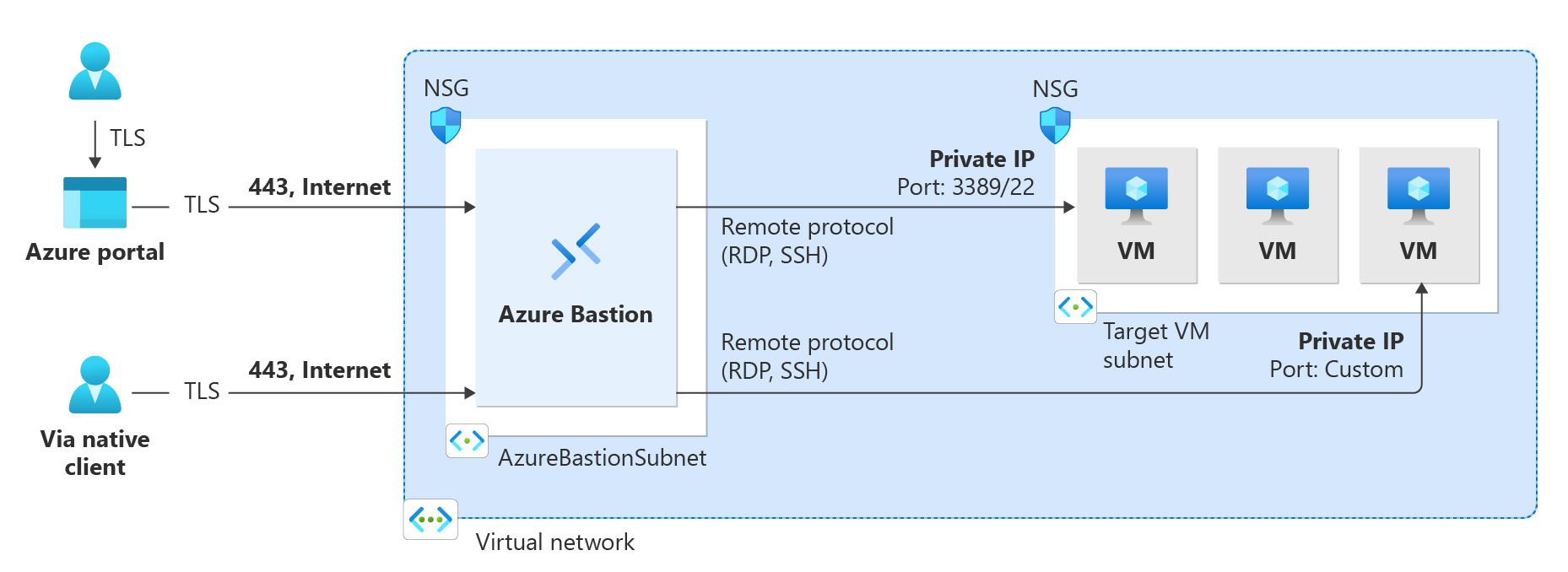
Developer: Shared infrastructure for development and testing environments.
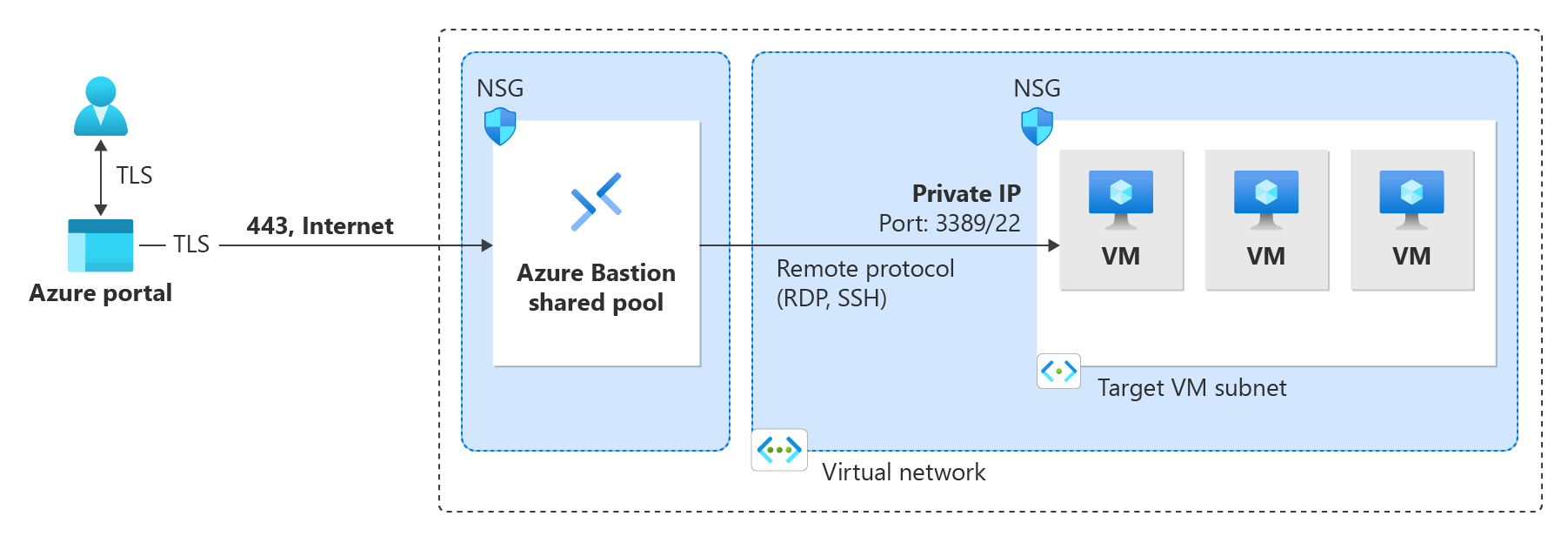
Requirements
Deployment requirements vary by SKU. Developer uses shared infrastructure with no virtual network required. Basic, Standard, and Premium require a dedicated subnet (AzureBastionSubnet) and public IP address. Premium supports private-only deployment without a public IP.
For complete requirements including subnet sizing and NSG rules, see About Bastion configuration settings.
Connection methods
Azure Bastion supports multiple connection methods:
- Browser-based connections: Connect through the Azure portal using an HTML5 web client. Available for all SKU tiers. No additional client software required.
- Native client connections: Connect using the SSH or RDP client already installed on your local computer. Available for Standard and Premium SKUs. Supports Microsoft Entra ID authentication and file transfer.
- Shareable links: Create shareable links that allow users to connect to VMs without accessing the Azure portal. Available for Standard and Premium SKUs.
For more information about connection methods and authentication options, see About VM connections and features.
Pricing and SLA
Azure Bastion pricing combines hourly SKU charges with outbound data transfer costs. Billing starts from the moment Bastion is deployed, regardless of usage.
For pricing details, see Azure Bastion pricing. For SLA and reliability information, see Reliability in Azure Bastion.
What's new
Azure Bastion is continuously updated with new features and improvements. To learn about the latest updates and announcements, see What's new in Azure Bastion?
Troubleshooting and FAQ
For information about troubleshooting and frequently asked questions, see the troubleshooting guide and Azure Bastion FAQ.