Hi @Daniel Needemyer,
Thank you for your response and for trying the provided steps.
Since you've already trying the big fixes (resetting Quick Steps, recreating them, repair, and a new profile), this strongly suggests a client‑side regression affecting those specific Quick Step actions, not a folder limitation or profile corruption.
There's one more thing I need to confirm is your Outlook build and update channel.
You can check it by:
Go to File > Office Account > About Outlook and copy the full version/build and channel.
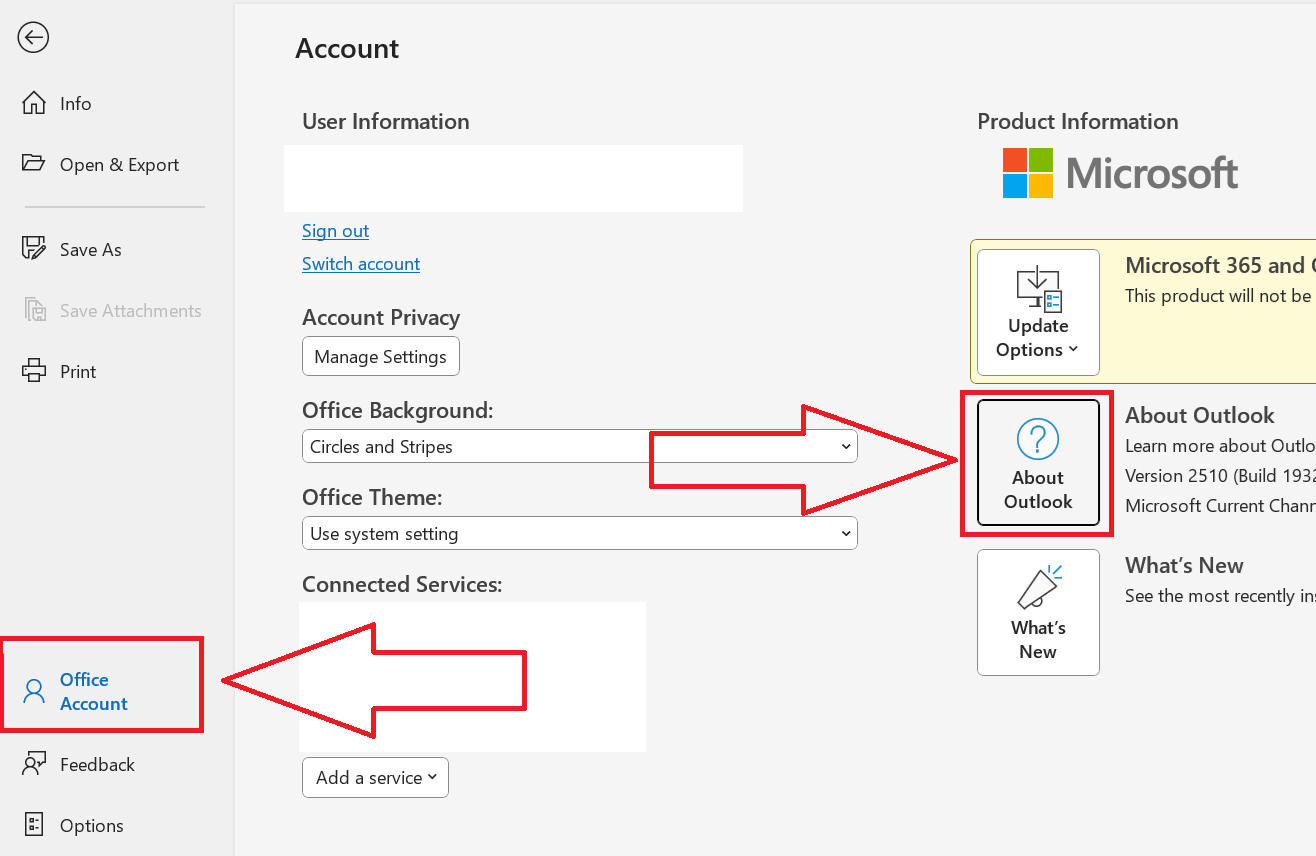
This will confirm if you’re on a build that introduced this behavior and guide whether to update or roll back.
While we're waiting for your update, here are the steps that often help:
1/ Check in Safe Mode:
Press Window+R and run:
outlook.exe /safe
If Quick Steps work in Safe Mode, a COM add‑in is interfering, you can disable add‑ins and re‑enable one by one.
2/ Create minimal equivalents that avoid the ‘clear’ actions:
Create two Quick Steps:
- QS – Move/Process (without Clear categories/flags)
- QS – Clear (use manual right‑click Categorize > Clear All Categories or Follow Up > Clear Flag).
This is a workaround, but it preserves most of your one‑click flow and aligns with how Outlook greys out Quick Steps whose actions aren’t currently applicable.
You can see: Problems with Quick Steps in Outlook New
Note: Microsoft is providing this information as a convenience to you. The sites are not controlled by Microsoft. Microsoft cannot make any representations regarding the quality, safety, or suitability of any software or information found there. Please make sure that you completely understand the risk before retrieving any suggestions from the above link
3/ Double‑check policy isn’t blocking those actions:
This barely happens but org policies can disable category/flag commands in certain contexts, which in turn greys out Quick Steps that call them.
If you’re domain‑joined, ask your IT admin who has admin privileges to confirm no recent GPO/Cloud Policy changes affecting Outlook tagging/flags, this exact symptom has been seen when policy toggles are applied.
While we're waiting for your "About Outlook build/channel", the steps 1 and 2 above should minimize the disruption.
Thank you so much for your patience and understanding throughout this process. If you have any questions or need further support, please don’t hesitate to reach out at any time.
I'm looking forward to hearing from you.
If the answer is helpful, please click "Accept Answer" and kindly upvote it. If you have extra questions about this answer, please click "Comment".
Note: Please follow the steps in our documentation to enable e-mail notifications if you want to receive the related email notification for this thread.
' cx='32' cy='32' r='32' /%3E%3Ctext x='50%25' y='55%25' dominant-baseline='middle' text-anchor='middle' fill='%23FFF' %3EDN%3C/text%3E%3C/svg%3E)

' cx='32' cy='32' r='32' /%3E%3Ctext x='50%25' y='55%25' dominant-baseline='middle' text-anchor='middle' fill='%23FFF' %3EAS%3C/text%3E%3C/svg%3E)
' cx='32' cy='32' r='32' /%3E%3Ctext x='50%25' y='55%25' dominant-baseline='middle' text-anchor='middle' fill='%23FFF' %3EKN%3C/text%3E%3C/svg%3E)
' cx='32' cy='32' r='32' /%3E%3Ctext x='50%25' y='55%25' dominant-baseline='middle' text-anchor='middle' fill='%23FFF' %3ESL%3C/text%3E%3C/svg%3E)
' cx='32' cy='32' r='32' /%3E%3Ctext x='50%25' y='55%25' dominant-baseline='middle' text-anchor='middle' fill='%23FFF' %3EDF%3C/text%3E%3C/svg%3E)
' cx='32' cy='32' r='32' /%3E%3Ctext x='50%25' y='55%25' dominant-baseline='middle' text-anchor='middle' fill='%23FFF' %3ENS%3C/text%3E%3C/svg%3E)
' cx='32' cy='32' r='32' /%3E%3Ctext x='50%25' y='55%25' dominant-baseline='middle' text-anchor='middle' fill='%23FFF' %3EKA%3C/text%3E%3C/svg%3E)
' cx='32' cy='32' r='32' /%3E%3Ctext x='50%25' y='55%25' dominant-baseline='middle' text-anchor='middle' fill='%23FFF' %3EDS%3C/text%3E%3C/svg%3E)
' cx='32' cy='32' r='32' /%3E%3Ctext x='50%25' y='55%25' dominant-baseline='middle' text-anchor='middle' fill='%23FFF' %3EL%3C/text%3E%3C/svg%3E)
' cx='32' cy='32' r='32' /%3E%3Ctext x='50%25' y='55%25' dominant-baseline='middle' text-anchor='middle' fill='%23FFF' %3EEA%3C/text%3E%3C/svg%3E)
' cx='32' cy='32' r='32' /%3E%3Ctext x='50%25' y='55%25' dominant-baseline='middle' text-anchor='middle' fill='%23FFF' %3EMD%3C/text%3E%3C/svg%3E)
' cx='32' cy='32' r='32' /%3E%3Ctext x='50%25' y='55%25' dominant-baseline='middle' text-anchor='middle' fill='%23FFF' %3ESL%3C/text%3E%3C/svg%3E)
' cx='32' cy='32' r='32' /%3E%3Ctext x='50%25' y='55%25' dominant-baseline='middle' text-anchor='middle' fill='%23FFF' %3EI%3C/text%3E%3C/svg%3E)
' cx='32' cy='32' r='32' /%3E%3Ctext x='50%25' y='55%25' dominant-baseline='middle' text-anchor='middle' fill='%23FFF' %3EGK%3C/text%3E%3C/svg%3E)
' cx='32' cy='32' r='32' /%3E%3Ctext x='50%25' y='55%25' dominant-baseline='middle' text-anchor='middle' fill='%23FFF' %3EAH%3C/text%3E%3C/svg%3E)