Служба автоматизации вызовов использует интерфейс REST API для получения запросов на действия и предоставления ответов, чтобы сообщить, был ли запрос успешно отправлен или нет. Из-за асинхронного характера вызова большинство действий имеют соответствующие события, которые активируются при успешном завершении или сбое действия. В этой статье рассматриваются действия, доступные для направления вызовов, таких как CreateCall, Transfer и Redirect, а также управление участниками. Пример кода показывает, как вызвать конкретное действие. Схемы последовательностей описывают события, ожидаемые после вызова действия. Схемы помогают визуализировать программирование приложения-службы с помощью автоматизации вызовов.
Автоматизация вызовов поддерживает другие действия для управления медиа вызова и записью, которые имеют отдельные статьи.
Prerequisites
Для всех примеров кода объект client, который можно создать, как показано. Кроме того, callConnection — это CallConnection объект, который вы получаете из Answer или CreateCall ответа. Вы также можете получить его из событий обратного вызова, получаемых приложением.
var client = new CallAutomationClient("<resource_connection_string>");
CallAutomationClient client = new CallAutomationClientBuilder().connectionString("<resource_connection_string>").buildClient();
const client = new CallAutomationClient("<resource_connection_string>");
call_automation_client = CallAutomationClient.from_connection_string("<resource_connection_string>")
Совершить исходящий звонок
Вы можете осуществить 1:1 или групповой звонок пользователю или на номер телефона (общедоступному номеру или номеру, который принадлежит службе Azure Communication Services).
При вызове конечной точки общедоступной телефонной сети (ТСОП) необходимо также указать номер телефона, который будет использоваться в качестве исходного идентификатора абонента и который отображается как уведомление о вызове в целевую конечную точку ТСОП.
Чтобы совершить вызов пользователю Служб коммуникации Azure, необходимо предоставить CommunicationUserIdentifier объект вместо PhoneNumberIdentifier.
Uri callbackUri = new Uri("https://<myendpoint>/Events"); //the callback endpoint where you want to receive subsequent events
var callerIdNumber = new PhoneNumberIdentifier("+16044561234"); // This is the Azure Communication Services provisioned phone number for the caller
var callThisPerson = new CallInvite(new PhoneNumberIdentifier("+16041234567"), callerIdNumber); // person to call
CreateCallResult response = await client.CreateCallAsync(callThisPerson, callbackUri);
String callbackUri = "https://<myendpoint>/Events"; //the callback endpoint where you want to receive subsequent events
PhoneNumberIdentifier callerIdNumber = new PhoneNumberIdentifier("+18001234567"); // This is the Azure Communication Services provisioned phone number for the caller
CallInvite callInvite = new CallInvite(new PhoneNumberIdentifier("+16471234567"), callerIdNumber); // person to call
CreateCallResult response = client.createCall(callInvite, callbackUri).block();
const callInvite = {
    targetParticipant: { phoneNumber: "+18008008800" }, // person to call
    sourceCallIdNumber: { phoneNumber: "+18888888888" } // This is the Azure Communication Services provisioned phone number for the caller
};
const callbackUri = "https://<myendpoint>/Events"; // the callback endpoint where you want to receive subsequent events
const response = await client.createCall(callInvite, callbackUri);
callback_uri = "https://<myendpoint>/Events"  # the callback endpoint where you want to receive subsequent events
caller_id_number = PhoneNumberIdentifier(
    "+18001234567"
)  # This is the Azure Communication Services provisioned phone number for the caller
call_invite = CallInvite(
    target=PhoneNumberIdentifier("+16471234567"),
    source_caller_id_number=caller_id_number,
)
call_connection_properties = client.create_call(call_invite, callback_uri)
При выполнении группового звонка, включающего номер телефона, необходимо указать номер телефона для использования в качестве идентификации вызывающего абонента для узла сети PSTN.
Uri callbackUri = new Uri("https://<myendpoint>/Events"); //the callback endpoint where you want to receive subsequent events
var pstnEndpoint = new PhoneNumberIdentifier("+16041234567");
var voipEndpoint = new CommunicationUserIdentifier("<user_id_of_target>"); //user id looks like 8:a1b1c1-...
var groupCallOptions = new CreateGroupCallOptions(new List<CommunicationIdentifier>{ pstnEndpoint, voipEndpoint }, callbackUri)
{
    SourceCallerIdNumber = new PhoneNumberIdentifier("+16044561234"), // This is the Azure Communication Services provisioned phone number for the caller
};
CreateCallResult response = await client.CreateGroupCallAsync(groupCallOptions);
String callbackUri = "https://<myendpoint>/Events"; //the callback endpoint where you want to receive subsequent events
PhoneNumberIdentifier callerIdNumber = new PhoneNumberIdentifier("+18001234567"); // This is the Azure Communication Services provisioned phone number for the caller
List<CommunicationIdentifier> targets = new ArrayList<>(Arrays.asList(new PhoneNumberIdentifier("+16471234567"), new CommunicationUserIdentifier("<user_id_of_target>")));
CreateGroupCallOptions groupCallOptions = new CreateGroupCallOptions(targets, callbackUri);
groupCallOptions.setSourceCallIdNumber(callerIdNumber);
Response<CreateCallResult> response = client.createGroupCallWithResponse(createGroupCallOptions).block();
const callbackUri = "https://<myendpoint>/Events"; // the callback endpoint where you want to receive subsequent events
const participants = [
    { phoneNumber: "+18008008800" },
    { communicationUserId: "<user_id_of_target>" }, //user id looks like 8:a1b1c1-...
];
const createCallOptions = {
    sourceCallIdNumber: { phoneNumber: "+18888888888" }, // This is the Azure Communication Services provisioned phone number for the caller
};
const response = await client.createGroupCall(participants, callbackUri, createCallOptions);
callback_uri = "https://<myendpoint>/Events"  # the callback endpoint where you want to receive subsequent events
caller_id_number = PhoneNumberIdentifier(
    "+18888888888"
)  # This is the Azure Communication Services provisioned phone number for the caller
pstn_endpoint = PhoneNumberIdentifier("+18008008800")
voip_endpoint = CommunicationUserIdentifier(
    "<user_id_of_target>"
)  # user id looks like 8:a1b1c1-...
call_connection_properties = client.create_group_call(
    target_participants=[voip_endpoint, pstn_endpoint],
    callback_url=callback_uri,
    source_caller_id_number=caller_id_number,
)
Ответ предоставляет CallConnection объект, который можно использовать для дальнейших действий по этому вызову после подключения. После ответа на вызов два события публикуются в конечной точке обратного вызова, предоставленной ранее:
CallConnected: уведомляет о том, что вызов был установлен с вызывающим абонентом.
ParticipantsUpdated: содержит последний список участников на звонке.
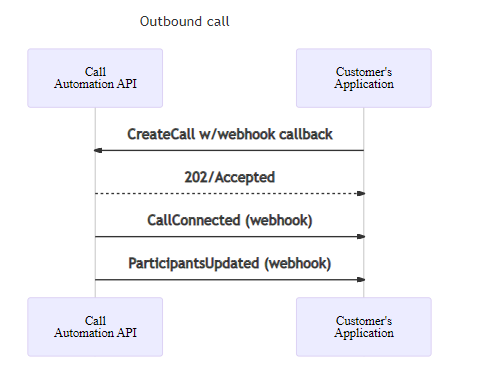
Если вызов завершается сбоем, вы получаете событие CallDisconnected и событие CreateCallFailed, оба с кодами ошибок для дальнейшего устранения неполадок. Дополнительные сведения о кодах ошибок см. в разделе "Устранение неполадок кодов ответа на вызов".
Подключитесь к вызову
Действие подключения позволяет службе установить соединение с текущим вызовом и выполнить действия по нему. Эта функция полезна для управления вызовом в комнатах или когда клиентские приложения инициируют вызов один на один или групповой вызов, где автоматизация вызовов не используется. Используйте свойство CallLocator для установления подключения. Параметры типа: ServerCallLocator, GroupCallLocatorи RoomCallLocator. Эти идентификаторы можно найти при первоначальном создании вызова или комнаты, а также они могут быть опубликованы в рамках события CallStarted.
Чтобы подключиться к любому вызову 1:1 или групповому вызову, используйте ServerCallLocator. Если вы использовали GroupCallId для запуска вызова, можно также использовать GroupCallLocator.
Uri callbackUri = new Uri("https://<myendpoint>/Events"); //the callback endpoint where you want to receive subsequent events
CallLocator serverCallLocator = new ServerCallLocator("<ServerCallId>");
ConnectCallResult response = await client.ConnectCallAsync(serverCallLocator, callbackUri);
String callbackUri = "https://<myendpoint>/Events"; //the callback endpoint where you want to receive subsequent events
CallLocator serverCallLocator =  new ServerCallLocator("<ServerCallId>");
ConnectCallResult response = client.connectCall(serverCallLocator, callbackUri).block();
const callbackUri = "https://<myendpoint>/Events"; // the callback endpoint where you want to receive subsequent events
const serverCallLocator = { kind: "serverCallLocator", id: "<serverCallId>" };
const response = await client.connectCall(serverCallLocator, callbackUri);
callback_uri = "https://<myendpoint>/Events"  # the callback endpoint where you want to receive subsequent events
server_call_locator = ServerCallLocator("<server_call_id>")
call_connection_properties = client.connect_call(call_locator=server_call_locator, callback_url=callback_uri)
Чтобы подключиться на звонок в Rooms, используйте RoomCallLocator, который принимает RoomId. Узнайте больше о комнатах и о том, как использовать API автоматизации звонков для управления текущим звонком в комнатах.
Uri callbackUri = new Uri("https://<myendpoint>/Events"); //the callback endpoint where you want to receive subsequent events
CallLocator roomCallLocator = new RoomCallLocator("<RoomId>");
ConnectCallResult response = await client.ConnectCallAsync(roomCallLocator, callbackUri);
String callbackUri = "https://<myendpoint>/Events"; //the callback endpoint where you want to receive subsequent events
CallLocator roomCallLocator =  new RoomCallLocator("<RoomId>");
ConnectCallResult response = client.connectCall(roomCallLocator, callbackUri).block();
const roomCallLocator = { kind: "roomCallLocator", id: "<RoomId>" };
const callbackUri = "https://<myendpoint>/Events"; // the callback endpoint where you want to receive subsequent events
const response = await client.connectCall(roomCallLocator, callbackUri);
callback_uri = "https://<myendpoint>/Events"  # the callback endpoint where you want to receive subsequent events
room_call_locator = RoomCallLocator("<room_id>")
call_connection_properties = client.connect_call(call_locator=room_call_locator, callback_url=callback_uri)
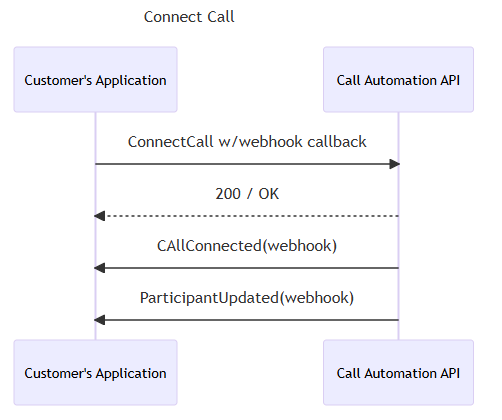
Успешный CallConnection ответ предоставляет объект, который можно использовать для дальнейших действий по этому вызову. На указанный вами ранее адрес обратного вызова публикуются два события.
-
CallConnected: уведомляет об успешном подключении к вызову.
-
ParticipantsUpdated: содержит последний список участников на звонке.
В любой момент после успешного подключения, если ваша служба отключится от этого вызова, событие CallDisconnected уведомит вас. Сбой подключения к вызову на начальном этапе приводит к событию ConnectFailed.
Ответ на входящий вызов
После подписки на получение входящих уведомлений о звонках в ресурс можно ответить на входящий звонок. При ответе на звонок необходимо указать URL-адрес обратного вызова. Службы связи Azure публикуют все последующие события об этом вызове по указанному URL-адресу.
string incomingCallContext = "<IncomingCallContext_From_IncomingCall_Event>";
Uri callBackUri = new Uri("https://<myendpoint_where_I_want_to_receive_callback_events");

var answerCallOptions = new AnswerCallOptions(incomingCallContext, callBackUri);
AnswerCallResult answerResponse = await client.AnswerCallAsync(answerCallOptions);
CallConnection callConnection = answerResponse.CallConnection;
String incomingCallContext = "<IncomingCallContext_From_IncomingCall_Event>";
String callbackUri = "https://<myendpoint>/Events";

AnswerCallOptions answerCallOptions = new AnswerCallOptions(incomingCallContext, callbackUri);
Response<AnswerCallResult> response = client.answerCallWithResponse(answerCallOptions).block();
const incomingCallContext = "<IncomingCallContext_From_IncomingCall_Event>";
const callbackUri = "https://<myendpoint>/Events";

const { callConnection } = await client.answerCall(incomingCallContext, callbackUri);
incoming_call_context = "<IncomingCallContext_From_IncomingCall_Event>"
callback_uri = "https://<myendpoint>/Events"  # the callback endpoint where you want to receive subsequent events
call_connection_properties = client.answer_call(
    incoming_call_context=incoming_call_context, callback_url=callback_uri
)
Ответ предоставляет CallConnection объект, который можно использовать для дальнейших действий по этому вызову после подключения. После ответа на вызов два события публикуются в конечной точке обратного вызова, предоставленной ранее:
-
CallConnected: уведомляет о том, что вызов был установлен с вызывающим абонентом.
-
ParticipantsUpdated: содержит последний список участников на звонке.
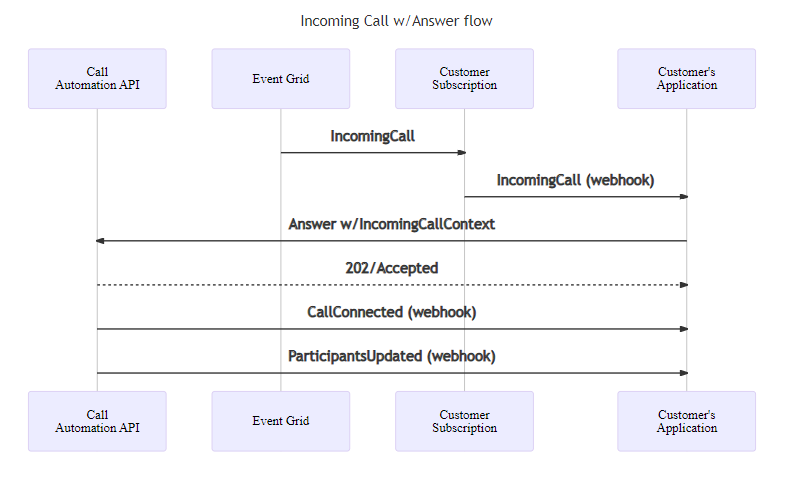
Если операция ответа завершается ошибкой AnswerFailed , вы получите событие с кодами ошибок для дальнейшего устранения неполадок. Дополнительные сведения о кодах ошибок см. в разделе "Устранение неполадок кодов ответа на вызов".
Отклонение вызова
Вы можете отклонить входящий звонок. Причины отказа : NoneBusyили Forbidden. Если ничего не указано, используется Noneзначение по умолчанию.
string incomingCallContext = "<IncomingCallContext_From_IncomingCall_Event>";
var rejectOption = new RejectCallOptions(incomingCallContext);
rejectOption.CallRejectReason = CallRejectReason.Forbidden;
_ = await client.RejectCallAsync(rejectOption);
String incomingCallContext = "<IncomingCallContext_From_IncomingCall_Event>";
RejectCallOptions rejectCallOptions = new RejectCallOptions(incomingCallContext)
        .setCallRejectReason(CallRejectReason.BUSY);
Response<Void> response = client.rejectCallWithResponse(rejectCallOptions).block();
const incomingCallContext = "<IncomingCallContext_From_IncomingCall_Event>";
const rejectOptions = {
    callRejectReason: KnownCallRejectReason.Forbidden,
};
await client.rejectCall(incomingCallContext, rejectOptions);
incoming_call_context = "<IncomingCallContext_From_IncomingCall_Event>"
client.reject_call(
    incoming_call_context=incoming_call_context,
    call_reject_reason=CallRejectReason.FORBIDDEN,
)
События не публикуются для действия «отклонение».
Перенаправление вызова
Вы можете перенаправить входящий вызов на другую конечную точку, не отвечая на нее. Перенаправление вызова удаляет возможность приложения управлять вызовом с помощью службы автоматизации вызовов.
string incomingCallContext = "<IncomingCallContext_From_IncomingCall_Event>";
var target = new CallInvite(new CommunicationUserIdentifier("<user_id_of_target>")); //user id looks like 8:a1b1c1-...
_ = await client.RedirectCallAsync(incomingCallContext, target);
String incomingCallContext = "<IncomingCallContext_From_IncomingCall_Event>";
CallInvite target = new CallInvite(new CommunicationUserIdentifier("<user_id_of_target>")); //user id looks like 8:a1b1c1-...
RedirectCallOptions redirectCallOptions = new RedirectCallOptions(incomingCallContext, target);
Response<Void> response = client.redirectCallWithResponse(redirectCallOptions).block();
const incomingCallContext = "<IncomingCallContext_From_IncomingCall_Event>";
const target = { targetParticipant: { communicationUserId: "<user_id_of_target>" } }; //user id looks like 8:a1b1c1-...
await client.redirectCall(incomingCallContext, target);
incoming_call_context = "<IncomingCallContext_From_IncomingCall_Event>"
call_invite = CallInvite(
    CommunicationUserIdentifier("<user_id_of_target>")
  )  # user id looks like 8:a1b1c1-...
client.redirect_call(
    incoming_call_context=incoming_call_context, target_participant=call_invite
)
Чтобы перенаправить звонок на номер телефона, создайте целевой идентификатор и идентификатор вызывающего абонента с помощью PhoneNumberIdentifier.
var callerIdNumber = new PhoneNumberIdentifier("+16044561234"); // This is the Azure Communication Services provisioned phone number for the caller
var target = new CallInvite(new PhoneNumberIdentifier("+16041234567"), callerIdNumber);
PhoneNumberIdentifier callerIdNumber = new PhoneNumberIdentifier("+16044561234"); // This is the Azure Communication Services provisioned phone number for the caller
CallInvite target = new CallInvite(new PhoneNumberIdentifier("+18001234567"), callerIdNumber);
const callerIdNumber = { phoneNumber: "+16044561234" };
const target = {
    targetParticipant: { phoneNumber: "+16041234567" },
    sourceCallIdNumber: callerIdNumber,
};
caller_id_number = PhoneNumberIdentifier(
    "+18888888888"
)  # This is the Azure Communication Services provisioned phone number for the caller
call_invite = CallInvite(
    target=PhoneNumberIdentifier("+16471234567"),
    source_caller_id_number=caller_id_number,
)
События не публикуются для перенаправления. Если целевой объект является пользователем Служб коммуникации Azure или номером телефона, принадлежащим вашему ресурсу, он создает новое IncomingCall событие с to заданным полем для указанного целевого объекта.
Перевод участника на другой вызов
Когда приложение отвечает на вызов или помещает исходящий вызов в конечную точку, приложение может перенести конечную точку в другую конечную точку назначения. При переводе вызова 1:1 ваше приложение выводится из вызова и теряет возможность управления вызовом с помощью Call Automation. Приглашение на вызов в целевой объект показывает идентификатор вызывающего объекта конечной точки, передаваемой. Предоставление пользовательского идентификатора вызывающего объекта не поддерживается.
var transferDestination = new CommunicationUserIdentifier("<user_id>");
var transferOption = new TransferToParticipantOptions(transferDestination) {
    OperationContext = "<Your_context>",
    OperationCallbackUri = new Uri("<uri_endpoint>") // Sending event to a non-default endpoint.
};
// adding customCallingContext
transferOption.CustomCallingContext.AddVoip("customVoipHeader1", "customVoipHeaderValue1");
transferOption.CustomCallingContext.AddVoip("customVoipHeader2", "customVoipHeaderValue2");

TransferCallToParticipantResult result = await callConnection.TransferCallToParticipantAsync(transferOption);
CommunicationIdentifier transferDestination = new CommunicationUserIdentifier("<user_id>");
TransferCallToParticipantOptions options = new TransferCallToParticipantOptions(transferDestination)
                .setOperationContext("<operation_context>")
                .setOperationCallbackUrl("<url_endpoint>"); // Sending event to a non-default endpoint.
// set customCallingContext
options.getCustomCallingContext().addVoip("voipHeaderName", "voipHeaderValue");

Response<TransferCallResult> transferResponse = callConnectionAsync.transferToParticipantCallWithResponse(options).block();
const transferDestination = { communicationUserId: "<user_id>" };
const options = { operationContext: "<Your_context>", operationCallbackUrl: "<url_endpoint>" };
// adding customCallingContext
const customCallingContext: CustomCallingContext = [];
customCallingContext.push({ kind: "voip", key: "customVoipHeader1", value: "customVoipHeaderValue1" })
options.customCallingContext = customCallingContext;

const result = await callConnection.transferCallToParticipant(transferDestination, options);
transfer_destination = CommunicationUserIdentifier("<user_id>")
call_connection_client = call_automation_client.get_call_connection("<call_connection_id_from_ongoing_call>")
# set custom context
voip_headers = {"customVoipHeader1", "customVoipHeaderValue1"}

result = call_connection_client.transfer_call_to_participant(
    target_participant=transfer_destination,
    voip_headers=voip_headers,
    operation_context="Your context",
    operationCallbackUrl="<url_endpoint>"
)
Когда приложение отвечает на групповой вызов, помещает исходящий групповой вызов в конечную точку или добавляет участника в вызов 1:1, приложение может перенести конечную точку из вызова в другую конечную точку назначения, за исключением конечной точки службы автоматизации вызовов. При передаче участника в групповом вызове соответствующий участник удаляется из вызова. Приглашение на вызов в целевой объект показывает идентификатор вызывающего объекта конечной точки, передаваемой. Предоставление пользовательского идентификатора вызывающего объекта не поддерживается.
// Transfer User
var transferDestination = new CommunicationUserIdentifier("<user_id>");
var transferee = new CommunicationUserIdentifier("<transferee_user_id>");
var transferOption = new TransferToParticipantOptions(transferDestination);
transferOption.Transferee = transferee;

// adding customCallingContext
transferOption.CustomCallingContext.AddVoip("customVoipHeader1", "customVoipHeaderValue1");
transferOption.CustomCallingContext.AddVoip("customVoipHeader2", "customVoipHeaderValue2");

transferOption.OperationContext = "<Your_context>";
transferOption.OperationCallbackUri = new Uri("<uri_endpoint>");
TransferCallToParticipantResult result = await callConnection.TransferCallToParticipantAsync(transferOption);

// Transfer PSTN User
var transferDestination = new PhoneNumberIdentifier("<target_phoneNumber>");
var transferee = new PhoneNumberIdentifier("<transferee_phoneNumber>");
var transferOption = new TransferToParticipantOptions(transferDestination);
transferOption.Transferee = transferee;

// adding customCallingContext
transferOption.CustomCallingContext.AddSipUui("uuivalue");
transferOption.CustomCallingContext.AddSipX("header1", "headerValue");

transferOption.OperationContext = "<Your_context>";

// Sending event to a non-default endpoint.
transferOption.OperationCallbackUri = new Uri("<uri_endpoint>");

TransferCallToParticipantResult result = await callConnection.TransferCallToParticipantAsync(transferOption);
// Transfer User
CommunicationIdentifier transferDestination = new CommunicationUserIdentifier("<user_id>");
CommunicationIdentifier transferee = new CommunicationUserIdentifier("<transferee_user_id>");
TransferCallToParticipantOptions options = new TransferCallToParticipantOptions(transferDestination);
options.setTransferee(transferee);
options.setOperationContext("<Your_context>");
options.setOperationCallbackUrl("<url_endpoint>");

// set customCallingContext
options.getCustomCallingContext().addVoip("voipHeaderName", "voipHeaderValue");

Response<TransferCallResult> transferResponse = callConnectionAsync.transferToParticipantCallWithResponse(options).block();

// Transfer Pstn User
CommunicationIdentifier transferDestination = new PhoneNumberIdentifier("<target_phoneNumber>");
CommunicationIdentifier transferee = new PhoneNumberIdentifier("<transferee_phoneNumber>");
TransferCallToParticipantOptions options = new TransferCallToParticipantOptions(transferDestination);
options.setTransferee(transferee);
options.setOperationContext("<Your_context>");
options.setOperationCallbackUrl("<url_endpoint>");

// set customCallingContext
options.getCustomCallingContext().addSipUui("UUIvalue");
options.getCustomCallingContext().addSipX("sipHeaderName", "value");

Response<TransferCallResult> transferResponse = callConnectionAsync.transferToParticipantCallWithResponse(options).block();
// Transfer User
const transferDestination = { communicationUserId: "<user_id>" };
const transferee = { communicationUserId: "<transferee_user_id>" };
const options = { transferee: transferee, operationContext: "<Your_context>", operationCallbackUrl: "<url_endpoint>" };

// adding customCallingContext
const customCallingContext: CustomCallingContext = [];
customContext.push({ kind: "voip", key: "customVoipHeader1", value: "customVoipHeaderValue1" })
options.customCallingContext = customCallingContext;

const result = await callConnection.transferCallToParticipant(transferDestination, options);

// Transfer pstn User
const transferDestination = { phoneNumber: "<target_phoneNumber>" };
const transferee = { phoneNumber: "<transferee_phoneNumber>" };
const options = { transferee: transferee, operationContext: "<Your_context>", operationCallbackUrl: "<url_endpoint>" };

// adding customCallingContext
const customCallingContext: CustomCallingContext = [];
customContext.push({ kind: "sipuui", key: "", value: "uuivalue" });
customContext.push({ kind: "sipx", key: "headerName", value: "headerValue" })
options.customCallingContext = customCallingContext;

const result = await callConnection.transferCallToParticipant(transferDestination, options);
# Transfer to user
transfer_destination = CommunicationUserIdentifier("<user_id>")
transferee = CommunicationUserIdentifier("transferee_user_id")
call_connection_client = call_automation_client.get_call_connection("<call_connection_id_from_ongoing_call>")

# create custom context
voip_headers = {"customVoipHeader1", "customVoipHeaderValue1"}

result = call_connection_client.transfer_call_to_participant(
    target_participant=transfer_destination,
    transferee=transferee,
    voip_headers=voip_headers,
    operation_context="Your context",
    operationCallbackUrl="<url_endpoint>"
)

# Transfer to PSTN user
transfer_destination = PhoneNumberIdentifier("<target_phoneNumber>")
transferee = PhoneNumberIdentifier("transferee_phoneNumber")

# create custom context
sip_headers={}
sip_headers.add("X-MS-Custom-headerName", "headerValue")
sip_headers.add("User-To-User","uuivale")

call_connection_client = call_automation_client.get_call_connection("<call_connection_id_from_ongoing_call>")
result = call_connection_client.transfer_call_to_participant(
    target_participant=transfer_destination,
    transferee=transferee,
    sip_headers=sip_headers,
    operation_context="Your context",
    operationCallbackUrl="<url_endpoint>"
)
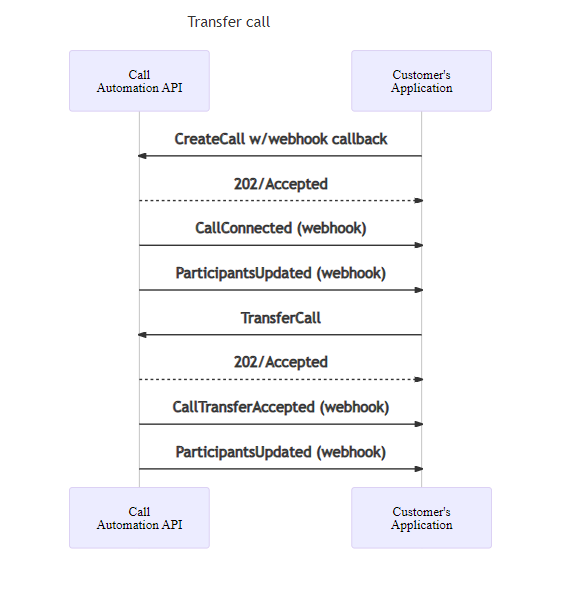
На схеме последовательности показан ожидаемый поток, когда приложение помещает исходящий вызов, а затем передает его в другую конечную точку.
Добавьте участника в вызов
Вы можете добавить участника, например пользователя Служб коммуникации Azure или номер телефона в существующий звонок. При добавлении номера телефона необходимо указать идентификатор абонента. Этот идентификатор вызывающего абонента отображается в уведомлении о вызове для добавленного участника.
// Add user
var addThisPerson = new CallInvite(new CommunicationUserIdentifier("<user_id>"));
// add custom calling context
addThisPerson.CustomCallingContext.AddVoip("myHeader", "myValue");
AddParticipantsResult result = await callConnection.AddParticipantAsync(addThisPerson);

// Add PSTN user
var callerIdNumber = new PhoneNumberIdentifier("+16044561234"); // This is the Azure Communication Services provisioned phone number for the caller
var addThisPerson = new CallInvite(new PhoneNumberIdentifier("+16041234567"), callerIdNumber);
// add custom calling context
addThisPerson.CustomCallingContext.AddSipUui("value");
addThisPerson.CustomCallingContext.AddSipX("header1", "customSipHeaderValue1");

// Use option bag to set optional parameters
var addParticipantOptions = new AddParticipantOptions(new CallInvite(addThisPerson))
{
    InvitationTimeoutInSeconds = 60,
    OperationContext = "operationContext",
    OperationCallbackUri = new Uri("uri_endpoint"); // Sending event to a non-default endpoint.
};

AddParticipantsResult result = await callConnection.AddParticipantAsync(addParticipantOptions);
// Add user
CallInvite callInvite = new CallInvite(new CommunicationUserIdentifier("<user_id>"));
// add custom calling context
callInvite.getCustomCallingContext().addVoip("voipHeaderName", "voipHeaderValue");
AddParticipantOptions addParticipantOptions = new AddParticipantOptions(callInvite)
                .setOperationContext("<operation_context>")
                .setOperationCallbackUrl("<url_endpoint>");
Response<AddParticipantResult> addParticipantResultResponse = callConnectionAsync.addParticipantWithResponse(addParticipantOptions).block();

// Add PSTN user
PhoneNumberIdentifier callerIdNumber = new PhoneNumberIdentifier("+16044561234"); // This is the Azure Communication Services provisioned phone number for the caller
CallInvite callInvite = new CallInvite(new PhoneNumberIdentifier("+16041234567"), callerIdNumber);
// add custom calling context
callInvite.getCustomCallingContext().addSipUui("value");
callInvite.getCustomCallingContext().addSipX("header1", "customSipHeaderValue1");
AddParticipantOptions addParticipantOptions = new AddParticipantOptions(callInvite)
                .setOperationContext("<operation_context>")
                .setOperationCallbackUrl("<url_endpoint>");
Response<AddParticipantResult> addParticipantResultResponse = callConnectionAsync.addParticipantWithResponse(addParticipantOptions).block();
// Add user
// add custom calling context
const customCallingContext: CustomCallingContext = [];
customContext.push({ kind: "voip", key: "voipHeaderName", value: "voipHeaderValue" })

const addThisPerson = {
    targetParticipant: { communicationUserId: "<acs_user_id>" },
    customCallingContext: customCallingContext,
};
const addParticipantResult = await callConnection.addParticipant(addThisPerson, {
            operationCallbackUrl: "<url_endpoint>",
            operationContext: "<operation_context>"
});

// Add PSTN user
const callerIdNumber = { phoneNumber: "+16044561234" }; // This is the Azure Communication Services provisioned phone number for the caller
// add custom calling context
const customCallingContext: CustomCallingContext = [];
customContext.push({ kind: "sipuui", key: "", value: "value" });
customContext.push({ kind: "sipx", key: "headerName", value: "headerValue" })
const addThisPerson = {
    targetParticipant: { phoneNumber: "+16041234567" },
    sourceCallIdNumber: callerIdNumber,
    customCallingContext: customCallingContext,
};
const addParticipantResult = await callConnection.addParticipant(addThisPerson, {
            operationCallbackUrl: "<url_endpoint>",
            operationContext: "<operation_context>"
});
# Add user
voip_headers = {"voipHeaderName", "voipHeaderValue"}
target = CommunicationUserIdentifier("<acs_user_id>")

call_connection_client = call_automation_client.get_call_connection(
    "<call_connection_id_from_ongoing_call>"
)
result = call_connection_client.add_participant(
    target,
    voip_headers=voip_headers,
    operation_context="Your context",
    operationCallbackUrl="<url_endpoint>"
)

# Add PSTN user
caller_id_number = PhoneNumberIdentifier(
    "+18888888888"
) # This is the Azure Communication Services provisioned phone number for the caller
sip_headers = {}
sip_headers["User-To-User"] = "value"
sip_headers["X-MS-Custom-headerName"] = "headerValue"
target = PhoneNumberIdentifier("+18008008800"),

call_connection_client = call_automation_client.get_call_connection(
    "<call_connection_id_from_ongoing_call>"
)
result = call_connection_client.add_participant(
    target,
    sip_headers=sip_headers,
    operation_context="Your context",
    operationCallbackUrl="<url_endpoint>",
    source_caller_id_number=caller_id_number
)
Чтобы добавить пользователя Служб коммуникации Azure, укажите CommunicationUserIdentifier вместо PhoneNumberIdentifier. В этом случае идентификатор вызывающего абонента не является обязательным.
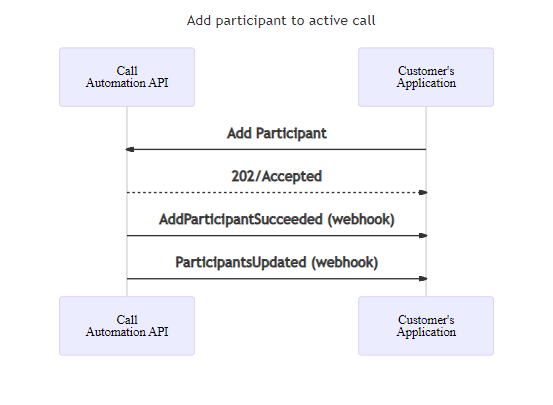
AddParticipant затем публикует событие AddParticipantSucceeded или AddParticipantFailed, а также ParticipantUpdated, предоставляющее последний список участников звонка.
Отмена запроса на добавление участника
// add a participant
var addThisPerson = new CallInvite(new CommunicationUserIdentifier("<user_id>"));
var addParticipantResponse = await callConnection.AddParticipantAsync(addThisPerson);

// cancel the request with optional parameters
var cancelAddParticipantOperationOptions = new CancelAddParticipantOperationOptions(addParticipantResponse.Value.InvitationId)
{
    OperationContext = "operationContext",
    OperationCallbackUri = new Uri("uri_endpoint"); // Sending event to a non-default endpoint.
}
await callConnection.CancelAddParticipantOperationAsync(cancelAddParticipantOperationOptions);
// Add user
CallInvite callInvite = new CallInvite(new CommunicationUserIdentifier("<user_id>"));
AddParticipantOperationOptions addParticipantOperationOptions = new AddParticipantOptions(callInvite);
Response<AddParticipantResult> addParticipantOperationResultResponse = callConnectionAsync.addParticipantWithResponse(addParticipantOptions).block();

// cancel the request
CancelAddParticipantOperationOptions cancelAddParticipantOperationOptions = new CancelAddParticipantOperationOptions(addParticipantResultResponse.invitationId)
                .setOperationContext("<operation_context>")
                .setOperationCallbackUrl("<url_endpoint>");
callConnectionAsync.cancelAddParticipantOperationWithResponse(cancelAddParticipantOperationOptions).block();
// Add user
const addThisPerson = {
    targetParticipant: { communicationUserId: "<acs_user_id>" },
};
const { invitationId } = await callConnection.addParticipant(addThisPerson, {
            operationCallbackUrl: "<url_endpoint>",
            operationContext: "<operation_context>"
});

// cancel the request
await callConnection.cancelAddParticipantOperation(invitationId, {
            operationCallbackUrl: "<url_endpoint>",
            operationContext: "<operation_context>"
});
# Add user
target = CommunicationUserIdentifier("<acs_user_id>")

call_connection_client = call_automation_client.get_call_connection(
    "<call_connection_id_from_ongoing_call>"
)
result = call_connection_client.add_participant(target)

# cancel the request
call_connection_client.cancel_add_participant_operation(result.invitation_id, operation_context="Your context", operationCallbackUrl="<url_endpoint>")
Перемещение участника на вызов из другого вызова
С помощью пакета SDK автоматизации вызовов Служб коммуникации Azure можно переместить участника из одного текущего вызова в другой с помощью API MoveParticipants. Это обеспечивает динамическую маршрутизацию и гибкую оркестрацию вызовов— распространенные в сценариях, таких как перемещение переводчика в звонок врача-пациента или передача клиента из вызова лобби в активный звонок в службу поддержки.
Примеры сценариев:
Врач + Маршрутизация комнат переводчика — перемещение отдельных переводчиков в основной вызов.
Передача звонков в лобби — удерживайте участников в отдельном вызове, пока не утверждено присоединиться к основному вызову.
var targetParticipant = new CommunicationUserIdentifier("<user_id>");

// CallConnectionId for the call that you want to move the participant from
var fromCallId = "<callConnectionId>";

// Move a participant from another call to current call with optional parameters
var moveParticipantsOptions = new MoveParticipantOptions(
    new List<CommunicationIdentifier> { targetParticipant },
    fromCallId)
{
    OperationContext = "operationContext",
    OperationCallbackUri = new Uri("uri_endpoint") // Sending event to a non-default endpoint.
};

MoveParticipantsResult result = await callConnection.MoveParticipantsAsync(moveParticipantsOptions);
List<CommunicationIdentifier> targetParticipants = new ArrayList<>(
    Arrays.asList(new CommunicationUserIdentifier("<user_id>"))
);
String fromCallId = "<callConnectionId>";

MoveParticipantsOptions moveParticipantsOptions = new MoveParticipantsOptions(targetParticipants, fromCallId)
    .setOperationContext("<operation_context>")
    .setOperationCallbackUrl("<url_endpoint>");

Response<MoveParticipantsResult> moveParticipantResultResponse =
    callConnectionAsync.moveParticipantWithResponse(moveParticipantsOptions).block();
const targetParticipants = [{ communicationUserId: "<user_id>" }];
const fromCallId = "<callConnectionId>";

const moveParticipantResult = await callConnection.moveParticipant(
    targetParticipants,
    fromCallId,
    {
        operationCallbackUrl: "<url_endpoint>",
        operationContext: "<operation_context>"
    }
);
target = CommunicationUserIdentifier("<user_id>")
target_participants = [target]
from_call_id = "<call_connection_id>"

call_connection_client = call_automation_client.get_call_connection(
    "<call_connection_id_from_ongoing_call>"
)

result = call_connection_client.move_participant(
    target_participants,
    from_call_id,
    operation_context="Your context",
    operationCallbackUrl="<url_endpoint>"
)
MoveParticipants публикует событие MoveParticipantSucceeded или MoveParticipantFaileded в целевом вызове.
Удаление участника из вызова
var removeThisUser = new CommunicationUserIdentifier("<user_id>");

// remove a participant from the call with optional parameters
var removeParticipantOptions = new RemoveParticipantOptions(removeThisUser)
{
    OperationContext = "operationContext",
    OperationCallbackUri = new Uri("uri_endpoint"); // Sending event to a non-default endpoint.
}

RemoveParticipantsResult result = await callConnection.RemoveParticipantAsync(removeParticipantOptions);
CommunicationIdentifier removeThisUser = new CommunicationUserIdentifier("<user_id>");
RemoveParticipantOptions removeParticipantOptions = new RemoveParticipantOptions(removeThisUser)
                .setOperationContext("<operation_context>")
                .setOperationCallbackUrl("<url_endpoint>");
Response<RemoveParticipantResult> removeParticipantResultResponse = callConnectionAsync.removeParticipantWithResponse(removeParticipantOptions).block();
const removeThisUser = { communicationUserId: "<user_id>" };
const removeParticipantResult = await callConnection.removeParticipant(removeThisUser, {
            operationCallbackUrl: "<url_endpoint>",
            operationContext: "<operation_context>"
});
remove_this_user = CommunicationUserIdentifier("<user_id>")
call_connection_client = call_automation_client.get_call_connection(
    "<call_connection_id_from_ongoing_call>"
)
result = call_connection_client.remove_participant(remove_this_user, operation_context="Your context", operationCallbackUrl="<url_endpoint>")
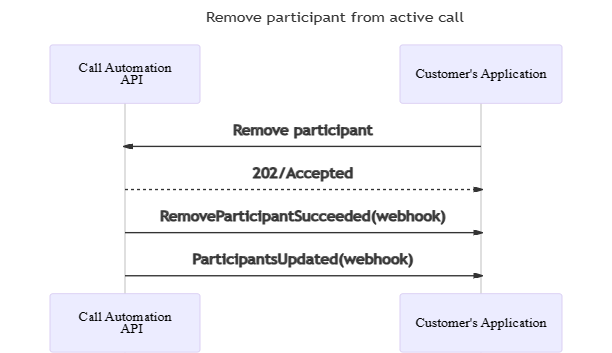
RemoveParticipant публикует событие RemoveParticipantSucceeded или RemoveParticipantFailed, а также событие ParticipantUpdated, который содержит последний список участников в звонке. Удаленный участник опущен из списка.
Завершить звонок
Вы можете использовать действие hangUp для удаления вашего приложения из вызова или завершения группового вызова, задав для параметра forEveryone значение true. Для вызова 1:1 hangUp по умолчанию завершает звонок с другим участником.
_ = await callConnection.HangUpAsync(forEveryone: true);
Response<Void> response = callConnectionAsync.hangUpWithResponse(true).block();
await callConnection.hangUp(true);
call_connection_client.hang_up(is_for_everyone=True)
Событие CallDisconnected публикуется после успешного hangUp завершения действия.
CallParticipant participantInfo = await callConnection.GetParticipantAsync(new CommunicationUserIdentifier("<user_id>"));
CallParticipant participantInfo = callConnection.getParticipant(new CommunicationUserIdentifier("<user_id>")).block();
const participantInfo = await callConnection.getParticipant({ communicationUserId: "<user_id>" });
participant_info = call_connection_client.get_participant(
    CommunicationUserIdentifier("<user_id>")
)
List<CallParticipant> participantList = (await callConnection.GetParticipantsAsync()).Value.ToList();
List<CallParticipant> participantList = Objects.requireNonNull(callConnection.listParticipants().block()).getValues();
const participantList = await callConnection.listParticipants();
participant_list = call_connection_client.list_participants()
CallConnectionProperties callConnectionProperties = await callConnection.GetCallConnectionPropertiesAsync();
CallConnectionProperties callConnectionProperties = callConnection.getCallProperties().block();
const callConnectionProperties = await callConnection.getCallConnectionProperties();
call_connection_properties = call_connection_client.get_call_properties()