Note
Access to this page requires authorization. You can try signing in or changing directories.
Access to this page requires authorization. You can try changing directories.
Adoption Score provides insights into your organization's digital transformation journey through its use of Microsoft 365 and the technology experiences that support it. Your organization's score reflects users and technology experience measurements and can be compared to benchmarks from organizations similar to yours. The meetings category is part of the users experiences measures. To learn more, check out the Adoption Score overview and read Microsoft's Privacy Statement.
Prerequisites
To get started with Meetings insights, users in your organization need to be licensed for:
- Microsoft Teams.
For more information, see assign licenses to users.
When users are active in these products at least once in the last 28 days, you start to see the insights.
Why your organization's meetings score matters
Meetings, where users explore ideas, plan, solve problems, and make decisions, are a fundamental pillar for organizational productivity. Research indicates that when users use online meeting tools effectively, they tend to save up to 104 minutes per week.
How the mobility score is calculated
Primary insight in the experience that contains the key metrics for this category in your organization is provided. Then a scoring framework is used for these metrics to calculate your organization's score.
Primary insight
Microsoft Teams integrates with Outlook calendar and provides a host of capabilities to make your meetings more engaging and effective. The primary insight looks at all Microsoft Teams online meetings that were held in your organization. The Primary insight also tracks how many meetings follow at least one of the best practices for Teams meetings.

Header: Shows the percentage of online meetings on Microsoft Teams held in the past 28 days that had video or screen sharing during the meeting.
Body: Provides more information on how following best practices for engagement during a meeting, such as use of video or screen sharing, can make meetings more effective.
Visualization (current state):
In this horizontal bar chart, the blue (colored) portion represents the percentage shown in the header
The fraction (numerator/denominator) is used for calculating the percentage shown in the header
- Numerator: The number of online Microsoft Teams meetings including users from your organization who used video or screen sharing.
- Denominator: The number of online Microsoft Teams meetings including users from your organization that were held in the last 28 days.
The peer benchmark value of the key metric is also shown as a percentage.
Link to resources: To view help content, select this link.
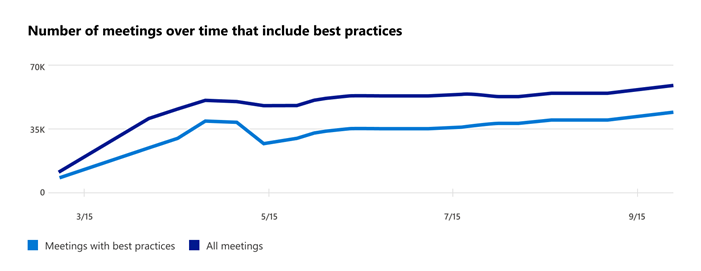
Trend visualization of the primary insight
The following chart shows the trend-lines of both the numerator and the denominator of the key metric from the primary insight. It shows the:
- Number of online Microsoft Teams meetings with best practices. For example, video or screen sharing
- The total number of online Microsoft Teams meetings held over the last 180 days.
Each data point on the line chart is an aggregate of activity for the last 28 days.
Scoring framework
The meetings score for your organization measures the degree to which online Microsoft Teams meetings in your organization followed best practices in the last 28 days. The score is weighted based on the number of users in your org attending the meetings and the meetings' duration.
Explore more about meetings in your organization
We also provide you with supporting information to help you understand how users in your organization, as an aggregate, conduct meetings. These additional metrics don't directly contribute to your Adoption Score, but can help you create an action plan as part of your digital transformation.
Breakdown of how many meetings follow best practices

Header: Highlights the percentage of online Microsoft Teams meetings that use video best practices considered in the primary insight and scoring.
Body: Provides information on the value of using these practices during meetings to make them more engaging.
Visualization: The breakdown in the visualization is meant to represent the extent to which online Microsoft Teams meetings are following each of the following best practices:
Video: The colored portion and the fraction represent the percentage of online Microsoft Teams meetings that have video turned on. The fraction is constructed from:
- Numerator: Online Microsoft Teams meetings held in the last 28 days that had video from at least one participant turned on.
- Denominator: The total number of online Microsoft Teams meetings held in your organization in the last 28 days.
Screen sharing: The colored portion and the fraction represent the percentage of online Microsoft Teams meetings in which users used the screen-sharing feature. The fraction includes:
- Numerator: Online Microsoft Teams meetings held in the last 28 days that had at least one participant sharing their screen.
- Denominator: The total number of online Microsoft Teams meetings conducted in your organization in the last 28 days.
Distribution of time spent by users in meetings

Header: Shows the percentage of users in your organization who attend online Microsoft Teams meetings for more than 20 hours per week on average, based on their activity in the last 28 days.
Body: Provides details on the value of using meeting best practices to make meetings engaging and productive.
Visualization: Provides a view of users in your organization based on their average time spent per week in meetings within the last 28 days. The following information is provided for each category:
Total meeting attendees: Shows the number of users in your organization who attended meetings, based on the average meeting duration range, in the last 28 days. For example, the 6-10 hours category indicates the number of users who attended meetings for an average of that many hours per week in the last 28 days.
Attendees in meetings with video: For each category, this shows how many users in your organization were in any meeting with video in the last 28 days.
Attendees in meetings with screen sharing: For each category, this shows how many users were in a meeting that included screen sharing in the last 28 days.
Distribution of meeting length by type

Header: Shows the percentage of instant (not previously scheduled) online Microsoft Teams meetings in the last 28 days that are under 30 minutes long.
Body: Provides information about the value of using instant meetings to resolve issues quickly.
Visualization: Provides the distribution of length (in minutes) of instant and scheduled meetings that took place in your organization in the last 28 days. The distribution categorizes each meeting into 1-15 minutes, 16-30 minutes, 31-60 minutes, and greater than 60 minutes.
Note
The scheduled meetings include all meetings that appeared on people's calendars. The instant meetings include:
- Calls, including both 1:1 and group calls.
- Meetings started using the Meet now feature in Microsoft Teams channels.
Use of different meeting types

Header: Highlights the percentage of instant online Microsoft Teams meetings over the preceding 28 days that are less than 30 minutes long.
Body: Provides information about the value of using the Meet now feature in Microsoft Teams channels.
Visualization: Shows what type of online Microsoft Teams meetings that users are attending. Each meeting type is represented as a horizontal bar where the colored portion and the fraction represent the following information:
Instant 1:1 calls:
- Numerator: The number of users attending 1:1 calls in the last 28 days.
- Denominator: The number of users attending any online Microsoft Teams meeting in the last 28 days.
Instant group calls:
- Numerator: The number of users attending group calls in the last 28 days.
- Denominator: The number of users attending any online Microsoft Teams meeting in the last 28 days.
Instant Meet now in channel:
- Numerator: The number of users using the Meet now feature within Microsoft Teams channels in the last 28 days.
- Denominator: The number of users attending any online Microsoft Teams meeting in the last 28 days.
Scheduled one-off meetings:
- Numerator: The number of users attending one-off online Microsoft Teams meetings on their calendar (scheduled) in the last 28 days.
- Denominator: The number of users attending any online Microsoft Teams meeting in the last 28 days.
Scheduled recurring meetings:
- Numerator: The number of users attending instances of recurring meetings on their calendar (scheduled) in the last 28 days.
- Denominator: The number of users attending any online Microsoft Teams meeting in the last 28 days.