Note
Access to this page requires authorization. You can try signing in or changing directories.
Access to this page requires authorization. You can try changing directories.
Copilot consent in Customer Insights - Journeys controls whether generative AI features are available and how related data is handled. These settings apply to all users and most Copilot features in Customer Insights - Journeys.
Copilot for model-driven apps is controlled separately in Power Platform admin center settings for Copilot in model-driven apps.
You can review the three Customer Insights - Journeys consent settings at Settings > Feature switches > Copilot:
- Global Opt-in consent: On indicates you agree to enable all Copilot and/or Bing Search-powered features and acknowledge that AI-generated content should be reviewed before use. Default is On.
- Global cross-geography data flow consent: On indicates that you agree that data may be stored and processed outside of your geographic region, compliance boundary, or national cloud instance. If you're in a region where Azure OpenAI is deployed such as the United States and Switzerland, this field doesn't display (the default is On and can't be changed). Default is Off for all other regions where Azure OpenAI isn't deployed.
- Global data sharing consent: On indicates that you agree to allow Microsoft to capture and review inputs and outputs from Copilot features to improve Microsoft's models, features, and services. Default is Off.
Roles required to change Copilot consent
A Dynamics 365 Customer Insights - Journeys admin role is required to change the opt-in and cross-geography consent levels.
Give consent in Customer Insights - Journeys
Go to Settings > Feature switches, and then go to the Copilot section.
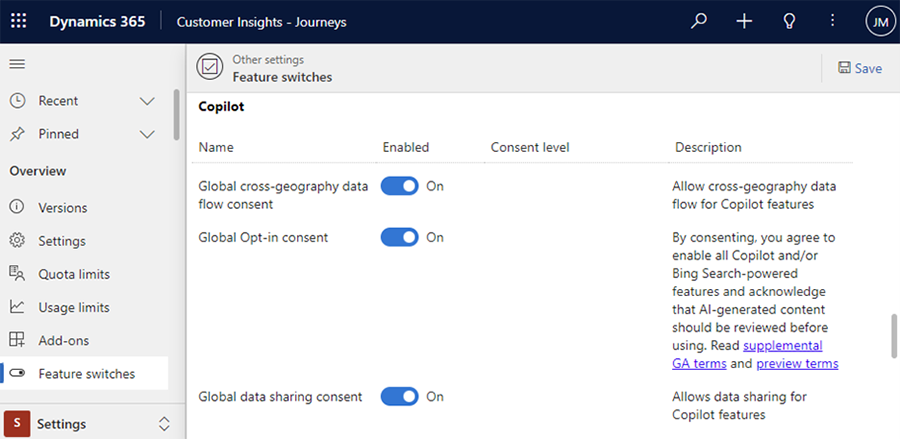
Enable or disable consent.
Select Save.
