Developer technologies | .NET | Blazor
A free and open-source web framework that enables developers to create web apps using C# and HTML, developed by Microsoft.
This browser is no longer supported.
Upgrade to Microsoft Edge to take advantage of the latest features, security updates, and technical support.
' cx='32' cy='32' r='32' /%3E%3Ctext x='50%25' y='55%25' dominant-baseline='middle' text-anchor='middle' fill='%23FFF' %3EGB%3C/text%3E%3C/svg%3E)
Hi,
I have an issue with a Blazor page.
Sometimes I receive the following error message on the browser's console view: Uncaught (in promise) SyntaxError: Unexpected token < in JSON at position 0
This is strange, because this error message is not coming always. Just when the application thinks something, and this happen:

If I click to end of the line VM50:1 on the screenshot, I have this:
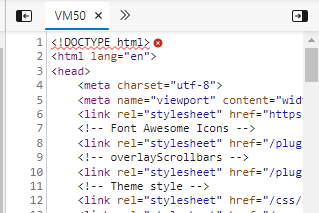
Any idea from anybody what can cause the problem?
The worst is that in this case none of the blazor events are working. I cannot click to buttons or blazor components, because none of them are working.
Thanks!
Gabor
A free and open-source web framework that enables developers to create web apps using C# and HTML, developed by Microsoft.
An object-oriented and type-safe programming language that has its roots in the C family of languages and includes support for component-oriented programming.
Locked Question. You can vote on whether it's helpful, but you can't add comments or replies or follow the question.
Answer recommended by moderator
Hi,
It seems, I was too quick with this help request.
In my portal I implemented a special design template and I forgot adding the following line into the <head></head>section of MainLayout:
<base href="~/" />
It seems after adding that forgotten line, the error mentioned previously disappeared.
This is a tipical application developer problem, not a framework issue.
Now I am monitoring the portal and check if the issue appears again.
Thanks!
Gabor
' cx='32' cy='32' r='32' /%3E%3Ctext x='50%25' y='55%25' dominant-baseline='middle' text-anchor='middle' fill='%23FFF' %3ERC%3C/text%3E%3C/svg%3E)
' cx='32' cy='32' r='32' /%3E%3Ctext x='50%25' y='55%25' dominant-baseline='middle' text-anchor='middle' fill='%23FFF' %3EDF%3C/text%3E%3C/svg%3E)
Thx Gabor, this solved my issue to!!
' cx='32' cy='32' r='32' /%3E%3Ctext x='50%25' y='55%25' dominant-baseline='middle' text-anchor='middle' fill='%23FFF' %3ERK%3C/text%3E%3C/svg%3E)
The issue was caused by Blazor WASM generating fingerprinted assets during publish.
For example, my index.html was referencing:
<script src="_framework/blazor.webassembly.js"></script>
But the published file was actually generated as something like:
_framework/blazor.webassembly.958z1vx7fr.js
So IIS returned index.html instead of the JS file, causing:
Uncaught SyntaxError: Unexpected token '<'
Then I also got:
Failed to fetch dynamically imported module: /_framework/dotnet.js
because dotnet.js was also fingerprinted.
The fix was:
In wwwroot/index.html, use:
<script type="importmap"></script>
<script src="_framework/blazor.webassembly#[.{fingerprint}].js"></script>
And in the .csproj file add:
<PropertyGroup>
  <OverrideHtmlAssetPlaceholders>true</OverrideHtmlAssetPlaceholders>
</PropertyGroup>
Then publish again:
dotnet clean
dotnet publish -c Release
Finally, deploy the generated publish output, usually:
bin/Release/netX.0/publish/wwwroot
After publishing, the generated index.html should contain the resolved fingerprinted files and a populated import map.