File History UI and Previous Versions Broken After Installing Recent Windows Updates (KB5101684 / KB5120249)

堂哥 lin 20 Reputation points
2026-08-31T05:33:10.2533333+00:00

win 10 22H2 desktop computer os build 19045.7663 BIOS american megatrends inc P11-A4  202108acerPC

win 11 25H2 latop OS Builds 26200.9278 BIOS Inysde Crop A1.22 LAPTOP-GJTRIQFJ Nitro AN515-57

Hello everyone, I am writing to report and check if other Windows 10 and 11 users are experiencing the exact same File History bug following recent updates. I hope the Microsoft engineering team investigates this regression thoroughly.(Note: I had to use my local computer account because my previous account was temporarily suspended.)

Before installing the recent updates, File History on my devices worked flawlessly. The "Last backup" time updated correctly whenever files were successfully backed up to the D: drive. However, after installing KB5101684 on my Windows 11 25H2 laptop on July 29, 2026, and KB5120249 on my Windows 10 22H2 desktop on August 12, 2026, the following issues emerged on both independent machines:

Files are still physically copied and backed up to the D: drive.

The File History control panel UI fails to update the "Last backup" timestamp.

Newly created or saved files (such as Word documents, images, and videos) display "There are no previous versions available" under their Properties.

Folder modification timestamps change unexpectedly even when no actual data inside has been altered.

Problem screenshot:螢幕擷取畫面 2026-07-29 195007
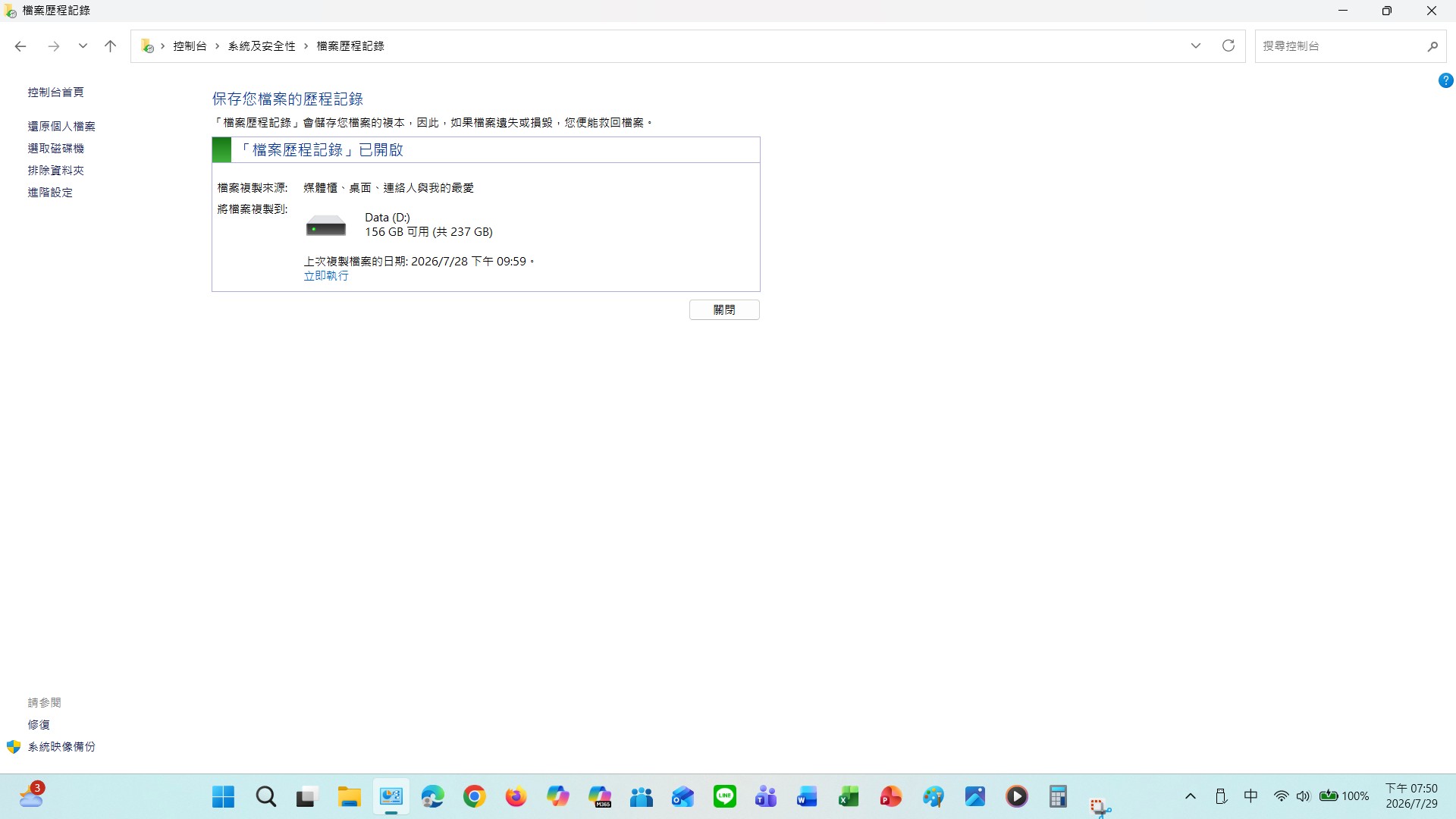
The File History control panel UI fails to update the "Last backup" timestamp.
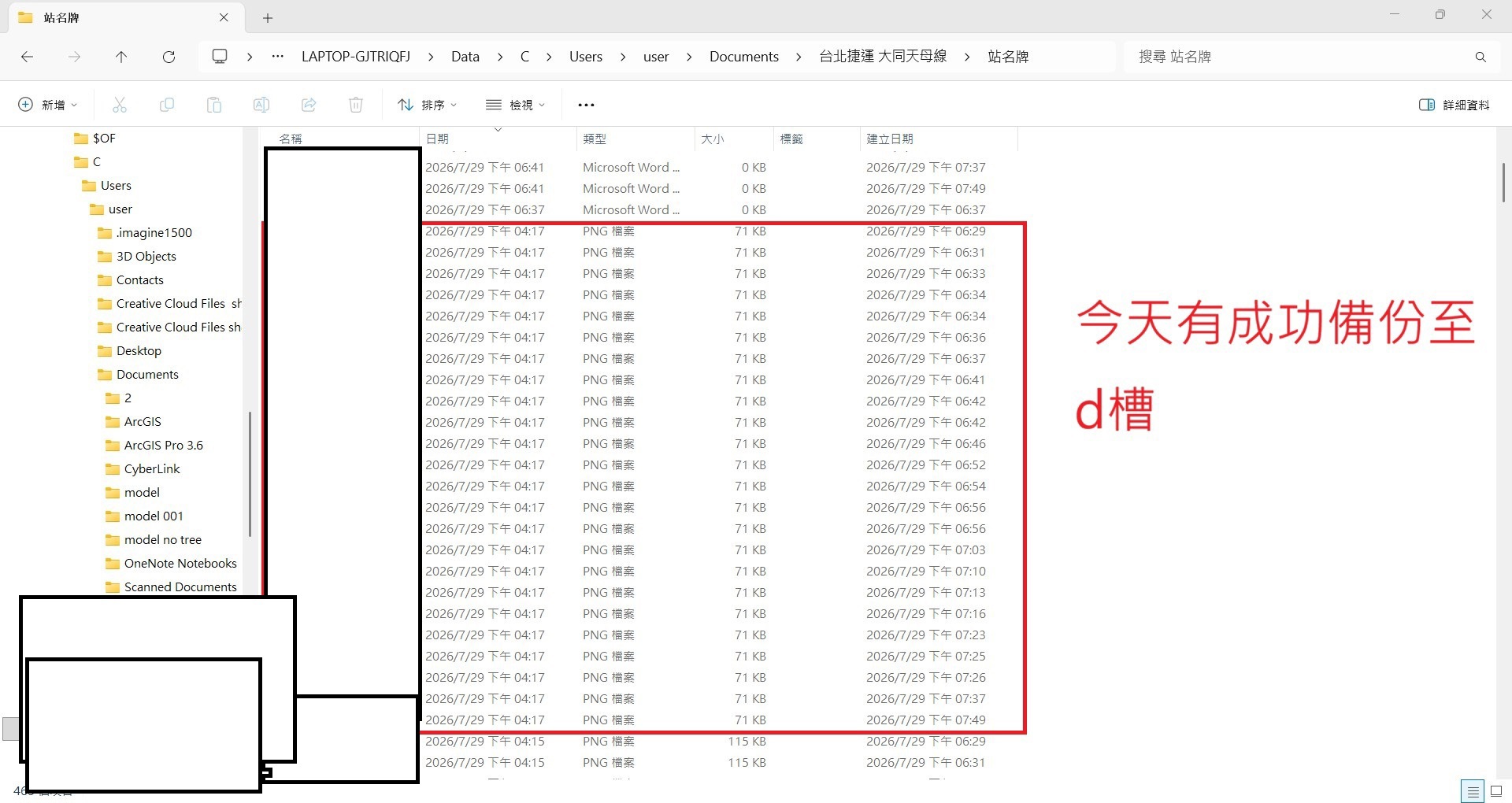
螢幕擷取畫面 2026-07-29 195103 Files are still physically copied and backed up to the D: drive.
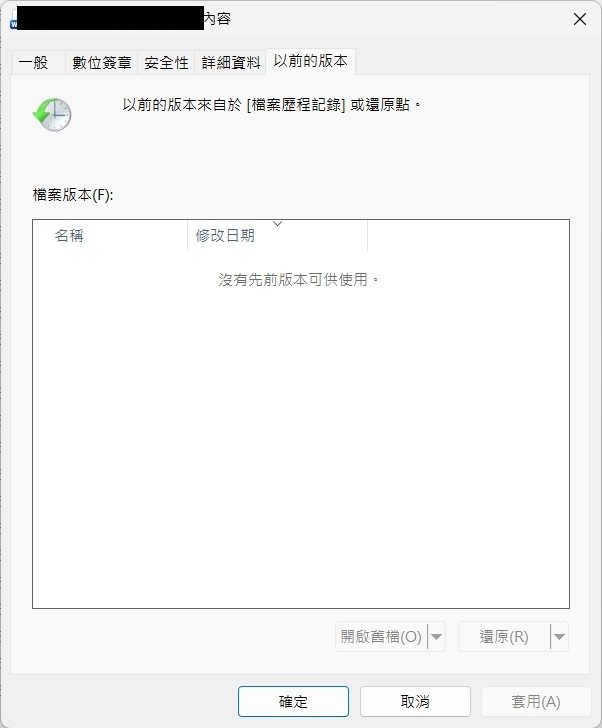
螢幕擷取畫面 2026-07-29 201220

Newly created or saved files (such as Word documents, images, and videos) display "There are no previous versions available" under their Properties.

I have never deleted system folders, modified the registry, or tweaked advanced settings improperly prior to these updates.

Temporary Workaround: Going to Control Panel → File History → Select drive and re-selecting the D: drive forces File History to resume normal tracking temporarily, but the issue persists on subsequent automated backups.

I have already submitted this through the Feedback Hub with full diagnostic details from two separate computers, but have received no response yet. If Microsoft fails to investigate whether these security/quality updates caused this regression and provide a fix in an upcoming patch, I will continue escalating this through official support channels.

If you are experiencing this exact same File History synchronization and UI bug after these updates, please comment below and share your experience.Don't be afraid, speak up!

If you're experiencing the same issue as me, could you please refer my question to Microsoft? I would greatly appreciate it.

Windows for home | Other | Recovery and backup
0 comments No comments

Answer accepted by question author
Alex-L 12,555 Reputation points Microsoft External Staff Moderator
2026-09-01T11:44:57.6766667+00:00

Hi 堂哥 lin

Thank you for the detailed report and screenshots.

At this time, there is no official Microsoft confirmation that KB5101684 or KB5120249 causes the File History behavior you describe. However, both updates included changes related to File History functionality, and other users have reported similar symptoms involving the "Last backup" timestamp, Previous Versions, and the need to re-select the backup drive as a workaround.

Since files are still being copied to the backup drive, the issue may be related to File History's catalog, tracking, or UI state rather than the actual backup process. Re-selecting the same drive appears to temporarily refresh the configuration.

You have already taken the appropriate step by submitting Feedback Hub reports. Unfortunately, no one in this public forum can directly escalate issues to the Windows engineering team, but additional reports from affected users can help Microsoft identify and investigate potential regressions.

If other community members are seeing the same behavior after these updates, please share your findings and submit Feedback Hub reports as well.

Was this answer helpful?

1 person found this answer helpful.

2 additional answers

Sort by: Most helpful
  1. BobHayes-3027 15 Reputation points
    2026-09-08T22:33:26.0333333+00:00

    Similar issues that started today after running Windows Update on two sepearate Windows 11 computers that were all up to date as of Saturday morning.

    Today I ran File History on 2 computers - both ran correctly. Then ran Windows Update and File History on both are now broken.

    Reached out to support who logged on to one of the computers, but troubleshooting did not provide an answer. Later I connected a drive and configured File History on a 3rd computer - it was working. Then I ran Windows Update and it broke it.

    Updated the case number and was told now by two seperate techs that it seems to be an issue with one of the updates and was passing it on to level 2 with the detailed testing notes I provided.

    The three updates that were installed were

    2026-09 Security Update (KB5124008) (26200.9445)

    2026-09 .NET Framework Security Update (KB5126052)

    Windows Malicious Software Removal Tool x64 - v5.145 (KB890830)

    Working before the update - not working after the update

    Was this answer helpful?

    0 comments No comments

  2. 堂哥 lin 20 Reputation points
    2026-09-01T15:49:59.3933333+00:00

    Windows 11 25H2 → KB5101684 → File History issue Windows 10 22H2 → KB5120249 → File History issue

    Since two different PCs developed similar problems after different Windows updates, I am concerned this may be a regression caused by recent Windows updates. I hope Microsoft can investigate and fix it.

    I've already reported and inquired about this issue through the Windows 10 Feedback Hub (I originally planned to use the Laptop Feedback Hub, but it was too slow, so I gave up), but I haven't received any response yet.

    I've also asked through Microsoft Community Hub, Microsoft Learn, and Reddit, and dozens of overseas users have told me they've encountered the same problem. If any of you are experiencing the same issue, please let me know. Don't worry.

    Can anyone inform Microsoft about my problem?

    These are the comments from 10 users who have told me they've encountered the same problem; screenshots are below:

    螢幕擷取畫面 2026-09-01 202555

    螢幕擷取畫面 2026-08-17 201755

    螢幕擷取畫面 2026-08-17 201818

    螢幕擷取畫面 2026-08-18 184914

    螢幕擷取畫面 2026-08-18 184943

    螢幕擷取畫面 2026-08-20 155114

    螢幕擷取畫面 2026-08-23 144309

    螢幕擷取畫面 2026-08-23 144338

    螢幕擷取畫面 2026-08-24 163501

    螢幕擷取畫面 2026-09-01 210848

    Was this answer helpful?

    0 comments No comments

Your answer

Answers can be marked as 'Accepted' by the question author and 'Recommended' by moderators, which helps users know the answer solved the author's problem.
