Outlook | Web | Outlook on the web for business | Contacts
Organizing and accessing contact information in Outlook on the web for business

This browser is no longer supported.
Upgrade to Microsoft Edge to take advantage of the latest features, security updates, and technical support.
' cx='32' cy='32' r='32' /%3E%3Ctext x='50%25' y='55%25' dominant-baseline='middle' text-anchor='middle' fill='%23FFF' %3EJM%3C/text%3E%3C/svg%3E)
More than once, I have been bitten because the To email address is populated with a name close to the intended recipient, and I have not caught it. How do I stop this auto-action?
Organizing and accessing contact information in Outlook on the web for business
' cx='32' cy='32' r='32' /%3E%3Ctext x='50%25' y='55%25' dominant-baseline='middle' text-anchor='middle' fill='%23FFF' %3EMP%3C/text%3E%3C/svg%3E)
Disable auto-complete settings in Outlook
Details at https://learn.microsoft.com/en-us/microsoft-365-apps/outlook/contacts/outlook-autocomplete-list
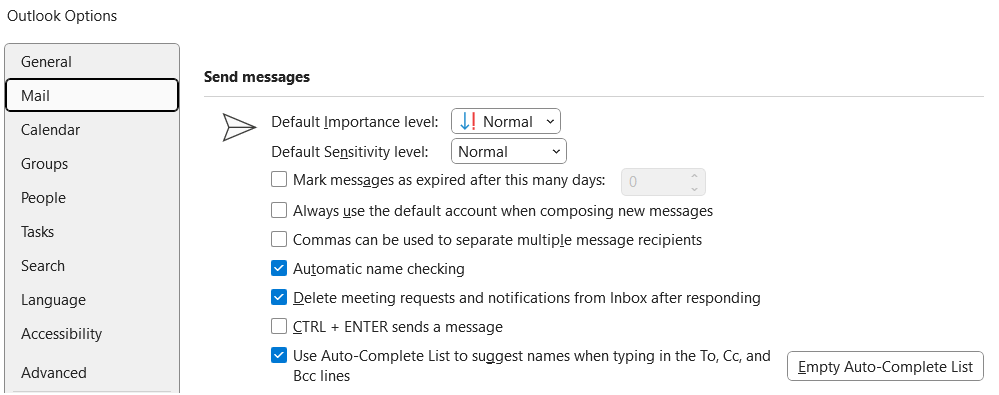
To access the AutoComplete setting, follow these steps:
On the File menu, select Options.
Select the Mail tab.
Scroll down until you see Send messages. Make sure that the Use Auto-Complete List to suggest names when typing in the To, Cc, and Bcc lines box is checked.
If the above response helps answer your question, remember to "Accept Answer" so that others in the community facing similar issues can easily find the solution. Your contribution is highly appreciated.
hth
Marcin
' cx='32' cy='32' r='32' /%3E%3Ctext x='50%25' y='55%25' dominant-baseline='middle' text-anchor='middle' fill='%23FFF' %3ESK%3C/text%3E%3C/svg%3E)
Outlook desktop
File → Options → Mail → scroll to “Send messages” → uncheck “Use Auto-Complete List to suggest names when typing in the To, Cc, and Bcc lines.” You can also clear the existing list with the “Empty Auto-Complete List” button, which removes stale/wrong cached addresses.
Outlook (web) / Microsoft 365
Settings → Mail → Compose and reply → turn off suggestions, or clear individual bad entries by hovering the suggestion and clicking the X.
Thanks.

@Senthil kumar said
Outlook (web) / Microsoft 365 - ... clear individual bad entries by hovering the suggestion and clicking the X
Microsoft has removed the ability to delete a single entry from your Autocomplete/Suggested People List (the drop down of suggested email addresses you see when you start typing in the "To:" field).
Previously there was an "X" to the right of an Autocomplete entry that would remove it from the list. Now the only method to get rid of a incorrect or out of date Autocomplete entry is to erase the whole list.
See the Answer by "Hornblower409 May 1 2026" - "How to convert your Autocomplete List to Contacts and erase the List" at
https://learn.microsoft.com/en-us/answers/questions/5871874/manually-removing-an-email-address-from-the-sugges?orderby=newest&page=1#answers