Hi there
Thank you for the response.
The steps are really many and complicated for a novice.
I followed the video in those Microsoft instructions but got lost when the person goes to steps involving booting into Win PE, which I had to try and find out what it was. Creating one was a bit confusing, making me look around and ended up using Hasleo WinToUSB, which has an option for Bootable WinPE USB, which I created.
I would appreciate, if you could confirm using this particular Hasleo program is OK.
I hope it achieves the same thing.
After booting to Win PE, I went back to the video and on using the X: \Windows \System32> mbr2gpt /validate command, it could not validate.
Since I did not know what to do, checked out some online tutorials and in one they said failure could be caused by having too many partitions and that one person deleted the "Recovery" partition, which he said could be replaced later under GPT.
Even then, it could not validate. The Microsoft instruction video mentions, if it cannot validate, then the conversion will not succeeds, unless I misunderstood what appears to be a talking robot.
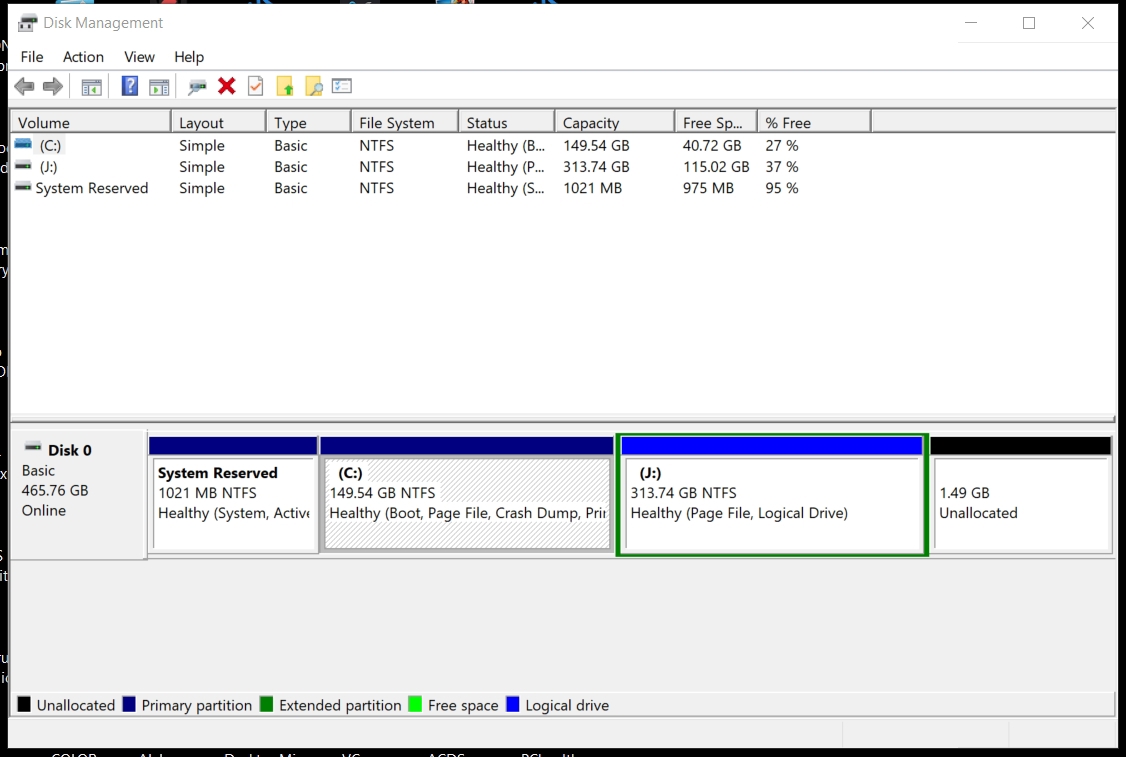
Before posting this, these are the current validate results for the above table:
X: \Windows\System32\mbr2gpt /validate
MBR2GPT: Attempting to validate disk -1
MBR2GPT: Retrieving layout of disk -1
Failed to retrieve geometry for disk -1
I do not quite understand this, because in the video that I was following on the page Microsoft page you recommended, there is only disk 0, which in the example validated.
Where does disk -1 come from, as in the screenshot, there is also just Disk 0?
When I looked at the partitions as shown in the screenshot, I got concerned when I saw one of the main partitions with the word "logical" as someone had mentioned there should be no logical partitions! Is this part of the problem and can it be solved?
So I am confused as it is hard to find instructions mentioning and addressing all the possible hurdles one may encounter.
Basically, I just want to be able to upgrade from Windows 10 to 11, without loosing any of the data on the SSD drive and can have functioning Windows after.
PC Health Check says I have to enable secure boot to pass the upgrade check, but enabling it, it seems is only possible under UEFI, but I cannot boot without Legacy ... which however means disabling UEFI, with which Secure boot gets deactivated.
So it is an impossible situation it seems I am in.
Looking at what I have written, is there a path to Win 11 which is not destructive to my complete Win PC on this drive? With status quo, is it possible correct what is preventing validation so I can proceed to conversion?
I would appreciate specific instructions understandable to a novice.
Thank you for your patience and help.
Kind regards
' cx='32' cy='32' r='32' /%3E%3Ctext x='50%25' y='55%25' dominant-baseline='middle' text-anchor='middle' fill='%23FFF' %3EX%3C/text%3E%3C/svg%3E)


' cx='32' cy='32' r='32' /%3E%3Ctext x='50%25' y='55%25' dominant-baseline='middle' text-anchor='middle' fill='%23FFF' %3EVZ%3C/text%3E%3C/svg%3E)