Hi @Pappalardo, Janine,
Thank you for reaching out to Microsoft Q&A.
I recognize that modifications to familiar features can be quite challenging, especially when tasks like cut and paste suddenly feel less intuitive.
As you mentioned, I tested the behavior in both the new Outlook and the classic Outlook versions, but I wasn’t able to reproduce the exact issue you’re seeing there.
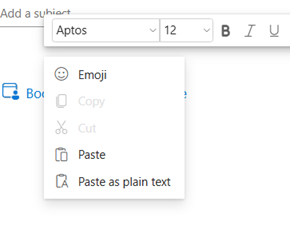
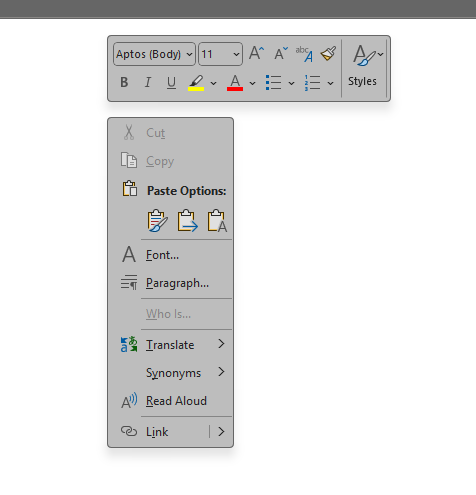
However, this behavior is more commonly observed in Window, where basic actions like Cut and Paste are nested under “Show more options.” This change is part of a broader design update from Microsoft aimed at simplifying the interface, though we understand it might feel like an extra step for long-time users.
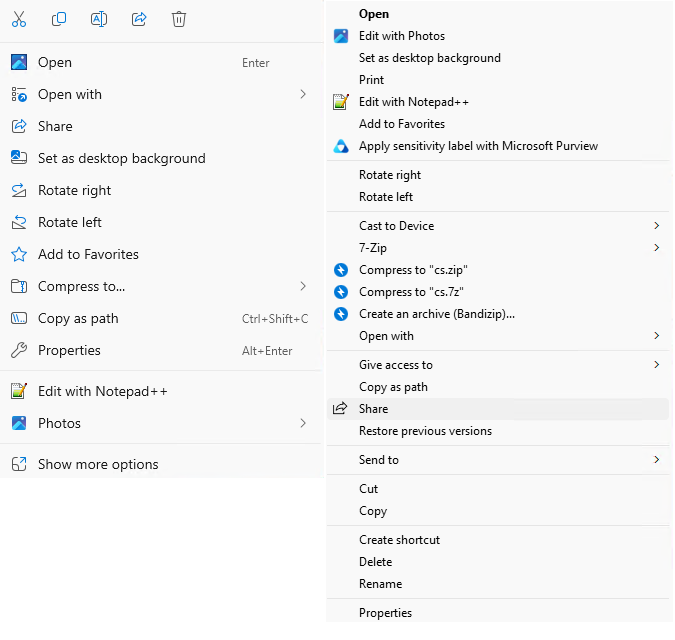
By design, the new version doesn't have that feature, if you think this feature is essential, we suggest you give feedback via: Ideas · Community, your feedback is crucial and can help guide future improvements.
If you need any further assistance, please don’t hesitate to let us know. We’re happy to help!
If the answer is helpful, please click "Accept Answer" and kindly upvote it. If you have extra questions about this answer, please click "Comment".
Note: Please follow the steps in our documentation to enable e-mail notifications if you want to receive the related email notification for this thread.
' cx='32' cy='32' r='32' /%3E%3Ctext x='50%25' y='55%25' dominant-baseline='middle' text-anchor='middle' fill='%23FFF' %3EPJ%3C/text%3E%3C/svg%3E)

' cx='32' cy='32' r='32' /%3E%3Ctext x='50%25' y='55%25' dominant-baseline='middle' text-anchor='middle' fill='%23FFF' %3ECB%3C/text%3E%3C/svg%3E)
' cx='32' cy='32' r='32' /%3E%3Ctext x='50%25' y='55%25' dominant-baseline='middle' text-anchor='middle' fill='%23FFF' %3EDT%3C/text%3E%3C/svg%3E)
' cx='32' cy='32' r='32' /%3E%3Ctext x='50%25' y='55%25' dominant-baseline='middle' text-anchor='middle' fill='%23FFF' %3ELG%3C/text%3E%3C/svg%3E)