Note
Access to this page requires authorization. You can try signing in or changing directories.
Access to this page requires authorization. You can try changing directories.
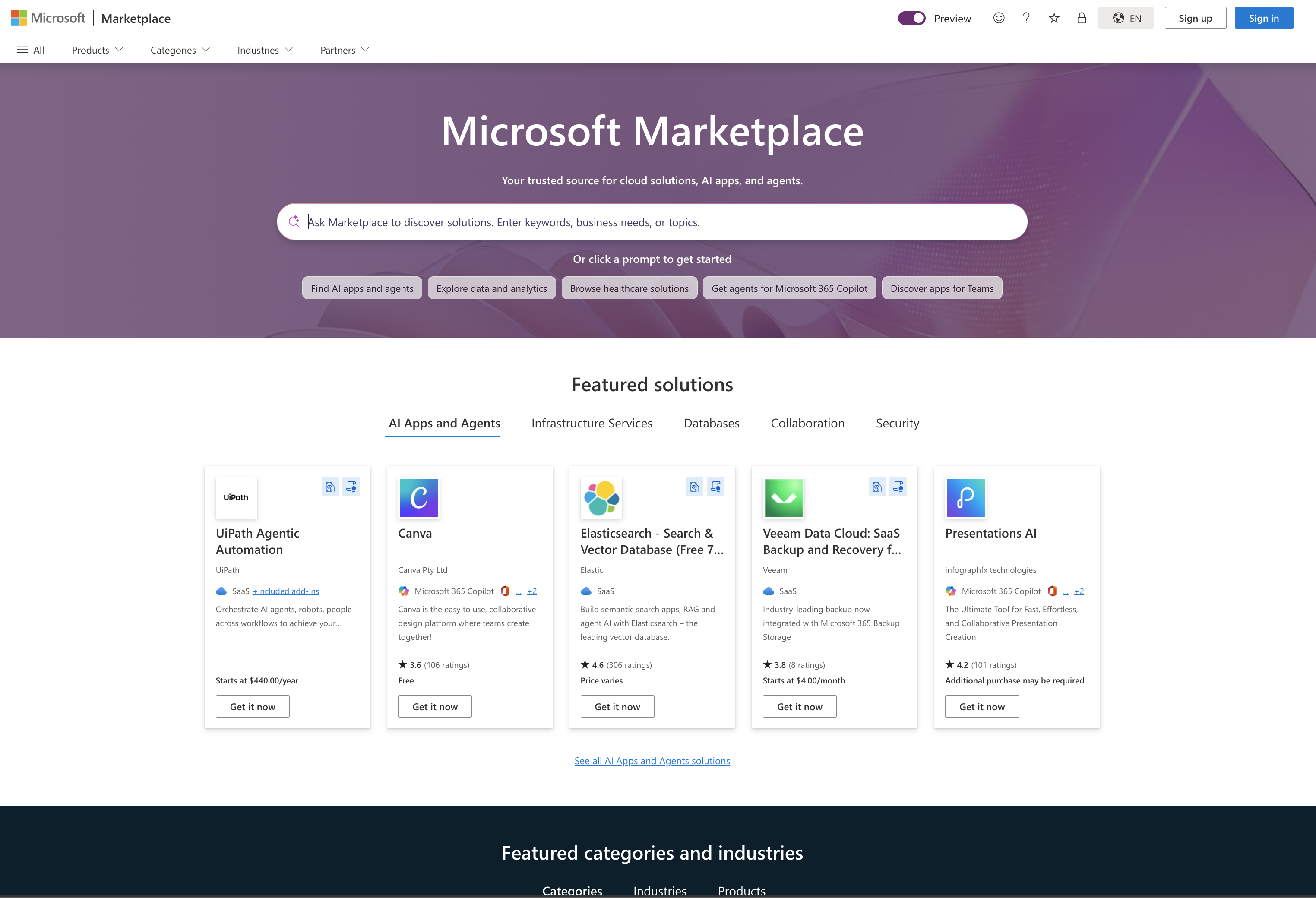
Microsoft Marketplace is your trusted source for cloud solutions, AI apps, and agents. Microsoft Marketplace offers a comprehensive catalog of solutions built on or built for Microsoft technologies, serving IT professionals, developers, and business users alike. With the new AI Apps and Agents category in Marketplace, you can discover AI apps and prebuilt agents that address a wide range of scenarios and meet your unique needs.
What you can find in Microsoft Marketplace
- Products: Find products tailored to a wide range of industries, categories, and business needs, including SaaS applications, Microsoft 365 integrated products, and Azure-based solutions. Products span Microsoft 365, Dynamics 365, Power Platform, and Azure. Categories include AI Apps and Agents, Analytics, Collaboration, Security, and more.
- AI Apps and Agents: To accelerate your AI initiatives, discover prebuilt AI applications and agents from industry-leading Microsoft partners.
- Professional Services: Discover prepackaged services that provide assessments, briefings, implementations, proofs of concept, and workshops for your Microsoft solutions.
- Partners: View profiles of trusted Microsoft partners that can help your organization digitally transform and achieve business goals faster with Microsoft-based services.
Important
If you wish to pull a complete list of offerings and partners, you can do so using the Public Products API.
Search and discover solutions
Microsoft Marketplace offers simple search and filtering options to help you quickly find what you are looking for. Use the Search bar at the top of the page to find solutions by vendor, product name, or keywords.

Enhanced search and filtering
When you explore Microsoft Marketplace, use the filters in the left pane to narrow results based on product, category, the availability of a free trial, pricing model (free, paid, or trial), customer ratings, and compliance programs.
 Select the Free trial checkbox under Pricing model to view products that include at least one plan with a free trial. Marketplace filters the results to show only those products.
Solutions are available for specific products including Microsoft 365, Dynamics 365, Power Platform, and Azure. Categories cover business functions like sales, collaboration, and marketing. Technical categories include AI Apps and Agents, Machine Learning, Analytics, and Security. You can also filter by industry and industry vertical.

Tip
When exploring the Professional Services gallery, make sure your location filter is set properly and use the filters on the left pane to narrow results based on product, industry, and service type.

Intelligent discovery for products (preview)
Important
Intelligent discovery is in preview. It's rolling out gradually, starting with the EN-US market and expanding to more markets over time ahead of general availability. Features and availability may change during the preview period. Read the blog to learn more.
Intelligent discovery is now in Microsoft Marketplace—a faster and easier way to find, evaluate, and choose cloud solutions, AI apps, and agents across the Microsoft ecosystem.
With intelligent discovery, you can:
- Find the right solutions fast. Instead of relying on keyword search alone, describe your use case in natural language. Smart search automatically applies the right filters and refinements so you find the most relevant solutions—faster.
- Chat, compare, and decide with confidence. Chat-enabled evaluation and comparison lets you ask questions in natural language, compare options side by side, and shortlist solutions to share with your team.
- Get AI built into every step. AI is seamlessly embedded into every step of the Marketplace journey—from search to evaluation to decision—through a simple, action-first interface. There's no new tool to learn or separate agent mode to enter, so you can act faster with less friction.
Intelligent discovery is powered by Microsoft Foundry and Azure OpenAI, with Microsoft's Responsible AI guardrails built into the experience. Look for the Ask Marketplace smart search bar at the top of the product gallery to get started.
Note
Intelligent discovery is currently available for the Products gallery. Professional Services, Partner Directory, and Industry Clouds continue to use the search and filtering experience described in Search and discover solutions.
Smart search
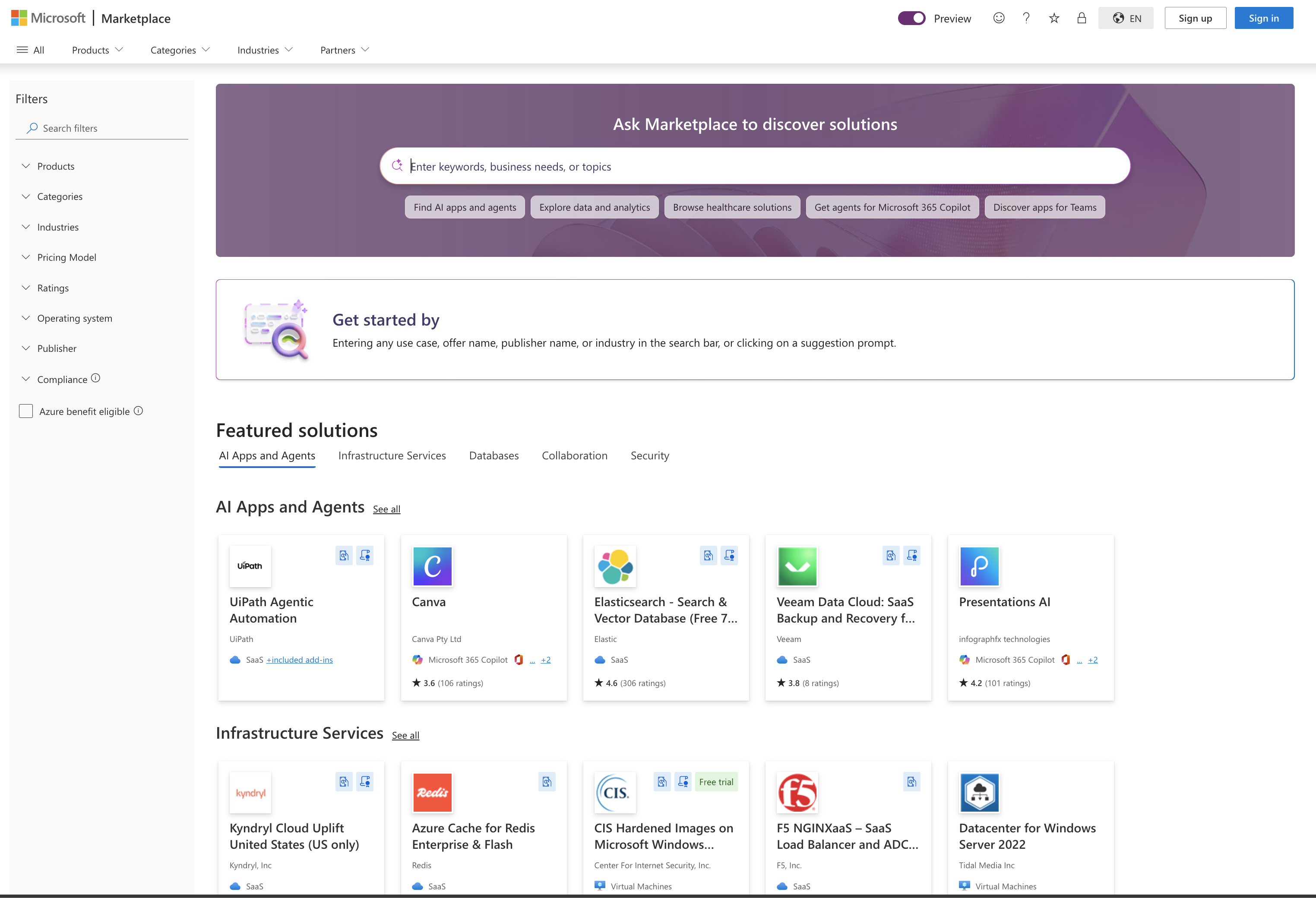
Describe what you're looking for in the Ask Marketplace smart search bar—or select one of the suggested prompts—and Marketplace applies the right filters, search terms, and sorting to surface relevant results. Suggested prompts below the search bar update as you refine, so the next best step is always in front of you.
Interactive chat on product detail pages
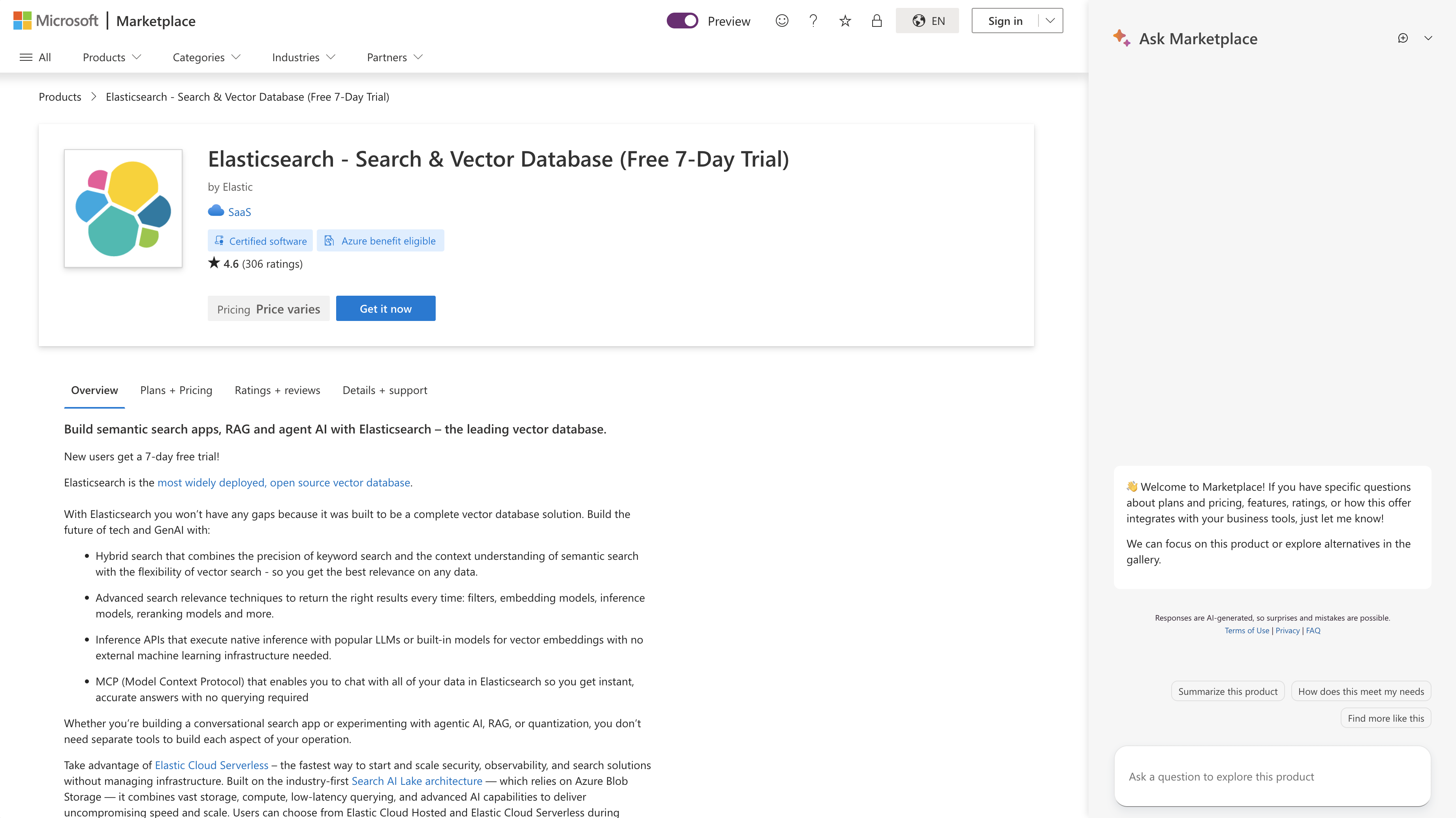
On any product detail page, an interactive chat lets you ask questions about the product in natural language—no need to read through every section. Answers are grounded in the publisher's offer listing, so you can get to what matters most for your scenario, such as pricing, integrations, deployment, or fit.
Product comparison
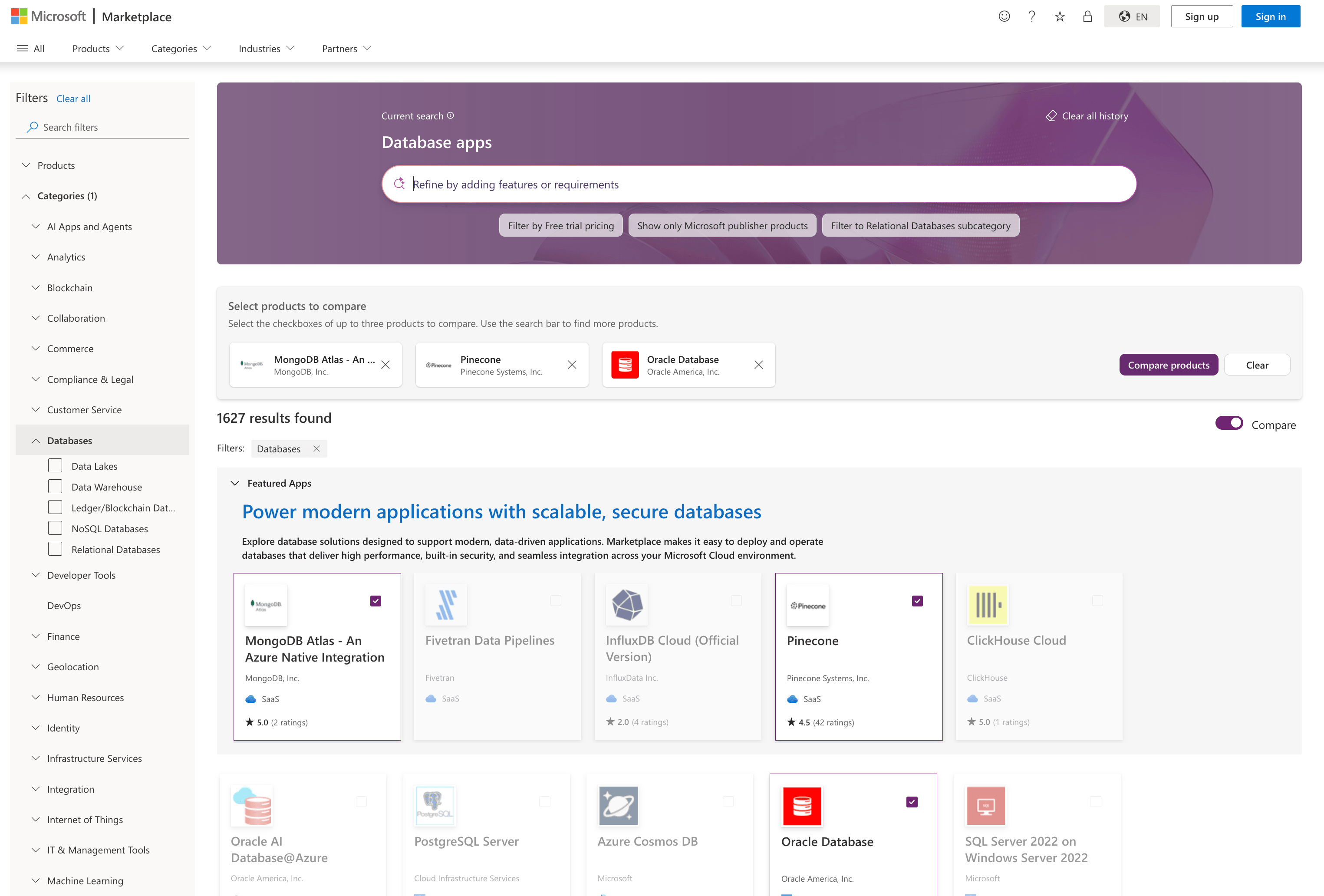
Activate the Compare toggle on the top right of the gallery to enter comparison mode. Product tiles show checkboxes and below the smart search bar a comparison tray appears. Select up to three products to add them to the tray, then choose Compare products to open the side-by-side comparison view.
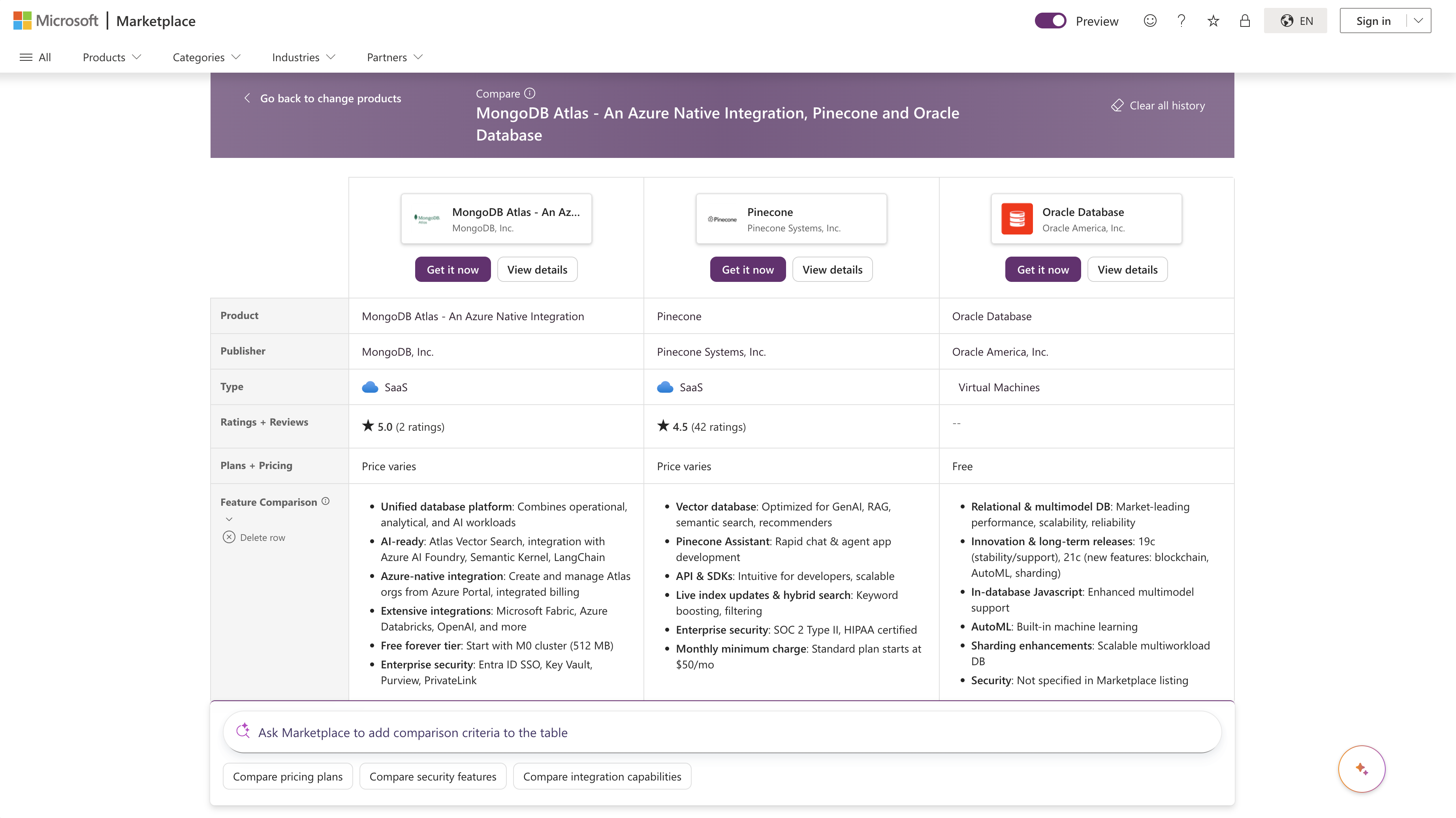
Marketplace generates a structured comparison table for the selected products. From the comparison view, use natural language to ask Marketplace to add the attributes that matter most to you, dive deeper into a specific dimension, or surface tradeoffs to help you make a confident decision.
Getting started
- Discover: Go to Microsoft Marketplace and describe what you're looking for in the Ask Marketplace smart search bar—or select one of the suggested prompts. For example, "I'm looking for AI solutions" or "Show me free analytics tools."
- Refine: Continue the conversation using the smart search bar or the suggested prompts. Marketplace keeps the search topic, category, subcategory, and applied filters in sync as you refine.
- Evaluate: Select a product to open its detail page and use the interactive chat to ask questions about pricing, integrations, deployment, or fit.
- Compare: Activate the Compare toggle on the gallery, add up to three products to the comparison tray, and choose Compare products to open the side-by-side comparison view. Ask follow-up questions to add the attributes you want to compare.
- Reset: Select the Clear all history next to the smart search bar at any time to start a fresh conversation and clear all filters.
Intelligent discovery: Responsible AI FAQ
What is Intelligent discovery?
Intelligent discovery brings AI-driven discovery features directly into the Microsoft Marketplace website, helping visitors find, evaluate, and compare apps, services, and AI agents across the Marketplace catalog using natural language conversation.
The AI uses Microsoft Foundry and Azure OpenAI to understand what you're looking for and translate it into Marketplace actions—such as applying filters, refining search results, opening product detail pages, and generating side-by-side comparisons—so you can discover the right solution faster.
Note
In the product interface, you see the label "Ask Marketplace" on the input bar where you interact with the AI.
What is Intelligent discovery's intended use?
The AI features in Marketplace are designed for product discovery and evaluation only — helping you identify, research, and compare solutions listed on Microsoft Marketplace. They aren't designed for:
- Technical support or troubleshooting
- Account management, billing, or licensing inquiries
- Questions about products or services not listed on Microsoft Marketplace
- General knowledge questions unrelated to Marketplace offerings
- Financial, legal, or procurement advice
For these needs, the AI lets you know it can't help. For general questions, try Microsoft Copilot.
How was Intelligent discovery evaluated?
The AI features in Marketplace go through automated testing, human review, and user research. The evaluation includes simulated conversations across a wide range of scenarios—both functional and adversarial—as well as Responsible AI red teaming to test for potential harms such as fabrication, prompt injection, and content safety issues.
Conversation quality, content safety, and user feedback (thumbs up/down) are continuously monitored to identify and address issues.
What are the limitations of Intelligent discovery?
- Information is based on Marketplace listings. The AI references information from product listings in the Marketplace catalog. It can't access external websites or documentation beyond what is available in the catalog.
- Responses may vary. As with all AI systems, responses to the same question may differ between sessions.
- Conversation limits apply. Sessions have turn and character limits, and expire after a period of inactivity.
- The experience is anonymous. The AI doesn't know who you are or your organization. All context comes from the current conversation only.
What does it mean that "AI-generated content may be incorrect"?
AI systems can produce responses that are inaccurate, incomplete, or misleading. For example, the AI might:
- Summarize a product's capabilities in a way that omits important details or qualifications
- Present information from a listing that the publisher later updated
- Misinterpret an ambiguous query and apply incorrect filters or surface irrelevant results
- Generate comparison content that doesn't fully capture differences between products
For these reasons, we recommend verifying important details—particularly pricing, compatibility, and compliance information—directly on the product page or with the publisher before making purchase decisions. The AI provides information to help guide your research, not to replace due diligence.
How do I know I'm interacting with AI?
All conversations in Intelligent discovery are with the AI. There's no option to transfer to a human agent within the experience. The AI is clearly identified through:
- A Copilot icon and the "Ask Marketplace" label in the interface
- An AI-generated content disclaimer displayed after the first AI response in a conversation
- Input placeholder text and suggestion prompts that indicate you're interacting with an AI-powered tool
Does Intelligent discovery make recommendations or endorse products?
The AI doesn't endorse or recommend specific products as "best." It applies filters and search terms based on the criteria you describe, surfaces multiple options when available, and presents factual comparisons based on listing data without subjective opinions. The basis for any filtering or narrowing is always visible in the interface.
You remain in control of which products to explore and can always modify filters, search terms, or sorting manually.
Privacy
Does Intelligent discovery process or retain any data when I'm using the service?
Intelligent discovery is built on the Azure OpenAI Service, which processes data related to service use including the prompts you submit. Key data practices include:
- Conversation data: Your messages and AI responses are retained during your session. After the session expires, conversation data in the service is deleted.
- Azure OpenAI content management: The Azure OpenAI Service includes a content management system that filters potentially harmful content. Input prompts and generated completions may be stored for up to 30 days to monitor for misuse. For more information, see the Azure OpenAI data, privacy, and security documentation.
- No personal data collection: Intelligent discovery doesn't request or require personal information. The experience is fully anonymous—the AI doesn't know your identity, organization, or purchase history. We recommend not sharing any protected or personal data in your conversations.
- Browser storage: Your browser may retain conversation session identifiers in local storage to enable session resumption if you navigate away and return. If you're using a shared or public computer, other users of that computer may be able to see or continue your conversation. We recommend clearing your browser's local storage before leaving a shared device.
Does Intelligent discovery use my data to train AI models?
No. Your conversations aren't used to train, retrain, or fine-tune AI models. Intelligent discovery retrieves product information from the Marketplace catalog in real time to enrich each conversation. No training on user data is performed.
What telemetry does Intelligent discovery collect?
Intelligent discovery collects limited data to monitor service quality and drive improvements. This data includes usage metrics like session length, performance metrics like response latency, and feedback you submit through thumbs up or thumbs down buttons.
How do I provide feedback or report an issue?
You can provide feedback on any AI response using the thumbs up/down buttons that appear on AI messages. If you encounter an issue or have concerns about the AI's behavior, use the thumbs down button. The team reviews your feedback to identify and address problems.
To start a fresh conversation at any time, select the reset button next to the input bar, which clears all conversation history and resets filters.
Security and safety
How does Intelligent discovery handle harmful or inappropriate requests?
Intelligent discovery includes multiple layers of protection:
- Content safety filtering: Input and output content is filtered through Azure's content safety systems to detect and block harmful content.
- Scope enforcement: The AI is constrained to product discovery and declines requests that fall outside this scope.
- Security protections: The AI is designed to resist prompt injection attempts and doesn't reveal its internal instructions or configuration.
Does Intelligent discovery generate or link to external URLs?
The AI only references URLs explicitly provided in Marketplace product data. It doesn't fabricate or generate placeholder URLs.
Find solutions in Marketplace within Azure portal
While Microsoft Marketplace at Marketplace.Microsoft.com is the primary discovery experience, you can also access solutions directly from within the Azure portal when you're working on Azure resources.
Search in Marketplace within Azure portal
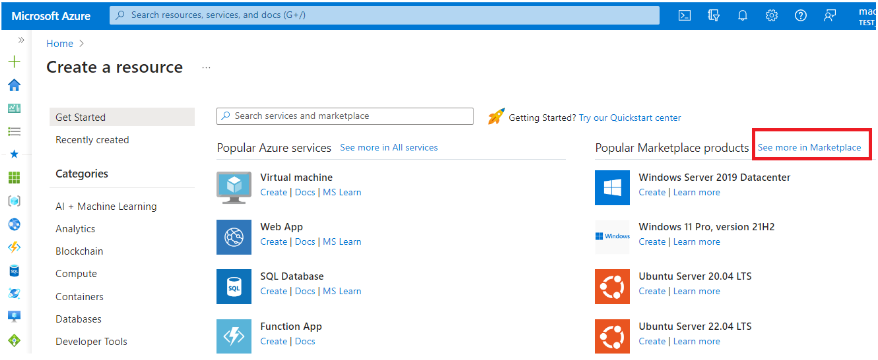
In the Azure portal, select + Create a resource or search for "marketplace" in the top search box.

Browse solutions using the categories on the left side or use the search bar.

Select the See more in Marketplace link on the top right to access Marketplace within Azure portal.
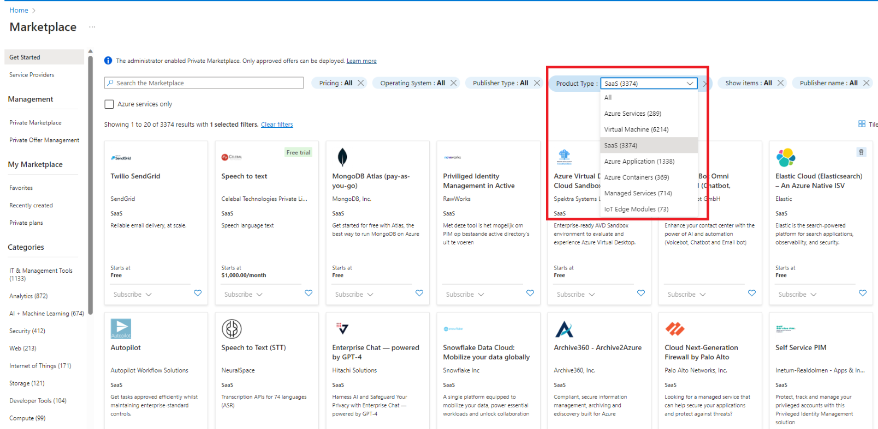
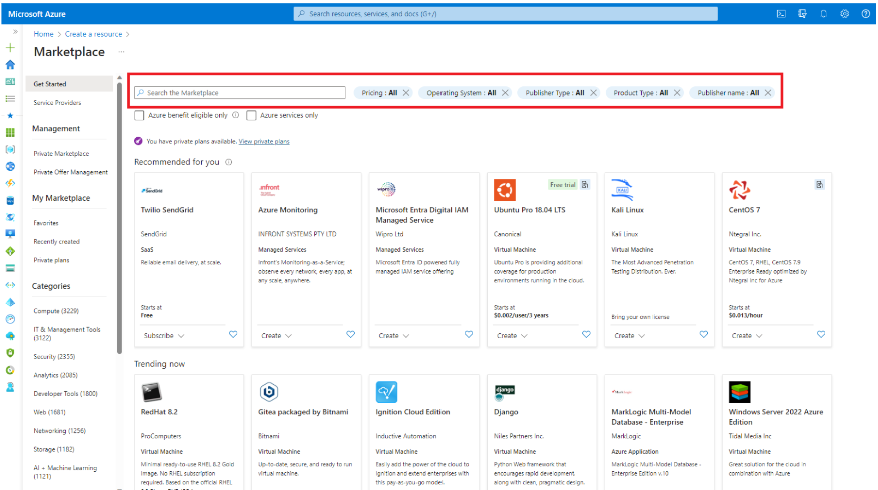
Marketplace within Azure portal offers simple search and filtering options to help you quickly find what you are looking for. Use the search box to find solutions by name or by entering keywords and apply filters to narrow results based on pricing model, operating system, product type, or publisher name.
Search in private Marketplace within Azure portal
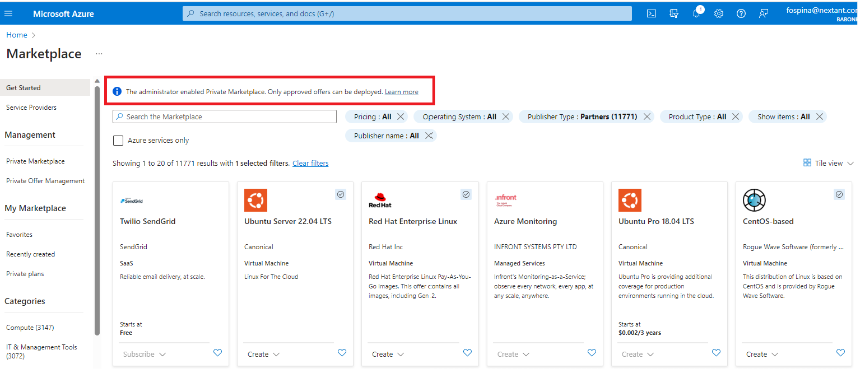
When private Marketplace within Azure portal is enabled, users see a notification that only approved offers can be deployed. Users can search the catalog using the search box and apply filters. Only approved products and approved plans can be deployed.
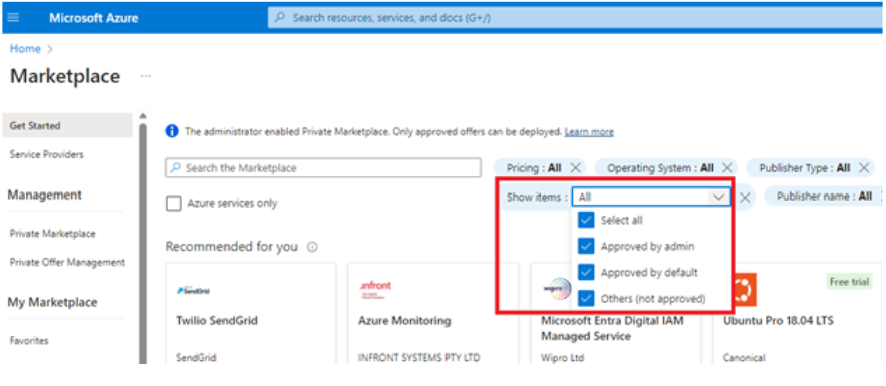
Apply the Show Items filter to view all solutions, solutions approved by the marketplace administrator, solutions approved by default, or all.
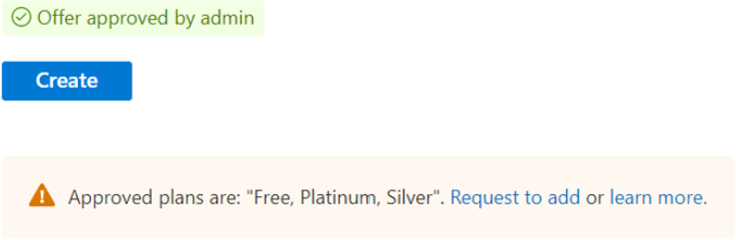
A green approved badge indicates a solution from a Microsoft partner that is approved for purchase and deployment.
A blue approved badge indicates a Microsoft offer and Endorsed Linux distributions approved for purchase and deployment.
SaaS offer discovery in Marketplace within Azure portal
Narrow down results to SaaS offers by using the Product Type filter, and then select SaaS or use the global search bar to find a specific SaaS offer by name or keyword.