Note
Access to this page requires authorization. You can try signing in or changing directories.
Access to this page requires authorization. You can try changing directories.
With the release of Windows 11, Microsoft now natively supports the presence sensing feature set in Windows. For Windows 11 PCs that have a presence sensor built in, users can have their screen turn off automatically when they leave (see Lock on leave), and then have their device wake up quickly when they approach (see Wake on approach). This can help keep their PC more secure, help save battery power, and help users get back to work more quickly.
Tip
To determine if your device has Microsoft's presence sensing support, check if you have settings as described in this Support article. For more information on the data collected by the feature see the Microsoft Privacy Statement.
Presence sensing is a set of features introduced in Windows 11, which includes Lock on Leave, Wake on Approach, and Adaptive Dimming . Presence sensors are a new class of proximity sensors that detect humans. This section primarily deals with the end user device experiences and recommendations. Presence sensors can be based on a variety of technology, including computer vision or radar; however, there are requirements to ensure implemetations process data locally and no image metadata is transmitted to the sensor stack. The Windows sensors stack does not leverage any AI models internally in the OS; some third-party presence sensors may make use of AI models. For more details on the hardware requirements see Presence sensors in the hardware component guidelines section. Microsoft's use of AI models is dictated by the Responsible AI standard.
Note
Some OEM devices implement custom sensors which offer similar functionality to presence sensing, however these implementations are not supported by Microsoft and do not benefit from Microsoft inbox features like user app privacy settings.
Terminology
| Term | Definition |
|---|---|
| Human presence sensor | Any hardware (or aggregation of hardware signals) that can detect one or more human's distance from a device or intent to interact with the device. This was unofficial name for the group of features, the official name is Presence Sensing |
| Presence sensing | The Windows term to describe the grouping of features of wake on approach, lock on leave, and so on. |
| Category I: presence sensor | Hardware (or an aggregation of hardware signals) that implements facial presence detection; scanning to detect a face and providing a bounding box around the face. Facial presence detection does not involve distinguishing one face from another face, predicting or classifying facial attributes. |
| Category II: human presence sensor | Hardware (or an aggregation of hardware signals) that implements people tracking; detecting and tracking individual movements that identify the presence of one or more humans |
| Distance agnostic | A human presence sensor or camera that does not expose distance to the OS. The hardware only exposes a binary human presence signal. |
| Proximity sensor | A piece of hardware, exposed separately from the device's camera in firmware, that can detect the user or object's distance from the device and exposes it to the OS. Presence sensors are a subset of human proximity sensors. |
| Distance-agnostic sensor | A piece of hardware, separate from the device's camera, that can detect a user's inexact location in relation to a device and exposes to the OS only a binary signal of human presence or lack of presence. |
| Host | Device running Windows |
| Internal sensor | Hardware installed physically in the host. |
| External sensor | Hardware physically outside of the host. |
Terminology (advanced)
- Primary user – The person occupying the predominant position in the sensor’s field of view. Multi‑person vectors and derived states (for example, OnlookerPresence) assume the first element corresponds to the primary user; when the primary user leaves, the primary user switches automatically.
- Head position vs. head orientation – Position describes where a person is relative to the device using Azimuth (–90°..+90°) and Altitude (–90°..+90°). Orientation describes how the head is rotated: Roll (0°..360°), Pitch (–180°..+180°), Yaw (–90°..+90°).
- User engagement (attention) – For Adaptive Dimming, engagement is typically defined by face yaw within ±45° relative to the sensor’s perpendicular when the user is in front of the device.
Overview (hardware, software, and API)
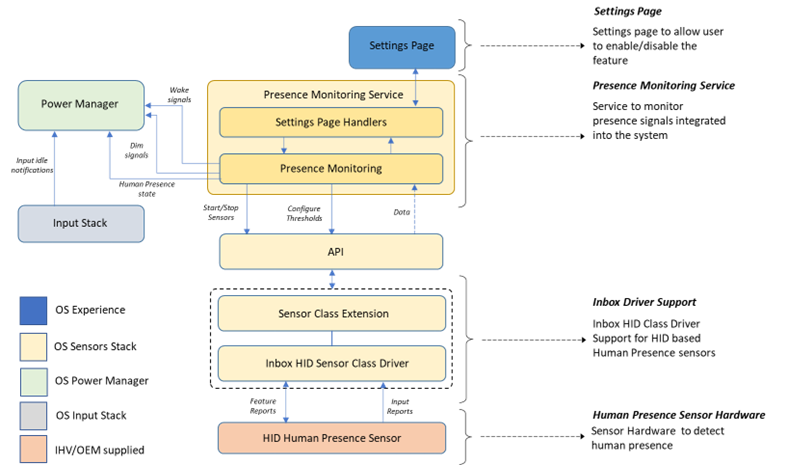
To enable the human presence features on Windows 11, additional hardware that supports the Microsoft defined presence sensor definition is required. The wake on approach and lock on leave features are available on all releases of Windows 11, while other features will be made available in future versions which will be called out in the document. HID components are optional but recommended and may be replaced with a custom sensors class extension driver.
Settings entry points
- Windows Settings:
ms-settings:presenceopens the Presence sensing page directly. - Privacy Settings:
ms-settings:privacy
Out-of-box experience (OOBE)
Devices with presence sensors can surface Presence sensing during setup so users can opt in before first sign‑in. The OEM has the ability to configure the default state of Presence Sensing features (see section below). The user must opt-in for any Presence sensing to be enabled. As a summary of potential states for OOBE toggle as of Windows 11 25H2:
| User Toggle State | OEM Default Set to ON | OEM Default to OFF |
|---|---|---|
| On | Apps can access the Presence Sensor, Presence sensing OS features are turned ON. | Apps can access the Presence Sensor, Presence sensing OS features are turned OFF. |
| Off | Apps can NOT access the Presence Sensor, Presence sensing OS features are turned OFF. | Apps can NOT access the Presence Sensor, Presence sensing OS features are turned OFF. |
Enterprise Configuration
IT Administrators can configure their devices default behaviours for Presence Sensing with the settings documented in the CSP, see HumanPresence CSP for details.
OEM Customizations
OEMs can configure their devices default behaviours for Presence Sensing with the settings documented in the Unattend reference, see Microsoft-Windows-Sensors-Core for details.
Power Settings
Additionally, there are new Adaptive Power subgroup power settings related to Presence Sensing. See Presence sensing power settings overview