Note
Access to this page requires authorization. You can try signing in or changing directories.
Access to this page requires authorization. You can try changing directories.
Applies to: SQL Server
Original KB number: 3135244
Summary
This article describes TLS 1.2 support for Microsoft SQL Server. It lists the SQL Server builds that enable TLS 1.2 server-side, the client drivers and providers that support TLS 1.2, the .NET Framework updates that SQL Server features depend on, and the most common errors you might see when TLS 1.2 is required but the components aren't up to date. SQL Server 2016, SQL Server 2017, SQL Server 2019, and SQL Server 2022 support TLS 1.2 natively and don't need a separate update. Out-of-mainstream versions (SQL Server 2008, 2008 R2, 2012, and 2014) need the updates listed in the tables below.
Known vulnerabilities exist for Secure Sockets Layer (SSL) and earlier versions of Transport Layer Security (TLS). Use TLS 1.2 (or TLS 1.3 where supported) for secure communication. On current Windows client and Windows Server releases, TLS 1.0 and TLS 1.1 are disabled by default, so client and server components must support TLS 1.2 or later to connect.
Important
No known vulnerabilities exist for the Microsoft TDS implementation, which is the protocol used between SQL Server clients and the SQL Server database engine. For background on the Schannel implementation of TLS 1.0, see the Windows security advisory from November 24, 2015.
Check whether you need this update
Use the following table to check whether your current version of SQL Server already supports TLS 1.2 or whether you need to install an update to enable TLS 1.2 support. Use the download links in the table to get the server updates that apply to your environment.
Note
Builds that are later than those listed in this table also support TLS 1.2.
| SQL Server release | Initial build/release that supported TLS 1.2 | Current updates with TLS 1.2 support | Additional information |
|---|---|---|---|
| SQL Server 2014 SP1 CU | 12.0.4439.1 SP1 CU5 |
KB3130926 - Cumulative Update 5 for SQL Server 2014 SP1 Note: KB3130926 now installs the last CU produced for 2014 SP1 (CU13 - KB4019099), which includes TLS 1.2 support and all hotfixes released to date. If needed, CU5 is available in the Windows Update Catalog. Note: TLS 1.2 support is also available in 2014 SP2 and 2014 SP3. |
KB3052404 - FIX: You cannot use the Transport Layer Security protocol version 1.2 to connect to a server that is running SQL Server 2014 or SQL Server 2012 |
| SQL Server 2014 SP1 GDR | 12.0.4219.0 SP1 GDR TLS 1.2 Update |
TLS 1.2 support for 2014 SP1 GDR is available in the latest cumulative GDR update- KB4019091. Note: TLS 1.2 support is also available in 2014 SP2 and 2014 SP3. |
|
| SQL Server 2014 RTM CU | 12.0.2564.0 RTM CU12 |
KB3130923 - Cumulative Update 12 for SQL Server 2014 Note: KB3130923 now installs the last CU released for 2014 RTM (CU14 - KB3158271 ), which includes TLS 1.2 support and all hotfixes released to date. If needed, CU12 is available in Windows Update Catalog. Note: TLS 1.2 support is also available in 2014 SP2 and 2014 SP3. |
KB3052404 - FIX: You cannot use the Transport Layer Security protocol version 1.2 to connect to a server that is running SQL Server 2014 or SQL Server 2012 |
| SQL Server 2014 RTM GDR | 12.0.2271.0 RTM GDR TLS 1.2 Update |
TLS Support for SQL 2014 RTM is currently only available by installing 2014 SP2 and 2014 SP3. | |
| SQL Server 2012 SP3 GDR | 11.0.6216.27 SP3 GDR TLS 1.2 Update |
Description of the security update for SQL Server 2012 SP3 GDR: January 16, 2018 Note: TLS 1.2 support is also available in 2012 SP4. |
|
| SQL Server 2012 SP3 CU | 11.0.6518.0 SP1 CU3 |
KB3123299 - Cumulative Update 1 for SQL Server 2012 SP3 Note: KB3123299 now installs the last CU released for 2012 SP3 (CU10 - KB4025925, which includes TLS 1.2 support and all hotfixes released to date). If needed, CU1 is available in Windows Update Catalog. Note: TLS 1.2 support is also available in 2012 SP4. |
KB3052404 - FIX: You cannot use the Transport Layer Security protocol version 1.2 to connect to a server that is running SQL Server 2014 or SQL Server 2012 |
| SQL Server 2012 SP2 GDR | 11.0.5352.0 SP2 GDR TLS 1.2 Update |
TLS 1.2 support for 2012 SP2 GDR is available in the latest cumulative GDR update - KB3194719. TLS 1.2 support is also available in 2012 SP3 and 2012 SP4. |
|
| SQL Server 2012 SP2 CU | 11.0.5644.2 SP2 CU10 |
KB3120313 - Cumulative Update 10 for SQL Server 2012 SP2. Note: KB3120313 now installs the last CU released for 2012 SP2 (CU16 - KB3205054, which includes TLS 1.2 support and all hotfixes released to date). If needed, CU1 is available in Windows Update Catalog. Note: TLS 1.2 support is also available in 2012 SP3 and 2012 SP4. |
KB3052404 - FIX: You cannot use the Transport Layer Security protocol version 1.2 to connect to a server that is running SQL Server 2014 or SQL Server 2012 |
| SQL Server 2008 R2 SP3 (x86/x64 only) | 10.50.6542.0 SP2 TLS 1.2 Update |
TLS 1.2 support is available in the latest cumulative update for SQL Server 2008 R2 SP3 - KB4057113. | |
| SQL Server 2008 R2 SP2 GDR (IA-64 only) | 10.50.4047.0 SP2 TLS 1.2 Update |
SQL Server 2008 R2 SP2 GDR (IA-64) TLS 1.2 Updates | |
| SQL Server 2008 R2 SP2 CU (IA-64 only) | 10.50.4344.0 SP2 TLS 1.2 Update |
SQL Server 2008 R2 SP2 GDR (IA-64) TLS 1.2 Updates | |
| SQL Server 2008 SP4 (x86/x64 only) | 10.0.6547.0 SP4 TLS 1.2 Update |
TLS 1.2 support is available in the latest cumulative update for SQL Server 2008 SP4 - KB4057114(x86/x64 only). | |
| SQL Server 2008 SP3 GDR (IA-64 only) | 10.0.5545.0 SP3 TLS 1.2 Update |
SQL Server 2008 SP3 GDR (IA-64) TLS 1.2 Updates | |
| SQL Server 2008 SP3 CU (IA-64 only) | 10.0.5896.0 SP3 TLS 1.2 Update |
SQL Server 2008 SP3 CU (IA-64) TLS 1.2 Updates |
Client component downloads
Use the following table to download the client components and driver updates that are applicable to your environment.
| Client component/driver | Updates with TLS 1.2 support |
|---|---|
| SQL Server Native Client 10.0 for SQL Server 2008/2008 R2 (x86/x64/IA64) | Microsoft SQL Server 2008 and SQL Server 2008 R2 Native Client |
| SQL Server Native Client 11.0 for SQL Server 2012/2014 (x86/x64) | Microsoft SQL Server 2012 Native Client - QFE |
| MDAC Client components (Sqlsrv32.dll and Sqloledb.dll) | Servicing stack update for Windows 10, version 1809: November 10, 2020 |
Client driver and provider support for TLS 1.2
The following table summarizes TLS 1.2 support across SQL Server drivers and providers:
| Driver | TLS 1.2 support | Note |
|---|---|---|
| Microsoft ODBC Driver for SQL Server 11 | Yes, with updates | Install the latest cumulative update for SQL Server 2012 or SQL Server 2014. (See the table in the Check whether you need this update section.) |
| Microsoft ODBC Driver for SQL Server 13 | Yes | Supports TLS 1.2 natively. |
| Microsoft ODBC Driver for SQL Server 17 | Yes | Supports TLS 1.2 natively. |
| Microsoft ODBC Driver for SQL Server 18 | Yes | Supports TLS 1.2 natively. |
| Microsoft OLE DB Driver for SQL Server 19 (MSOLEDBSQL) | Yes | Supports TLS 1.2 natively. |
| SQL Server Native Client 10 | Yes, with updates | Install the latest cumulative update for SQL Server 2008 or SQL Server 2008 R2. (See the table in the Check whether you need this update section.) |
| SQL Server Native Client 11 | Yes, with updates | Install the latest cumulative update for SQL Server 2012 or SQL Server 2014. (See the table in the Check whether you need this update section.) |
| SQL Server ODBC Driver (SQLSRV32.DLL) | Yes, for certain OSs | Added support in Windows Server 2019 and Windows 10. Earlier OS versions don't support it. |
| SQL Server OLE DB Provider (SQLOLEDB) | Yes, for certain OSs | Added support in Windows Server 2019 and Windows 10. Earlier OS versions don't support it. |
Other fixes needed for SQL Server to use TLS 1.2
Install the following .NET hotfix rollups to let SQL Server features that rely on .NET endpoints use TLS 1.2. Examples include Database Mail and SSIS components like the Web Service task.
| Operating System | .NET Framework version | Updates with TLS 1.2 support |
|---|---|---|
| Windows 7 Service Pack 1, Windows 2008 R2 Service Pack 1 | 3.5.1 | Support for TLS v1.2 included in the .NET Framework version 3.5.1 |
| Windows 8 RTM, Windows 2012 RTM | 3.5 | Support for TLS v1.2 included in the .NET Framework version 3.5 |
| Windows 8.1, Windows 2012 R2 SP1 | 3.5 SP1 | Support for TLS v1.2 included in the .NET Framework version 3.5 SP1 on Windows 8.1 and Windows Server 2012 R2 |
Frequently asked questions
Does SQL Server 2016 and later versions support TLS 1.1?
SQL Server 2016, SQL Server 2017 on Windows, SQL Server 2019 on Windows, and SQL Server 2022 support TLS 1.0 through TLS 1.2. The TLS versions that clients actually use depend on what the underlying Windows operating system enables. On current Windows releases, TLS 1.0 and TLS 1.1 are disabled by default. If you want to allow only TLS 1.2 (or later), disable the older protocols in Schannel.
Does SQL Server 2019 allow connections that use TLS 1.0 or 1.1, or only 1.2?
SQL Server 2019 has the same level of TLS support as SQL Server 2016 and SQL Server 2017. SQL Server 2019 RTM ships with TLS 1.2 support, and no other update or fix is needed to enable it. Schannel settings on the operating system control which TLS versions clients can actually use.
Is TDS affected by known vulnerabilities?
No known vulnerabilities exist for the Microsoft TDS implementation. Because several standards-enforcement organizations mandate the use of TLS 1.2 for encrypted communication channels, Microsoft is releasing support for TLS 1.2 for the widespread SQL Server installation base.
How will Microsoft distribute the TLS 1.2 updates to customers?
This article provides download links for the appropriate server and client updates that support TLS 1.2.
Does TLS 1.2 support SQL Server 2005?
TLS 1.2 support is offered only for SQL Server 2008 and later versions.
Are customers who aren't using SSL/TLS affected if SSL 3.0 and TLS 1.0 are disabled on the server?
Yes. SQL Server encrypts the user name and password during authentication even when a secure communication channel isn't otherwise used. The TLS 1.2 update is needed for any SQL Server instance where the only enabled protocol on the server is TLS 1.2.
Which versions of Windows Server support TLS 1.2?
Windows Server 2008 R2 and later versions support TLS 1.2.
What's the correct registry setting to enable TLS 1.2 for SQL Server communication?
The correct registry settings are as follows:
[HKEY_LOCAL_MACHINE\SYSTEM\CurrentControlSet\Control\SecurityProviders\SCHANNEL\Protocols\TLS 1.2][HKEY_LOCAL_MACHINE\SYSTEM\CurrentControlSet\Control\SecurityProviders\SCHANNEL\Protocols\TLS 1.2\Client] "DisabledByDefault"=dword:00000000 "Enabled"=dword:00000001[HKEY_LOCAL_MACHINE\SYSTEM\CurrentControlSet\Control\SecurityProviders\SCHANNEL\Protocols\TLS 1.2\Server] "DisabledByDefault"=dword:00000000 "Enabled"=dword:00000001
These settings are required for both server and client computers. The DisabledByDefault and Enabled settings are required to be created on Windows 7 clients and Windows Server 2008 R2 servers. On Windows 8 and later versions of the client operating systems or Windows Server 2012 server and later versions of the server operating systems, TLS 1.2 should already be enabled. If you're implementing a deployment policy for Windows Registry that needs to be independent of the OS release, add the mentioned registry keys to the policy.
In addition, if you're using Database Mail on your SQL Server, you also need to set the following .NET registry keys:
[HKEY_LOCAL_MACHINE\SOFTWARE\WOW6432Node\Microsoft\.NETFramework\v2.0.50727] "SystemDefaultTlsVersions"=dword:00000001 "SchUseStrongCrypto"=dword:00000001[HKEY_LOCAL_MACHINE\SOFTWARE\WOW6432Node\Microsoft\.NETFramework\v4.0.30319] "SystemDefaultTlsVersions"=dword:00000001 "SchUseStrongCrypto"=dword:00000001[HKEY_LOCAL_MACHINE\SOFTWARE\Microsoft\.NETFramework\v2.0.50727] "SystemDefaultTlsVersions"=dword:00000001 "SchUseStrongCrypto"=dword:00000001[HKEY_LOCAL_MACHINE\SOFTWARE\Microsoft\.NETFramework\v4.0.30319] "SystemDefaultTlsVersions"=dword:00000001 "SchUseStrongCrypto"=dword:00000001
Known issues
SSMS, Report Server, and Report Manager can't connect after you apply the TLS 1.2 fix
SQL Server Management Studio (SSMS), Report Server, and Report Manager don't connect to the database engine after you apply the fix for SQL Server 2008, 2008 R2, 2012, or 2014. Report Server and Report Manager fail and return the following error message:
The report server cannot open a connection to the report server database. A connection to the database is required for all requests and processing. (rsReportServerDatabaseUnavailable)
This issue occurs because SSMS, Report Manager, and Reporting Services Configuration Manager use ADO.NET, and ADO.NET support for TLS 1.2 is available only in the .NET Framework 4.6. For earlier versions of the .NET Framework, you need to apply a Windows update so that ADO.NET can support TLS 1.2 communications for the client. The Windows updates that enable TLS 1.2 support in earlier versions of the .NET framework are listed in the table in the Check whether you need this update section.
Reporting Services Configuration Manager pre-login handshake fails
Reporting Services Configuration Manager reports the following error message even after you update client providers to a version that supports TLS 1.2:
Could not connect to server: A connection was successfully established to the server, but then an error occurred during the pre-login handshake.
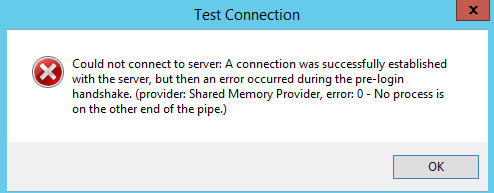
To fix this problem, manually create the following registry key on the system that hosts the Reporting Services Configuration Manager:
HKEY_LOCAL_MACHINE\SYSTEM\CurrentControlSet\Control\SecurityProviders\SCHANNEL\Protocols\TLS 1.2\Client: "Enabled"=dword:00000001
Encrypted endpoint communication fails for Availability Groups, Database Mirroring, or Service Broker
The encrypted endpoint communication that uses TLS 1.2 fails when you use encrypted communications for Availability Groups, Database Mirroring, or Service Broker in SQL Server. An error message that resembles the following one is logged in the SQL error log:
Connection handshake failed. An OS call failed: (80090331) 0x80090331(The client and server cannot communicate, because they do not possess a common algorithm.). State 56.
For more information about this issue, see FIX: The encrypted endpoint communication with TLS 1.2 fails when you use SQL Server.
Errors when you install SQL Server 2012 or 2014 with TLS 1.2 enabled
Different errors occur when you try to install SQL Server 2012 or SQL Server 2014 on a server that has TLS 1.2 enabled.
For more information, see FIX: Error when you install SQL Server 2012 or SQL Server 2014 on a server that has TLS 1.2 enabled.
Encrypted connection for Database Mirroring or Availability Groups fails with an MD5 certificate
An encrypted connection with Database Mirroring or Availability Groups doesn't work when you use a certificate after you disable all other protocols other than TLS 1.2. You might see one or both of the following error messages.
An error message that resembles the following one is logged in the SQL Server error log:
Connection handshake failed. An OS call failed: (80090331) 0x80090331(The client and server cannot communicate, because they do not possess a common algorithm.). State 58.'
An error message that resembles the following one is logged in the Windows event log:
Log Name:      System
Source:        Schannel
Date:          <Date Time>
Event ID:      36888
Task Category: None
Level:         Error
Keywords:
User:          SYSTEM
Computer:      ------------
Description:
A fatal alert was generated and sent to the remote endpoint. This may result in termination of the connection. The TLS protocol defined fatal error code is 40. The Windows SChannel error state is 1205.

Log Name:      System
Source:        Schannel
Date:          <Date Time>
Event ID:      36874
Task Category: None
Level:         Error
Keywords:
User:          SYSTEM
Computer:      -----------
Description:
An TLS 1.2 connection request was received from a remote client application, but none of the cipher suites supported by the client application are supported by the server. The SSL connection request has failed.
This issue occurs because Availability Groups and Database Mirroring require a certificate that doesn't use fixed length hash algorithms, such as MD5. Fixed length hashing algorithms aren't supported in TLS 1.2.
For more information, see FIX: Communication using MD5 hash algorithm fails if SQL Server uses TLS 1.2.
Intermittent SQL Server service termination on SQL Server 2008 and 2008 R2
The following SQL Server database engine versions are affected by the intermittent service termination issue that's reported in Knowledge Base article 3146034. To protect yourself from the service termination issue, install the TLS 1.2 updates for SQL Server that are mentioned in this article if your SQL Server version is listed in the following table:
| SQL Server release | Affected version |
|---|---|
| SQL Server 2008 R2 SP3 (x86 and x64) | 10.50.6537.0 |
| SQL Server 2008 R2 SP2 GDR (IA-64 only) | 10.50.4046.0 |
| SQL Server 2008 R2 SP2 (IA-64 only) | 10.50.4343.0 |
| SQL Server 2008 SP4 (x86 and x64) | 10.0.6543.0 |
| SQL Server 2008 SP3 GDR (IA-64 only) | 10.0.5544.0 |
| SQL Server 2008 SP3 (IA-64 only) | 10.0.5894.0 |
Database Mail doesn't work with TLS 1.2
Database Mail fails with the following error:
Microsoft.SqlServer.Management.SqlIMail.Server.Common.BaseException: Mail configuration information could not be read from the database. Unable to start mail session.
For more information, see Other fixes needed for SQL Server to use TLS 1.2.
SCCM can't connect to SQL Server after TLS 1.2 is enabled
System Center Configuration Manager (SCCM) can't connect to SQL Server after the TLS 1.2 protocol is enabled on SQL Server. In this situation, you get the following error message:
TCP Provider: An existing connection was forcibly closed by the remote host
This issue might occur when SCCM uses a SQL Server Native Client driver that doesn't have a fix. To fix this issue, download and install the client fix that's listed in the Client component downloads section. For example, Microsoft SQL Server 2012 Native Client - QFE.
You can find out which driver SCCM is using to connect to SQL Server by viewing the SCCM log, as shown in the following example:
[SQL Server Native Client 11.0]TCP Provider: An existing connection was forcibly closed by the remote host.~~  $$<Configuration Manager Setup><08-22-2016 04:15:01.917+420><thread=2868 (0xB34)>
 *** [08001][10054][Microsoft][SQL Server Native Client 11.0]Client unable to establish connection  $$<Configuration Manager Setup><08-22-2016 04:15:01.917+420><thread=2868 (0xB34)>
 *** Failed to connect to the SQL Server, connection type: SMS ACCESS.  $$<Configuration Manager Setup><08-22-2016 04:15:01.917+420><thread=2868 (0xB34)>
 INFO: SQL Connection failed. Connection: SMS ACCESS, Type: Secure  $$<Configuration Manager Setup><08-22-2016 04:15:01.917+420><thread=2868 (0xB34)>Native Client 11.0]TCP Provider: An existing connection was forcibly closed by the remote host.~~  $$<Configuration Manager Setup><08-22-2016 04:15:01.917+420><thread=2868 (0xB34)>
 *** [08001][10054][Microsoft][SQL Server Native Client 11.0]Client unable to establish connection  $$<Configuration Manager Setup><08-22-2016 04:15:01.917+420><thread=2868 (0xB34)>
 *** Failed to connect to the SQL Server, connection type: SMS ACCESS.  $$<Configuration Manager Setup><08-22-2016 04:15:01.917+420><thread=2868 (0xB34)>
 INFO: SQL Connection failed. Connection: SMS ACCESS, Type: Secure  $$<Configuration Manager Setup><08-22-2016 04:15:01.917+420><thread=2868 (0xB34)>