NAS file permissions in Azure NetApp Files
You can control access to specific files and folders in a file system. File and folder permissions are more granular than share permissions.
Note
File and folder permissions can overrule share permissions.
Permission inheritance
Folders can be assigned inheritance flags, which means that parent folder permissions propagate to child objects. Inheritance can also be disabled on specific files or folders as needed.
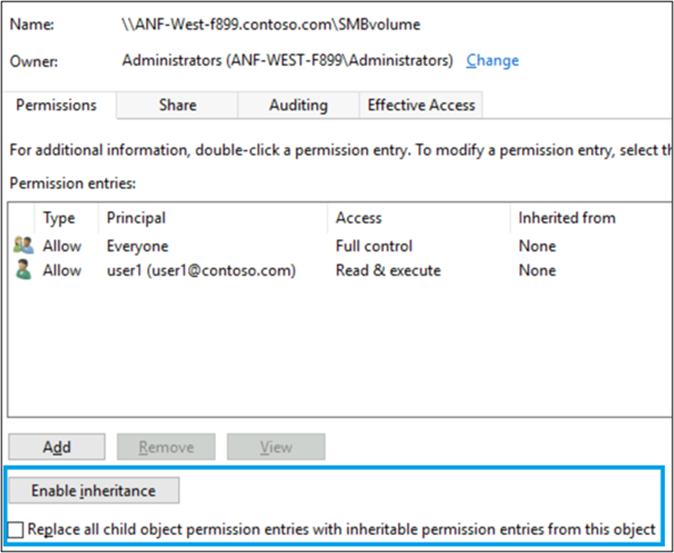
In Windows SMB shares, inheritance is controlled in the advanced permission view.
For NFSv3, permission inheritance doesn't work via ACL, but instead can be mimicked using umask and setgid flags.
With NFSv4.1, permission inheritance can be handled using inheritance flags on ACLs.
SMB file permissions in Azure NetApp Files
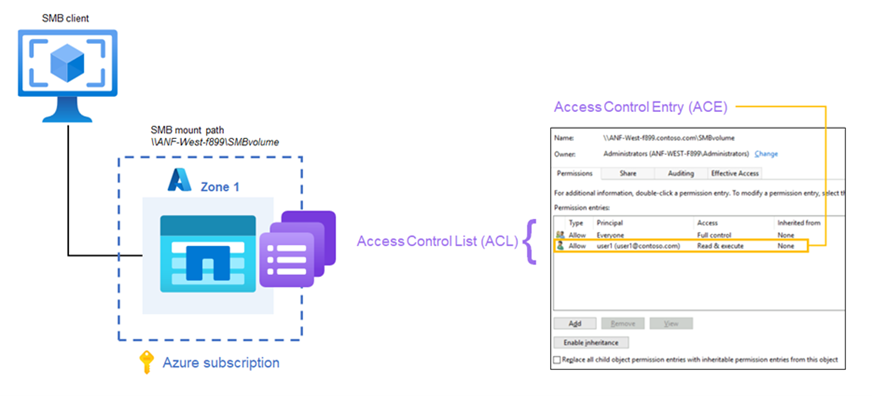
SMB volumes in Azure NetApp Files can leverage NTFS security styles to make use of NTFS access control lists (ACLs) for access controls. NTFS ACLs provide granular permissions and ownership for files and folders by way of access control entries (ACEs). Directory permissions can also be set to enable or disable inheritance of permissions.
NFS permissions
NFS file access permissions limit what users and groups can do once a NAS volume is mounted.
NFS mode bits
Mode bits are a key feature of NFS file permissions in Azure NetApp Files. Mode bit permissions in NFS provide basic permissions for files and folders, using a standard numeric representation of access controls. Mode bits can be used with either NFSv3 or NFSv4.1, but mode bits are the standard option for securing NFSv3.
The following table shows how those numeric values correspond to access controls.
| Number | Function |
|---|---|
| 1 | execute (x) |
| 2 | write (w) |
| 3 | write/execute (wx) |
| 4 | read (r) |
| 5 | read/execute (rx) |
| 6 | read/write (rw) |
| 7 | read/write/execute (rwx) |
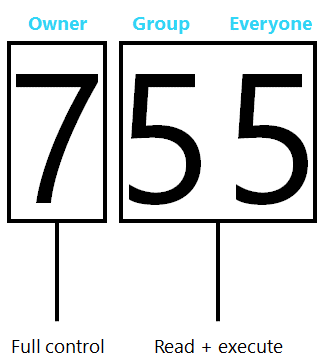
Numeric values are applied to different segments of an access control: owner, group and everyone else, meaning that there are no granular user access controls in place for basic NFSv3.
The following image shows an example of how a mode bit access control might be constructed for use with an NFSv3 object.
Auxiliary/supplemental groups with NFS in Azure NetApp Files
NFS has a specific limitation for the maximum number of auxiliary GIDs (secondary groups) that can be honored in a single NFS request.
- The maximum for AUTH_SYS/AUTH_UNIX is 16.
- For AUTH_GSS (Kerberos), the maximum is 32.
Azure NetApp Files provides the ability to increase the maximum number of auxiliary groups to 1,024. The options to extend the group limitation work the same way the -manage-gids option for other NFS servers works. The command: -g or --manage-gids. When an access request is made, only 16 GIDs are passed in the RPC portion of the packet.
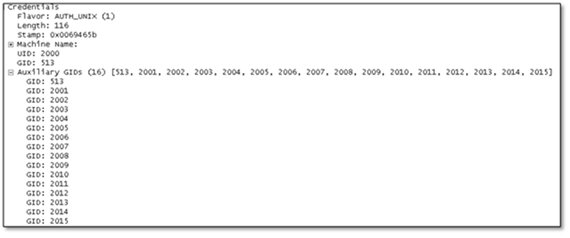
Any GID beyond the limit of 16 is dropped by the protocol. Extended GIDs in Azure NetApp Files can only be used with external name services such as LDAP.
NFSv4.x access control lists in Azure NetApp Files
The NFSv4.x protocol can provide access control in the form of access control lists (ACLs), which care similar to ACLs used in SMB using Windows NTFS permissions.
An NFSv4.x ACL consists of individual Access Control Entries (ACEs), each of which provides an access control directive to the server.
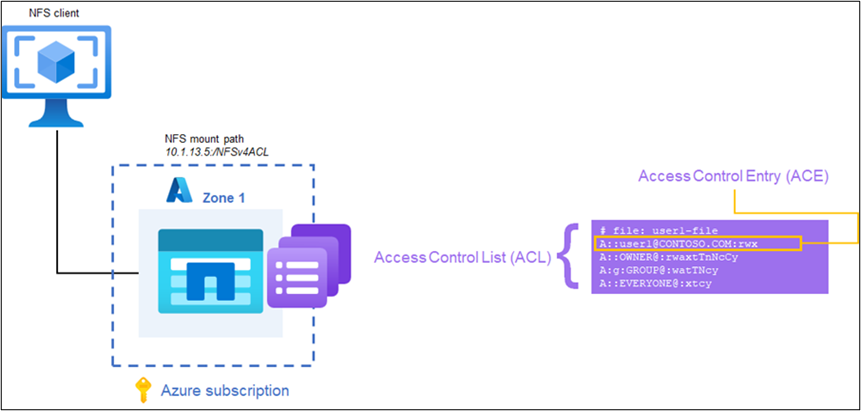
Each NFSv4.x ACL is created with the format of type:flags:principal:permissions. A:g:group1@contoso.com:rwatTnNcCy is an example of a valid ACL.
- Type: The type of ACL being defined. Valid choices include Access (A), Deny (D), Audit (U), Alarm (L). Azure NetApp Files supports Access, Deny and Audit ACL types, but Audit ACLs, while being able to be set, don't currently produce audit logs.
- Flag: Adds extra context for an ACL. There are three kinds of ACE flags: group, inheritance, and administrative. For more information on flags, see NFSv4.x ACE flags.
- Principal: Defines the user or group that is being assigned the ACL. A principal on an NFSv4.x ACL uses the format of name@ID-DOMAIN-STRING.COM. For more detailed information on principals, see NFSv4.x user and group principals.
- Permissions: Where the access level for the principal is defined. Each permission is designated a single letter (for instance, read gets “r”, write gets “w” and so on). Full access would incorporate each available permission letter. For more information, see NFSv4.x permissions.
Example of NFSv4.x ACL
# nfs4_getfacl acl-dir
# file: acl-dir/
A:di:user1@CONTOSO.COM:rwaDxtTnNcCy
A:fdi:user2@CONTOSO.COM:rwaDxtTnNcCy
A:fi:user3@CONTOSO.COM:rwaDxtTnNcCy
A::OWNER@:rwaDxtTnNcCy
A:g:GROUP@:rxtncy
A::EVERYONE@:rxtncy
To learn more about the NFSv4.x ACE flags, NFSv4.x permissions, and how NFSv4.x ACLs work, see Azure NetApp Files Access Control Lists.