Note
Access to this page requires authorization. You can try signing in or changing directories.
Access to this page requires authorization. You can try changing directories.
Applies to:  SQL Server on Windows
Azure SQL Managed Instance
SQL Server on Windows
Azure SQL Managed Instance
This article explains how to use PolyBase on a SQL Server instance to query external data in Hadoop.
Note
Starting in SQL Server 2022 (16.x), Hadoop is no longer supported in PolyBase.
Prerequisites
- If PolyBase isn't installed, see PolyBase installation. The installation article explains the prerequisites.
- Starting with SQL Server 2019 (15.x), you must also enable the PolyBase feature.
- PolyBase supports two Hadoop providers: Hortonworks Data Platform (HDP) and Cloudera Distributed Hadoop (CDH). Hadoop follows the "Major.Minor.Version" pattern for its new releases, and all versions within a supported major and minor release are supported. For information on supported versions of Hortonworks Data Platform (HDP) and Cloudera Distributed Hadoop (CDH), see PolyBase Connectivity Configuration.
Note
PolyBase supports Hadoop encryption zones starting with SQL Server 2016 SP1 CU7 and SQL Server 2017 CU3. If you're using PolyBase scale-out groups, all compute nodes must also be on a build that includes support for Hadoop encryption zones.
Configure Hadoop connectivity
First, configure SQL Server PolyBase to use your specific Hadoop provider.
Run sp_configure with 'hadoop connectivity' and set an appropriate value for your provider. To find the value for your provider, see PolyBase Connectivity Configuration.
-- Values map to various external data sources.
-- Example: value 7 stands for Hortonworks HDP 2.1 to 2.6 on Linux,
-- 2.1 to 2.3 on Windows Server, and Azure Blob Storage
sp_configure @configname = 'hadoop connectivity', @configvalue = 7;
GO

RECONFIGURE
GO
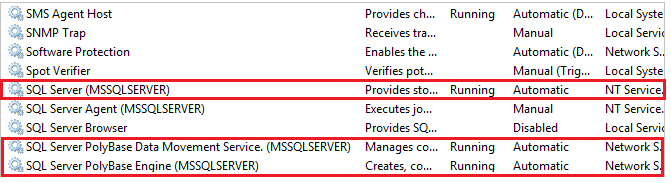
Restart SQL Server by using services.msc. Restarting SQL Server also restarts these services:
- SQL Server PolyBase Data Movement Service
- SQL Server PolyBase Engine
Enable pushdown computation
To improve query performance, enable pushdown computation to your Hadoop cluster:
Find the file yarn-site.xml in the installation path of SQL Server. Typically, the path is:
C:\Program Files\Microsoft SQL Server\MSSQL13.MSSQLSERVER\MSSQL\Binn\PolyBase\Hadoop\conf\On the Hadoop machine, find the analogous file in the Hadoop configuration directory. In the file, find and copy the value of the configuration key
yarn.application.classpath.On the SQL Server machine, in the yarn-site.xml file, find the yarn.application.classpath property. Paste the value from the Hadoop machine into the value element.
For all CDH 5.X versions, add the
mapreduce.application.classpathconfiguration parameters either to the end of youryarn-site.xmlfile or into themapred-site.xmlfile. HortonWorks includes these configurations within theyarn.application.classpathconfigurations. See PolyBase configuration for examples.
Important
To use the computation pushdown functionality with Hadoop, the target Hadoop cluster must have the core components of HDFS, YARN, and MapReduce, with the job history server enabled. PolyBase submits the pushdown query via MapReduce and pulls status from the job history server. Without either component, the query fails.
Configure an external table
To query the data in your Hadoop data source, you must define an external table to use in Transact-SQL queries. The following steps describe how to configure the external table.
Create a master key on the database, if one does not already exist. This is required to encrypt the credential secret.
CREATE MASTER KEY ENCRYPTION BY PASSWORD = 'password';Arguments
PASSWORD ='password'
Use this password to encrypt the master key in the database. The password must meet the Windows password policy requirements of the computer that hosts the instance of SQL Server.
Create a database scoped credential for Kerberos-secured Hadoop clusters.
-- IDENTITY: the Kerberos user name.
-- SECRET: the Kerberos password
CREATE DATABASE SCOPED CREDENTIAL HadoopUser1
WITH IDENTITY = '<hadoop_user_name>', Secret = '<hadoop_password>';
Create an external data source with CREATE EXTERNAL DATA SOURCE.
-- LOCATION (Required) : Hadoop Name Node IP address and port.
-- RESOURCE MANAGER LOCATION (Optional): Hadoop Resource Manager location to enable pushdown computation.
-- CREDENTIAL (Optional):  the database scoped credential, created above.
CREATE EXTERNAL DATA SOURCE MyHadoopCluster WITH (
      TYPE = HADOOP,
      LOCATION ='hdfs://10.xxx.xx.xxx:xxxx',
      RESOURCE_MANAGER_LOCATION = '10.xxx.xx.xxx:xxxx',
      CREDENTIAL = HadoopUser1
);
Create an external file format with CREATE EXTERNAL FILE FORMAT.
-- FORMAT TYPE: Type of format in Hadoop (DELIMITEDTEXT,  RCFILE, ORC, PARQUET).
CREATE EXTERNAL FILE FORMAT TextFileFormat WITH (
      FORMAT_TYPE = DELIMITEDTEXT,
      FORMAT_OPTIONS (FIELD_TERMINATOR ='|',
            USE_TYPE_DEFAULT = TRUE))
Create an external table pointing to data stored in Hadoop with CREATE EXTERNAL TABLE. In this example, the external data contains car sensor data.
-- LOCATION: path to file or directory that contains the data (relative to HDFS root).
CREATE EXTERNAL TABLE [dbo].[CarSensor_Data] (
      [SensorKey] int NOT NULL,
      [CustomerKey] int NOT NULL,
      [GeographyKey] int NULL,
      [Speed] float NOT NULL,
      [YearMeasured] int NOT NULL
)
WITH (LOCATION='/Demo/',
      DATA_SOURCE = MyHadoopCluster,
      FILE_FORMAT = TextFileFormat
);
Create statistics on an external table.
CREATE STATISTICS StatsForSensors on CarSensor_Data(CustomerKey, Speed)
PolyBase queries
PolyBase works well in the following scenarios:
- Running ad hoc queries against external tables.
- Importing data.
- Exporting data.
The following examples use fictional car sensor data.
Ad hoc queries
The following ad hoc query joins relational data with Hadoop data. It selects customers who drive faster than 35 mph by joining structured customer data stored in SQL Server with car sensor data stored in Hadoop.
SELECT DISTINCT Insured_Customers.FirstName,Insured_Customers.LastName,
       Insured_Customers. YearlyIncome, CarSensor_Data.Speed
FROM Insured_Customers, CarSensor_Data
WHERE Insured_Customers.CustomerKey = CarSensor_Data.CustomerKey and CarSensor_Data.Speed > 35
ORDER BY CarSensor_Data.Speed DESC
OPTION (FORCE EXTERNALPUSHDOWN);   -- or OPTION (DISABLE EXTERNALPUSHDOWN)
Importing data
The following query imports external data into SQL Server. This example imports data for fast drivers into SQL Server so you can do more in-depth analysis. To improve performance, the sample uses a columnstore index.
SELECT DISTINCT
      Insured_Customers.FirstName, Insured_Customers.LastName,
      Insured_Customers.YearlyIncome, Insured_Customers.MaritalStatus
INTO Fast_Customers from Insured_Customers INNER JOIN
(
      SELECT * FROM CarSensor_Data where Speed > 35
) AS SensorD
ON Insured_Customers.CustomerKey = SensorD.CustomerKey
ORDER BY YearlyIncome

CREATE CLUSTERED COLUMNSTORE INDEX CCI_FastCustomers ON Fast_Customers;
Exporting data
The following query exports data from SQL Server to Hadoop. First, enable PolyBase export. Then, create an external table for the destination before exporting data to it.
-- Enable INSERT into external table
sp_configure 'allow polybase export', 1;
reconfigure

-- Create an external table.
CREATE EXTERNAL TABLE [dbo].[FastCustomers2009] (
      [FirstName] char(25) NOT NULL,
      [LastName] char(25) NOT NULL,
      [YearlyIncome] float NULL,
      [MaritalStatus] char(1) NOT NULL
)
WITH (
      LOCATION='/old_data/2009/customerdata',
      DATA_SOURCE = HadoopHDP2,
      FILE_FORMAT = TextFileFormat,
      REJECT_TYPE = VALUE,
      REJECT_VALUE = 0
);

-- Export data: Move old data to Hadoop while keeping it query-able via an external table.
INSERT INTO dbo.FastCustomer2009
SELECT T.* FROM Insured_Customers T1 JOIN CarSensor_Data T2
ON (T1.CustomerKey = T2.CustomerKey)
WHERE T2.YearMeasured = 2009 and T2.Speed > 40;
View PolyBase objects in SSMS
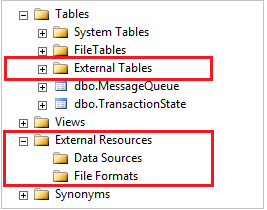
In SSMS, external tables appear in a separate folder named External Tables. External data sources and external file formats are located in subfolders under External Resources.
Next steps
For more tutorials on creating external data sources and external tables to a variety of data sources, see PolyBase Transact-SQL reference.
To explore more ways to use and monitor PolyBase, see the following articles: