Note
Access to this page requires authorization. You can try signing in or changing directories.
Access to this page requires authorization. You can try changing directories.
This article describes the different permission levels that you declare in your add-in's manifest to specify the level of JavaScript API access your add-in requires for its features.
Important
This article applies to only non-Outlook add-ins. To learn about permission levels for Outlook add-ins, see Understanding Outlook add-in permissions.
Permissions model
A five-level JavaScript API access-permissions model provides the basis for privacy and security for users of your add-ins. The following figure shows the five levels of API permissions you can declare in your add-in's manifest.
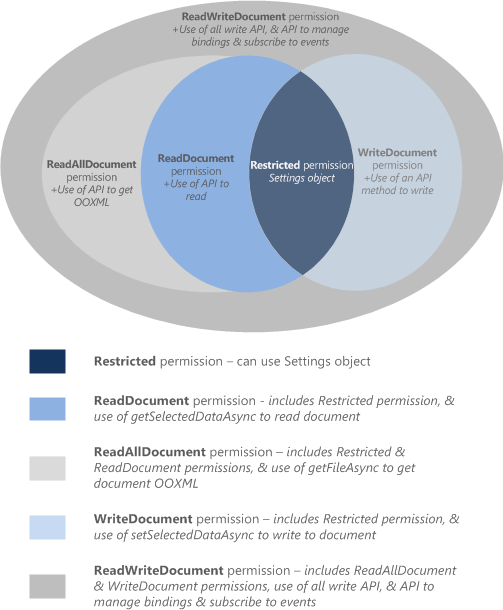
These permissions specify the subset of the API that the add-in runtime allows your add-in to use when a user inserts, and then activates (trusts) your add-in. To declare the permission level your add-in requires, specify one of the permission values in the manifest. The markup varies depending on the type of manifest.
| Permission canonical name | Add-in only manifest name | Unified manifest name |
|---|---|---|
| restricted | Restricted | Document.Restricted.User |
| read document | ReadDocument | Document.Read.User |
| read all document | ReadAllDocument | Document.ReadAll.User |
| write document | WriteDocument | Document.Write.User |
| read/write document | ReadWriteDocument | Document.ReadWrite.User |
Important
If your add-in uses the application-specific APIs, declare the read/write document permission in the manifest. This requirement applies even when your code only reads data.
Manifest declaration examples
Unified manifest for Microsoft 365: Use the
"authorization.permissions.resourceSpecific"property. The following example requests the read/write document permission."authorization": { "permissions": { "resourceSpecific": [ ... { "name": "Document.ReadWrite.User", "type": "Delegated" }, ] } },Add-in only manifest: Use the Permissions element of the manifest. The following example requests the read/write document permission.
<Permissions>ReadWriteDocument</Permissions>
Permission levels
The following table describes the subsets of the Common JavaScript APIs that each permission level enables. The application-specific APIs aren't controlled by this table. They always require the read/write document permission, even when your add-in only reads data.
| Permission canonical name | Add-in only manifest name | Unified manifest name | Enabled subset of the Common APIs |
|---|---|---|---|
| restricted | Restricted | Document.Restricted.User | The methods of the Settings object, and the Document.getActiveViewAsync method. This is the minimum permission level that an add-in can request. |
| read document | ReadDocument | Document.Read.User | In addition to the APIs allowed by the restricted permission, this level adds access to the APIs to read the document and manage bindings. This access includes the use of:
|
| read all document | ReadAllDocument | Document.ReadAll.User | In addition to the APIs allowed by the restricted and read document permissions, this level allows Document.getSelectedDataAsync and Document.getFileAsync methods. These APIs access the underlying OOXML code of the document.. |
| write document | WriteDocument | Document.Write.User | In addition to the APIs allowed by the restricted permission, this level adds access to the Document.setSelectedDataAsync method. This method writes the user's selection in the document. |
| read/write document | ReadWriteDocument | Document.ReadWrite.User | In addition to the API allowed by the restricted, read document, read all document, and write document permissions, this level includes access to all remaining APIs supported by add-ins, including methods for subscribing to events. You must declare the read/write document permission to access these additional APIs:
|
See also
Collaborate with us on GitHub
The source for this content can be found on GitHub, where you can also create and review issues and pull requests. For more information, see our contributor guide.
Office Add-ins