Note
Access to this page requires authorization. You can try signing in or changing directories.
Access to this page requires authorization. You can try changing directories.
With Microsoft 365, you receive new product updates and features as they become available instead of doing costly updates every few years. You can manage how your organization receives these updates. For example, you can sign up for an early release so that your organization receives updates first. You can designate that only certain individuals receive the updates. Or, you can remain on the default release schedule and receive the updates later. This article explains the different release options and how you can use them for your organization.
If your organization is using targeted release for Microsoft 365 services, you can continue to do so as we drive towards our converged release strategy. We recommend configuring release preferences for frontier, standard, and deferred audiences to align with the new release model as Microsoft begins delivering an increasing number of major features through it over time. Use the Microsoft Message Center to keep up with new products and services that use the new, audience-based release model. For information about modern release options for Microsoft 365, see Configure modern release options for Microsoft 365 Copilot.
Important
The Microsoft 365 updates described in this article apply to new Outlook, OneDrive, SharePoint in Microsoft 365, Microsoft 365 for the web, Microsoft 365 admin center, some components of Exchange Online and Microsoft Teams. These release options are targeted, best effort ways to release changes to Microsoft 365 but can't be guaranteed at all times or for all updates. They don't currently apply to services other than those listed previously. For information about release options for Microsoft 365 Apps, see Overview of update channels for Microsoft 365 Apps.
How release validation works
Any new release is first tested and validated by the feature team, then by the entire Microsoft 365 feature team, followed by all of Microsoft. After internal testing and validation, the next step is a Targeted release (formerly known as First release) to customers who opt in. At each release ring, Microsoft collects feedback and further validates quality by monitoring key usage metrics. This series of progressive validation is in place to make sure the worldwide-release is as robust as possible. The releases are pictured in the following figure.
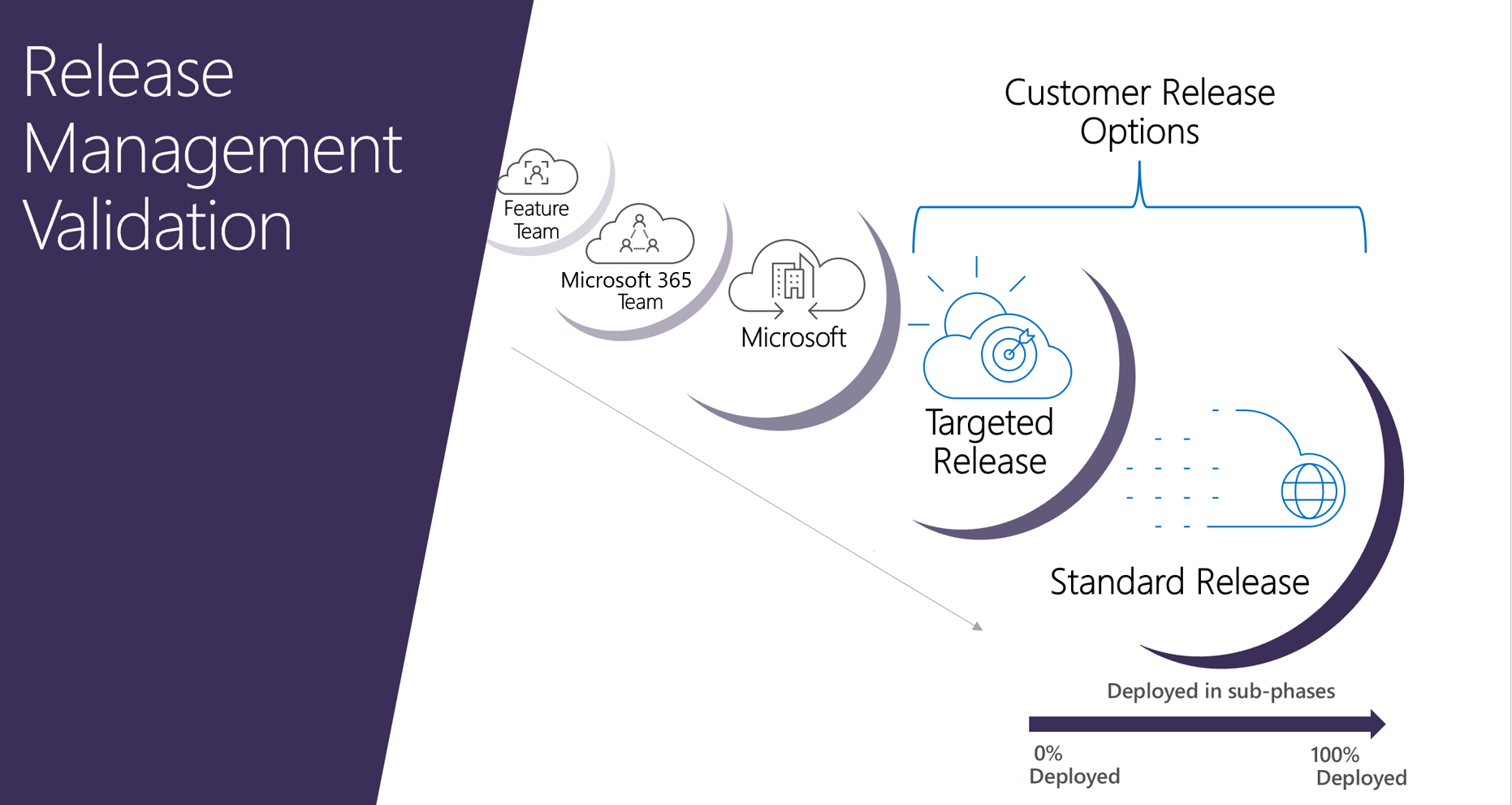
For significant updates, customers are initially notified by the Microsoft 365 Roadmap. As an update gets closer to rolling out, it's communicated through your Microsoft 365 Message center.
Standard release
For Microsoft 365, Standard release is the default option where you and your users receive the latest updates when they're released broadly to all customers.
Targeted release
With this option, you and your users can be the first to see the latest updates and help shape the product by providing early feedback. You can choose to have individuals or the entire organization receive updates early.
Important
Large or complex updates may take longer than others so that no users are adversely affected. There is no guarantee on the exact timeline of a release. Targeted release is now available for customers with either the Office 365 GCC plan or the Office 365 GCC High plan and DoD plan for the following services: new Outlook, OneDrive, SharePoint in Microsoft 365, Microsoft 365 for web, Microsoft 365 admin center, and some components of Exchange Online.
Note
If you switch from targeted release back to standard release track, your users may lose access to features that haven't reached standard release yet.
Targeted release for entire organization
If you Set up the release option in the admin center for this option, all your users will get the Targeted release experience. For organizations with more than 300 users, we recommend using a test subscription for this option. For test subscription information, reach out to your Microsoft contact.
Targeted release for selected users
If you Set up the release option in the admin center for this option, you can define specific users, usually power users, to receive early access to features and functionality.
It's important to ensure that your help desk is opted into Targeted release so that they have access to the Targeted release features needed to support your users.
Important
Some features only roll out on a per-organization basis. This means that the entire organization will receive access to the feature at the same time. For features like this, it’s not possible for selected users in the targeted release program to get the feature early. This means that your organization won't be able to receive these features early if you have configured selected users in targeted release. To make sure that you see all features in targeted release, you'll need to configure targeted release for the entire organization or set up a test organization.
Benefits of Targeted release
Targeted release allows admins, change managers, or anyone else responsible for Microsoft 365 updates to prepare for the upcoming changes by letting them:
- Test and validate new updates before they're released to all users in the organization.
- Prepare user notification and documentation before updates are released worldwide.
- Prepare internal help-desk for upcoming changes.
- Go through compliance and security reviews.
- Use feature controls, where applicable, to control the release of updates to end users.
Best practices for Targeted release
- Keep most users in standard release and assign IT pros and power users to targeted release to evaluate new features ahead of broader rollout. Targeted release users can then prepare user notifications, documentation, and the internal help desk before updates are released worldwide.
- Only assign specific users in targeted release.
- If you need to test a feature in targeted release with a larger group of users (or a tenant), consider using a test tenant instead of putting your entire organization in targeted release.
Set up the release option in the admin center
You can change how your organization receives Microsoft 365 updates by following these steps. You have to be a global admin in Microsoft 365 to opt in.
Important
Microsoft recommends that you use roles with the fewest permissions. Using roles with the fewest permissions helps improve security for your organization. Global Administrator is a highly privileged role that should be limited to emergency scenarios when you can't use an existing role. For more information, see About administrator roles in the Microsoft 365 admin center.
It can take up to 24 hours for the following changes to take effect in Microsoft 365. If you opt out of targeted release after enabling it, your users might lose access to features that haven't reached the scheduled release yet.
- In the admin center, go to the Settings > Org Setting, and under the Organization profile tab, choose Release preferences.
- To opt out of targeted release, select Standard release, then select Save changes.
- To enable targeted release for all users in your organization, select Targeted release for everyone, then select Save changes.
- To enable targeted release for some people in your organization, select Targeted release for selected users, then select Save.
- Choose Select users to add users one at a time, or Upload users to add them in bulk.
- When you're done adding users, select Save.

Next steps
Discover how to manage messages in your Microsoft 365 Message center to get notifications about upcoming Microsoft 365 updates and releases.
Related content
Modern change management for Microsoft 365 - Overview
Configure modern release options for Microsoft 365 Copilot
Get started with the Microsoft Release Communications MCP Server
Prepare for Microsoft 365 updates with Message center
Release notes for Outlook for Windows (new) Targeted Release