Note
Access to this page requires authorization. You can try signing in or changing directories.
Access to this page requires authorization. You can try changing directories.
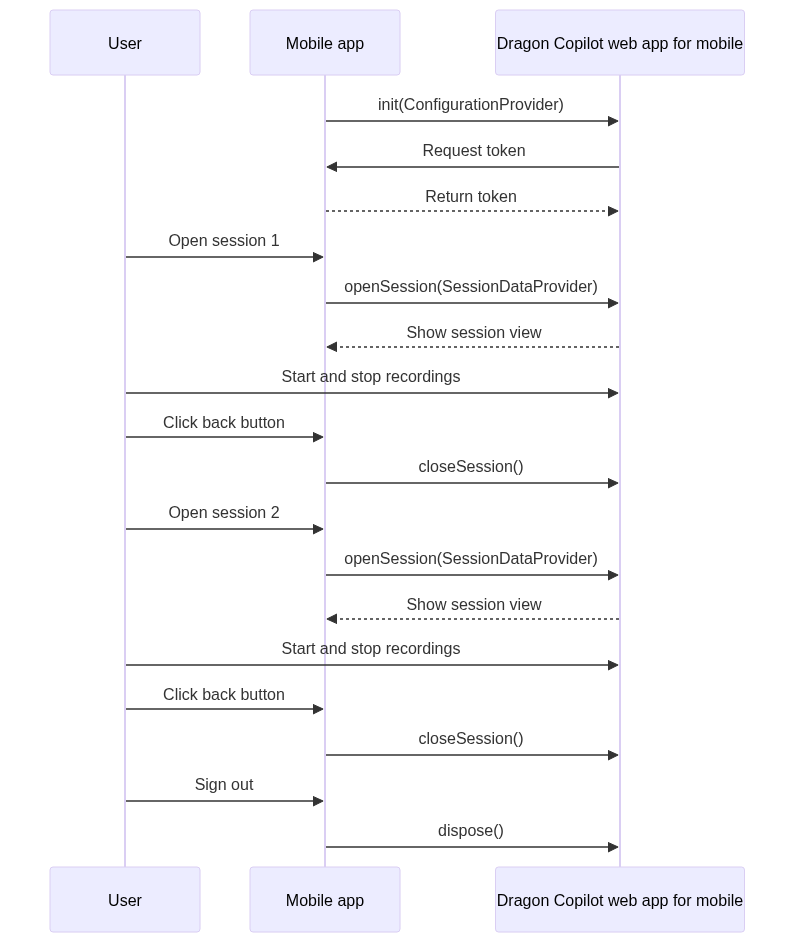
Your mobile app must interact with Dragon Copilot web app for mobile at different times during the workflow:
When the user launches the app and signs in, your app must check the license and do the following:
Acquire an access token.
Initialize Dragon Copilot web app for mobile.
Configure it for the user.
When the user selects an encounter in the app, your app must configure Dragon Copilot web app for mobile for the encounter.
When the user signs out, your app must notify Dragon Copilot web app for mobile to pause the upload of data to Dragon Copilot.
In addition, Dragon Copilot web app for mobile supports handling microphone interruptions.
The following diagrams illustrate the interactions between components in a Dragon Copilot web app for mobile integration:
Sequence diagram: Session initialization
Sequence diagram: Ambient recording
