Note
Access to this page requires authorization. You can try signing in or changing directories.
Access to this page requires authorization. You can try changing directories.
To integrate your AI apps and agents as Dragon Copilot extensions, you need to understand the workflow and overall architecture. You'll build an API endpoint that integrates with the Dragon Copilot workflow. There are two different flows that your extension can implement:
Iterative flow: Use this flow when your extension needs to interact with the audio turns from the encounter. For example, your extension might analyze the audio data and provide real-time feedback or suggestions based on the conversation.
End of encounter flow: Use this flow when your extension processes the entire encounter after it concludes. For example, your extension might analyze the full transcript and clinical note to generate a summary or identify key insights.
The following diagram illustrates the iterative data flow with authentication:
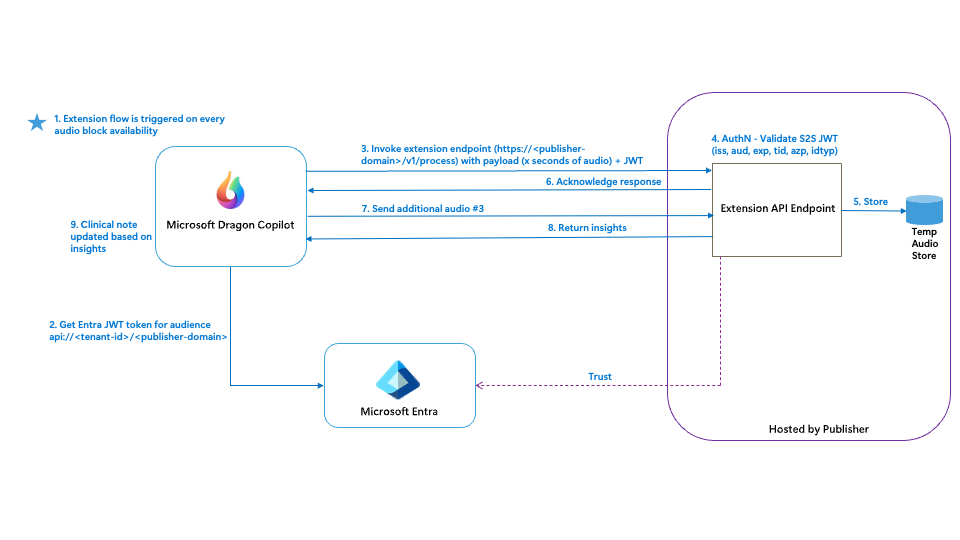
API endpoint schema
Dragon Copilot extensions must implement a RESTful API endpoint that adheres to the Dragon Copilot extensibility API schema. This schema defines the required endpoints, request and response formats, and supported operations. The schema is provided as an OpenAPI (Swagger) YAML file. Key elements include:
- POST /v1/process: The main entry point for Dragon Copilot to invoke your extension. The request payload includes session data, user context, and the requested encounter data.
- Response: Your extension must return a response that includes the result of the extension, such as an adaptive card payload, actions, and any additional data required by the client.
You can find the full schema in the dragon extensibility API schema file in the official samples repository.
Sample request and response
When Dragon Copilot calls your extension endpoint, it sends a JSON payload that includes session information, user context, and any relevant clinical data. Your extension processes this request and returns a structured response.
You can find examples in the sample requests and responses documentation.
Authentication
Secure communication between Dragon Copilot and your extension is essential. Authentication is handled using a Microsoft Entra service principal and OAuth 2.0. The process involves:
- Registering your extension as an application in Entra ID.
- Configuring additional properties on the application.
- Implementing token validation in your extension to ensure only authorized requests from Dragon Copilot are accepted.
- Registering the
Microsoft.HealthPlatformresource provider in your Azure subscription to enable integration.
For detailed steps, see the authentication and authorization design documentation.
Adaptive Card response
Your extension's response should include an Adaptive Card payload, which defines how the output is rendered in the Dragon Copilot app. Adaptive Cards are a JSON-based UI framework that allows you to present information and actions in a consistent, interactive format.
For more information, see Dragon Copilot adaptive card specification.
For general information on Adaptive Cards, see https://adaptivecards.io/.
Development flow
The following diagram shows the fundamental steps in the development journey to create and integrate a Dragon Copilot extension. The main stages, from local development to integration testing, are the following:
Local development and testing: Set up your development environment and create your extension.
Start by cloning the repo https://github.com/microsoft/dragon-copilot-extension-samples.
Use the sample code and API schema in the sample repo to ensure compatibility with Dragon Copilot.
Use a REST client to test your API.
Authentication setup: Configure authentication for the Dragon Copilot platform to securely communicate with your extension. Set up service principals and register the required Azure resource providers.
Integration testing or sandbox testing: Test your application locally by using tools like dev tunnels to simulate a public URL.
Build the technical configuration package: For information about the technical configuration package and the Dragon Copilot CLI tool, see Build the technical configuration package for your AI apps and agents.
Deploy to your test environment: Deploy your extension in your Dragon admin center test environment. This step makes your extension available for internal testing.
Publish: Create an offer in Partner Center. This step makes your extension available for customer healthcare organizations.

Glossary
- Client: The Dragon Copilot app where users interact with your extension. This can be the Microsoft Dragon Copilot desktop, web, or mobile apps. It can also be an EHR that embeds the Dragon Copilot web UI.
- Dev tunnel: A service that creates a publicly accessible URL for your locally running application. Use this service for local integration testing. For more information, see Dev tunnels documentation.
- Dragon admin center: The administration platform for a Dragon Copilot organization. Dragon administrators use it to provision Dragon products, set up environments, and configure Dragon Copilot settings for their users. This admin center is where admins install AI apps and agents for their environments. For more information, see Dragon admin center documentation.
- Local application: Your app running on your local machine.
- Platform: Handles all the Dragon Copilot related operations, including keeping a record of your manifest, and calling your endpoint based on the contract.
- Production application: Your deployed app, which has a publicly accessible URL.