Note
Access to this page requires authorization. You can try signing in or changing directories.
Access to this page requires authorization. You can try changing directories.
| Enabled for | Public preview | General availability |
|---|---|---|
| Users by admins, makers, or analysts | - |  Feb 13, 2026
 |
Business value
You’ll reduce clicks and speed up decision‑making by making list data easier to scan. With labels shown before values, your frontline workers can differentiate records at a glance, cutting time spent opening items and improving task throughput.
Feature details
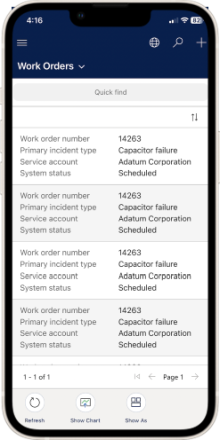
The Power Apps Grid control on mobile can now show column labels before their values. It also supports more columns while removing avatar icons for tighter, more scannable lists. This makes each row more self‑explanatory without needing to open the record.
How to use
- In Power Apps, open the table view used by your mobile list.
- Edit the grid control properties for that view.
- Set the Show Column Names for List View property to Yes.
- Select Save and publish the view. The mobile app reflects the change on the next sync.
Enablement and scope
- This is a UI‑level setting on the grid control and doesn't require a platform feature flag. It can be applied per view.
- The change is compatible with mobile list views and optimized for devices with limited screen width by reducing reliance on avatars and increasing the number of visible columns.
Geographic areas
Visit the Explore Feature Geography report for Microsoft Azure areas where this feature is planned or available.
Language availability
Visit the Explore Feature Language report for information on this feature's availability.