Note
Access to this page requires authorization. You can try signing in or changing directories.
Access to this page requires authorization. You can try changing directories.
| Enabled for | Public preview | General availability |
|---|---|---|
| Users by admins, makers, or analysts |  Mar 16, 2026
 |
May 14, 2026 |
Business value
Accelerate offline sync and reduce data usage by creating precise FetchXML filters. Advanced optimization options help you avoid timeouts on large datasets, so your frontline teams stay productive in the field.
Feature details
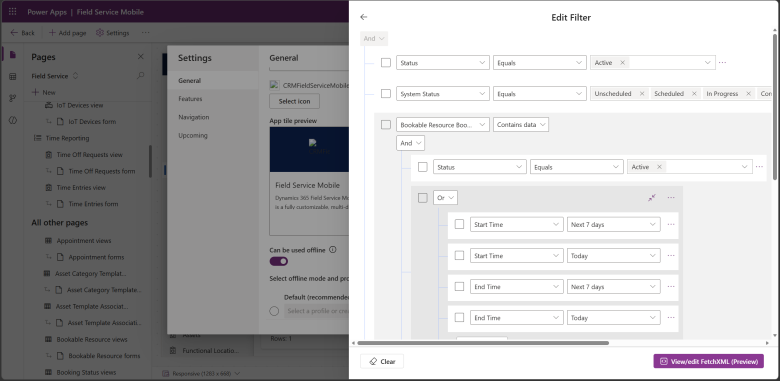
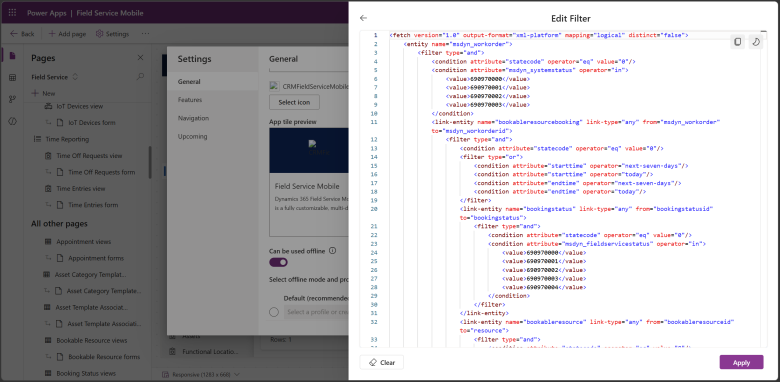
The offline profile designer in Power Apps now includes a FetchXML editor that gives you direct, code-level control over the queries that determine which data syncs to mobile devices. When you open a table's filter configuration inside an offline profile, a new View/Edit FetchXML option appears in Expression Builder, opening a side-by-side code editor. You get full XML syntax control for logic that goes beyond what Expression Builder supports, including aggregates, hierarchy operators (above/under), fiscal-period filters, between/not-between clauses, and granular older-than operators.
The editor also exposes advanced optimization options such as latematerialize, SQL query hints (for example, OptimizeForUnknown, ENABLE_HIST_AMENDMENT_FOR_ASC_KEYS), union hints, and centralized filtering. Built-in validation checks that your XML is well-formed before you save, preventing broken profiles. If your FetchXML uses only constructs that Expression Builder supports, the visual UI updates to reflect your changes; if you use advanced constructs, you continue editing in the FetchXML editor going forward. The two tools are complementary: use Expression Builder for simple scenarios and the FetchXML editor for advanced control and performance tuning.
This feature is automatically available in the offline profile designer in Power Apps with no feature flag or additional configuration required. To use it, open Settings, select Offline profiles, and create or edit a profile. Add a table, open its filter-rows configuration (custom or related rows), and select View/Edit FetchXML in Expression Builder. Review the pregenerated XML, author or paste your query, select Apply, and then Save the profile.
To disable or revert your FetchXML customization, open the same filter configuration, clear or replace the XML with the default query generated by Expression Builder, and save the profile again. Changes apply to offline filtering for tables and related rows, controlling what data is downloaded and synced to devices.
Geographic areas
Visit the Explore Feature Geography report for Microsoft Azure areas where this feature is planned or available.
Language availability
Visit the Explore Feature Language report for information on this feature's availability.