Note
Access to this page requires authorization. You can try signing in or changing directories.
Access to this page requires authorization. You can try changing directories.
| Enabled for | Public preview | General availability |
|---|---|---|
| Admins, makers, marketers, or analysts, automatically | - |  Mar 13, 2026
 |
Business value
Retailers operating in multiple regions need the flexibility to present a localized, brand-consistent experience across all registers. This feature empowers organizations to customize button and tab labels in any supported language directly within the Layout Designer, eliminating the need for duplicate layouts or manual code changes. It streamlines localization, reduces maintenance, and ensures that both self-checkout and assisted registers can deliver a tailored user interface for every audience.
Feature details
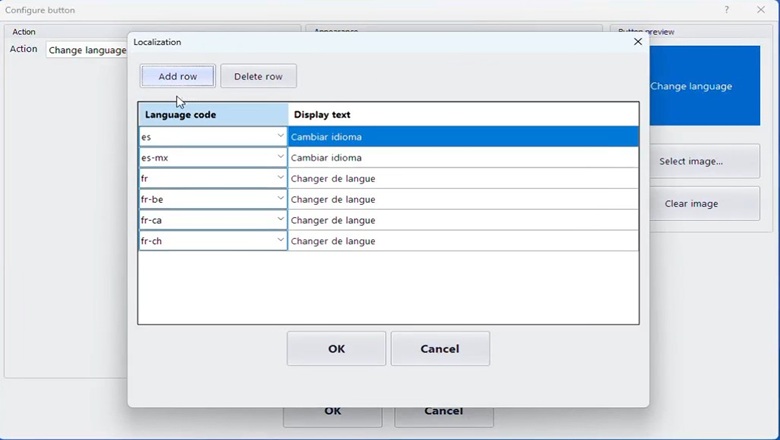
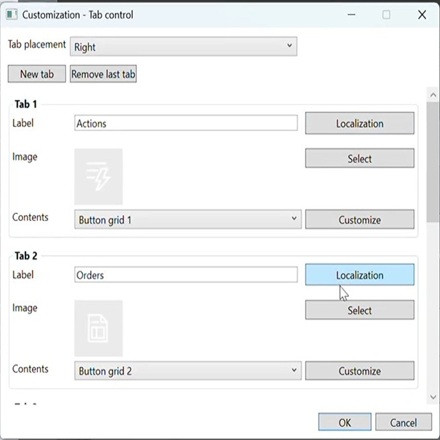
This feature introduces layout-level localization for button grids and tabs in Store Commerce. Merchants and designers can define display text for each button and tab in every supported language using a simple table interface in the Layout Designer. This eliminates the need for duplicate layouts and ensures a consistent, branded experience across all registers.
Target audience
- Store/IT administrators: Configure available languages at the store level.
- Merchandisers/designers: Localize button and tab text for each language in the Layout Designer user interface (UI).
How it’s enabled/disabled
- You configure it in Commerce headquarters.
- Optionally, you can add secondary languages to the store configuration.
Layout Designer
- For each button in the grid, a table allows entry of display text per language code.
- For each tab, a Localization button opens a table to enter tab names per language code.
Customization and configuration
Button grids:
- In Layout Designer, each button’s properties include a table with columns for language code and display text.
- You enter translations for each supported language. The system falls back to the default text if a translation is missing.
Tabs:
- Each tab has a Localization button that opens a table for language code and tab name.
- You enter translations for each supported language. If a translation is missing, the system falls back to the default tab name.
POS language text
- The system uses string-based text IDs for all layout elements, allowing overrides for any language.
Customer experience (runtime)
- When a user changes the application language through change language operation, all button and tab labels update instantly to the selected language.
- Selecting a language tile updates all UI strings (buttons, tabs, labels) dynamically, so no restart is required.
- If a translation is missing for a string, the default (base language) text is shown.
Localization logic
- POS String Resource Manager fetches localized text for each element.
- If no translation is found, the system uses the original display text.
Data flow
- All translations are stored and synchronized to registers via Commerce Data Exchange (CDX) jobs.
Limitations
- Automatic translation and language detection aren't included.
- Each layout, resolution, and language combination must be configured separately if needed.
Geographic areas
Visit the Explore Feature Geography report for Microsoft Azure areas where this feature is planned or available.
Language availability
Visit the Explore Feature Language report for information on this feature's availability.