Note
Access to this page requires authorization. You can try signing in or changing directories.
Access to this page requires authorization. You can try changing directories.
| Enabled for | Public preview | General availability |
|---|---|---|
| Users by admins, makers, or analysts |  May 1, 2025
 |
Oct 31, 2025 |
Business value
Inaccurate email addresses in CRM systems can significantly hinder your productivity and engagement with prospects, leading to missed opportunities and decreased sales performance. Now, the Sales Qualification Agent in Dynamics 365 Sales verifies each email address and identifies if it's a work or personal email. Sales teams can save precious time by ignoring unreachable leads, increase the effectiveness of their sales outreach, and stay compliant by reaching out to only valid work emails.
Feature details
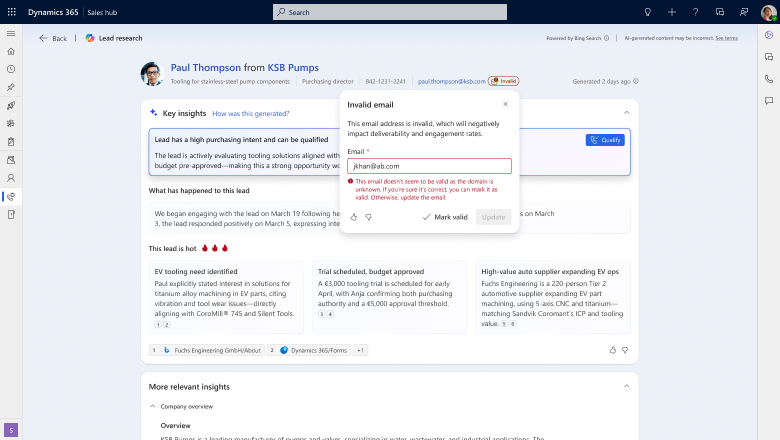
The Sales Qualification Agent uses validated email addresses as it conducts lead research, outreach, and qualification.
As an admin, you can specify which email field on the lead form the agent validates. You set this field as part of the Sales Qualification Agent settings.
As a seller, you can:
- See whether the email address associated with the lead is valid.
- See the email address categorized as work or personal.
- Update the validity and categorization if you disagree with the assessment. For example, you can mark an email address as personal if the agent inadvertently marks it as a work email address.
Geographic areas
Visit the Explore Feature Geography report for Microsoft Azure areas where this feature is planned or available.
Language availability
Visit the Explore Feature Language report for information on this feature's availability.
Related content
Lead insights page (docs)