Note
Access to this page requires authorization. You can try signing in or changing directories.
Access to this page requires authorization. You can try changing directories.
| Enabled for | Public preview | General availability |
|---|---|---|
| Users by admins, makers, or analysts |  Jul 28, 2025
 |
Apr 30, 2026 |
Business value
Sales teams often deal with large volumes of lead and contact data from sources like business cards, web forms, and scanned documents. Manually entering this information into Dynamics 365 Sales is time-consuming, error-prone, and takes away from high-value selling activities like engaging with customers and closing deals.
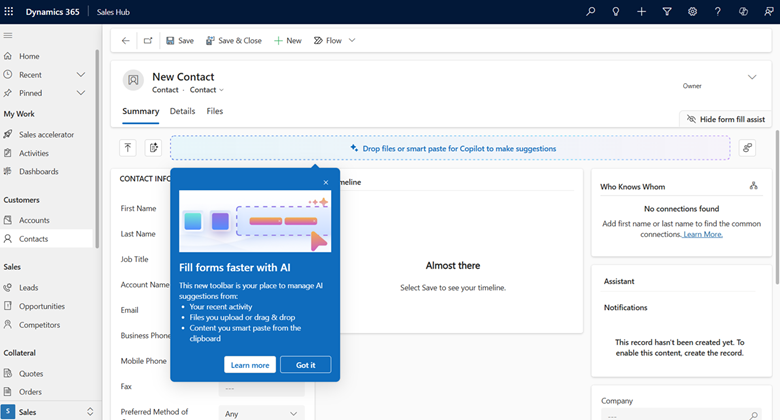
As part of Copilot’s form fill assistance initiatives, the form fill assist toolbar supports uploading of files, emails, and images, helping eliminate this manual data entry work. It uses AI to extract key details such as names, phone numbers, addresses, and company info from uploaded content, and intelligently maps them to the right fields in the sales form. This capability streamlines data entry, reduces errors, and helps you stay focused on selling.
Feature details
As a seller, you can:
- Use Files to upload supported file types (.txt, .docx, .csv, .pdf, .png, .jpg, .jpeg, .bmp) and get inline suggestions to fill out fields based on the file’s content.
- Drag and drop a file or use the file selector button in the form fill assist toolbar to start.
- Hover over the file’s source tag to see which fields the file suggests.
- Accept all suggestions at once with the Accept All button or clear them with the Clear or Clear All options.
- Show or hide the form fill assist toolbar, access the Smart Paste button, and provide feedback with the more actions menu.
For more details and timelines, see the Power Apps release plan: Enhanced experience for form filling with Copilot
Note
The feature doesn't currently support files with sensitivity labels.
Geographic areas
Visit the Explore Feature Geography report for Microsoft Azure areas where this feature is planned or available.
Language availability
Visit the Explore Feature Language report for information on this feature's availability.
Related content
Use form fill assistance (docs)