Note
Access to this page requires authorization. You can try signing in or changing directories.
Access to this page requires authorization. You can try changing directories.
Predictive forecasting uses AI to estimate how much revenue you'll actually close, based on your historical performance and current pipeline. Unlike your manual forecast (Committed, Best Case), predictive forecasting accounts for historical close rates and pipeline trajectory — helping you spot risks like deals slipping to the next period, or opportunities from new deals flowing in that you might miss otherwise.
Prerequisites
To use predictive forecasting, you need the following:
- Predictive opportunity scoring must be enabled with at least one model configured. Configure predictive opportunity scoring
- Premium forecasting must be enabled (requires a specific Dynamics 365 Sales license). Learn more about premium forecasting
Note
If sufficient data isn't available for predictive forecasting, an error message is displayed and the Prediction column is left empty.
View predicted revenue
The Prediction column in the forecast grid shows the predicted revenue for each seller or manager — separate from the manual forecast columns (Committed, Best Case). Predictions are based on historical close rates and the current pipeline trajectory, and are recalculated automatically every seven days.
Open a forecast and view the Prediction column.
The following screen shows an example of a Prediction column.
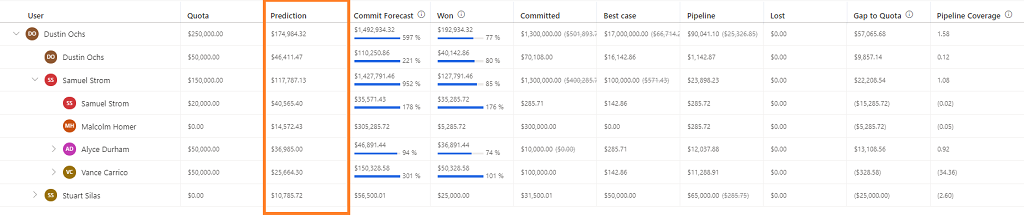
When you hover over the information icon on the Prediction column header, the last recalculation date of the prediction is shown. Predictions are recalculated after every seven days; you can't trigger a manual recalculation.
Prediction details
Select a value in the Prediction column to display the Prediction details pane.
Note
To view prediction factors, your administrator must enable prediction factors.
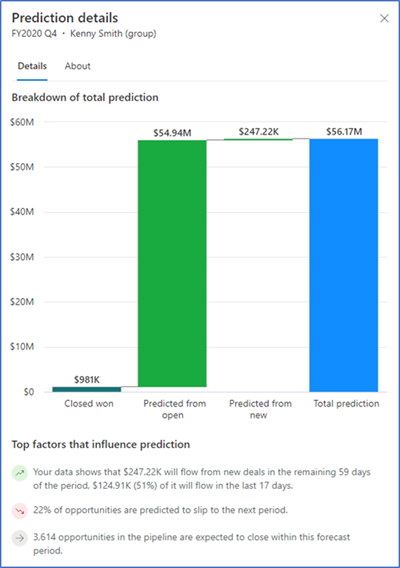
The graph in the Prediction details pane consists of the following values:
Closed won: Total actual revenue of opportunities that have been closed as won during the current forecast period.
Predicted from open: Total estimated revenue from open opportunities that are predicted to close during the current forecasting period and are contributing to the prediction.
Predicted from new: Total estimated revenue from new opportunities that are predicted to close during the current forecasting period and are contributing to the prediction.
Total prediction: Total predicted amount for the current forecasting period.
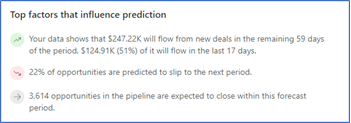
The top 5 factors that influence the prediction are displayed below the graph. The following image shows an example of a Top factors that influence prediction section.
| Icon | Influencing factor | What to do |
|---|---|---|
 |
The top positive influencing factor is that $247.22K will flow from new deals in the remaining 59 days of the period, and $124.91K (51%) of it will flow in the last 17 days. | Protect these deals. Assign resources to ensure they close on time. |
 |
The negative influencing factor is that 22% of opportunities are predicted to slip to the next period. | Prioritize these deals. Consider adding executive support or accelerating the close plan. |
 |
The neutral influencing factor is that 3,614 opportunities in the pipeline are expected to close within this forecast period. | Use as baseline context. No immediate action needed. |
Can't find the feature in your app?
There are a few possibilities:
- You don't have the necessary license to use this feature. Check out the comparison table and the licensing guide to see which features are available with your license.
- You don't have the necessary security role to use this feature.
- To configure or setup a feature, you need to have the Administration and customization roles
- To use sales-related features, you need to have the Primary sales roles
- Some tasks require specific Functional roles.
- Your administrator hasn't turned on the feature.
- Your organization is using a custom app. Check with your administrator for exact steps. The steps described in this article are specific to the out-of-the-box Sales Hub and Sales Professional apps.