Note
Access to this page requires authorization. You can try signing in or changing directories.
Access to this page requires authorization. You can try changing directories.
Use this article to understand how vulnerability assessment works for SQL servers on machines, review scan findings, and manage baselines and disable rules.
Vulnerability assessment for SQL servers on machines
Microsoft Defender for SQL servers on machines extends protection for your Azure-native SQL servers to support hybrid environments and protect SQL servers (all supported versions) hosted in Azure, other cloud environments, and on-premises machines:
- SQL Server on Virtual Machines
- On-premises SQL servers:
The integrated vulnerability assessment scanner discovers, tracks, and helps you remediate potential database vulnerabilities. Scan findings provide an overview of your SQL machines' security state and details about security findings.
Note
- The scan is lightweight, safe, takes only a few seconds per database, and is entirely read-only. It does not make any changes to your database.
- Execute permissions on the following stored procedures are required for some of the vulnerability assessment rules to run correctly: xp_instance_regread, sysmail_help_profile_sp.
Explore vulnerability assessment findings
The vulnerability assessment service scans your databases every 12 hours.
The vulnerability assessment dashboard provides an overview of assessment results across all your databases. It also summarizes healthy and unhealthy databases and failing checks by risk distribution.
You can view the vulnerability assessment results directly from Defender for Cloud or the individual resource page.
The article Review and remediate vulnerabilities provides detailed guidance for working with SQL vulnerability assessment scan results.
Set a baseline
As you review SQL vulnerability assessment results, you can mark specific findings as an acceptable baseline in your environment. A baseline customizes how results are reported. Results that match the baseline are considered passing in later scans. After you establish a baseline security state, the vulnerability assessment scanner reports only deviations from that baseline so you can focus on relevant issues.
Modern recommendations experience:

Legacy findings experience:
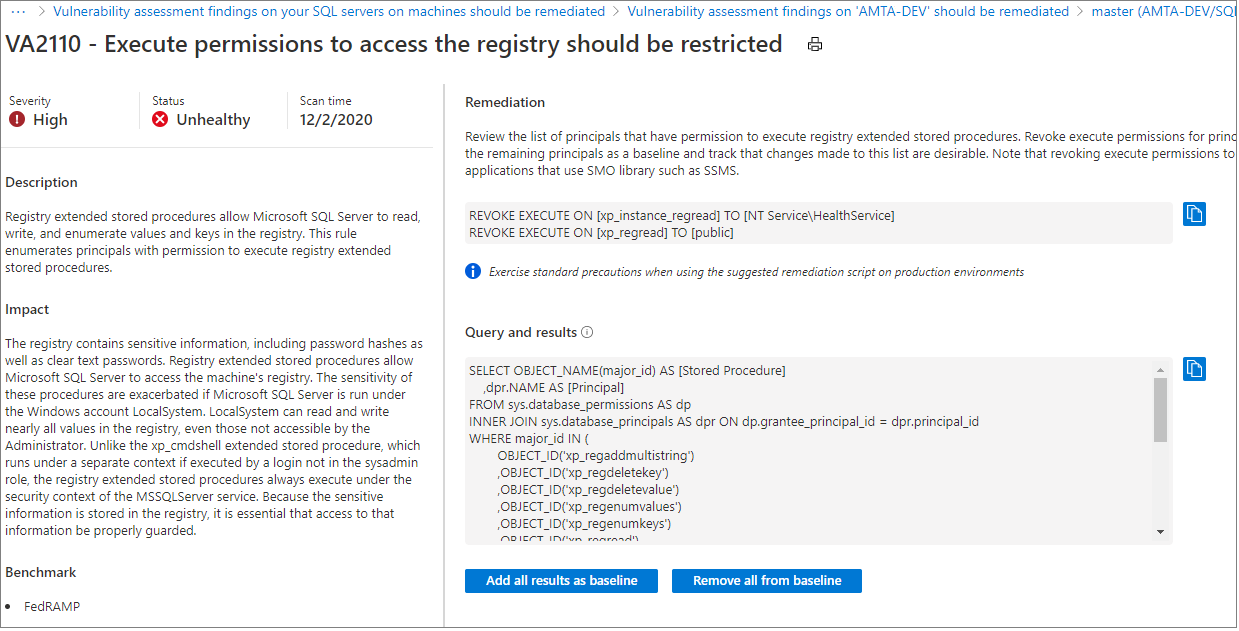
Export results
Use the Continuous export feature of Microsoft Defender for Cloud to export vulnerability assessment findings to Azure Event Hubs or Log Analytics workspace.
View vulnerabilities in graphical, interactive reports
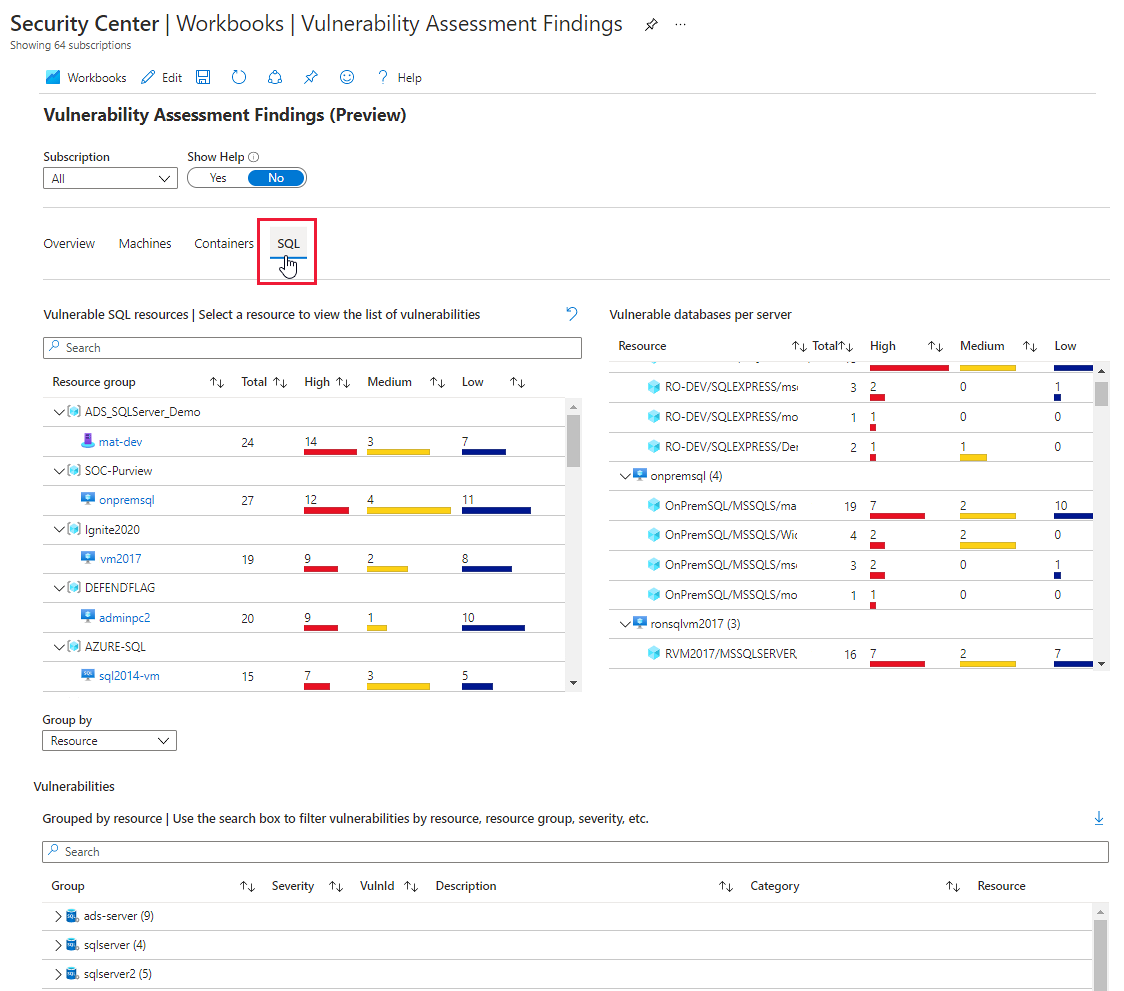
Defender for Cloud's integrated Azure Monitor Workbooks gallery includes an interactive report of findings from vulnerability scanners for machines, containers in container registries, and SQL servers.
The Vulnerability Assessment Findings report gathers these findings and organizes them by severity, resource type, and category. You can find this report in the workbooks gallery from Defender for Cloud's sidebar.
Exempt specific findings (recommendations)
Not all SQL VA findings might be relevant to your organization or configuration, and you might choose to ignore them regardless of their status. To do this, you can create an exemption at the subscription or management group level so the recommendation no longer affects your secure score or compliance for that scope.
Note
- The exemption setup succeeds, but it will not take effect unless the "Azure CSPM" standard is assigned on the selected scope.
- Creating an exemption requires specific permissions.
Manage vulnerability assessments programmatically
You can manage vulnerability assessments programmatically by using Azure PowerShell cmdlets.
Use Azure PowerShell
You can use Azure PowerShell cmdlets to programmatically manage your vulnerability assessments. The supported cmdlets are:
| Cmdlet name as a link | Description |
|---|---|
| Add-AzSecuritySqlVulnerabilityAssessmentBaseline | Add SQL Vulnerability Assessment baseline. |
| Get-AzSecuritySqlVulnerabilityAssessmentBaseline | Get SQL Vulnerability Assessment baseline. |
| Get-AzSecuritySqlVulnerabilityAssessmentScanResult | Gets SQL Vulnerability Assessment scan results. |
| Get-AzSecuritySqlVulnerabilityAssessmentScanRecord | Gets SQL Vulnerability Assessment scan records. |
| Remove-AzSecuritySqlVulnerabilityAssessmentBaseline | Removes SQL Vulnerability Assessment baseline. |
| Set-AzSecuritySqlVulnerabilityAssessmentBaseline | Sets new SQL Vulnerability Assessment baseline on a specific database discards old baseline if any exists. |
Data residency
Note
Changing the Defender for SQL on Machines plan's Log Analytics workspace resets scan results and baseline settings. If you revert to the original Log Analytics workspace within 90 days, scan results and baseline settings are available again.
SQL Vulnerability Assessment queries the SQL server by using publicly available queries from Defender for Cloud recommendations for SQL Vulnerability Assessment and stores query results. SQL Vulnerability Assessment data is stored in the location of the Log Analytics workspace that the machine is connected to. For example, if you connect a SQL virtual machine to a Log Analytics workspace in West Europe, the results are stored in West Europe. This data is collected only when SQL Vulnerability Assessment is enabled on the Log Analytics workspace.
Metadata information about the connected machine is also collected, specifically:
- Operating system name, type, and version
- Computer fully qualified domain name (FQDN)
- Connected Machine agent version
- UUID (BIOS ID)
- SQL server name and underlying database names
You can specify the region where SQL Vulnerability Assessment data is stored by choosing the Log Analytics workspace location. Microsoft might replicate data to other regions for resiliency, but it doesn't replicate data outside the geography.