Note
Access to this page requires authorization. You can try signing in or changing directories.
Access to this page requires authorization. You can try changing directories.
You can create an Azure Database for PostgreSQL flexible server by using Azure managed disks. Azure managed disks are block-level storage volumes that Azure manages and you use with Azure Virtual Machines. Managed disks work like a physical disk in an on-premises server, but they're virtualized. When you use managed disks, you just specify the disk size and the disk type, and then provision the disk. After you provision the disk, Azure handles the rest. Azure Database for PostgreSQL flexible servers support premium solid-state drives (Premium SSD) and premium solid-state drives version 2 (Premium SSD v2). Pricing is based on the compute, memory, and storage tier you choose.
Premium SSD
Azure Premium SSD delivers high-performance and low-latency disk support for virtual machines (VMs) with input/output (IO)-intensive workloads. Premium SSD units are suitable for mission-critical production applications.
Premium SSD v2
Premium SSD v2 offers higher performance than Premium SSD, while also being less costly, as a general rule. You can individually tweak the performance (capacity, throughput, and input/output operations per second, referred to as IOPS) of Premium SSD v2 at any time. The ability to do these adjustments allows workloads to be cost-efficient while meeting shifting performance needs. For example, a transaction-intensive database might need to cope with a large amount of IOPS for a couple of exceptionally high-demand days. Or a gaming application might demand higher throughput during peak hours only. Hence, for most general-purpose workloads, Premium SSD v2 can provide the best price for performance. You can now deploy Azure Database for PostgreSQL flexible servers with Premium SSD v2 disk in all supported regions.
Differences between Premium SSD and Premium SSD v2
Unlike Premium SSD, Premium SSD v2 doesn't have dedicated sizes. You can set a Premium SSD v2 disk to any size you prefer, and make granular adjustments as per your workload requirements. Those granular increments can go in steps of 1 GiB. Premium SSD v2 doesn't support host caching, but still provides lower latency than Premium SSD. Premium SSD v2 capacities range from 1 GiB to 64 TiBs.
The following table provides a comparison of different aspects of the types of disk supported by Azure Database for PostgreSQL flexible servers, to help you decide which one suits your needs better.
| Premium SSD v2 | Premium SSD | |
|---|---|---|
| Disk type | SSD | SSD |
| Scenario | Production and performance-sensitive workloads that consistently require low latency and high IOPS and throughput. | Production and performance-sensitive workloads. |
| Max disk size | 65,536 GiB | 32,767 GiB |
| Max throughput | 1,200 MB/s | 900 MB/s |
| Max IOPS | 80,000 | 20,000 |
Premium SSD v2 offers up to 32 TiBs per region per subscription by default, but supports higher capacity by request. To request an increase in capacity, request a quota increase or contact Azure Support.
Azure Database for PostgreSQL service offers a baseline throughput of 125 MB/s for disks up to 399 GiB, and 500 MB/s for disks over 400 GiB at no extra cost. Increasing throughput beyond the free tier results in extra charges.
The storage that you provision is the amount of storage capacity available to your Azure Database for PostgreSQL flexible server. This storage holds database files, temporary files, transaction logs, and PostgreSQL server logs. The total amount of storage that you provision also defines the I/O capacity available to your server.
| Disk size | Premium SSD IOPS | Premium SSD v2 IOPS |
|---|---|---|
| 32 GiB | Provisioned 120; up to 3,500 | First 3,000 IOPS free; can scale up to 17,179 |
| 64 GiB | Provisioned 240; up to 3,500 | First 3,000 IOPS free; can scale up to 34,359 |
| 128 GiB | Provisioned 500; up to 3,500 | First 3,000 IOPS free; can scale up to 68,719 |
| 256 GiB | Provisioned 1,100; up to 3,500 | First 3,000 IOPS free; can scale up to 80,000 |
| 512 GiB | Provisioned 2,300; up to 3,500 | First 12,000 IOPS free; can scale to 80,000 |
| 1 TiB | 5,000 | First 12,000 IOPS free; can scale up to 80,000 |
| 2 TiB | 7,500 | First 12,000 IOPS free; can scale up to 80,000 |
| 4 TiB | 7,500 | First 12,000 IOPS free; can scale up to 80,000 |
| 8 TiB | 16,000 | First 12,000 IOPS free; can scale up to 80,000 |
| 16 TiB | 18,000 | First 12,000 IOPS free; can scale up to 80,000 |
| 32 TiB | 20,000 | First 12,000 IOPS free; can scale up to 80,000 |
| 64 TiB | N/A | First 12,000 IOPS free; can scale up to 80,000 |
The following table provides an overview of premium SSD v2 disk capacities and performance maximums to help you decide which one you should use.
| SSD v2 disk size | Maximum available IOPS | Maximum available throughput (MB/s) |
|---|---|---|
| 1 GiB-64 TiBs | 3,000-80,000 (Increases by 500 IOPS per GiB) | 125-1,200 (increases by 0.25 MB/s per set IOPS) |
Your virtual machine type also has IOPS limits. Although you can select any storage size independently from the server type, you might not be able to use all IOPS that the storage provides, especially when you choose a server with a few vCores. To learn more, see Compute options in Azure Database for PostgreSQL.
Note
Regardless of the type of storage you assign to your instance, you can only scale storage up, not down.
You can monitor your I/O consumption in the Azure portal, or by using Azure CLI commands. The relevant metrics to monitor are storage limit, storage percentage, storage used, and I/O percentage.
Disk full conditions
When your disk becomes full, the server returns errors and prevents any further modifications. Reaching the limit might also cause problems with other operational activities, such as backups and write-ahead log (WAL) archiving. To avoid this disk full condition, consider the following options:
- The server automatically switches to read-only mode when the storage usage reaches 95 percent, or when the available capacity is less than 5 GiB. If you're using Premium SSD storage type, use the storage autogrow feature or scale up the storage of the server to avoid this issue.
- If the server is marked as read only because of disk full condition, delete the data that you no longer require. To do this, execute the following command to change the mode to read-write. When the server is in read-write mode, you can execute the delete command.
SET SESSION CHARACTERISTICS AS TRANSACTION READ WRITE;
Actively monitor the disk space that's in use by using storage_percentage or storage_used metrics. Increase the disk size before you run out of available space in your storage. Set up an alert to notify you when your server storage is approaching an out-of-disk state. For more information, see Use the Azure portal to set up alerts on metrics for Azure Database for PostgreSQL.
Price
For the most up-to-date pricing information, see Azure Database for PostgreSQL flexible server pricing.
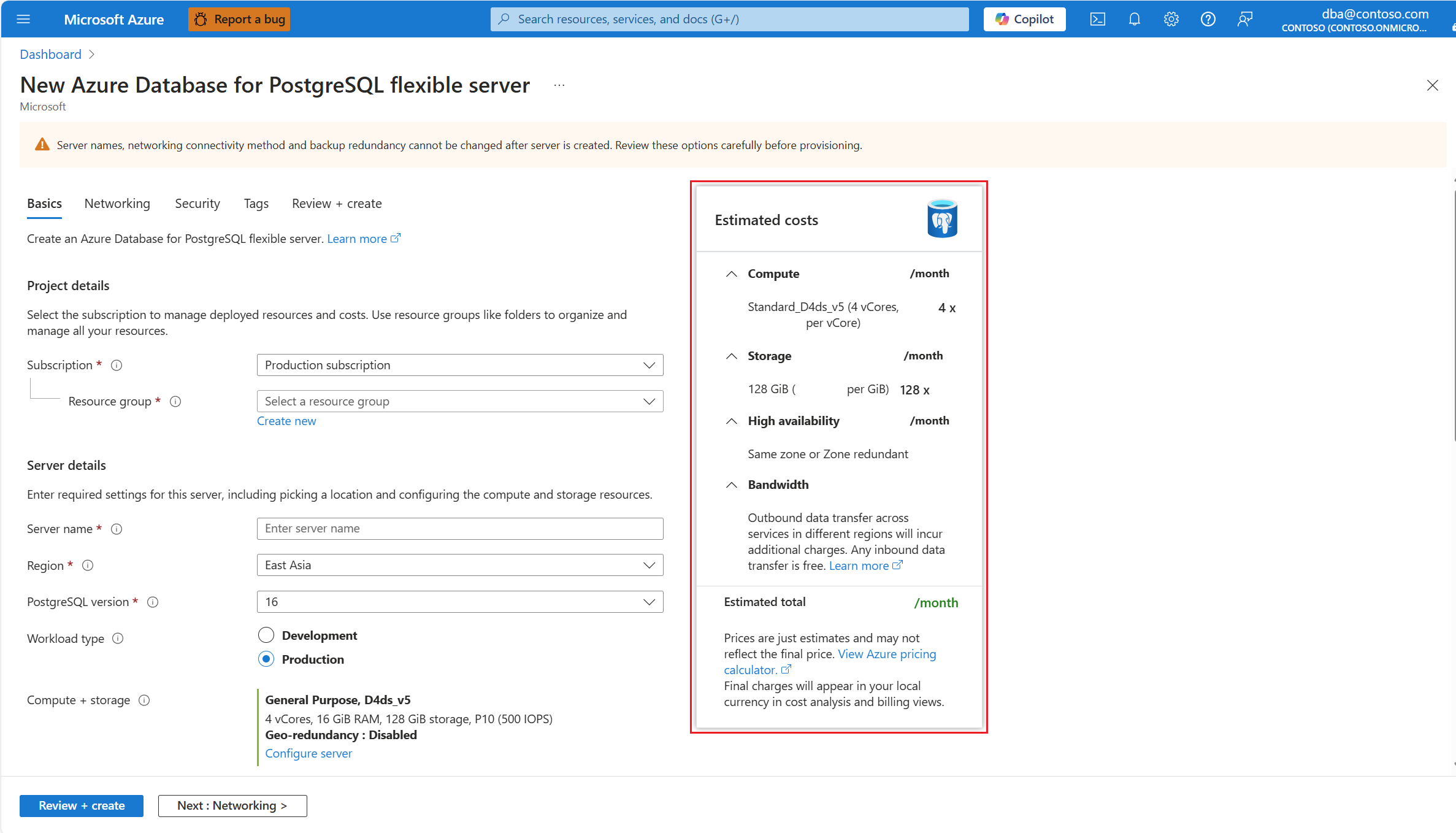
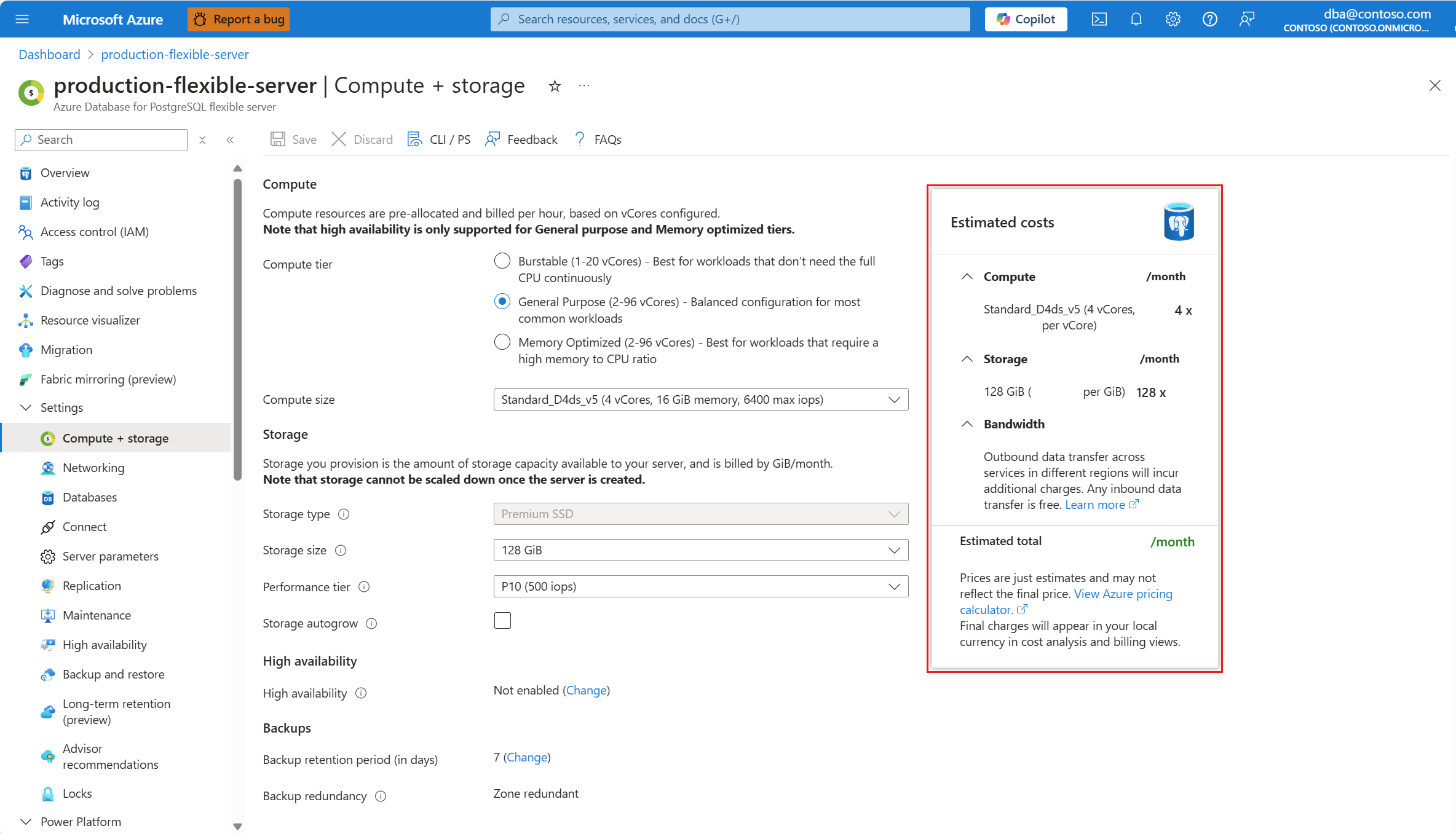
Azure portal also shows you an estimation of the monthly costs of a server configuration, based on the options selected.
That estimation can be seen throughout the server creation experience, in the New Azure Database for PostgreSQL Flexible server page:
It can also be seen for existing servers if, in the resource menu of an existing instance, under the Settings section, you select Compute + storage:
If you don't have an Azure subscription, you can use the Azure pricing calculator to get an estimated price. In the Azure pricing calculator website, select Databases category, and then select Azure Database for PostgreSQL to add the service to your estimate and then customize the options.