Note
Access to this page requires authorization. You can try signing in or changing directories.
Access to this page requires authorization. You can try changing directories.
Switch services using the Version drop-down list. Learn more about navigation.
Applies to: ✅ Microsoft Fabric ✅ Azure Data Explorer ✅ Azure Monitor ✅ Microsoft Sentinel
Calculates the geohash string value of a geographic location.
Read more about geohash.
Syntax
geo_point_to_geohash(longitude, latitude,[ accuracy ])
Learn more about syntax conventions.
Parameters
| Name | Type | Required | Description |
|---|---|---|---|
| longitude | real |
✔️ | Geospatial coordinate, longitude value in degrees. Valid value is a real number and in the range [-180, +180]. |
| latitude | real |
✔️ | Geospatial coordinate, latitude value in degrees. Valid value is a real number and in the range [-90, +90]. |
| accuracy | int |
Defines the requested accuracy. Supported values are in the range [1, 18]. If unspecified, the default value 5 is used. |
Returns
The geohash string value of a given geographic location with requested accuracy length. If the coordinate or accuracy is invalid, the query produces an empty result.
Note
- Geohash can be a useful geospatial clustering tool.
- Geohash has 18 accuracy levels with area coverage ranging from 25 Million km² at the highest level 1 to 0.6 μ² at the lowest level 18.
- Common prefixes of geohash indicate proximity of points to each other. The longer a shared prefix is, the closer the two places are. Accuracy value translates to geohash length.
- Geohash is a rectangular area on a plane surface.
- Invoking the geo_geohash_to_central_point() function on a geohash string that was calculated on longitude x and latitude y won't necessarily return x and y.
- Due to the geohash definition, it's possible that two geographic locations are very close to each other but have different geohash codes.
Geohash rectangular area coverage per accuracy value:
| Accuracy | Width | Height |
|---|---|---|
| 1 | 5000 km | 5000 km |
| 2 | 1250 km | 625 km |
| 3 | 156.25 km | 156.25 km |
| 4 | 39.06 km | 19.53 km |
| 5 | 4.88 km | 4.88 km |
| 6 | 1.22 km | 0.61 km |
| 7 | 152.59 m | 152.59 m |
| 8 | 38.15 m | 19.07 m |
| 9 | 4.77 m | 4.77 m |
| 10 | 1.19 m | 0.59 m |
| 11 | 149.01 mm | 149.01 mm |
| 12 | 37.25 mm | 18.63 mm |
| 13 | 4.66 mm | 4.66 mm |
| 14 | 1.16 mm | 0.58 mm |
| 15 | 145.52 μ | 145.52 μ |
| 16 | 36.28 μ | 18.19 μ |
| 17 | 4.55 μ | 4.55 μ |
| 18 | 1.14 μ | 0.57 μ |
See also geo_point_to_s2cell(), geo_point_to_h3cell().
For comparison with other available grid systems, see geospatial clustering with Kusto Query Language.
Examples
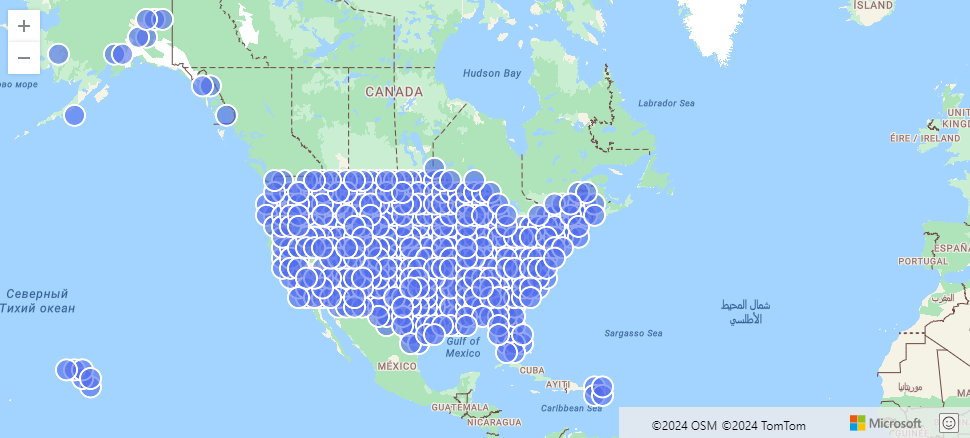
The following example finds US storm events aggregated by geohash.
StormEvents
| project BeginLon, BeginLat
| summarize by hash=geo_point_to_geohash(BeginLon, BeginLat, 3)
| project geo_geohash_to_central_point(hash)
| render scatterchart with (kind=map)
Output
The following example calculates and returns the geohash string value.
print geohash = geo_point_to_geohash(-80.195829, 25.802215, 8)
Output
| geohash |
|---|
| dhwfz15h |
The following example finds groups of coordinates. Every pair of coordinates in the group resides in a rectangular area of 4.88 km by 4.88 km.
datatable(location_id:string, longitude:real, latitude:real)
[
  "A", double(-122.303404), 47.570482,
  "B", double(-122.304745), 47.567052,
  "C", double(-122.278156), 47.566936,
]
| summarize count = count(),                                          // items per group count
            locations = make_list(location_id)                        // items in the group
            by geohash = geo_point_to_geohash(longitude, latitude)    // geohash of the group
Output
| geohash | count | locations |
|---|---|---|
| c23n8 | 2 | ["A", "B"] |
| c23n9 | 1 | ["C"] |
The following example produces an empty result because of the invalid coordinate input.
print geohash = geo_point_to_geohash(200,1,8)
Output
| geohash |
|---|
The following example produces an empty result because of the invalid accuracy input.
print geohash = geo_point_to_geohash(1,1,int(null))
Output
| geohash |
|---|