Note
Access to this page requires authorization. You can try signing in or changing directories.
Access to this page requires authorization. You can try changing directories.
Important
New deployments of Azure Cosmos DB for PostgreSQL are blocked because the service is on a retirement path.
Existing clusters, including read replicas, remain supported.
For test migrations, use the migration service dry run feature when you migrate to Azure Database for PostgreSQL elastic clusters, so you don't need to create a separate test environment. If you still need a separate environment, use point-in-time restore (PITR).
The Azure Database for PostgreSQL migration experience separates target elastic cluster creation from database migration. This separation is useful when your organization provisions infrastructure separately from migration execution (due to technical or organizational reasons), requires extra control over networking and firewall readiness, or uses infrastructure-as-code tooling to create target resources before migration.
By default, the migration workflow creates a new elastic cluster before starting migration. If you already created a compatible elastic cluster, you can turn off cluster creation, select the existing target, and run the migration against that cluster. This option also helps you minimize the downtime to just the migration window, which is less than 10 minutes in most cases.
When to use this option
Use the default flow when you want the migration workflow to create the target elastic cluster and proceed with migration in one experience.
Use an existing elastic cluster when your platform or infrastructure team creates the cluster ahead of time.
Use an existing elastic cluster when you need to complete networking, firewall, identity, or deployment validation before scheduling the migration window.
Use an existing elastic cluster when you provision Azure resources through automation tools and want migration execution to remain separate from infrastructure deployment.
Prerequisites for using an existing elastic cluster
Before you select an existing elastic cluster as the migration target, verify that it meets the following requirements:
The target must be an Azure Database for PostgreSQL flexible server elastic cluster, not a regular flexible server.
The target cluster must be in the same Azure region as the source CPG cluster.
The target node size must be at least the source CPG cluster node size.
The target storage size must be at least the source CPG cluster storage size and at least as large as the largest disk size in the source CPG cluster.
The target database names must match the CPG configuration.
The target PostgreSQL major version should be PostgreSQL 16. Create server using PG 17 but in Resource tag, have a tag cpg-migration : true (it will create the target with PG16)
Migration can't happen to an already migrated server.
The Microsoft Entra authentication setting on the target if applicable must match the source setting.
High availability, read replicas, and private endpoints shouldn't be enabled on the target before migration. You can configure these features after migration is complete, where supported.
SSDV2 disks aren't supported for migrations.
Run migration to an existing elastic cluster
Use this flow when the target elastic cluster is already provisioned and validated.
Start the migration workflow.
Select Use existing server for the Server option.

Select the subscription, region, and resource group that contain the target elastic cluster.
Use the Select server link to choose from the available elastic clusters in the selected scope.
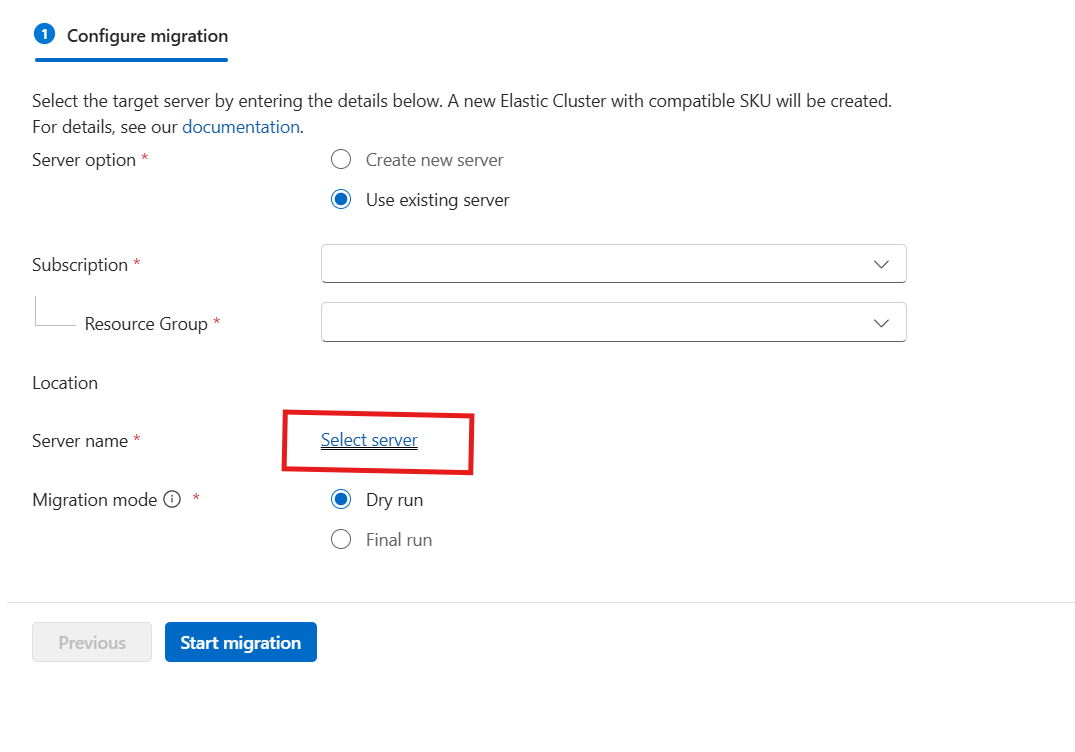
Review the migration mode.
Start the migration.
When you select the Use existing server option, the workflow skips elastic cluster creation and firewall rule creation. The workflow connects to the selected existing elastic cluster and migrates the database.
Automation support
You can provision the target elastic cluster before migration by using supported Azure deployment methods such as Azure portal, Azure CLI, Bicep, ARM templates, or Terraform, depending on your organization’s deployment standards. You can then run migration execution against the existing target elastic cluster from the migration workflow.
SDK-based migration tooling support is planned for a later phase. Until SDK-based migration execution is available, use the supported migration experience for running the migration after the target elastic cluster is created.