Note
Access to this page requires authorization. You can try signing in or changing directories.
Access to this page requires authorization. You can try changing directories.
Applies to:  Azure SQL Managed Instance
This article teaches you how to monitor backup activity for Azure SQL Managed Instance by either querying the msdb database or by configuring extended event (XEvent) sessions.
Overview
Azure SQL Managed Instance stores backup information in the msdb database and also emits events (also known as Extended Events or XEvents) during backup activity, which can be used for reporting. Configure an XEvent session to track information such as backup status, backup type, size, time, and location within the msdb database. This information can be integrated with backup monitoring software and also used for Enterprise Audit.
Enterprise Audits might require proof of successful backups, time of backup, and duration of the backup.
Query msdb database
To query backup history from msdb, you need access to the msdb database on the SQL managed instance. For example, you can gain access by being a member of a role that grants SELECT on msdb.dbo.backupset and msdb.dbo.backupmediafamily.
To view backup activity, run the following query from a user-defined database:
SELECT TOP (100)
    DB_NAME(DB_ID(bs.database_name)) AS [Database Name],
    CONVERT (BIGINT, bs.backup_size / 1048576) AS [Uncompressed Backup Size (MB)],
    CONVERT (BIGINT, bs.compressed_backup_size / 1048576) AS [Compressed Backup Size (MB)],
    CONVERT (NUMERIC (20, 2),
    CASE
        WHEN bs.compressed_backup_size > 0
        THEN CONVERT (FLOAT, bs.backup_size) / CONVERT (FLOAT, bs.compressed_backup_size)
        ELSE NULL
    END
    ) AS [Compression Ratio],
    bs.is_copy_only,
    -- bs.user_name, -- Applicable only for user-initiated COPY ONLY backups.
    bs.has_backup_checksums,
    DATEDIFF(SECOND, bs.backup_start_date, bs.backup_finish_date) AS [Backup Elapsed Time (sec)],
    bs.backup_finish_date AS [Backup Finish Date],
    bmf.physical_block_size
FROM msdb.dbo.backupset AS bs WITH (NOLOCK)
     INNER JOIN msdb.dbo.backupmediafamily AS bmf WITH (NOLOCK)
         ON bs.media_set_id = bmf.media_set_id
WHERE bs.[type] = 'D'
    -- AND bs.[is_copy_only] = 1  -- If you want to filter out for user initiated COPY ONLY backups.
ORDER BY bs.backup_finish_date DESC
OPTION (RECOMPILE); -- Optimize for ad hoc execution
Note
When querying msdb system tables such as dbo.backupmediaset or dbo.backupset, you see encryption-related fields indicating that backup files aren't encrypted. This status reflects only engine-level encryption. All automatic backups are encrypted at rest.
Configure XEvent session
Use the extended event backup_restore_progress_trace to record the progress of your SQL Managed Instance backup. Modify the XEvent sessions as needed to track the information you're interested in for your business. These T-SQL snippets store the XEvent sessions in the ring buffer, but you can also write to Azure Blob Storage. XEvent sessions that store data in the ring buffer have a limit of about 1,000 messages, so use them only to track recent activity. Additionally, ring buffer data is lost upon failover. For a historical record of backups, write to an event file instead.
To create and start an XEvent session, you need the ALTER ANY EVENT SESSION permission on the managed instance.
The following table summarizes the two sessions described in this article:
| Session | Events captured | Target | Use case |
|---|---|---|---|
| Basic backup trace | Completion (100 percent) of full backups | Ring buffer | Track recent completed full backups. |
| Verbose backup trace | Start and finish of full, differential, and log backups | Ring buffer | Track detailed activity across all backup types. |
Configure basic tracking
Configure a basic XEvent session to capture events about complete full backups. This script collects the name of the database, the total number of bytes processed, and the time the backup completed.
Use Transact-SQL (T-SQL) to configure the basic XEvent session:
CREATE EVENT SESSION [Basic backup trace] ON SERVER
ADD EVENT sqlserver.backup_restore_progress_trace
(
        WHERE operation_type = 0
        AND trace_message LIKE '%100 percent%'
)
ADD TARGET package0.ring_buffer WITH (STARTUP_STATE = ON);
GO

ALTER EVENT SESSION [Basic backup trace] ON SERVER
STATE = start;
To confirm the session is running, query sys.dm_xe_sessions for Basic backup trace.
Configure verbose tracking
Configure a verbose XEvent session to track greater details about your backup activity. This script captures start and finish of both full, differential and log backups. Since this script is more verbose, it fills up the ring buffer faster, so entries might recycle faster than with the basic script.
Use T-SQL to configure the verbose XEvent session:
CREATE EVENT SESSION [Verbose backup trace] ON SERVER
ADD EVENT sqlserver.backup_restore_progress_trace(
    WHERE (
              [operation_type]=(0) AND (
              [trace_message] like '%100 percent%' OR
              [trace_message] like '%BACKUP DATABASE%' OR [trace_message] like '%BACKUP LOG%'))
       )
ADD TARGET package0.ring_buffer
WITH (MAX_MEMORY=4096 KB,EVENT_RETENTION_MODE=ALLOW_SINGLE_EVENT_LOSS,
       MAX_DISPATCH_LATENCY=30 SECONDS,MAX_EVENT_SIZE=0 KB,MEMORY_PARTITION_MODE=NONE,
       TRACK_CAUSALITY=OFF,STARTUP_STATE=ON)

ALTER EVENT SESSION [Verbose backup trace] ON SERVER
STATE = start;
To confirm the session is running, query sys.dm_xe_sessions for Verbose backup trace.
Monitor backup progress
After the XEvent session is created, you can use T-SQL to query ring buffer results and monitor the progress of the backup. Once the XEvent starts, it collects all backup events so entries are added to the session roughly every 5-10 minutes.
Query the basic tracking session
The following T-SQL code queries the Basic backup trace session and returns the name of the database, the total number of bytes processed, and the time the backup completed:
WITH
a AS (SELECT CAST (xet.target_data AS XML) AS xed
    FROM sys.dm_xe_session_targets AS xet
         INNER JOIN sys.dm_xe_sessions AS xe
             ON (xe.address = xet.event_session_address)
    WHERE xe.name = 'Basic backup trace'),
b AS (SELECT d.n.value('(@timestamp)[1]', 'datetime2') AS [timestamp],
           ISNULL(db.name, d.n.value('(data[@name="database_name"]/value)[1]', 'varchar(200)')) AS database_name,
           d.n.value('(data[@name="trace_message"]/value)[1]', 'varchar(4000)') AS trace_message
    FROM a
CROSS APPLY xed.nodes('/RingBufferTarget/event') AS d(n)
         LEFT OUTER JOIN master.sys.databases AS db
             ON db.physical_database_name = d.n.value('(data[@name="database_name"]/value)[1]', 'varchar(200)'))
SELECT * FROM b;
The following screenshot shows an example of the output of the Basic backup trace query:
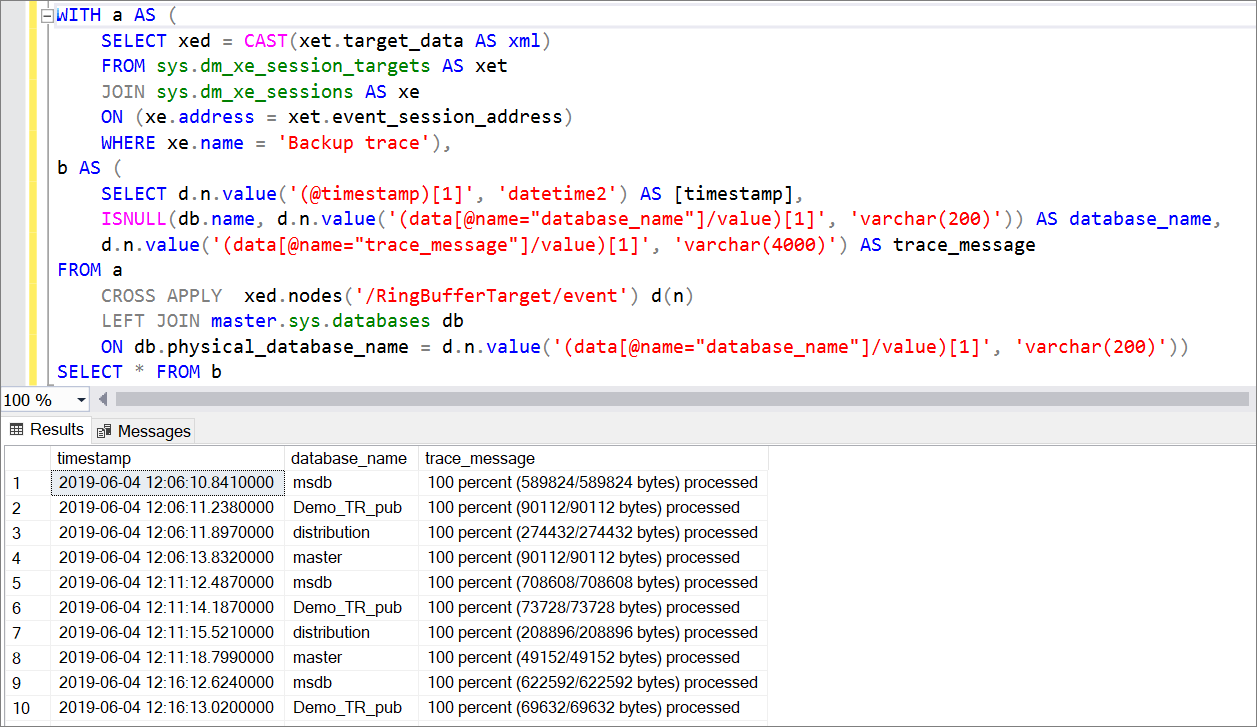
In this example, five databases were automatically backed up over the course of 2 hours and 30 minutes, and there are 130 entries in the XEvent session.
Query the verbose tracking session
The following T-SQL code queries the Verbose backup trace session and returns the name of the database, as well as the start and finish of full, differential, and log backups.
WITH
a AS (SELECT CAST (xet.target_data AS XML) AS xed
    FROM sys.dm_xe_session_targets AS xet
         INNER JOIN sys.dm_xe_sessions AS xe
             ON (xe.address = xet.event_session_address)
    WHERE xe.name = 'Verbose backup trace'),
b AS (SELECT d.n.value('(@timestamp)[1]', 'datetime2') AS [timestamp],
           ISNULL(db.name, d.n.value('(data[@name="database_name"]/value)[1]', 'varchar(200)')) AS database_name,
           d.n.value('(data[@name="trace_message"]/value)[1]', 'varchar(4000)') AS trace_message
    FROM a
CROSS APPLY xed.nodes('/RingBufferTarget/event') AS d(n)
         LEFT OUTER JOIN master.sys.databases AS db
             ON db.physical_database_name = d.n.value('(data[@name="database_name"]/value)[1]', 'varchar(200)'))
SELECT * FROM b;
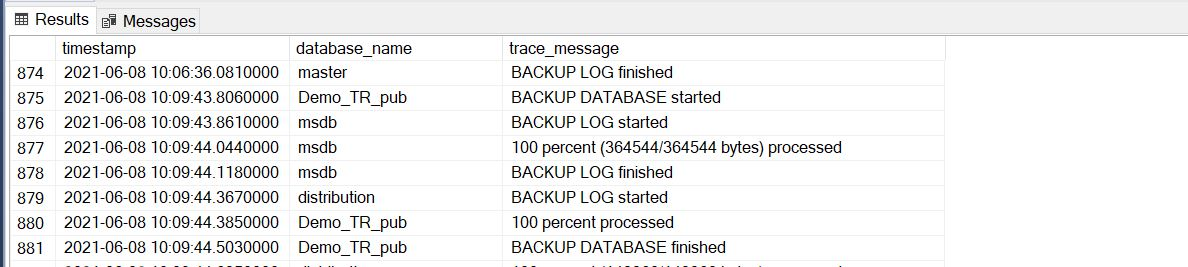
The following screenshot shows an example of a full backup in the XEvent session:
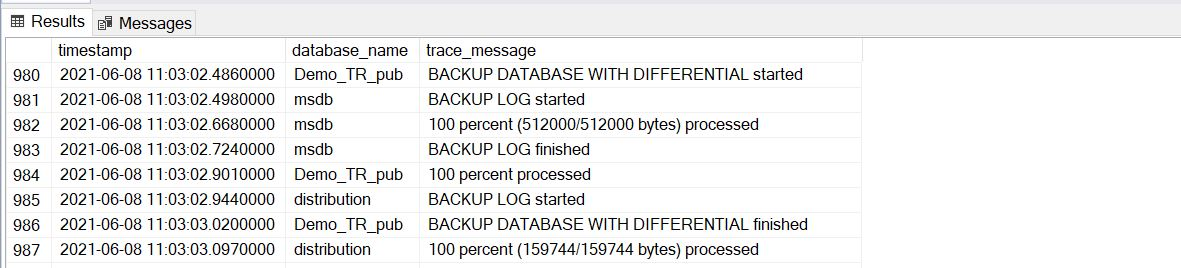
The following screenshot shows an example of an output of a differential backup in the XEvent session: