Note
Access to this page requires authorization. You can try signing in or changing directories.
Access to this page requires authorization. You can try changing directories.
Failures can vary in the scope of their impact. Some hardware failures, such as a failed disk, might affect a single host machine. A failed network switch could affect a whole server rack. Less common are failures that disrupt a whole datacenter, such as loss of power in a datacenter. Rarely, an entire region could become unavailable.
One of the main ways to make an application resilient is through redundancy. But you need to plan for this redundancy when you design the application. Also, the level of redundancy that you need depends on your business requirements—not every application needs redundancy across regions to guard against a regional outage. In general, a tradeoff exists between greater redundancy and reliability versus higher cost and complexity.
In Azure, some regions are further divided into multiple Availability Zones. An Availability Zone corresponds with a physically isolated datacenter in the geographic region. Azure has numerous features for providing application redundancy at every level of potential failure, including Virtual Machine Scale Sets, availability zones, and paired regions.
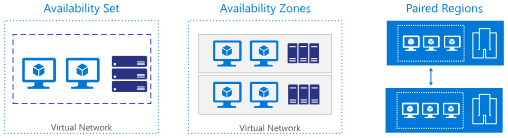
The diagram has three side-by-side panels, each titled by a redundancy scope. The left panel, Rack-level redundancy for a Virtual Machine Scale Set, shows a Load Balancer above two boxes, Fault domain 1 and Fault domain 2, that each contain three virtual machines. The middle panel, Datacenter-level redundancy across availability zones, shows a zone-redundant Load Balancer above three boxes labeled Zone 1, Zone 2, and Zone 3 that each contain one virtual machine. The right panel, Region-level redundancy for a multi-region deployment, shows Traffic Manager above two boxes, Region A (primary) and Region B (secondary), that each contain an App tier virtual machine and a Data tier virtual machine. In every panel, lines connect the top routing component to each box below it. A dashed replication and failover path runs vertically between the two regions in the right panel.
The following table summarizes each option.
| Virtual Machine Scale Set | Availability Zone | Traffic Manager (multi-region) | |
|---|---|---|---|
| Scope of failure | Rack | Datacenter | Region |
| Request routing | Load Balancer | zone-redundant Load Balancer | Traffic Manager |
| Network latency | Very low | Low | Mid to high |
| Virtual networking | VNet | VNet | Cross-region VNet peering |
Virtual Machine Scale Sets
To protect against localized hardware failures, such as a disk or network switch failing, deploy your VMs in a Virtual Machine Scale Set with flexible orchestration mode. Flexible orchestration distributes VM instances across multiple fault domains, which are groups of hardware that share a common power source and network switch. If a hardware failure affects one fault domain, a load balancer in front of the scale set continues to route traffic to the instances in the other fault domains. Flexible orchestration provides high availability with the widest range of VM features, and you can spread instances across availability zones to also protect against datacenter-wide failures.
Scale sets coordinate platform maintenance so that planned update and patching events affect only a subset of instances at any given time. You can also enable automatic instance repairs so the scale set replaces an unhealthy instance and maintains availability.
Organize scale sets by the instance's role in your application, and deploy at least two instances per role across separate fault domains. For example, in a three-tier web application, create separate scale sets for the front-end, application, and data tiers, each with enough instances spread across fault domains that a single hardware failure doesn't take down the entire tier.
Availability zones
An Availability Zone is a physically separate zone within an Azure region. Each Availability Zone has a distinct power source, network, and cooling. Deploying VMs across availability zones helps to protect an application against datacenter-wide failures. Not all regions support availability zones.
Multi-region deployment and paired regions
To protect an application against a regional outage, deploy the application across multiple regions and use Azure Traffic Manager to distribute internet traffic across regions. A paired region is one option for selecting a secondary region, but not every Azure region has a pair.
Use region pairs when your architecture benefits from paired-region capabilities, such as platform update sequencing and service features that depend on paired regions. For example, Azure geo-redundant storage (GRS) replicates data to the paired region for the selected primary region.
If your primary region isn't paired, or if your requirements are better served by another location, choose a nonpaired secondary region based on service availability, data residency, latency, and disaster recovery objectives. For most resources, you design regional resiliency by deploying and operating a full secondary stamp in another region, regardless of whether that region is paired.