Note
Access to this page requires authorization. You can try signing in or changing directories.
Access to this page requires authorization. You can try changing directories.
Applies to: ✔️ AKS Automatic ✔️ AKS Standard
This article shows how Azure Kubernetes Service (AKS) can automatically block cluster upgrades when it detects deprecated Kubernetes API usage.
For most production workloads, AKS Automatic is the recommended production-ready default experience for AKS. Kubernetes API breaking-change detection is preconfigured on both AKS Automatic and AKS Standard clusters.
Behavior in AKS Automatic and AKS Standard
Both cluster modes include this safeguard:
- AKS Automatic: Included by default as part of AKS Automatic production-ready platform safeguards.
- AKS Standard: Included by default on AKS Standard clusters.
In both modes, AKS can block minor version upgrade operations when it detects recent usage of APIs deprecated or removed in the target Kubernetes version.
Overview
To stay within a supported Kubernetes version, you must upgrade your cluster at least once per year and prepare for possible disruptions. These disruptions can include API breaking changes, deprecations, and dependencies such as Helm and Container Storage Interface (CSI). It can be difficult to anticipate these disruptions and migrate critical workloads without downtime.
When AKS detects deprecated API usage for the target version, it can automatically block minor version upgrade operations and alert you to the issue. This behavior helps you avoid unexpected disruptions and gives you time to fix deprecated API usage before continuing the upgrade.
Prerequisites
Make sure you meet the following prerequisites:
- The upgrade operation is a Kubernetes minor version change for the cluster control plane.
- The Kubernetes target version is 1.26 or later.
- The last-seen usage of deprecated APIs for the target version occurred within 12 hours before the upgrade operation. AKS records usage hourly, so usage within the most recent hour isn't guaranteed to appear in detection.
Note
You don't need to manually enable this detection feature. AKS Automatic and AKS Standard clusters preconfigure it.
Mitigate stopped upgrade operations
If you meet the prerequisites, attempt an upgrade, and receive an error similar to the following error message:
Bad Request({
  "code": "ValidationError",
  "message": "Control Plane upgrade is blocked due to recent usage of a Kubernetes API deprecated in the specified version. Please refer to https://kubernetes.io/docs/reference/using-api/deprecation-guide to migrate the usage. To bypass this error, set enable-force-upgrade in upgradeSettings.overrideSettings. Bypassing this error without migrating usage will result in the deprecated Kubernetes API calls failing. Usage details: 1 error occurred:\n\t* usage has been detected on API flowcontrol.apiserver.k8s.io.prioritylevelconfigurations.v1beta1, and was recently seen at: 2023-03-23 20:57:18 +0000 UTC, which will be removed in 1.26\n\n",
  "subcode": "UpgradeBlockedOnDeprecatedAPIUsage"
})
Use one of the following options:
Remove usage of deprecated APIs (recommended)
In the Azure portal, navigate to your cluster resource and select Diagnose and solve problems
Select Create, Upgrade, Delete, and Scale > Kubernetes API deprecations.
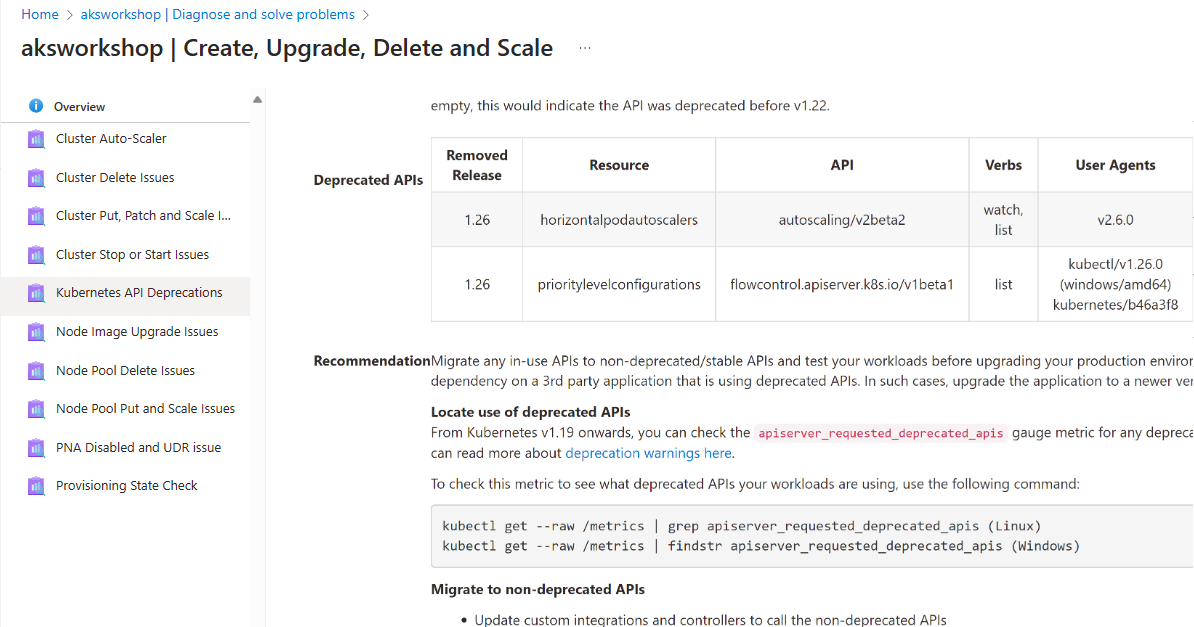
Wait 12 hours from the time the last deprecated API usage was seen. Read-only verbs are excluded from the deprecated API usage, namely Get/List/Watch. You can also check past API usage by enabling Container insights and exploring kube audit logs.
Retry your cluster upgrade.
Bypass validation to ignore API changes
Note
This method requires Azure CLI version 2.57 or later. If you have the preview CLI extension installed, update to version 3.0.0b10 or later. This method isn't recommended for normal production operations because deprecated APIs in the target Kubernetes version might fail long term. Remove deprecated API usage as soon as possible after the upgrade.
Run upgrade with validation bypass by using the az aks upgrade command with --enable-force-upgrade and set --upgrade-override-until to define when the bypass window ends. If you don't set a value, the window defaults to three days from current time. The provided date and time must be in the future.
# Set environment variables
RESOURCE_GROUP_NAME=<your-resource-group-name>
CLUSTER_NAME=<your-cluster-name>
KUBERNETES_VERSION=<target-kubernetes-version>

# Run the upgrade command with validation bypass
az aks upgrade --name $CLUSTER_NAME --resource-group $RESOURCE_GROUP_NAME --kubernetes-version $KUBERNETES_VERSION --enable-force-upgrade --upgrade-override-until 2023-10-01T13:00:00Z
Note
Z is the zone designator for the zero UTC/GMT offset, also known as 'Zulu' time. This example sets the end of the window to 13:00:00 GMT. For more information, see Combined date and time representations.
Production considerations
For production workloads, follow these practices:
- Treat upgrade blocking as a safety mechanism, not a failure state.
- Prefer API migration over force bypass.
- Use planned maintenance windows and pre-upgrade checks.
- Monitor deprecated API usage continuously to avoid last-minute upgrade blocks.
Related content
This article showed you how to stop AKS cluster upgrades automatically on API breaking changes. To learn more about more upgrade options for AKS clusters, see Upgrade options for Azure Kubernetes Service (AKS) clusters.
To learn more about AKS Automatic, see the following articles: