Note
Access to this page requires authorization. You can try signing in or changing directories.
Access to this page requires authorization. You can try changing directories.
By Sébastien Ros and Rick Anderson
Memory management is complex, even in a managed framework like .NET. Analyzing and resolving memory issues can be challenging. Memory leaks and garbage collection (GC) issues are commonly due to a lack of understanding about how memory consumption works in .NET, or not understanding the process for measuring usage.
This article demonstrates common memory use patterns that can be problematic, and suggests alternate approaches.
Explore garbage collection (GC) in .NET
The GC process allocates heap segments where each segment is a contiguous range of memory. Objects placed in the heap are categorized into one of three generations: 0, 1, or 2. The generation determines the frequency of the GC attempts to release memory on managed objects that the app no longer references. The GC addresses the lower-numbered generations more frequently.
Objects are moved from one generation to another based on their lifetime. As objects live longer, they're moved into a higher generation. As mentioned previously, GC runs less often on higher generations. Short-lived objects always remain in Gen 0. For example, objects that are referenced during the life of a web request are short lived. Application level singletons generally migrate to Gen 2.
When an ASP.NET Core app starts, the GC process:
- Reserves some memory for the initial heap segments.
- Commits a small portion of memory when the runtime loads.
The preceding memory allocations are done for performance reasons. The performance benefit comes from heap segments in contiguous memory.
Review caveats when using GC.Collect
In general, ASP.NET Core apps in production should not use the GC.Collect method explicitly. Inducing garbage collections at suboptimal times can decrease performance significantly.
GC.Collect is useful when investigating memory leaks. Calling GC.Collect() triggers a blocking garbage collection cycle that tries to reclaim all objects inaccessible from managed code. It's a useful way to understand the size of the reachable live objects in the heap, and track growth of memory size over time.
Analyze the memory usage of an app
Dedicated tools can help analyze memory usage, including:
- Counting object references.
- Measuring how much effect the GC has on CPU usage.
- Measuring memory space used for each generation.
Use the following tools to analyze memory usage:
- dotnet-trace utility (can use on production machines)
- Analyze memory usage without the Visual Studio debugger
- Measure memory usage in Visual Studio
Detect memory issues
Task Manager can be used to get an idea of how much memory an ASP.NET app is using. The Task Manager memory value:
- Represents the amount of memory used by the ASP.NET process.
- Includes the app's living objects and other memory consumers such as native memory usage.
If the Task Manager memory value increases indefinitely and never flattens out, the app has a memory leak. The following sections demonstrate and explain several memory usage patterns.
Explore the sample display memory usage app
The MemoryLeak sample app is available on GitHub. The MemoryLeak app:
- Includes a diagnostic controller that gathers real-time memory and GC data for the app.
- Has an Index page that displays the memory and GC data. The Index page is refreshed every second.
- Contains an API controller that provides various memory load patterns.
- Can be used to display memory usage patterns of ASP.NET Core apps, but it isn't a supported tool.
Run MemoryLeak. Allocated memory slowly increases until a GC occurs. Memory increases because the tool allocates a custom object to capture data. The following image shows the MemoryLeak Index page when a Gen 0 GC occurs. The chart shows 0 RPS (Requests per second) because no API endpoints from the API controller have been called.

The chart displays two values for the memory usage:
- Allocated: The amount of memory occupied by managed objects.
- Working Set: The set of pages in the virtual address space of the process that are currently resident in physical memory. The working set shown is the same value Task Manager displays. For more information, see Working Set.
Transient objects
The following API creates a 20-KB String instance and returns it to the client. On each request, a new object is allocated in memory and written to the response. Strings are stored as UTF-16 characters in .NET so each character takes 2 bytes in memory.
[HttpGet("bigstring")]
public ActionResult<string> GetBigString()
{
    return new String('x', 10 * 1024);
}
The following chart is generated with a relatively small load that shows how GC affects memory allocations.

The chart illustrates the following details:
- 4K RPS (Requests per second)
- Gen 0 GC collections occur about every 2 seconds
- Constant Working Set, approximately 500 MB
- CPU is 12%
- Stable memory consumption and release (through GC)
The following chart is taken at the max throughput that the machine can handle.

The chart illustrates the following details:
- 22 K RPS
- Gen 0 GC collections occur several times per second
- Gen 1 collections trigger because the app allocates significantly more memory per second
- Constant Working Set, approximately 500 MB
- CPU is 33%
- Stable memory consumption and release (through GC)
- CPU (33%) isn't over-utilized, so GC can keep up with a high number of allocations
Workstation GC versus Server GC
The .NET Garbage Collector has two different modes:
- Workstation GC: Optimized for the desktop.
- Server GC: The default GC for ASP.NET Core apps. Optimized for the server.
The GC mode can be set explicitly in the project file or in the runtimeconfig.json file of the published app. The following markup shows setting ServerGarbageCollection in the project file:
<PropertyGroup>
  <ServerGarbageCollection>true</ServerGarbageCollection>
</PropertyGroup>
Changing ServerGarbageCollection in the project file requires the app to be rebuilt.
Note
Server garbage collection is not available on machines with a single core. For more information, see the IsServerGC property.
The following image shows the memory profile under a 5K RPS using the Workstation GC.

The differences between this chart and the server version are significant:
- Working Set drops from 500 MB to 70 MB
- GC does Gen 0 collections multiple times per second instead of every 2 seconds
- GC drops from 300 MB to 10 MB
On a typical web server environment, CPU usage is more important than memory, therefore the Server GC is better. If memory utilization is high and CPU usage is relatively low, the Workstation GC might be more performant. For example, high density hosting several web apps where memory is scarce.
GC using Docker and small containers
When multiple containerized apps run on the same machine, Workstation GC might be more performant than Server GC. For more information, see Running with Server GC in a Small Container (blog) and Running with Server GC in a Small Container Scenario Part 1 – Hard Limit for the GC Heap (blog).
Persistent object references
The GC can't free objects that are referenced. Objects that are referenced but no longer needed result in a memory leak. If the app frequently allocates objects and fails to free them after they are no longer needed, memory usage increases over time.
The following API creates a 20-KB String instance and returns it to the client. The difference with the previous example is that a static member references this instance, which means the instance is never available for collection.
private static ConcurrentBag<string> _staticStrings = new ConcurrentBag<string>();

[HttpGet("staticstring")]
public ActionResult<string> GetStaticString()
{
    var bigString = new String('x', 10 * 1024);
    _staticStrings.Add(bigString);
    return bigString;
}
The preceding code:
- Demonstrates a typical memory leak.
- With frequent calls, causes app memory to increase until the process crashes with an
OutOfMemoryexception.
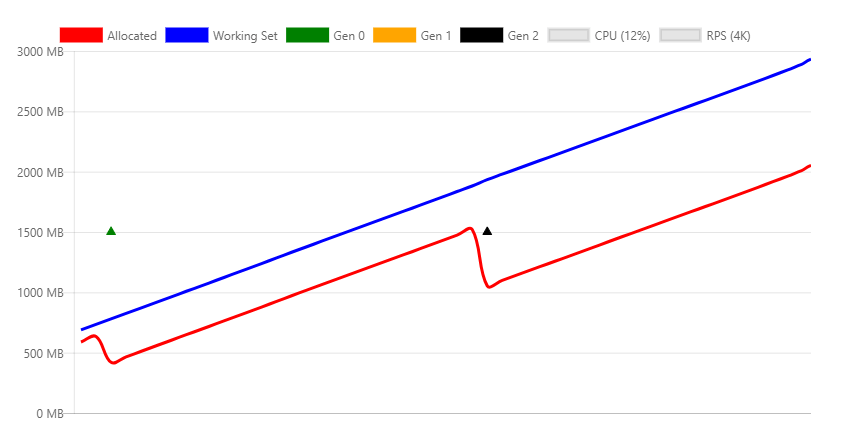
The chart illustrates the following details:
- Load testing the
/api/staticstringendpoint causes a linear increase in memory - GC tries to free memory as memory pressure grows by calling a Gen 2 collection
- GC can't free the leaked memory; Allocated and Working Set increase with time
Some scenarios, such as caching, require object references to be held until memory pressure forces them to be released. The WeakReference class can be used for this type of caching code. A WeakReference object is collected under memory pressures. The default implementation of the IMemoryCache interface uses WeakReference.
Native memory
Some .NET objects rely on native memory, but native memory isn't collectable by the GC. The .NET object that uses native memory must free it by using native code.
.NET provides the IDisposable interface to let developers release native memory. Even if the Dispose method isn't called, correctly implemented classes call Dispose when the finalizer runs.
Consider the following code:
[HttpGet("fileprovider")]
public void GetFileProvider()
{
    var fp = new PhysicalFileProvider(TempPath);
    fp.Watch("*.*");
}
PhysicalFileProvider is a managed class, so any instance is collected at the end of the request.
The following image shows the memory profile while invoking the fileprovider API continuously.

The preceding chart shows an obvious issue with the implementation of this class, as it keeps increasing memory usage. This result is a known problem tracked in GitHub dotnet/aspnetcore issue #844.
The same leak occurs in user code in the following scenarios:
- Not releasing the class correctly
- Forgetting to invoke the
Disposemethod of the dependent objects that should be disposed
Large object heap
Frequent memory allocation/free cycles result in fragmented memory, especially when allocating large chunks of memory. Objects are allocated in contiguous blocks of memory. To mitigate fragmentation, when the GC frees memory, it tries to defragment it. This process is called compaction. Compaction involves moving objects. Moving large objects imposes a performance penalty. For this reason, the GC creates a special memory zone for large objects, called the large object heap (LOH). Objects that are greater than 85,000 bytes (approximately 83 KB) are:
- Placed on the LOH
- Not compacted
- Processed during Gen 2 collection
When the LOH is full, the GC triggers a Gen 2 collection.
- Gen 2 collections are inherently slow.
- They can incur the cost of triggering a collection on all other generations.
The following code compacts the LOH immediately:
GCSettings.LargeObjectHeapCompactionMode = GCLargeObjectHeapCompactionMode.CompactOnce;
GC.Collect();
For information on compacting the LOH, see the LargeObjectHeapCompactionMode property.
In containers that use .NET Core 3.0 or later, the LOH is automatically compacted.
The following API that illustrates this behavior:
[HttpGet("loh/{size=85000}")]
public int GetLOH1(int size)
{
   return new byte[size].Length;
}
The following chart shows the memory profile of calling the /api/loh/84975 endpoint, under maximum load:
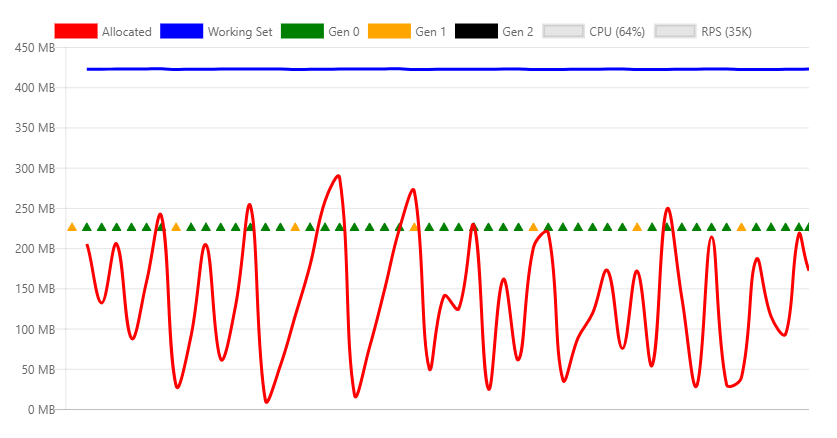
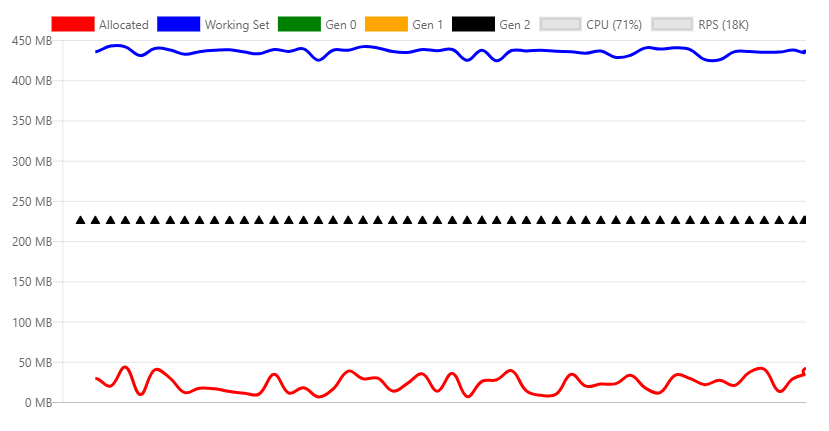
The following chart shows the memory profile of calling the /api/loh/84976 endpoint, allocating just one more byte:
Note
The byte[] structure has overhead bytes, which is why 84,976 bytes triggers the 85,000 limit.
Comparing the two preceding charts:
- Working Set is similar for both scenarios, about 450 MB
- Under LOH requests (84,975 bytes) show mostly Gen 0 collections
- Over LOH requests generate constant Gen 2 collections, which are expensive. More CPU is required and throughput drops ~50%.
Temporary large objects are problematic because they cause Gen 2 collections.
For maximum performance, minimize the use of large objects. If possible, split up large objects. For example, Response Caching Middleware in ASP.NET Core splits the cache entries into blocks less than 85,000 bytes.
The following links show the ASP.NET Core approach to keeping objects under the LOH limit:
For more information, see:
HttpClient
Incorrectly using the HttpClient class can result in a resource leak.
System resources (such as database connections, sockets, file handles, and so on) present two issues:
- They're more scarce than memory.
- They're more problematic when leaked than memory.
Experienced .NET developers know to call the Dispose method on objects that implement the IDisposable interface. Not disposing objects that implement IDisposable typically results in leaked memory or leaked system resources.
HttpClient implements IDisposable, but should not be disposed on every invocation. Rather, HttpClient should be reused.
The following endpoint creates and disposes a new HttpClient instance on every request:
[HttpGet("httpclient1")]
public async Task<int> GetHttpClient1(string url)
{
    using (var httpClient = new HttpClient())
    {
        var result = await httpClient.GetAsync(url);
        return (int)result.StatusCode;
    }
}
Under load, the following error messages are logged:
fail: Microsoft.AspNetCore.Server.Kestrel[13]
      Connection id "0HLG70PBE1CR1", Request id "0HLG70PBE1CR1:00000031":
      An unhandled exception was thrown by the application.
System.Net.Http.HttpRequestException: Only one usage of each socket address
    (protocol/network address/port) is normally permitted --->
    System.Net.Sockets.SocketException: Only one usage of each socket address
    (protocol/network address/port) is normally permitted
   at System.Net.Http.ConnectHelper.ConnectAsync(String host, Int32 port,
    CancellationToken cancellationToken)
Even though the HttpClient instances are disposed, it takes some time for the operating system to release the actual network connection. The process of continuously creating new connections results in ports exhaustion. Each client connection requires its own client port.
One way to prevent port exhaustion is to reuse the same HttpClient instance:
private static readonly HttpClient _httpClient = new HttpClient();

[HttpGet("httpclient2")]
public async Task<int> GetHttpClient2(string url)
{
    var result = await _httpClient.GetAsync(url);
    return (int)result.StatusCode;
}
The HttpClient instance is released when the app stops. This example shows that not every disposable resource should be disposed after each use.
The following articles describe a better way to handle the lifetime of an HttpClient instance:
Object pooling
The previous example showed how the HttpClient instance can be made static and reused by all requests. Reuse prevents running out of resources.
Object pooling is an alternative:
- It uses the reuse pattern.
- The design is ideal for objects that are expensive to create.
A pool is a collection of preinitialized objects that can be reserved and released across threads. Pools can define allocation rules such as limits, predefined sizes, or growth rate.
The NuGet package Microsoft.Extensions.ObjectPool contains classes that help to manage such pools.
The following API endpoint instantiates a byte buffer that is filled with random numbers on each request:
        [HttpGet("array/{size}")]
        public byte[] GetArray(int size)
        {
            var random = new Random();
            var array = new byte[size];
            random.NextBytes(array);

            return array;
        }
The following chart displays calling the preceding API with moderate load:

The chart reveals that Gen 0 collections happen about once per second.
The code can be optimized by pooling the byte buffer by using the ArrayPool<T> class. A static instance is reused across requests.
What's different with this approach is that a pooled object is returned from the API:
- The object is out of your control as soon as you return from the method.
- You can't release the object.
To set up disposal of the object:
- Encapsulate the pooled array in a disposable object.
- Register the pooled object by using the HttpContext.Response.RegisterForDispose method.
RegisterForDispose takes care of calling Dispose on the target object, so the object is released only after the HTTP request completes.
private static ArrayPool<byte> _arrayPool = ArrayPool<byte>.Create();

private class PooledArray : IDisposable
{
    public byte[] Array { get; private set; }

    public PooledArray(int size)
    {
        Array = _arrayPool.Rent(size);
    }

    public void Dispose()
    {
        _arrayPool.Return(Array);
    }
}

[HttpGet("pooledarray/{size}")]
public byte[] GetPooledArray(int size)
{
    var pooledArray = new PooledArray(size);

    var random = new Random();
    random.NextBytes(pooledArray.Array);

    HttpContext.Response.RegisterForDispose(pooledArray);

    return pooledArray.Array;
}
Applying the same load as the nonpooled version results in the following chart:

The main difference is allocated bytes, and as a consequence, fewer Gen 0 collections.
Related content
Collaborate with us on GitHub
The source for this content can be found on GitHub, where you can also create and review issues and pull requests. For more information, see our contributor guide.

ASP.NET Core