Note
Access to this page requires authorization. You can try signing in or changing directories.
Access to this page requires authorization. You can try changing directories.
Question
Wednesday, April 3, 2019 10:19 AM | 1 vote
Hi
I have a C++ solution/project that is developed with Visual Studio 2017 by many developers. We don't want to upgrade it to VS2019 yet.
I tried building this solution using Visual Studio 2019 16.0.0 Preview 5.0 and the build failed with:
*error MSB8020: The build tools for Visual Studio 2017 (Platform Toolset = 'v141') cannot be found. To build using the v141 build tools, please install Visual Studio 2017 build tools. *
It appears that 'Visual Studio 2017 build tools' is no longer available, so I downloaded and installed 'Visual Studio 2019 build tools' and enabled component:
MSVC v141 - VS 2017 C++ x64/x86 build tools ...
However, VS 2019 still gives the same error:
error MSB8020: The build tools for Visual Studio 2017 (Platform Toolset = 'v141') cannot be found.
Why isn't VS2019 finding the VS2017 build tools?
All replies (9)
Wednesday, April 3, 2019 1:10 PM ✅Answered | 1 vote
They are being found perfectly fine for me:
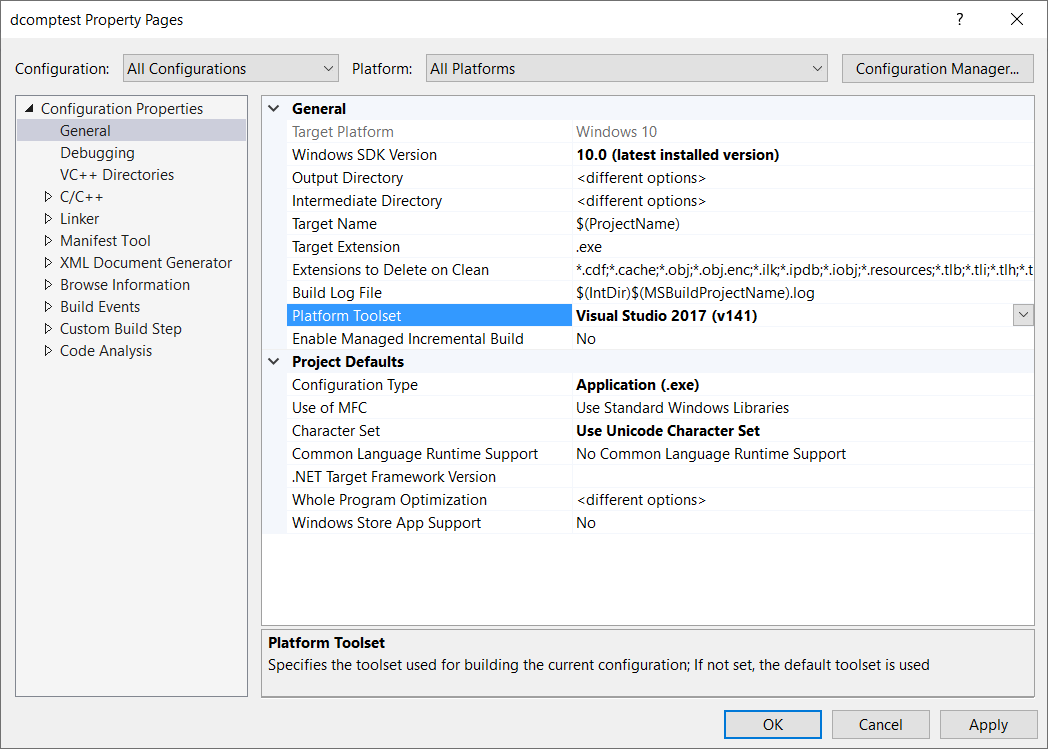
I would suggest you check that they are actually installed by seeing if they actually exist on disk.
This is a signature. Any samples given are not meant to have error checking or show best practices. They are meant to just illustrate a point. I may also give inefficient code or introduce some problems to discourage copy/paste coding. This is because the major point of my posts is to aid in the learning process.
Wednesday, April 3, 2019 12:10 PM
>Why isn't VS2019 finding the VS2017 build tools?
Presumably because you've not installed them?
Use the Visual Studio installer and install the MSVC v141 build tools
Dave
Wednesday, April 3, 2019 12:13 PM
As I wrote in my question, I have downloaded and installed 'Visual Studio 2019 build tools' and enabled component: '*MSVC v141 - VS 2017 C++ x64/x86 build tools ...'. *
So my question is valid.
Wednesday, April 3, 2019 1:26 PM | 1 vote
Thanks, I had installed the tools but a system restart was necessary. Working ok now.
Thursday, April 4, 2019 10:12 AM
I have the exact same problem with my Visual Studio 2019 official installation. I have installed the build tools for all relevant architectures (x86/x64 and ARM) and I have even installed the Visual Studio 2017 and 2019 Build Tools as a separate installation, to no avail. I have already Visual Studio 2017 installed on the computer as well, but the project properties claims that the v141 toolset is not installed.
For detailed info, please see my post on Stack Overflow, https://stackoverflow.com/q/55509980/650012.
If anyone has any suggestions, I am all ears.
Thursday, April 4, 2019 10:52 AM
Have you selected the VS2017 build tools option in the VS2019 build tools install? And restarted your machine?
Thursday, April 4, 2019 11:23 AM
Thanks, but it does not help.
Thursday, April 4, 2019 12:20 PM
I personally have two copies of Visual Studio 2019 installed, one on my developer system with 2017 installed alongside it and the other on my Surface with just 2019 and the 2017 tools installed. Both of them have no issues finding the v141 toolset.
Have you tried this on another computer to see if the same thing happens? Have you tried doing a repair install of both instances of Visual Studio?
The unfortunate thing about this kind of problem is that people couldn't really give anything more than general advice until they experienced the problem, and I have been using Visual Studio 2019 since the preview stages and didn't end up with any problems.
This is a signature. Any samples given are not meant to have error checking or show best practices. They are meant to just illustrate a point. I may also give inefficient code or introduce some problems to discourage copy/paste coding. This is because the major point of my posts is to aid in the learning process.
Thursday, April 4, 2019 1:42 PM | 1 vote
Thanks, managed to solve the issue now, see the answer to my own question on StackOverflow: https://stackoverflow.com/a/55517174/650012
In short, I had not installed the C++ Universal Windows Platform Tools for v142 nor v141. As far as I could tell, these components did not become available until I tried to create a C++ UWP project in VS 2019. Once I did that, I also noticed that my .vcxproj file was missing the ApplicationTypeRevision element. Once I fixed these tasks, building the v141 targeted runtime component succeeded without problems.