Note
Access to this page requires authorization. You can try signing in or changing directories.
Access to this page requires authorization. You can try changing directories.
Question
Friday, July 14, 2017 6:12 PM
Hi All,
I am creating a Hyper-V Windows Server with two Virtual Switches, one External and one Internal Virtual Switch. The Hyper-V Windows Server can access the internet OK.
The problem I am having is accessing a shared folder located on the Host computer from the Hyper-V Windows Server. The Hyper-V Windows server needs to access files on the Host computer. I have read numerous websites on how to setup files and folders sharing between Hyper-V host and guest operating system, but I'm having no successfully.
Has anyone simple How-To instructions on how to setup sharing between Hyper-V host and guest operating system? Screenshots of the procedure would also help :-)
I hope you can help
Colin
All replies (8)
Friday, July 14, 2017 6:46 PM ✅Answered | 1 vote
For a temporary situation you could just swing the guest over to the external vSwitch. If you need a more permanent route you could build a NAT router. http://www.dell.com/support/article/us/en/19/how10169/configuring-windows-server-2012-r2-as-a-router?lang=en
Regards, Dave Patrick ....
Microsoft Certified Professional
Microsoft MVP [Windows Server] Datacenter Management
Disclaimer: This posting is provided "AS IS" with no warranties or guarantees, and confers no rights.
Friday, July 14, 2017 7:39 PM ✅Answered | 3 votes
Hi
One safest way i use is what i need inside of virtual machines i create a folder & burn it with power iso and make it ISO, once it become an ISO image, simply mount it in a VM. It will be available for you.
Second way of get folder inside of VM, shutdown the VM and mount the VM VDH file, it will be visible in my computer property and then you can copy whatever data you want, dis mount the VDH and start the VM again you will see you data in C:\ drive.
third way is remote desktop, over remote desktop you can also copy file & folder, for this you have to allow local disk in remote desktop property.
forth option is USB, mount USB into your Host then into VM.
Fifth option is network, create a folder share it and access it from outside.
Kindly click "Mark as Answer" on the post that helps you, this can be beneficial to other community members reading this thread.
Regards.
H.shakir
Monday, July 17, 2017 7:18 AM ✅Answered | 2 votes
Hi ceBlueSky,
1. Generally, if we want to copy files from Hyper Host to the guest VM, we may enable "Allow enhanced session mode" in hyper V settings:
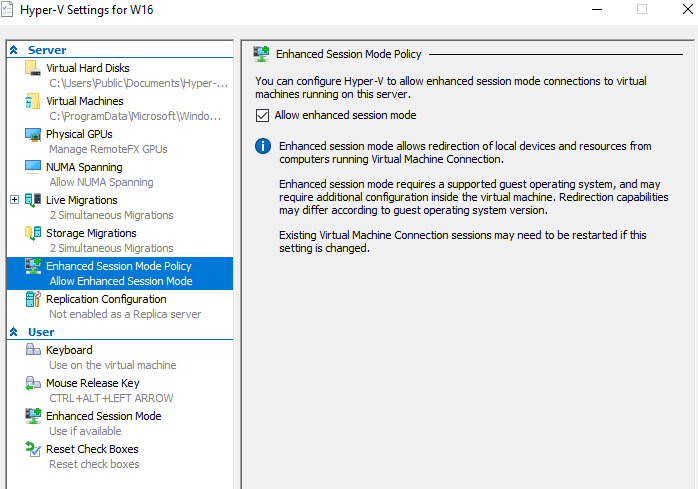
2. If you want to visit the share on the host, you may connect the VM to external VSwitch, so that the VM will get IP settings that can communicate with the host. (As Dave has mentioned above.)
Best Regards,
Anne
Please remember to mark the replies as answers if they help.
If you have feedback for TechNet Subscriber Support, contact [email protected].
Wednesday, July 19, 2017 2:19 AM
Hi ceBlueSky,
Just to check if the above reply could be of help, if yes, you may mark useful reply as answer, if you have other concerns, welcome to feedback.
Best Regards,
Anne
Please remember to mark the replies as answers if they help.
If you have feedback for TechNet Subscriber Support, contact [email protected].
Monday, April 23, 2018 6:19 AM
Late to the game here...
But is it bad to place the virtual machine in the same workgroup as the host? I did this and was able to transfer files with ease as well as create and delete files.
I figure if able to add vm to a domain, the same result. With added user permissions given to either machine.
Very curious to know if adding to same workgroup is a security vulnerability... have not found any info!
Monday, April 23, 2018 12:31 PM
As your question is totally unrelated to the original post, you should open a new post for your question.
tim
Thursday, May 23, 2019 10:54 AM
Hi, a bit out of the box thinking here but I just use dropbox on the host and the VM in some cases. You can either opt for 2 different accounts and share selectively what you want between the 2 or use 1 account on both if you want them to be completely in sync. Obviously, this isn't ideal if you need to share large amounts of data or rely on real-time changes, but other than that it's a nice option to have and it also gives you the option to share/access files from other places than just the host.
Sigh...
Tuesday, June 2, 2020 7:57 AM
Hi,
The second way does not work as you will get an hash mismatch disk error when you try to connect to VM. Also, Reverting to a checkpoint will not work.
Regards,
Nigel