Note
Access to this page requires authorization. You can try signing in or changing directories.
Access to this page requires authorization. You can try changing directories.
Question
Friday, February 21, 2020 4:19 PM
Hi,
I have created the followin certificates :
MyRootCA from Server1
MyCA from Server 2
MyServicesServer1 from Server1
The chain of trust is valid, from the bottom MySErviceServer1 to the top MyRootCa.
MyCa and MyRootCA is installed on all computers and the MyServiceServer1 is installed on the Server1.
On Server1 I got a WCF service using the MyServiceServer1 certificate. The problem is that clients that connect to this service return RemoteCertificateNameMismatch in ValidateClientCertificate?
The MyServicesServer1 CN is set to Server1 (name of the server) and the host file on each client have the DNS Server1 name connected to the specific IP adress.
Server1 192.168.1.254
So why are not MyServiceServer1 certificate valid?
Regards
All replies (6)
Monday, February 24, 2020 10:33 AM
Hello,
Thank you for posting in our TechNet forum.
I have received your request, we are searching and researching this case, and we will recover you as soon as possible.
Thank you for your understanding and support.
Best Regards,
Daisy Zhou
Please remember to mark the replies as answers if they help.
If you have feedback for TechNet Subscriber Support, contact [email protected].
Tuesday, February 25, 2020 6:45 AM
Hi,
According to our description, we have two-tier PKI structure.
This is root CA:
MyRootCA from Server1
This is sub issuing CA:
MyCA from Server 2
We install WCF service on server1:
MyServicesServer1 from Server1
To better understand our question, please confirm the following information:
Do we request such service certificate using certificate template? Or how do we request the service certificate?
Would you please check the subject name or SAN on this certificate?
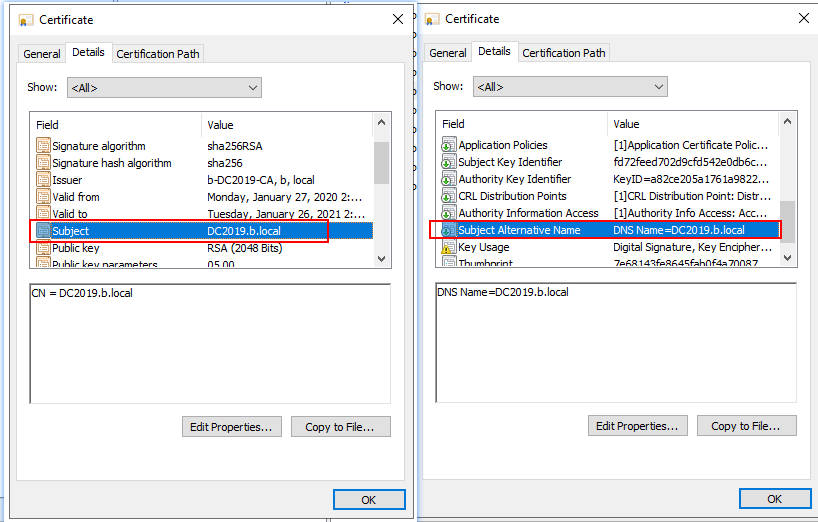
We can know more information about WCF Client Authentication using X509 certificates on SSL here.
WCF Client Authentication using X509 certificates on SSL
http://architecturebyashwani.blogspot.com/2010/01/wcf-client-authentication-using-x509.html
Tip: This answer contains the content of a third-party website. Microsoft makes no representations about the content of these websites. We provide this content only for your convenience.
Best Regards,
Daisy Zhou
Please remember to mark the replies as answers if they help.
If you have feedback for TechNet Subscriber Support, contact [email protected].
Tuesday, February 25, 2020 10:13 AM
Hi,
1. The request for the service is created on Server 1 in MMC > Local Machine Certificates > Personal, right click, All task > Adv Options > Create Custom Request.
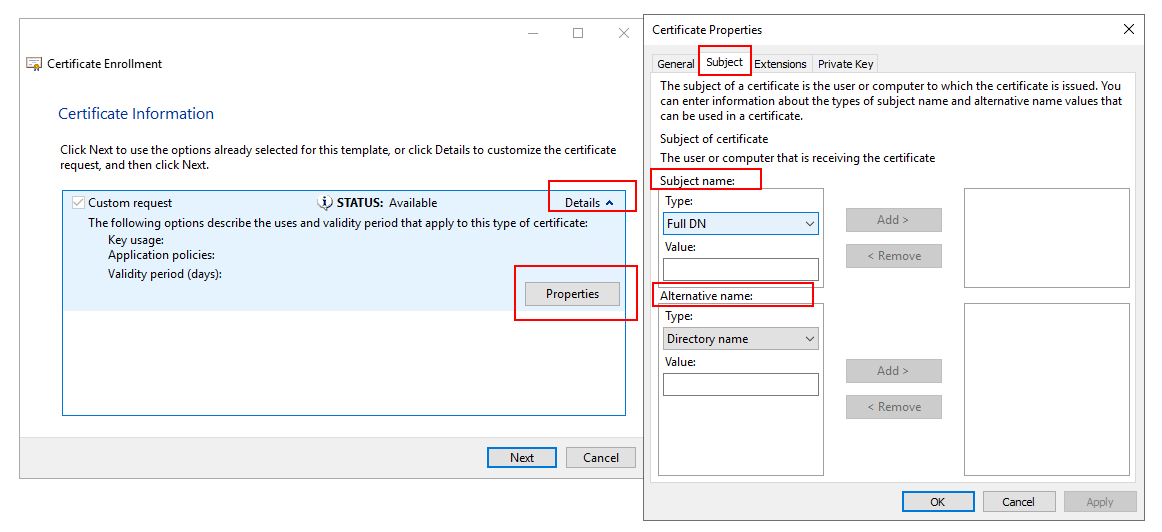
Here I choose Proceed without enrollment policy, PKCS#10. In the Certificate Information I go Propterties and fill in Friendly name and Description. Under Subject tab I add CN, C, L and O, and under the Private Key tab I set Key size = 2048, Make Provate Key Exportable, Hash Algortihm = SHA256. Thats it, then it saved as Base 64.
The rquest is sent to Server 2 where it is issued. The issued certificate is then saved to file and imported on Server 1.
2. The subject contains this :
CN = Server1
O = MyOrganisation
L = Skane
C = SE
I can´t find any Subject Alternative Name. I do have a IP adress to Server 1 and all clients have a host name that points Server1 to this IP adress.
Another question, how about revok list? At one point I got error while connecting the the service that sayd that the revoke list could not be reached. No communication could be made? Is it necessary for the client to be able to connect to Server 2 who issued the certificate?
Regards
Wednesday, February 26, 2020 6:25 AM
Hi,
So we follow up this wizard.
Q1: I can´t find any Subject Alternative Name
**A1: ** Choose Proceed without enrollment policy.
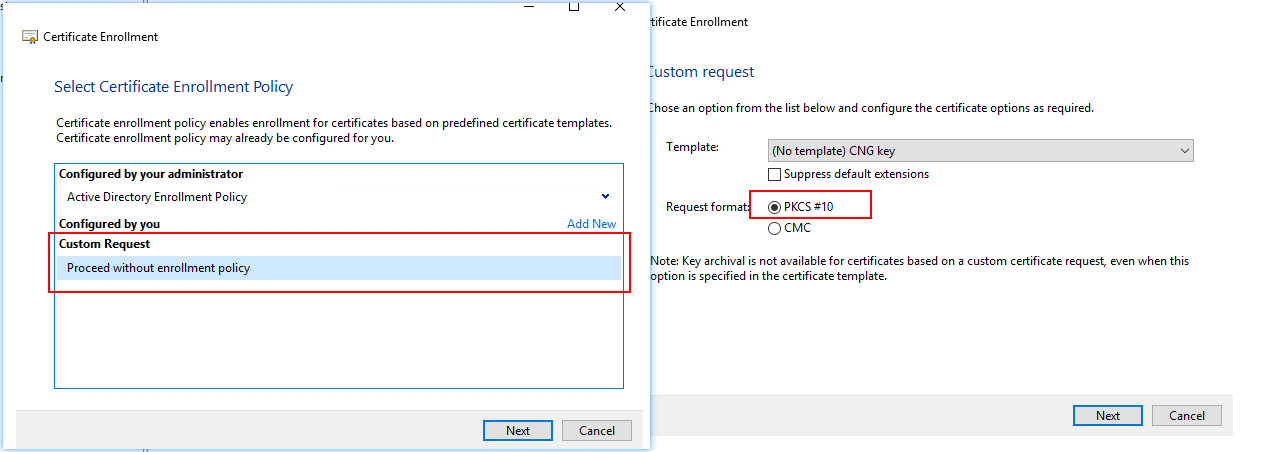
The Alternative name is Subject Alternative Name.
Q2: how about revok list? At one point I got error while connecting the the service that sayd that the revoke list could not be reached. No communication could be made? Is it necessary for the client to be able to connect to Server 2 who issued the certificate?
**A2:**The client should be able access all the AIA entries and CDP entries to verify its root CA certificate (in our case, it is issuing CA certificate) and if the certificate is in CRL list.
Best Regards,
Daisy Zhou
Please remember to mark the replies as answers if they help.
If you have feedback for TechNet Subscriber Support, contact [email protected].
Friday, February 28, 2020 2:35 AM
Hi,
If this question has any update or is this issue solved? Also, for the question, is there any other assistance we could provide?
Best Regards,
Daisy Zhou
Please remember to mark the replies as answers if they help.
If you have feedback for TechNet Subscriber Support, contact [email protected].
Monday, March 2, 2020 5:12 AM
Hi,
I am just writing to see if this question has any update. If anything is unclear, please feel free to let us know.
Thanks for your time and have a nice day!
Best Regards,
Daisy Zhou
Please remember to mark the replies as answers if they help.
If you have feedback for TechNet Subscriber Support, contact [email protected].