Note
Access to this page requires authorization. You can try signing in or changing directories.
Access to this page requires authorization. You can try changing directories.
Question
Saturday, February 24, 2018 12:33 AM
I'm looking for a step by step guide for configuring IKEv2 when I have the correct and properly functioning certificate in Windows 10. When using IKEv2 on 2K8R2, does network discovery need to be enabled? Is a TAP adapter required?
All replies (3)
Monday, February 26, 2018 10:19 AM
Hi,
Thanks for your question.
How to setup a VPN connection:
1.Open the Windows Start Menu, and start typing “control panel“.Click on the Control Panel in the results.
2.Open Network and Internet.
3.Click on Network and Sharing Center.
4.Click Set up a new connection or network.
5.Click Connect to a workplace and push Next.
6.If you are asked “Do you want to use a connection that you already have?”, select “No, create a new connection” and then push Next.
7.Click Use my Internet connection (VPN).
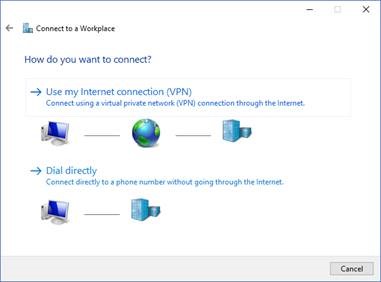
8.Enter **de154.nordvpn.com ** (Or any of our servers you wish to use – you can find all of our servers here: into Internet Address and Germany#154 server(Or any other name you wish) into Destination name and
push Create.
9.Open Network and sharing center again and click Change adapter settings.<o:p></o:p>
10.Open the properties dialog of Germany#154 adapter and show Security tab.<o:p></o:p>
11.Enter the following:
Type of VPN: **IKEv2
**Data encryption: **Require encryption (disconnect if server declines)
**Authentication: Use Extensible Authentication Protocol(EAP) and EAP-MSCHAPv2
And click OK.<o:p></o:p>
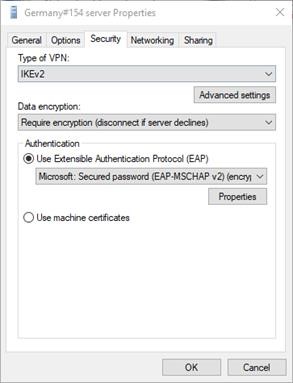
12.Move the cursor to the right corner of your screen and click the Network icon and click on **Germany#154 server, then Connect. **
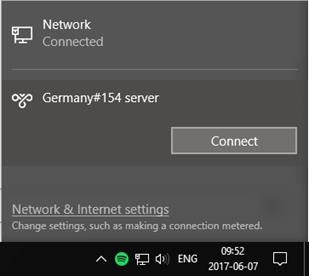 ********
Note: Moreover, I think it’s unnecessary to enable TAP adapter and network discovery.
Here is links refer to how to setup VPN connection using IKEv2, it may be helpful:
Configure IKEv2-based Remote Access
/en-us/previous-versions/windows/it-pro/windows-server-2008-R2-and-2008/ff687731(v=ws.10)
how to connect to VPN servers on Windows 10 using the IKEv2 protocol
https://nordvpn.com/tutorials/windows-10/ikev2/
Demonstrate Windows Server 2008 R2 VPN connection
http://techgenix.com/community-test-lab-guide-demonstrate-windows-server-2008-r2-vpn-reconnect/
Please Note: Since the web site is not hosted by Microsoft, the link may change without notice. Microsoft does not guarantee the accuracy of this information.
I appreciate your effort. If you have any questions or concerns, don’t hesitate to let me know.
Best regards,
Michael
Please remember to mark the replies as an answers if they help.
If you have feedback for TechNet Subscriber Support, contact [email protected]
Wednesday, February 28, 2018 8:57 AM
Hi,
How are things going on? Just checking in to see if the information provided was helpful.
Please let us know if you would like further assistance.
Wish you have a nice day!
Best regards,
Michael
Please remember to mark the replies as an answers if they help.
If you have feedback for TechNet Subscriber Support, contact [email protected]
Friday, March 9, 2018 11:45 AM
Hi ylduoright,
How are things going on? Was your issue resolved?
Please let us know if you would like further assistance.
Wish you have a nice day!
Best regards,
Michael
Please remember to mark the replies as an answers if they help.
If you have feedback for TechNet Subscriber Support, contact [email protected]