Note
Access to this page requires authorization. You can try signing in or changing directories.
Access to this page requires authorization. You can try changing directories.
Question
Friday, May 17, 2013 2:28 AM
How to make the web part Title bold and increase the font size and change colour
All replies (9)
Friday, May 17, 2013 11:22 AM ✅Answered
Personally, I would use the HTML Form Webpart to do this, however, you can achieve the same using the content editor.
1. When you are editing the page, put your cursor in the Content Editors text area (where it says "Click here to add new content" when you add the webpart to the page)
2. On the Ribbon, In the Page Editing Tools tab, then Format Text section, click HTML, then select Edit HTML Source
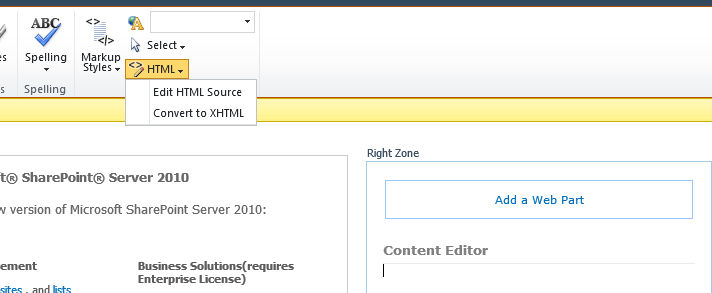
3. This will open the HTML Source window. Enter your CSS in here, then click OK to close and save the window.
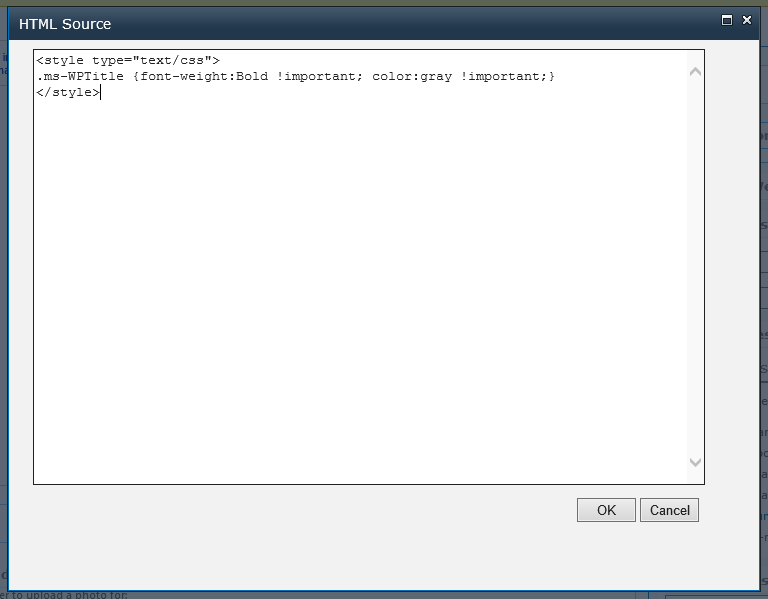
Regards, Matthew
MCPD | MCITP
My Blog
Please remember to click "Mark As Answer" if a post solves your problem or "Vote As Helpful" if it was useful.
I just added a webpart to the TechNet Gallery that allows administrative users to upload, crop and format user profile photos. Check it out here: Upload and Crop User Profile Photos
Friday, May 17, 2013 2:53 AM
HI Naf,
Use custom CSS to apply the style for Web-part .
http://msdn.microsoft.com/en-us/library/hh537935%28v=office.14%29.aspx
By the way you can customize your SharePoint UI with custom CSS placing into file server or stylelibrary
Vadivelu B Life with SharePoint
Friday, May 17, 2013 3:41 AM
HI Naf,
Use custom CSS to apply the style for Web-part .
http://msdn.microsoft.com/en-us/library/hh537935%28v=office.14%29.aspx
By the way you can customize your SharePoint UI with custom CSS placing into file server or stylelibrary
Vadivelu B Life with SharePoint
This post will help you to customize your webpart title style.
Sekar - Our life is short, so help others to grow
Whenever you see a reply and if you think is helpful, click " Vote As Helpful"! And whenever you see a reply being an answer to the question of the thread, click "
 Mark As Answer
Friday, May 17, 2013 3:43 AM
Hi ,
1.)Create you own css according to requirement .
2.)Go to designer and add that css file to style library or in your own folder .
3.)Give reference to your css file in master page .now you can use classes of your css file in your web parts .
Hope this helps.
Friday, May 17, 2013 6:21 AM
Thanks , can I have a step by step visual guidence please
Friday, May 17, 2013 7:05 AM | 1 vote
You need to override the styles applied in the .ms-WPTitle and .ms-WPHeader classes.
E.g. to make a webparts Title bold and gray, you want the following CSS
.ms-WPTitle {font-weight:Bold !important; color:gray !important;}
To change the colour of the line under the webparts title, add this to the CSS
.ms-WPTitle {font-weight:Bold !important; color:gray !important;}
.ms-WPHeader{border-bottom:thin gray solid !important;}
There are many ways to apply CSS to a page or site, but for testing your CSS and applying it to just one page, the following is an easy method:
1. Add a HTML Form webpart to the page
2. Edit the webpart properties of the HTML Form webpart
3. Under the Appearance section, change the chrome type to None
4. Under the Form Content section, click on Source Editor... and add the following CSS (to change the colour and font weight of the pages webparts titles)
<style type="text/css">
.ms-WPTitle {font-weight:Bold !important; color:gray !important;}
</style>
5. Click Save to save and close the text editor
6. Click OK on the webparts properties to save and close the webparts toolpane
7. Save page and refresh your page. The new CSS will be applied to your webparts.
Regards, Matthew
MCPD | MCITP
My Blog
Please remember to click "Mark As Answer" if a post solves your problem or "Vote As Helpful" if it was useful.
I just added a webpart to the TechNet Gallery that allows administrative users to upload, crop and format user profile photos. Check it out here: Upload and Crop User Profile Photos
Friday, May 17, 2013 10:57 AM
Thanks, appearance section is visible, but I could not find Form Content section. I am using a web part called Content Editor . Please help me
Wednesday, October 22, 2014 4:01 PM
Hi Matthew,
I tried the code and it looks like it worked when I'm in edit mode, but as soon as I exit edit mode, the Webparts that have to do with lists do not change color. Any idea why this is happenning? I think the html code only wors on CEWPs
Thanks!
Tuesday, December 16, 2014 2:28 PM
I have used a CSS in custom control to run at server side,
<style id="txtTitleColorCSS" type="text/css" runat="server"></style>
In the code behind,
string wpTitleColor = ".ms-WPTitle { color: " + WPProperty.wpTitleColor + "; text-transform: uppercase; font-size:1.5em;}";
txtTitleColorCSS.InnerText = wpTitleColor;
It was able to save the title with the way I needed the CSS.
Regards, Rupesh Singh http://www.ngenioussolutions.com