Note
Access to this page requires authorization. You can try signing in or changing directories.
Access to this page requires authorization. You can try changing directories.
Question
Sunday, August 2, 2020 5:04 PM
I have a DataTable that I need exported to Excel, this part is simple. What is getting me is how do I write custom header values into row 1 and start writing the data into row 2?
All replies (4)
Sunday, August 2, 2020 7:40 PM | 1 vote
Hello,
This may or may not fit your needs.
You can export a DataTable to a .xlsx file using SpreadSheetLight, free which can be installed via NuGet coupled with Microsoft's DocumentFormat.OpenXml (version 2.5).
Data class to read data from SQL-Server into a DataTable and export said DataTable to a new Excel file or an existing Excel file.
using System.Data;
using DocumentFormat.OpenXml.Spreadsheet;
using SpreadsheetLight;
using Color = System.Drawing.Color;

namespace WindowsFormsApp1
{
    using System.Data.SqlClient;

    public class DataOperationsSqlServer
    {
        private static string ConnectionString = "Data Source=.\\SQLEXPRESS;" +
                                                 "Initial Catalog=NorthWindAzureForInserts;" +
                                                 "Integrated Security=True";
        public static DataTable LoadCustomers()
        {
            using (SqlConnection cn = new SqlConnection { ConnectionString = ConnectionString })
            {
                using (SqlCommand cmd = new SqlCommand { Connection = cn })
                {
                    cmd.CommandText = "SELECT cu.CustomerIdentifier, cu.CompanyName, " +
                                      "cu.ContactName, co.Name " +
                                      "FROM Customers AS cu " +
                                      "INNER JOIN Countries AS co " +
                                      "ON cu.CountryIdentifier = co.CountryIdentifier";

                    DataTable dtCustomers = new DataTable();
                    cn.Open();
                    dtCustomers.Load(cmd.ExecuteReader());
                    dtCustomers.Columns["CustomerIdentifier"].ColumnMapping = MappingType.Hidden;

                    dtCustomers.Columns["CustomerIdentifier"].Caption = "Id";
                    dtCustomers.Columns["CompanyName"].Caption = "Name";
                    dtCustomers.Columns["ContactName"].Caption = "Contact";
                    dtCustomers.Columns["Name"].Caption = "Country";
                    return dtCustomers;
                }
            }
        }
        /// <summary>
        /// Use existing Excel file
        /// </summary>
        /// <param name="fileName"></param>
        /// <param name="dataTable"></param>
        public static void ImportDataTableIntoExistingFile(string fileName, DataTable dataTable)
        {

            using (var document = new SLDocument(fileName))
            {
                /*
                 * Set header style
                 */
                var style = document.CreateStyle();
                style.Font.Bold = true;
                style.Font.FontColor = Color.White;
                style.Fill.SetPattern(PatternValues.Solid,
                    Color.Black, Color.Black);

                /*
                 * Here I set the Caption property of each column
                 */
                for (int index = 0; index < dataTable.Columns.Count; index++)
                {
                    document.SetCellValue(SLConvert.ToCellReference(1, index +1),
                        dataTable.Columns[index].Caption);

                    document.SetCellStyle(1, index + 1, style);
                }


                document.ImportDataTable(2, 1, dataTable, false);
                document.RenameWorksheet("Sheet1", "Customers");
                document.Save();
            }

        }
        /// <summary>
        /// Create new Excel file or overwrite existing file
        /// </summary>
        /// <param name="fileName"></param>
        /// <param name="dataTable"></param>
        public static void ImportDataTableIntoNewFile(string fileName, DataTable dataTable)
        {

            using (var document = new SLDocument())
            {
                /*
                 * Set header style
                 */
                var style = document.CreateStyle();
                style.Font.Bold = true;
                style.Font.FontColor = Color.White;
                style.Fill.SetPattern(PatternValues.Solid,
                    Color.Black, Color.Black);

                /*
                 * Here I set the Caption property of each column
                 */
                for (int index = 0; index < dataTable.Columns.Count; index++)
                {
                    document.SetCellValue(SLConvert.ToCellReference(1, index + 1),
                        dataTable.Columns[index].Caption);

                    document.SetCellStyle(1, index + 1, style);
                }

                document.ImportDataTable(2, 1, dataTable, false);
                document.RenameWorksheet("Sheet1", "Customers");
                document.SaveAs(fileName);
            }
        }
    }
}
Import to existing Excel file
var fileName = Path.Combine(AppDomain.CurrentDomain.BaseDirectory, "Demo.xlsx");
DataOperationsSqlServer.ImportDataTableIntoExistingFile(fileName,DataOperationsSqlServer.LoadCustomers());
Import into a new Excel file
var fileName = Path.Combine(AppDomain.CurrentDomain.BaseDirectory, "Demo1.xlsx");
DataOperationsSqlServer.ImportDataTableIntoNewFile(fileName, DataOperationsSqlServer.LoadCustomers());
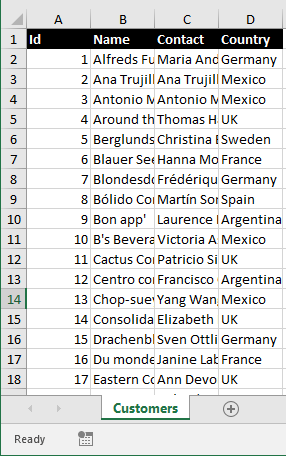
Please remember to mark the replies as answers if they help and unmarked them if they provide no help, this will help others who are looking for solutions to the same or similar problem. Contact via my Twitter (Karen Payne) or Facebook (Karen Payne) via my MSDN profile but will not answer coding question on either.
NuGet BaseConnectionLibrary for database connections.
StackOverFlow
Monday, August 3, 2020 7:02 AM | 1 vote
Hi,
Thank you for posting here.
If you want to write datatable to a csv file, you can write a simple method yourself.
This is an example.
        public static void ToCsv(DataTable dt,string fileName)
        {
            StringBuilder sb = new StringBuilder();

            //Custom header value.
            dt.Columns["ID"].Caption = "testID";
            dt.Columns["Name"].Caption = "testName";

            IEnumerable<string> columnNames = dt.Columns.Cast<DataColumn>().
                                  Select(column => column.Caption);
            sb.AppendLine(string.Join(",", columnNames));
            foreach (DataRow row in dt.Rows)
            {
                IEnumerable<string> fields = row.ItemArray.Select(field => field.ToString());
                sb.AppendLine(string.Join(",", fields));
            }
            File.WriteAllText(fileName, sb.ToString());
        }
Best Regards,
Timon
MSDN Community Support
Please remember to click "Mark as Answer" the responses that resolved your issue, and to click "Unmark as Answer" if not. This can be beneficial to other community members reading this thread. If you have any compliments or complaints to MSDN Support, feel free to contact [email protected].
Friday, August 7, 2020 7:54 AM
Hi,
Has your issue been resolved?
If so, please click on the "Mark as answer" option of the reply that solved your question, so that it will help other members to find the solution quickly if they face a similar issue.
Best Regards,
Timon
MSDN Community Support
Please remember to click "Mark as Answer" the responses that resolved your issue, and to click "Unmark as Answer" if not. This can be beneficial to other community members reading this thread. If you have any compliments or complaints to MSDN Support, feel free to contact [email protected].
Friday, August 14, 2020 2:55 AM
Try the following code snippet. It is required to add free spire.xls.dll as reference in your project.
using Spire.Xls;

namespace DatatableToExcel
{
    class Program
    {
        static void Main(string[] args)
        {
            //Create a workbook
            Workbook wb = new Workbook();

            //Get the first worksheet
            Worksheet sheet = wb.Worksheets[0];

            //Write custom headers in row 1
            sheet.Range["A1"].Text = "My Col-1";
            sheet.Range["B1"].Text = "My Col-2";
            sheet.Range["C1"].Text = "My Col-3";
            sheet.Range["D1"].Text = "My Col-4";

            //Create a datatable
            System.Data.DataTable table = new System.Data.DataTable();
            table.Columns.Add();
            table.Columns.Add();
            table.Columns.Add();
            table.Columns.Add();
            table.Rows.Add("a", "b", "c", "d");
            table.Rows.Add("e", "f", "g", "h");
            table.Rows.Add("i", "j", "k", "l");
            table.Rows.Add("m", "n", "o", "p");

            //Import data from datatable to workshset, specifying the start column index and row index to write data
            //The second parameter 'false' means the header row of datatable won't be written in the worksheet
            sheet.InsertDataTable(table,false, 2, 1);

            //Save the document
            wb.SaveToFile("DatatableToExcel.xlsx",ExcelVersion.Version2013);
        }
    }
}