Note
Access to this page requires authorization. You can try signing in or changing directories.
Access to this page requires authorization. You can try changing directories.
Question
Wednesday, March 6, 2019 10:54 PM
Hi Guys
I am creating a dynamic group in Intune to pull new enrolled Android Corporate-owned, fully managed user devices, my Advanced rule was device.deviceOSType -eq "Android", but it pull all Android device in to it, anyone has idea about the rule for creating dynamic group for Android Corporate-owned, fully managed user devices(Preview) only?
Thanks
yan
All replies (9)
Thursday, March 7, 2019 2:59 AM ✅Answered
Hello yan,
You can use the following device rule. For the full list of device rules, you can just refer here.
(device.deviceOSType -eq "Android") -and (device.deviceOwnership -eq "Company")
In addition, if you can create a category for the fully managed devices in Intune, then you also can use deviceCategory rule.
Best regards,
Andy Liu
Please remember to mark the replies as answers if they help.
If you have feedback for TechNet Subscriber Support, contact [email protected].
Thursday, March 7, 2019 4:48 PM
Hi Andy:
Thanks for your reply,(device.devicesOSType **-eq "Android") -and(device.deviceOwnershipompany") will pull not just Android(Fully Managed) device also pull Android(Work Profile) Device as well, I want to auto pull Fully managed Android device once it get enrolled. Sign Category works but I will have to sign the Category before the device get pull to the group. **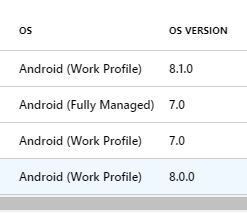
yan
Tuesday, March 12, 2019 6:22 AM
Hello,
As far as I know, there is no such rule for separating fully managed and work profile devices.
You can submit a feature request on the Intune Uservoice site.
https://microsoftintune.uservoice.com/forums/291681-ideas
Best regards,
Andy Liu
Please remember to mark the replies as answers if they help.
If you have feedback for TechNet Subscriber Support, contact [email protected].
Tuesday, March 12, 2019 10:04 PM
Got you, thanks Andy.
yan
Monday, April 22, 2019 4:38 PM
I have found that I can separate out the two types using the following:
(device.deviceOSType -contains "AndroidEnterprise")
(device.deviceOSType -contains "AndroidForWork")
My dynamic groups have unique devices in each group, associated with either work profile devices or Fully managed devices.
Monday, May 13, 2019 6:27 PM | 3 votes
here you go my friend:
(device.deviceOSType -eq "AndroidEnterprise") -and (device.enrollmentProfileName -eq null)
This will give you ONLY fully managed android devices.
Wednesday, September 11, 2019 9:09 AM
On my AAD/Intune, I have Fully Managed that appears As "Android" OS Type... strange but true...
And more complicated, "Android" OS Type appears also for Work profile MDM Devices...
So I did a dyn group with :
((device.deviceOSType -eq "AndroidEnterprise") -and (device.enrollmentProfileName -eq null)) or ((device.managementType -ne null) -and (device.deviceOSType -eq "Android") -and (device.deviceOwnership -eq "Company"))
Monday, September 23, 2019 12:43 PM
Exactly what i was looking for, thank you!
Thursday, January 16, 2020 1:10 PM
here you go my friend:
(device.deviceOSType -eq "AndroidEnterprise") -and (device.enrollmentProfileName -eq null)
This will give you ONLY fully managed android devices.
Perfect.....
This should be marked as the correct answer...