Note
Access to this page requires authorization. You can try signing in or changing directories.
Access to this page requires authorization. You can try changing directories.
Question
Monday, June 26, 2017 9:09 AM
I build my images in MDT for deployment and at the end of the customization of my gold image I usually run: Dism /Online /Cleanup-Image /RestoreHealth
Since i am trying with the Windows 10 1703 version i always get an error:
PS C:\WINDOWS\system32> Dism /Online /Cleanup-Image /RestoreHealth
Deployment Image Servicing and Management tool
Version: 10.0.15063.0
Image Version: 10.0.15063.0
[===========================97.1%======================== ]
Error: 0x800f081f
The source files could not be found.
Use the "Source" option to specify the location of the files that are required to restore the feature. For more informat
ion on specifying a source location, see http://go.microsoft.com/fwlink/?LinkId=243077.
The DISM log file can be found at C:\WINDOWS\Logs\DISM\dism.log
Same error when specifying the source
PS C:\WINDOWS\system32> Dism /Online /Cleanup-Image /RestoreHealth /Source:D:\sources\install.wim
Deployment Image Servicing and Management tool
Version: 10.0.15063.0
Image Version: 10.0.15063.0
[===========================97.1%======================== ]
Error: 0x800f081f
The source files could not be found.
Use the "Source" option to specify the location of the files that are required to restore the feature. For more informat
ion on specifying a source location, see http://go.microsoft.com/fwlink/?LinkId=243077.
Log file exerpt:
2017-06-26 11:04:53, Info DISM DISM Package Manager: PID=12368 TID=16024 Processing the top level command token(cleanup-image). - CPackageManagerCLIHandler::Private_ValidateCmdLine
2017-06-26 11:04:53, Info DISM DISM Package Manager: PID=12368 TID=16024 Attempting to route to appropriate command handler. - CPackageManagerCLIHandler::ExecuteCmdLine
2017-06-26 11:04:53, Info DISM DISM Package Manager: PID=12368 TID=16024 Routing the command... - CPackageManagerCLIHandler::ExecuteCmdLine
2017-06-26 11:04:53, Warning DISM DISM Package Manager: PID=12368 TID=16024 CBS AddSource failed with HRESULT=0x8007010b! - CDISMPackageManager::Internal_Finalize
2017-06-26 11:04:53, Info DISM DISM Package Manager: PID=12368 TID=16024 CBS session options=0x40100! - CDISMPackageManager::Internal_Finalize
2017-06-26 11:07:15, Info DISM DISM Package Manager: PID=12368 TID=10904 Error in operation: source for package or file not found, ResolveSource() unsuccessful. (CBS HRESULT=0x800f081f) - CCbsConUIHandler::Error
2017-06-26 11:07:15, Error DISM DISM Package Manager: PID=12368 TID=16024 Failed finalizing changes. - CDISMPackageManager::Internal_Finalize(hr:0x800f081f)
2017-06-26 11:07:15, Error DISM DISM Package Manager: PID=12368 TID=16024 The source files could not be found; their location must be specified using the /source option to restore the feature. - GetCbsErrorMsg
2017-06-26 11:07:15, Error DISM DISM Package Manager: PID=12368 TID=16024 Failed processing package changes with session option CbsSessionOptionRepairStoreCorruption - CDISMPackageManager::RestoreHealth(hr:0x800f081f)
2017-06-26 11:07:15, Error DISM DISM Package Manager: PID=12368 TID=16024 The source files could not be found; their location must be specified using the /source option to restore the feature. - GetCbsErrorMsg
2017-06-26 11:07:15, Error DISM DISM Package Manager: PID=12368 TID=16024 Failed to restore the image health. - CPackageManagerCLIHandler::ProcessCmdLine_CleanupImage(hr:0x800f081f)
2017-06-26 11:07:15, Error DISM DISM Package Manager: PID=12368 TID=16024 Failed while processing command cleanup-image. - CPackageManagerCLIHandler::ExecuteCmdLine(hr:0x800f081f)
All replies (5)
Monday, June 26, 2017 10:44 AM ✅Answered | 1 vote
Hello,
Actually DISM seems to be broken on V1703. So you may try steps mentioned here and see if they helps you to make DISM working without additionally configuring the GPO:
https://www.kapilarya.com/fix-dism-error-0x800f0906-on-windows-10-v1703
Let us know if this helps, Good luck :)
Microsoft MVP (Windows and Devices for IT)
Windows Insider MVP
Windows Help & Support [www.kapilarya.com]
Tuesday, June 27, 2017 9:45 AM ✅Answered
Hi Thomas Vitoz,
It is a known issue before, because CBS lacks a component. A fresh installed Windows 1703 could repair it.
I suggest that you could try to use the Media creation tool download the ISO file.
https://www.microsoft.com/en-ca/software-download/windows10
Once the iso is downloaded, mount it. ( Right click at the iso file > click Mount ).
Then open the elevated command prompt ( command prompt (admin) ) > copy & paste this...........
Dism /Online /Cleanup-Image /RestoreHealth /Source:wim:H:\sources\install.wim:1 /limitaccess
> press Enter.
NOTE : H is the drive letter where the iso is mounted. If your drive letter is not H, replace H with your drive letter.
Meanwhile, you could check the link below about Windows 10 V1703: Fix for DISM error 0x800F081F. It will check the Registry about the Package.
http://borncity.com/win/2017/04/26/windows-10-v1703-fix-for-dism-error-0x800f081f/
Please Note: Since the website is not hosted by Microsoft, the link may change without notice. Microsoft does not guarantee the accuracy of this information.
Hope it will be helpful to you
Please remember to mark the replies as answers if they help.
If you have feedback for TechNet Subscriber Support, contact [email protected].
Monday, June 26, 2017 9:20 AM
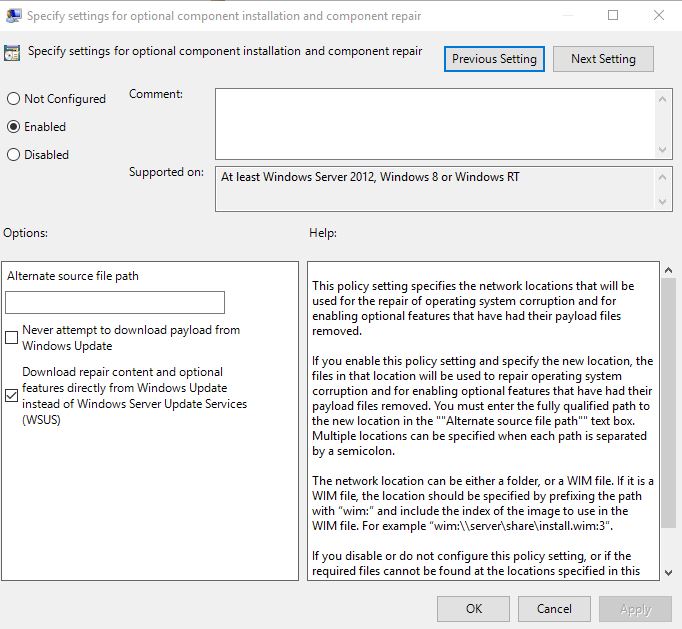
Apparently it works successfully if i set the following setting in gpedit
Monday, June 26, 2017 12:32 PM
It was broken, but it seems OK since the May round of updates. That looks like the type of error I used to get. When did you build the gold image?
Bill
Monday, June 26, 2017 2:45 PM
I installed the May update but get the same error.
Image is being built now