Note
Access to this page requires authorization. You can try signing in or changing directories.
Access to this page requires authorization. You can try changing directories.
Question
Friday, December 27, 2019 12:18 AM
I'm trying to move the storage pool ownership to the 03 node. But it won't accept i:
Error
The operation has failed.
The action 'Move' did not complete.
Error Code: 0x8007174b
Clustered storage is not connected to the node
The setup is 3x Dell R630 with a MD1420 directly attached with HBA SAS cables.
The two working nodes use
Dell 12Gbps HBA
While the node not working uses the PERC H830
All with latest firmware and drivers from lifecycle controller and dell command update.
All replies (7)
Friday, December 27, 2019 1:49 PM
The PERC H830 is a RAID controller, not an HBA. You should never mix storage adaptors. I would check with DELL to see if they even support such a configuration for a cluster. Running the cluster validation wizard on the storage would also tell you what the cluster is complaining about, but my hunch is that it is the mix of adapters.
tim
Saturday, December 28, 2019 8:55 PM
Thanks for your reply, after some research this solved my problem. The H830 was set to raid mode. But it's HBA capable and I just had to switch it in the BIOS settings.
If anyone else has this problem, as long as the card is put in HBA mode in BIOS it should be no problem:
https://www.youtube.com/watch?v=l41rhE79vqU
I also turned of disk cache just to ensure the configuration is as close as possible to the dell 12Gbps HBA:
https://johannstander.com/2016/08/01/vsan-changing-dell-controller-from-raid-to-hba-mode/
Sunday, December 29, 2019 1:47 PM
Still not a good idea to mix storage controllers. The process of sharing storage requires close interaction among the controllers. Even a small glitch between controllers can cause issues. The cluster validation wizard highlights differences in storage drivers from one node to the next. Having the same controllers at the same driver/bios/firmware levels is more important in a cluster than having the same processors. That's why I suggested you check with DELL to see if they will even support such a configuration in a cluster.
tim
Sunday, December 29, 2019 9:08 PM
Thanks, I totally see your concern and validating a cluster is of course basic procedure for me before starting a cluster, and to receive MS support. I've tried contacting Dell but in this specific case only the MD1420 is in support / warranty and not the actual R630 hosts so I'm trying out using the MD1420 servicetag. I'll try to remember to respond with the service request response from Dell when I receive it :)
I'm not saying it's right, just noticing, it's been running 1 year in production (in RAID mode) setup by someone else. So it's at least shown to be quite stable, and in the "real world" good enough for the paying customer so far.
Monday, December 30, 2019 6:22 AM
Hi ,
Good to hear that you have solved this issue by yourself.
In addition, thanks for sharing your solution in the forum as it would be helpful to anyone who encounters similar issues.
You could mark the useful reply as answer if you want to end this thread up.
Best Regards,
Candy
Please remember to mark the replies as an answers if they help.
If you have feedback for TechNet Subscriber Support, contact [email protected]
Tuesday, January 7, 2020 9:19 PM
Ok, so an update on this matter.
I've got an awnser from DELL it's probably going to work but not supported. Also the same thing from Microsofts own info below. Anyhow the PERC H830 is setup to work in HBA mode it's enterprise graded and DELL certified for Storage Spaces as well.
The only noticable difference is the enclosure says the Bus Type is RAID when the storage pool is owned by the PERC H830 node see picture:
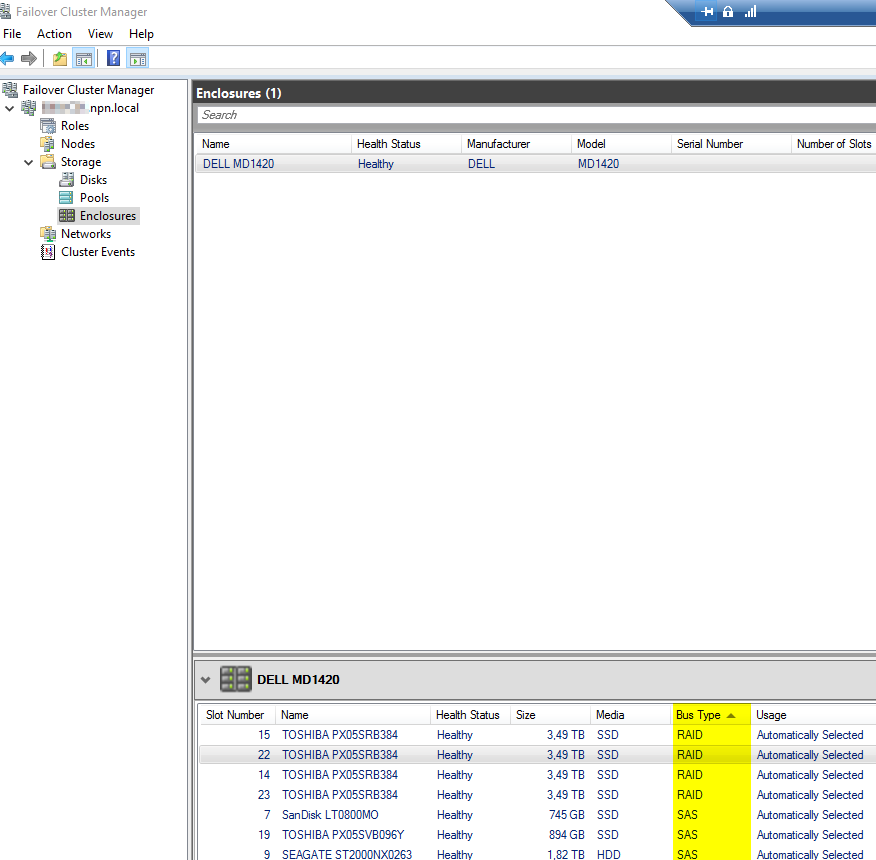
Also stated from Microsoft here (altough 2012R2 highest stated version here so no defined info on 2016 and 2019):
Identical SAS HBAs that are certified for use with Storage Spaces
/sv-se/previous-versions/windows/it-pro/windows-server-2012-R2-and-2012/hh831739(v=ws.11)
Dell response:
*Please excuse the delayed response due to the holiday period. *
*I would expect your suggested setup to work, but it is not officially supported by DELL. *
Raymond Rokamp
Enterprise Support Analyst.
Dell EMC | ProSupport Server Nordic
Dell EMEA Enterprise Expert Center – Cherrywood
Wednesday, January 8, 2020 1:33 PM
If it is not supported by the hardware vendor, then I would only use it in lab situations. If you run into an issue in production, you are pretty much on your own. I've used non-supported environments for labs for years, but I would never deploy non-supported into production.
tim