Note
Access to this page requires authorization. You can try signing in or changing directories.
Access to this page requires authorization. You can try changing directories.
Question
Sunday, February 23, 2020 7:53 AM
i have to show data by datagridview and i each row checkbox is coming. some time it is checked and some time unchecked. but in few cases i need to hide checkbox & cell will be blank. how can i achieve it ?
https://stackoverflow.com/questions/14124033/hide-some-datagridview-checkbox-cell
thanks
All replies (1)
Sunday, February 23, 2020 4:46 PM ✅Answered
Hello,
Although hiding a DataGridViewCheckBoxCell is possible does not mean it's a good idea for this degrades the user experience. A better approach is to custom paint the cell.
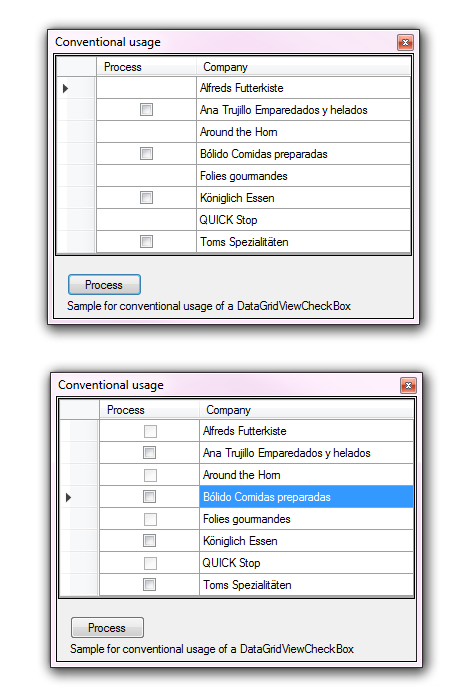
In the image below the top image is what you are asking for while the second as stated provides a clear understanding to the majority of users the check box cell is not available.
Note I used the following to set cells to read only so there is no concrete logic.
for (var rowIndex = 0; rowIndex < dataGridView1.Rows.Count -1; rowIndex++)
{
    if (rowIndex % 2 == 0)
    {
        dataGridView1.Rows[rowIndex].Cells[0].ReadOnly = true;
    }
}
Events to handle read-only cells in column zero.
dataGridView1.CellPainting += DataGridView1_CellPainting;
dataGridView1.CellContentClick += DataGridView1_CellContentClick;
Handling cell click
private void DataGridView1_CellContentClick(object sender, DataGridViewCellEventArgs e)
{
    if (e.ColumnIndex != 0) return;
    if (dataGridView1.Rows[e.RowIndex].Cells[e.ColumnIndex].ReadOnly)
    {
        return;
    }
}
In CellPainting use one of the paths laid out in the inner if statement.
private void DataGridView1_CellPainting(object sender, DataGridViewCellPaintingEventArgs e)
{
    if (e.ColumnIndex > -1 && e.RowIndex > -1 && dataGridView1.Columns[e.ColumnIndex] is DataGridViewCheckBoxColumn && dataGridView1[e.ColumnIndex, e.RowIndex].ReadOnly)
    {
        var checkSize = CheckBoxRenderer.GetGlyphSize(e.Graphics, CheckBoxState.CheckedNormal);
        e.Handled = true;
        e.PaintBackground(e.CellBounds, true);
        if (e.Value != null)
        {
            // best
            CheckBoxRenderer.DrawCheckBox(e.Graphics,
                new Point(e.CellBounds.X + e.CellBounds.Width / 2 - checkSize.Width / 2, e.CellBounds.Y + e.CellBounds.Height / 2 - checkSize.Height / 2),
                (bool)e.Value ? System.Windows.Forms.VisualStyles.CheckBoxState.CheckedDisabled : CheckBoxState.UncheckedDisabled);

            // works but not intuitive
            //e.Paint(e.ClipBounds, DataGridViewPaintParts.Border | DataGridViewPaintParts.Background);  //put what to draw
            //e.Handled = true;
        }
    }
}
Please remember to mark the replies as answers if they help and unmarked them if they provide no help, this will help others who are looking for solutions to the same or similar problem. Contact via my Twitter (Karen Payne) or Facebook (Karen Payne) via my MSDN profile but will not answer coding question on either.
NuGet BaseConnectionLibrary for database connections.
StackOverFlow