Note
Access to this page requires authorization. You can try signing in or changing directories.
Access to this page requires authorization. You can try changing directories.
Question
Wednesday, August 21, 2019 10:38 AM
Hello, server unmounted database. When I try mount see error
Failed to mount database "Mailbox Database 1". Error: An Active Manager operation failed with a transient error. Please retry the operation. Error: Database action failed with transient error. Error: A transient error occurred during a database operation. Error: MapiExceptionNetworkError: Unable to mount database. (hr=0x80040115, ec=-2147221227) Diagnostic context: Lid: 65256 Lid: 12514 Win32Error: 0x6BE Lid: 62184 Lid: 16280 dwParam: 0x0 Msg: EEInfo: ComputerName: n/a Lid: 8600 dwParam: 0x0 Msg: EEInfo: ProcessID: 8028 Lid: 12696 dwParam: 0x0 Msg: EEInfo: Generation Time: 0419-08-21T10:31:25.7570000Z Lid: 10648 dwParam: 0x0 Msg: EEInfo: Generating component: 2 Lid: 14744 dwParam: 0x0 Msg: EEInfo: Status: 1726 Lid: 9624 dwParam: 0x0 Msg: EEInfo: Detection location: 974 Lid: 13720 dwParam: 0x0 Msg: EEInfo: Flags: 0 Lid: 11672 dwParam: 0x0 Msg: EEInfo: NumberOfParameters: 0 Lid: 49064 dwParam: 0x1 Lid: 12514 Win32Error: 0x6BE Lid: 62184 Lid: 16280 dwParam: 0x0 Msg: EEInfo: ComputerName: n/a Lid: 8600 dwParam: 0x0 Msg: EEInfo: ProcessID: 8028 Lid: 12696 dwParam: 0x0 Msg: EEInfo: Generation Time: 0419-08-21T10:31:30.1480000Z Lid: 10648 dwParam: 0x0 Msg: EEInfo: Generating component: 2 Lid: 14744 dwParam: 0x0 Msg: EEInfo: Status: 1726 Lid: 9624 dwParam: 0x0 Msg: EEInfo: Detection location: 974 Lid: 13720 dwParam: 0x0 Msg: EEInfo: Flags: 0 Lid: 11672 dwParam: 0x0 Msg: EEInfo: NumberOfParameters: 0 Lid: 1047 StoreEc: 0x80040115 [Database: Mailbox Database 1, Server: SRV-15-Exch.....]
All replies (4)
Thursday, August 22, 2019 6:22 AM ✅Answered
The problem was in a damaged cluster DAG layer. In the end we solved AD cleanup via adsi edit of non-functional DAG and we work on a standelone server.
Wednesday, August 21, 2019 12:34 PM
- Check your APPLICATION and SYSTEM event logs for errors regarding this database and disk systems
- What took place before this occurred, i.e. did it dismount on its own, power failure, maintenance or updates?
- What have you done since the time of failure
- How much free disk space do you have on the drives that hold the EDB & Logs?
- If you have not done so already I would highly recommend making a master offline copy of the DB onto an alternate location/disk
Search, Recover, Export Mailboxes, Contacts, Calendars, Tasks from ALL versions of Exchange Offline EDB's, On-Premises Exchange Databases & Office 365. Export, Migrate/Recover into On-Premises Exchange Server, Office 365 with Lucid8's DigiScope
Thursday, August 22, 2019 5:03 AM
Use Step by Step guide from this reference:
Thursday, August 22, 2019 6:18 AM
Hi,
Have you set up a DAG?
1.Please check if Exchange replication and the Exchange Information Store services are running. IPv6 is enabled on the Exchange server.
2.When the antivirus application is installed on the server, which might interfere with the connection of the Exchange server to the Active Directory in your network. Remove it temproraily.
3.To avoid the impact of corrupt index catalog, run the command:
Get-MailboxDatabaseCopyStatus | fl name, contentindexstate
4.Check if the database is in clean shutdown. This can be checked by opening Exchange Management Shell and run the following:
eseutil /mh "c:\DBRecovery\Mailbox Database GUID.edb"
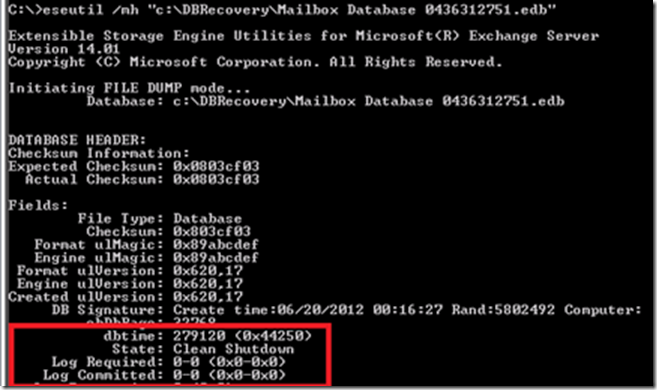
5.The time between the Exchange server and the domain controllers are synced and in the same time zone.
Regards,
Kelvin Deng
Please remember to mark the replies as answers if they helped. If you have feedback for TechNet Subscriber Support, contact [email protected].