Note
Access to this page requires authorization. You can try signing in or changing directories.
Access to this page requires authorization. You can try changing directories.
Question
Thursday, September 10, 2015 1:57 PM
Hi everyone,
I am hoping that someone can help me out here. I have a 2 node 2012 R2 Hyper-V Failover Cluster, and I am trying to get our Veeam backups to work on this Cluster. On node 1 the backups work fine with no issues, but on node 2 the Veeam jobs constantly fail with the following error:
10/09/2015 14:39:23 :: Unable to create snapshot (Microsoft CSV Shadow Copy Provider) (mode: Veeam application-aware processing with failover). Details: Failed to check whether provider '{400a2ff4-5eb1-44b0-8a05-1fcac0bcf9ff}' supports shadow copies on the volume '\\?\Volume{d8496e1b-cf0c-4cf4-8554-0afd39f67e5d}\'.The volume shadow copy provider is not registered in the system.--tr:Failed to add volumes to the snapshot set.--tr:Failed to perform pre-backup tasks.
On the node where the backups are failing, issuing the command to list the providers only shows the following providers:
C:\Windows\system32>vssadmin list providers
vssadmin 1.1 - Volume Shadow Copy Service administrative command-line tool
(C) Copyright 2001-2013 Microsoft Corp.
Provider name: 'Microsoft CSV Shadow Copy Helper Provider'
* Provider type: Software*
* Provider Id: {26d02d81-6aac-4275-8504-b9c6edc5261d}*
* Version: 1.0.0.1*
Provider name: 'Microsoft File Share Shadow Copy provider'
* Provider type: Fileshare*
* Provider Id: {89300202-3cec-4981-9171-19f59559e0f2}*
* Version: 1.0.0.1*
Provider name: 'Microsoft Software Shadow Copy provider 1.0'
* Provider type: System*
* Provider Id: {b5946137-7b9f-4925-af80-51abd60b20d5}*
* Version: 1.0.0.7*
But for some reason on the working node, it lists the above providers along with the additional provider that Veeam is expecting:
Provider name: 'Microsoft CSV Shadow Copy Provider'
* Provider type: Software*
* Provider Id: {400a2ff4-5eb1-44b0-8a05-1fcac0bcf9ff}*
* Version: 1.0.0.1*
I could really do with knowing why node 2 is missing this provider, and how I can get it installed so that I can get the backups to work. The Cluster Nodes were both built at the same time using the same configuration, so why this is missing is a mystery to me!
Any help anyone can give me is greatly appreciated.
Many thanks.
Robert Milner | MCITP: Virtualization Administrator | Website: http://www.remilner.co.uk | Twitter: @robm82
All replies (4)
Tuesday, September 15, 2015 6:21 AM ✅Answered | 1 vote
Hi,
Sorry for the delay in reply.
Providers are set in registry key. Compare the following key and check if you can find the missing one.
HKEY_LOCAL_MACHINE\SYSTEM\CurrentControlSet\Services\VSS\Providers\
However generally we will still use the default provider so have a try to set UseMicrosoftProvider as 1 with following steps:
1. Click Start, click Run, type regedit , and then click OK.
2. Locate the following registry subkey, and then right-click it:
HKey_Local_Machine\SYSTEM\CurrentControlSet\Control\BackupRestore
3. Point to New, and then click DWORD Value.
4. Type UseMicrosoftProvider as the name for the new DWORD value, and then press ENTER.
5. Double-click UseMicrosoftProvider. To enable the new feature, type 1 in the Value box. To disable the new feature, type 0 in the Value box.
6. Press ENTER, and then exit Registry Editor.
7. Restart the server.
Please remember to mark the replies as answers if they help and un-mark them if they provide no help. If you have feedback for TechNet Support, contact [email protected].
Tuesday, September 15, 2015 8:58 AM ✅Answered | 1 vote
Hi Shaon,
Thank you for responding - the information that you gave me helped me to resolve my issue although I found an alternative method to resolve said issue.
I did indeed compare the registry keys on the 2 Hyper-V Servers at the location: HKEY_LOCAL_MACHINE\SYSTEM\CurrentControlSet\Services\VSS\Providers\
What I found was that the Hyper-V node that wasn't showing the Microsoft CSV Shadow Copy Provider, it was for some reason missing the CLSID registry key:
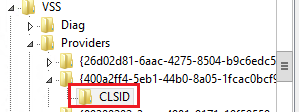
So I exported this key from the working Hyper-V node, and imported it into the other non-working Hyper-V node. I then restarted the Volume Shadow Copy service, and I could then query the Microsoft CSV Shadow Copy Provider writer using vssadmin! I have just kicked off my Veeam backup job and the backup job is now working!
Thank you so much for your valuable help :).
Robert Milner | MCITP: Virtualization Administrator | Website: http://www.remilner.co.uk | Twitter: @robm82
Thursday, February 25, 2016 8:09 PM
Guys,
I am having a similar issue with my two Windows 2008 R2 Enterprise Servers Hyper-V Failover Cluster the difference is that none of my nodes have the Microsoft CSV Shadow Copy Provider.
How do I install the Microsoft CSV Shadow Copy Provider on them?
Is it a matter of getting a copy of someone else's and import? This is what I do have.
C:\Windows\system32>vssadmin list providers
vssadmin 1.1 - Volume Shadow Copy Service administrative command-line tool
(C) Copyright 2001-2005 Microsoft Corp.
Provider name: 'HP LeftHand VSS Provider'
Provider type: Hardware
Provider Id: {acef7bd9-c49b-435a-bb6c-bc3bab91fda5}
Version: 10.0.0.1488
Provider name: 'Microsoft Software Shadow Copy provider 1.0'
Provider type: System
Provider Id: {b5946137-7b9f-4925-af80-51abd60b20d5}
Version: 1.0.0.7
Saturday, July 9, 2016 11:04 AM
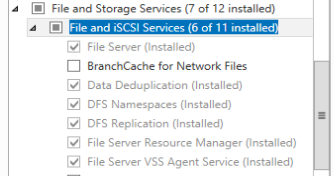
It's a role if you use SoFS:
File Server VSS Agent Service