Note
Access to this page requires authorization. You can try signing in or changing directories.
Access to this page requires authorization. You can try changing directories.
Question
Wednesday, October 30, 2013 3:00 PM
I am having the problem described in the following post: http://social.technet.microsoft.com/Forums/en-US/b9701061-f347-4a6b-a5a1-7ab0dc0857d1/server-manager-under-manageability-online-data-retrieval-failures-occurred?forum=windowsserverpreview
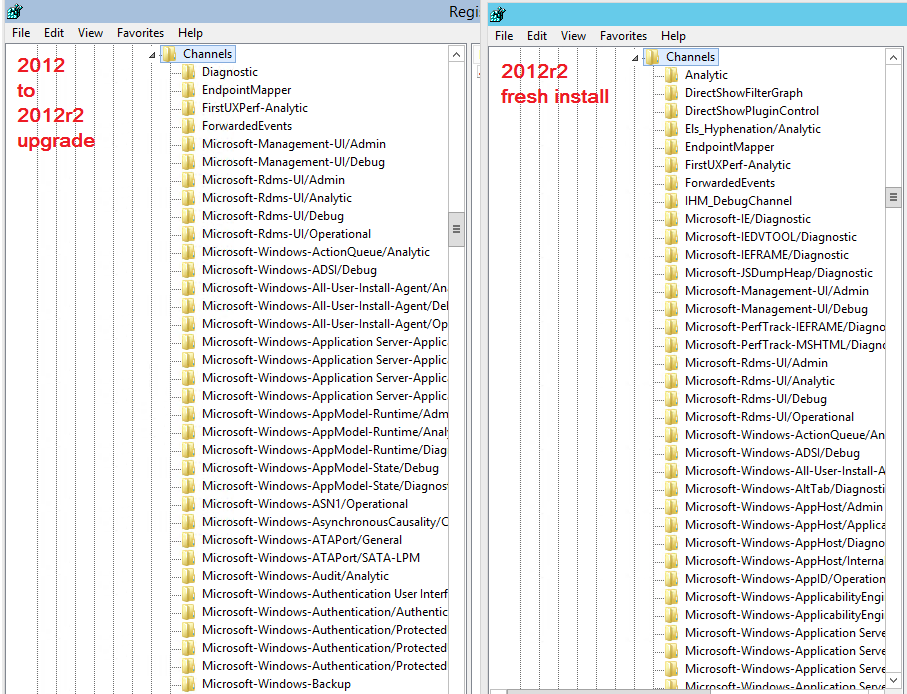
2012r2 fresh install does not have the error but 2012 upgrade install does.
The registries are quite different between the two (see pic.)
What is the proper way to fix this?
All replies (9)
Thursday, December 26, 2013 12:18 PM ✅Answered
Hello,
Here is an article related to this issue. Hope it is helpful.
Windows Server 2012 - Server Manager Troubleshooting Guide, Part II: Troubleshoot Manageability Status Errors in Server Manager
Regards,
Sophia
Please remember to click “Mark as Answer” on the post that helps you, and to click “Unmark as Answer” if a marked post does not actually answer your question. This can be beneficial to other community members reading the thread.
Thursday, October 31, 2013 9:43 AM
Hi ,
Thank you for posting your issue in the forum.
I am trying to involve someone familiar with this topic to further look at this issue. There might be some time delay. Appreciate your patience.
Thank you for your understanding and support.
Best Regards,
Andy Qi
If you are TechNet Subscription user and have any feedback on our support quality, please send your feedback here.
Friday, November 1, 2013 12:28 PM
Hello,<o:p></o:p>
<o:p> </o:p>
Thank you
for posting your issue in the forum.<o:p></o:p>
<o:p> </o:p>
It seems
like the issue is caused due to incorrectly setting GPP to collect Event Logs
backup. <o:p></o:p>
<o:p> </o:p>
Important: The action plan below will modify the registry. However, serious
problems might occur if you modify the registry incorrectly. So please back up the registry before you modify it.
Then, you can restore the registry if a problem occurs.<o:p></o:p>
<o:p></o:p>
After
backing up the following registry key, please delete this AutoBakupLogFiles
registry and refresh/close and open Server Manager.<o:p></o:p>
<o:p></o:p>
Name:**
AutoBackupLogFiles** <o:p></o:p>
Location:
HKEY_LOCAL_MACHINE\SYSTEM\CurrentControlSet\Services\EventLog\Security<o:p></o:p>
<o:p> </o:p>
Here is
the article that gives more details on how to configure backing up event logs:<o:p></o:p>
<o:p></o:p>
msdn.microsoft.com/en-us/library/cc231247.aspx
<o:p> </o:p>
Best regards,<o:p></o:p>
Sophia Sun<o:p></o:p>
Wednesday, November 6, 2013 2:27 PM
Hi,
How is everything going?
Do you have any updates about the status of the issue? When you have time, please feel free to post this information here. Thanks for your cooperation.
Regards,
Thursday, November 7, 2013 9:00 PM
please delete this AutoBakupLogFiles
registry and refresh/close and open Server Manager
HKEY_LOCAL_MACHINE\SYSTEM\CurrentControlSet\Services\EventLog\Security<o:p>
There is no entry AutoBackupLogFiles on any machine, client or server using the Server Manager.
Thursday, November 7, 2013 9:04 PM
Hi,
How is everything going?
Do you have any updates about the status of the issue? When you have time, please feel free to post this information here. Thanks for your cooperation.
Regards,
Yes the issue still exists. I just did another upgrade from 2012 vl to 2012r2 vl and the problem is still happening.
I did find out something interesting. Removing the GUI from the server and then re-installing it fixes the problem.
Dism /online /disable-feature /featurename:ServerCore-FullServer
Dism /online /enable-feature /featurename:Server-Gui-Mgmt /featurename:Server-Gui-Shell /featurename:ServerCore-FullServer
Tuesday, December 3, 2013 9:39 PM
Hi,
How is everything going?
Do you have any updates about the status of the issue? When you have time, please feel free to post this information here. Thanks for your cooperation.
Regards,
Yes the issue still exists. I just did another upgrade from 2012 vl to 2012r2 vl and the problem is still happening.
I did find out something interesting. Removing the GUI from the server and then re-installing it fixes the problem.
Dism /online /disable-feature /featurename:ServerCore-FullServer
Dism /online /enable-feature /featurename:Server-Gui-Mgmt /featurename:Server-Gui-Shell /featurename:ServerCore-FullServer
As an update this worked 80% of the time. I still have several servers that are still reporting: Server Manager, All servers, Manageability column, "Online - Data retrieval failures occurred".
Monday, January 6, 2014 7:15 AM
Hello,
Just want to confirm the current situations.
Please feel free to let us know if you need further assistance.
Regards,
Sophia Sun
Please remember to click “Mark as Answer” on the post that helps you, and to click “Unmark as Answer” if a marked post does not actually answer your question. This can be beneficial to other community members reading the thread.
Wednesday, March 22, 2017 2:26 PM
Hi,
i had the exact same problem and the channel registry keys wasn't the same as its mentioned on many forums . It varies on all machines so the general fix is below:
Check in channel events in event viewer:
Event viewer > Microsoft > Windows > servermanager-Managementprovider > Operational and check the warning messages it generates at the time of server manager refresh.
eg: Generic failure querying the localized name for channel: Microsoft-Windows-AppModel-Runtime/Diagnostics [hResult = Function failed during execution., hLastResult = The system cannot find the file specified.].
as you see Microsoft-Windows-AppModel-Runtime/Diagnostics is the channel that is throwing the warning and now go to registry and delete the channel
on registry:
go to HKLM\SOFTWARE\Microsoft\Windows\CurrentVersion\WINEVT\Channels\
and find the appropriate channel as per the event log and delete them.
make sure to delete all of them that is throwing the warning and reopen server manager and the events will be cleared.
PS: please export and save registry before changes (just in case )
SCCM Query on Technet